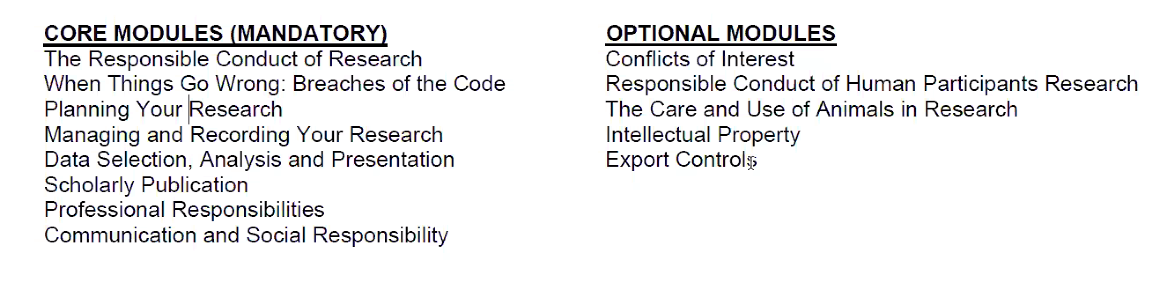
(要完成7个GRIP module)
introduction:https://intranet.ecu.edu.au/research/for-research-students/grip/accessing-grip
GRS:https://blackboard.ecu.edu.au/webapps/blackboard/content/listContent.jsp?course_id=_571123_1&content_id=_4922996_1
GRIP:https://blackboard.ecu.edu.au/webapps/blackboard/content/listContent.jsp?course_id=_571123_1&content_id=_4385362_1&mode=reset
Accessing GRIP
The Graduate Research Induction Program (GRIP) is an online training program for all new ECU research students. It provides essential information to get you started on your research journey.
GRIP has 7 modules:
- Getting started
- Getting organised
- Working with your supervisor
- Searching the literature
- Confirmation of candidature
- Literature Review and Research Methodology
- Responsible research
To access GRIP as a new user:
- log into BlackBoard;
- type GRS Programs into the Community Site Search box (located on the lower left-hand side of the page);
- when the search results show the unit GRS Programs click on the arrow next to the site number (far left hand side), then click Enrol from the drop own menu, then Submit and OK to confirm your enrolment;
- GRS Programs will now appear in the list under My Communities and you will have access to GRIP within that community site.
Note that the enrolment process is only for the first time you access the site; once you have enrolled, the site should automatically appear in My Communities whenever you log into BlackBoard.
If you accessed and completed an earlier version of GRIP (Prior to February 2017) please contact researchstudentsupport@ecu.edu.au if you need support.
If you have already registered as a user for the GRS Programs BlackBoard site, please login and find GRIP on the navigation menu on the left side.

若有收获,就点个赞吧
0 人点赞


