概述
pytest是一个非常成熟的全功能的Python测试框架,主要特点有以下几点:
- 简单灵活,容易上手,文档丰富
- 支持参数化,可以细粒度地控制要测试的测试用例;
- 能够支持简单的单元测试和复杂的功能测试,还可以用来做selenium/appnium等自动化测试、接口自动化测试(pytest+requests)
- pytest具有很多第三方插件,并且可以自定义扩展,比较好用的如pytest-selenium(集成selenium)、pytest-html(完美html测试报告生成)、pytest-rerunfailures(失败case重复执行)、pytest-xdist(多CPU分发)等
- 测试用例的skip和xfail处理
-
测试用例的设计原则
用Pytest写用例时候,一定要按照下面的规则去写,否则不符合规则的测试用例是不会执行的
文件名以 test_.py 文件和_test.py
- 以 test_ 开头的函数
- 以 Test 开头的类,不能包含 init 方法
- 以 test_ 开头的类里面的方法
- 所有的包 package 必须要有init.py 文件
测试用例的执行方法
目录结构
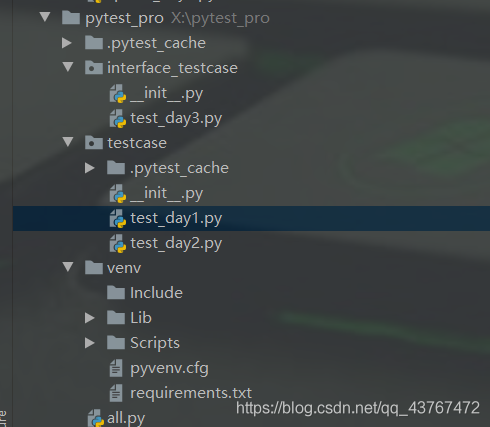
主函数模式
- 运行所有 pytest.main()
- 指定模块 pytest.main([‘-vs’,’./testcase/test_day1.py’])
- 指定目录pytest.main([‘-vs’,’./testcase’])
通过nodeid指定用例运行:nodeid由模块名,分隔符,类名,方法名,函数名组成
运行所有:pytest
- 指定模块 pytest -vs ./testcase/test_day1.py
- 指定目录 pytest -vs ./testcase
- 通过nodeid指定用例运行:nodeid由模块名,分隔符,类名,方法名,函数名组成
- -s:表示输出调试信息,包括print打印的信息
- -v:显示更详细的信息,-vs一起使用
- pytest.main([‘-vs’,’./testcase/test_day1.py’,’-n=2’])
- pytest -vs ./testcase/test_day1.py -n 2
- -n:支持多线程或者分布式运行测试用例
- reruns==number 表示失败用例重跑,number:重跑次数
- pytest -vs ./testcase/test_day2.py —reruns 2
- pytest.main([‘–vs’,’./testcase/test_day2.py’,‘reruns=2’])
- -x:表示只要一个用例报错,那么测试停止运行
- –maxfail=2 出现两个失败用例停止
- -k:根据测试用例的部分字符串指定测试用例
- pytest -vs test_day2.py -k “yang”
- -m:标记表达式
通过读取pytest.ini配置文件运行(最主要运行的方式)
pytest.ini是pytest单元测试框架中的核心配置文件
- 位置:一般是放在项目的根目录
- 编码:必须是ANSI,可以使用notepad++来修改编码格式
- 作用:改变pytest的默认行为
- 运行的规则:不管是主函数的模式运行该,命令行模式,都会区读取这个配置文件
```python
实际项目配置中,尽量删除注释,确保不必要的问题出现
[pytest] addopts=-vs #命令行参数 用空格分离 testpaths=./testcase #测试用例的路径 ./testcase/testday2.py # python_files=test.py #模块名的规则 python_classes=Test #类名的规则 python_functions=test #方法名的规则 ```

若有收获,就点个赞吧
0 人点赞


