1.查看当前可以访问mysql的主机配置信息
mysql -u root -puse mysql;#查看当前可以访问mysql的主机配置信息select host from user where user='root';
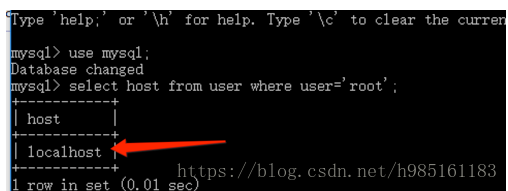
2.将Host设置为通配符%
Host列指定了允许用户登录所使用的IP,比如user=root Host=192.168.1.1。这里的意思就是说root用户只能通过192.168.1.1的客户端去访问。 user=root Host=localhost,表示只能通过本机客户端去访问。而%是个通配符,如果Host=192.168.1.%,那么就表示只要是IP地址前缀为“192.168.1.”的客户端都可以连接。如果Host=%,表示所有IP都有连接权限。
注意:在生产环境下不能为了省事将host设置为%,这样做会存在安全问题,具体的设置可以根据生产环境的IP进行设置;
update user set host = '%' where user ='root';

3.Host设置了“%”后便可以允许远程访问
#重启生效flush privileges;

若有收获,就点个赞吧
0 人点赞


