本文简单的介绍Spring Boot与OAuth2的集成、OAuth client、OAuth authorization server、OAuth resource server的示例。
👉单点登录Github(客户端)
👐创建项目
略。
👏项目结构
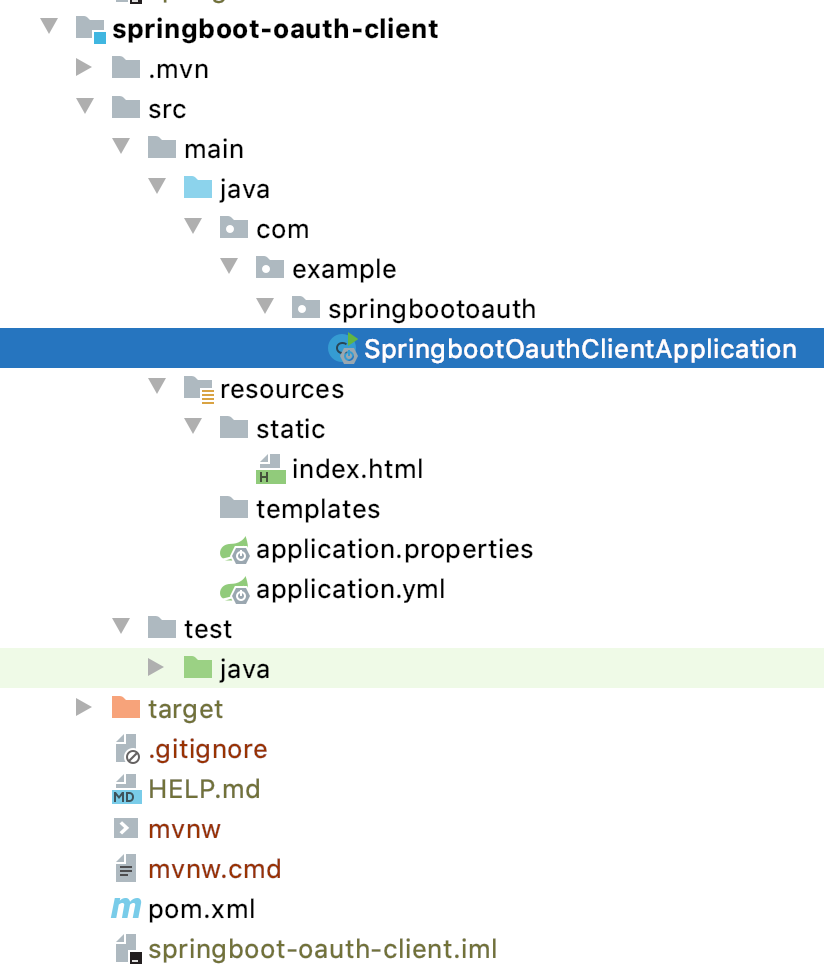
👏添加首页
<!doctype html><html lang="en"><head><meta charset="utf-8"/><meta http-equiv="X-UA-Compatible" content="IE=edge"/><title>Demo</title><meta name="description" content=""/><meta name="viewport" content="width=device-width"/><base href="/"/><link rel="stylesheet" type="text/css" href="/webjars/bootstrap/css/bootstrap.min.css"/><script type="text/javascript" src="/webjars/jquery/jquery.min.js"></script><script type="text/javascript" src="/webjars/bootstrap/js/bootstrap.min.js"></script><script src="/webjars/js-cookie/js.cookie.js" type="text/javascript"></script></head><body><h1>Demo</h1><div class="container"></div></body></html>
👏POM
<?xml version="1.0" encoding="UTF-8"?><project xmlns="http://maven.apache.org/POM/4.0.0" xmlns:xsi="http://www.w3.org/2001/XMLSchema-instance"xsi:schemaLocation="http://maven.apache.org/POM/4.0.0 https://maven.apache.org/xsd/maven-4.0.0.xsd"><modelVersion>4.0.0</modelVersion><parent><artifactId>springboot-demo</artifactId><groupId>com.example</groupId><version>0.0.1-SNAPSHOT</version></parent><artifactId>springboot-oauth-client</artifactId><version>0.0.1-SNAPSHOT</version><name>springboot-oauth-client</name><description>Demo project for Spring Boot and OAuth Client</description><properties><java.version>1.8</java.version></properties><dependencies><!--CSS\JS等资源--><dependency><groupId>org.webjars</groupId><artifactId>jquery</artifactId><version>3.4.1</version></dependency><dependency><groupId>org.webjars</groupId><artifactId>bootstrap</artifactId><version>4.3.1</version></dependency><dependency><groupId>org.webjars</groupId><artifactId>js-cookie</artifactId><version>2.1.0</version></dependency><dependency><groupId>org.webjars</groupId><artifactId>webjars-locator-core</artifactId></dependency><!--客户端--><dependency><groupId>org.springframework.boot</groupId><artifactId>spring-boot-starter-oauth2-client</artifactId></dependency><dependency><groupId>org.springframework.boot</groupId><artifactId>spring-boot-starter-security</artifactId></dependency><dependency><groupId>org.springframework.boot</groupId><artifactId>spring-boot-starter-web</artifactId></dependency><dependency><groupId>org.springframework.boot</groupId><artifactId>spring-boot-starter-test</artifactId><scope>test</scope><exclusions><exclusion><groupId>org.junit.vintage</groupId><artifactId>junit-vintage-engine</artifactId></exclusion></exclusions></dependency><dependency><groupId>org.springframework.security</groupId><artifactId>spring-security-test</artifactId><scope>test</scope></dependency><!--支持热部署--><dependency><groupId>org.springframework.boot</groupId><artifactId>spring-boot-devtools</artifactId><optional>true</optional><scope>true</scope></dependency></dependencies><build><plugins><plugin><groupId>org.springframework.boot</groupId><artifactId>spring-boot-maven-plugin</artifactId><configuration><!--Flag to indicate if the run processes should be forked. Disabling forking willdisable some features such as an agent, custom JVM arguments, devtools orspecifying the working directory to use.--><!--原文,意思就是不加会导致一些特性被关闭,比如devtools--><fork>true</fork></configuration></plugin></plugins></build></project>
👏配置
server:port: 8081spring:security:oauth2:client:registration:github:#这是在oauth authorization server注册的id、secretclientId: "********"clientSecret: "**********"
👏启动类
package com.example.springbootoauth;import com.fasterxml.jackson.databind.ObjectMapper;import org.springframework.boot.SpringApplication;import org.springframework.boot.autoconfigure.SpringBootApplication;import org.springframework.context.annotation.Bean;import org.springframework.http.HttpMethod;import org.springframework.http.HttpStatus;import org.springframework.security.config.annotation.web.builders.HttpSecurity;import org.springframework.security.config.annotation.web.configuration.WebSecurityConfigurerAdapter;import org.springframework.security.core.annotation.AuthenticationPrincipal;import org.springframework.security.oauth2.client.OAuth2AuthorizedClient;import org.springframework.security.oauth2.client.userinfo.DefaultOAuth2UserService;import org.springframework.security.oauth2.client.userinfo.OAuth2UserRequest;import org.springframework.security.oauth2.client.userinfo.OAuth2UserService;import org.springframework.security.oauth2.core.OAuth2AuthenticationException;import org.springframework.security.oauth2.core.OAuth2Error;import org.springframework.security.oauth2.core.user.OAuth2User;import org.springframework.security.web.authentication.HttpStatusEntryPoint;import org.springframework.security.web.csrf.CookieCsrfTokenRepository;import org.springframework.web.bind.annotation.GetMapping;import org.springframework.web.bind.annotation.RestController;import javax.servlet.http.HttpServletRequest;import java.io.BufferedReader;import java.io.IOException;import java.io.InputStream;import java.io.InputStreamReader;import java.net.HttpURLConnection;import java.net.URL;import java.util.Collections;import java.util.List;import java.util.Map;@SpringBootApplicationpublic class SpringbootOauthClientApplication extends WebSecurityConfigurerAdapter {@Overrideprotected void configure (HttpSecurity http) throws Exception {// @formatter:off// 配置除了"/favicon.ico", "/error", "/webjars/**"这些地址不需经过认证之外其他所有都需认证// 配置所有认证失败返回401状态码(默认403状态码)// 配置OAuth2.0认证http.authorizeRequests(a ->a.antMatchers("/favicon.ico", "/error", "/webjars/**").permitAll().anyRequest().authenticated()).exceptionHandling(e ->e.authenticationEntryPoint(new HttpStatusEntryPoint(HttpStatus.UNAUTHORIZED))).oauth2Login();// @formatter:on}public static void main (String[] args) {SpringApplication.run(SpringbootOauthClientApplication.class, args);}}
🤙Github OAuth app
我们必须先去Github申请一个新的oauth app用来接入Github,Add a new OAuth app。
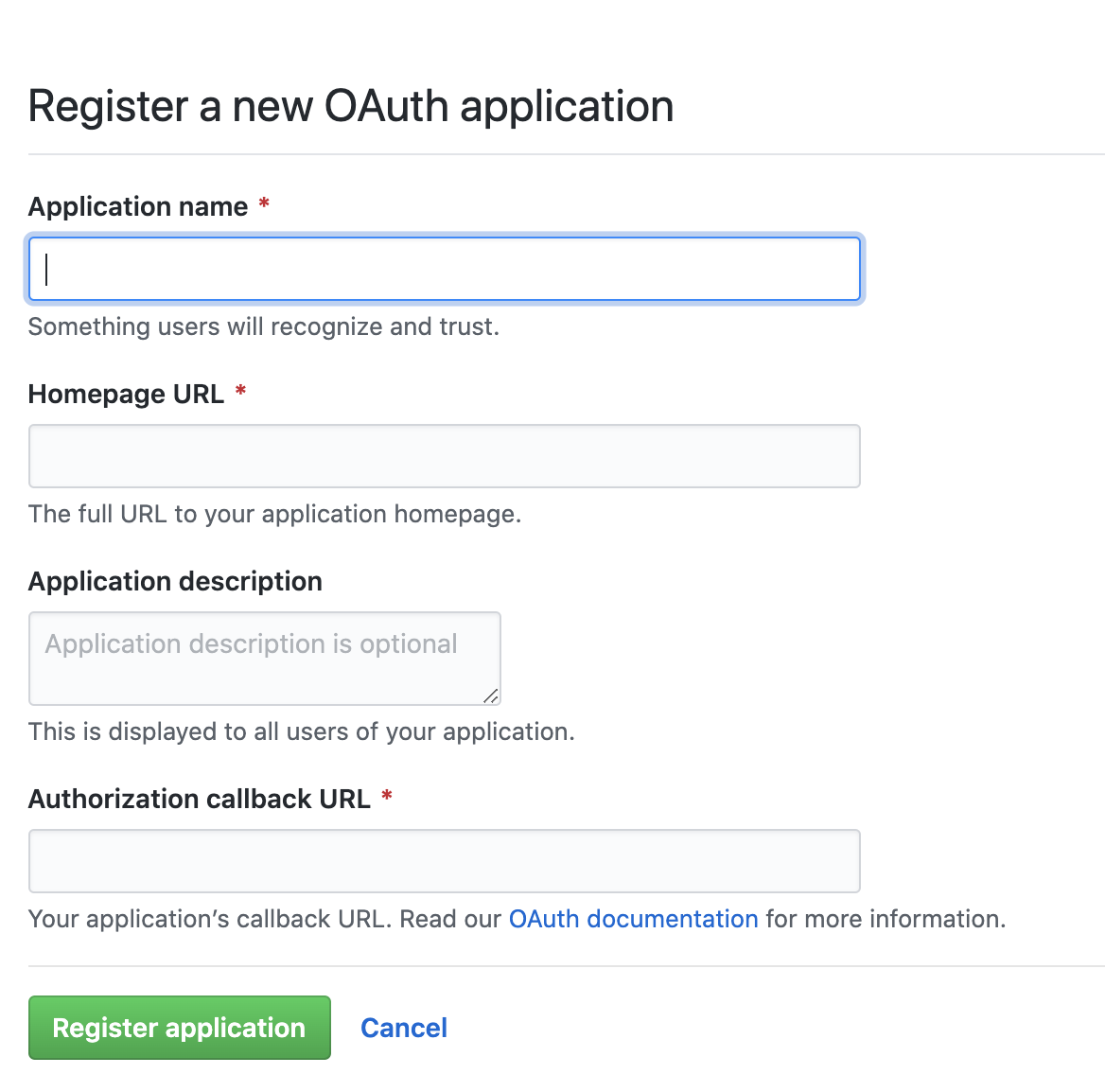
Application name 、 Application description按照个人需求填写,Homepage URL按照上面的配置的话应该是localhost:8081
Authorization callback URL按照上面的配置的话应该是localhost:8081/login/oauth2/code/github
callback URL在Spring Boot中的模板是:{baseUrl}/login/oauth2/code/{registrationId}
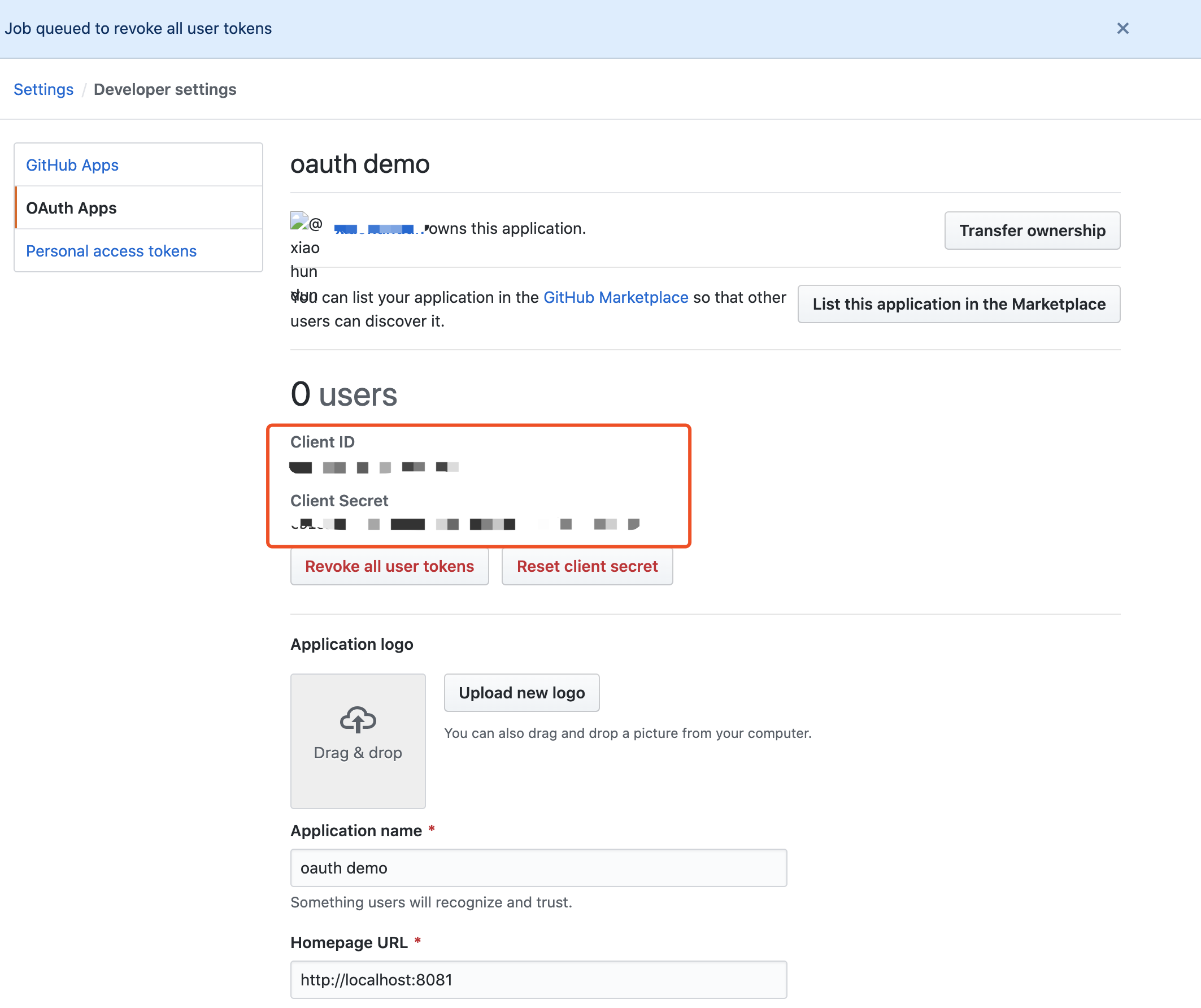
注册完毕之后,我们可以看到注册的app的Client ID、Client Secret,这两个要放到配置中去。
🤙启动项目
就这么简单
- 创建项目
- 加一个简单的首页
- POM加一点儿依赖
- 简单加两个配置
- 稍微配置下启动类
一个OAuth客户端就“能用了”
启动项目,并访问主页locahost:8081,会发现跳转到了Github认证
github使用的认证模式是code模式,即授权码(authorization-code)模式。rfc6749
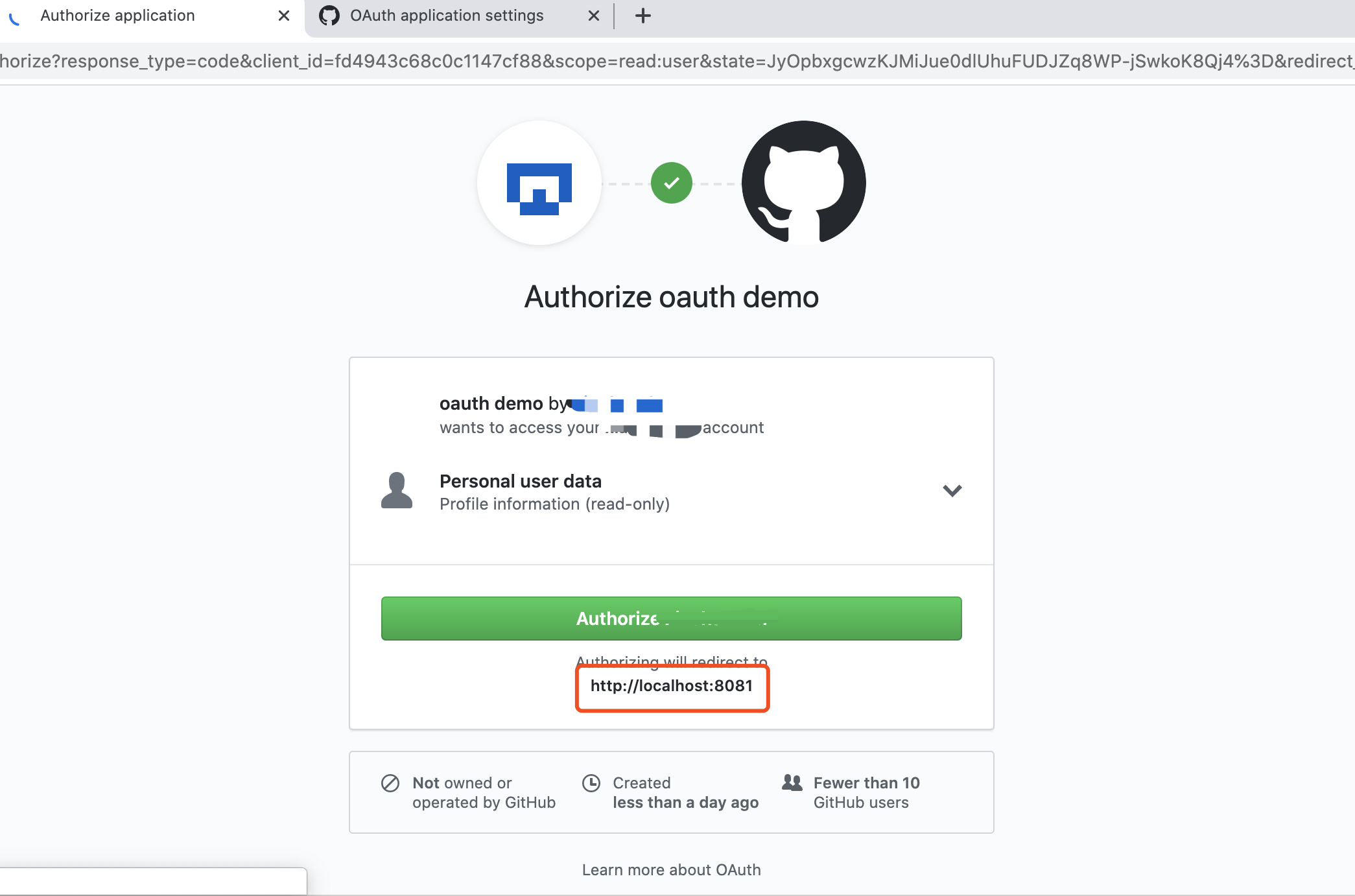
点击Authorize并认证成功之后便会跳转到你的homepage,也就是localhost:8081。
只要你仍然在Github保持登录状态,本地app不需要重新认证,即使打开一个新的窗口(无痕、别的浏览器[没有登录github]除外)。
🤙请求链
👌Ⅰ访问首页
General:
Request URL: http://localhost:8081/Request Method: GETStatus Code: 302Remote Address: [::1]:8081Referrer Policy: strict-origin-when-cross-origin
Request:
GET / HTTP/1.1Host: localhost:8081Connection: keep-aliveCache-Control: max-age=0Upgrade-Insecure-Requests: 1User-Agent: Mozilla/5.0 (Macintosh; Intel Mac OS X 10_15_4) AppleWebKit/537.36 (KHTML, like Gecko) Chrome/81.0.4044.138 Safari/537.36Accept: text/html,application/xhtml+xml,application/xml;q=0.9,image/webp,image/apng,/;q=0.8,application/signed-exchange;v=b3;q=0.9Sec-Fetch-Site: noneSec-Fetch-Mode: navigateSec-Fetch-User: ?1Sec-Fetch-Dest: documentAccept-Encoding: gzip, deflate, brAccept-Language: en-GB,en-US;q=0.9,en;q=0.8,zh-CN;q=0.7,zh;q=0.6
Response:
HTTP/1.1 302Set-Cookie: JSESSIONID=118A9185FDC6BA0D68C20B62583C5BBF; Path=/; HttpOnlyX-Content-Type-Options: nosniffX-XSS-Protection: 1; mode=blockCache-Control: no-cache, no-store, max-age=0, must-revalidatePragma: no-cacheExpires: 0X-Frame-Options: DENYLocation: http://localhost:8081/oauth2/authorization/githubContent-Length: 0Date: Wed, 20 May 2020 10:00:07 GMTKeep-Alive: timeout=60Connection: keep-alive
因为没有认证信息,所以服务器返回302,重定向至Location:http://localhost:8081/oauth2/authorization/github
上面地址的模板是:{baseUrl}/oauth2/authorization/{provider}
在这个地址的处理里根据provider的信息正式向provider进行认证
👌Ⅱ重定向
被重定向至:localhost:8081/**oauth2/authorization/github**
_
General:
Request URL: http://localhost:8081/oauth2/authorization/githubRequest Method: GETStatus Code: 302Remote Address: [::1]:8081Referrer Policy: strict-origin-when-cross-origin
Request:
Accept: text/html,application/xhtml+xml,application/xml;q=0.9,image/webp,image/apng,*/*;q=0.8,application/signed-exchange;v=b3;q=0.9Accept-Encoding: gzip, deflate, brAccept-Language: en-GB,en-US;q=0.9,en;q=0.8,zh-CN;q=0.7,zh;q=0.6Cache-Control: max-age=0Connection: keep-aliveCookie: JSESSIONID=118A9185FDC6BA0D68C20B62583C5BBFHost: localhost:8081Sec-Fetch-Dest: documentSec-Fetch-Mode: navigateSec-Fetch-Site: noneSec-Fetch-User: ?1Upgrade-Insecure-Requests: 1User-Agent: Mozilla/5.0 (Macintosh; Intel Mac OS X 10_15_4) AppleWebKit/537.36 (KHTML, like Gecko) Chrome/81.0.4044.138 Safari/537.36
Response:
Cache-Control: no-cache, no-store, max-age=0, must-revalidateConnection: keep-aliveContent-Length: 0Date: Wed, 20 May 2020 10:00:07 GMTExpires: 0Keep-Alive: timeout=60Location: https://github.com/login/oauth/authorize?response_type=code&client_id=********&scope=read:user&state=iTdcnTtCIwpC36VQoWEt_3We2E8DUNdk488QlDdRHa8%3D&redirect_uri=http://localhost:8081/login/oauth2/code/githubPragma: no-cacheX-Content-Type-Options: nosniffX-Frame-Options: DENYX-XSS-Protection: 1; mode=block
Github是知名的provider,所以我们只需要提供client id,client secret即可,其他信息,比如:
- 认证地址(authorizationUri):https://github.com/login/oauth/authorize
- Token地址(tokenUri):https://github.com/login/oauth/access_token
- 用户信息地址(userInfoUri):https://api.github.com/user
- 授权模式(authorizationGrantType):authorization_code
- 重定向地址(redirectUri):{baseUrl}/{action}/oauth2/code/{registrationId}
等信息已经内置在框架中。 当我们搭建服务器端时,我们作为Provider也需要提供这些信息。
将response_type(授权模式)、client_id(客户端id)、重定向地址等放到地址参数中被重定向至
https://github.com/login/oauth/authorize?response_type=code&client_id=*&scope=read:user&state=iTdcnTtCIwpC36VQoWEt_3We2E8DUNdk488QlDdRHa8%3D&redirect_uri=http://localhost:8081/login/oauth2/code/github获取授权码
👌Ⅲ重定向
General:
Request URL: https://github.com/login/oauth/authorize?response_type=code&client_id=********&scope=read:user&state=iTdcnTtCIwpC36VQoWEt_3We2E8DUNdk488QlDdRHa8%3D&redirect_uri=http://localhost:8081/login/oauth2/code/githubRequest Method: GETStatus Code: 302 FoundRemote Address: 140.82.113.3:443Referrer Policy: strict-origin-when-cross-origin
Request:
Accept: text/html,application/xhtml+xml,application/xml;q=0.9,image/webp,image/apng,*/*;q=0.8,application/signed-exchange;v=b3;q=0.9Accept-Encoding: gzip, deflate, brAccept-Language: en-GB,en-US;q=0.9,en;q=0.8,zh-CN;q=0.7,zh;q=0.6Cache-Control: max-age=0Connection: keep-aliveCookie: _octo=GH1.1.647508601.1588919991; _ga=GA1.2.1354001975.1588920084; tz=Asia%2FShanghai; _device_id=1a9cd9d4b86d40b8bb966bc1bd48a5c8; has_recent_activity=1; user_session=nohRAJiFcnuRdw2m63bkJf4SEZUHKBQekx-cqAAJ0_6o6IJ2; __Host-user_session_same_site=nohRAJiFcnuRdw2m63bkJf4SEZUHKBQekx-cqAAJ0_6o6IJ2; logged_in=yes; dotcom_user=****; _gh_sess=nxyLIvIbckSbSXcX%2BOQUq3iriiB0KgldKr6XG%2FNuX3Iv1UyTsaDDYXWshvAEobcOZt759Yxwgqi4%2BNgpU8gK8EPk51abjHjAgTCqLpd80bRxIV%2Bic8Ywik25NmiOYbFmyoLP2CC90NPNhG14yVHdHZXUAi9e2IJncrLo9pwIjvLgkB3PH0%2Bns%2Fsg6FmYiMpx7ercCkdy2L04V5ByYLSXBu4MYHXJ1b%2FGYB1b%2F4esQmSK63mHNj4v9JbLtcgcCSKbaVPUmnAdjgpiRCLQXA88b7kqmMHepXhghy8CDbUKY%2BJSXlwjHUcoSTykaXx2E0VICsOSH0qcwH7C2kUSxLvcD8rQGXffUjLiojRtsx4%2BN4HlJBXueuXQ6Rv7yOOn5nccbNF3BLP5YcoVAyu0BBMBnKqNErTsrD82SpYEDcaQ2Rbk65uSuL00BUfZH4ZetwM2wNB4YgUExkQIk5giujaPLLtS2LOSj%2Bj0UYyZj3Jx2v9%2F7U9uYGW2Le3afXncrURtxXbNlJ5WV0Bi7z9lNRcO7vYpGeGA5qzH%2BJzwxVQsqaM2CdGiIK8R8DV%2B0VrfxmtBBzmxXYlOmJJ%2BHCSBMcnMFKNbyGZ3bmHDeKtTRr1yZRphBEoN5jJO1WYvAnPvgQB6jfa5FD712TATuCrAQLtsTmgMuWa8IJX6NVgjvPhyIuJrFGz8ib6gooToJdCqfjNq7SupCIATqKbgQ1uvXhV44%2Fnh2cQF9VlhHFmOuMjTZADPTJmsZI4LYoZqiQ0qUQgVmufWUZwqkZglhguypjtyR42yu%2FFKhA2ZPc5JUqHEqNHH098J52%2BqDHdD1eQYxWvLniaTHq3oC4UjG%2Bwxaei0K86hVpByP%2FVl4z2xABTpFO5Z9MfbOjdUDwu696e4%2FmBDWfHBbzmjUsiZrZuRGc0%2FucpShxJpFzo4xJhpB4e5OhAYhQbgiFhnVkCIitZZenVMFSn5g8odutB4Oe1R30QVD%2BI5%2FHpOhYF0C2sUxlqV7DClLwIgg4WrPPN7dKIvsP%2F%2ByMBqzuO7Zom%2BgLd7Fxei2XFIJgC706jOB0%2FR%2F%2FhF30XFXeyH8WJN4pXiJMzwmx7s0%2F%2F0ljGxaVGA8AvV14vq8rChu2vFlE2IU8xu0fYk7ujSfgcKvU9TwBkh3Rh%2FDYVeDCy7CAqRDfwi9Z7VzlUmtgUa5onahRc1nmFtPTZ3oaQFLlzZOWrQn9Of%2BIHCeyE55ZIF%2FqHmn8sN1g4VvGKmYdWmj%2B7jaZIwjx8yCePz4PQatrNNf332QphRdy9mQfx9teHSuDTsZMlnNr%2FA6cFuqdAUd%2FFlSIEwmq5WRWVKUazcxlwyUrTxRT%2FyRuGnjGnw4CWKDzGd7N%2FqijkspsLLu%2BfyOKu0y1GZIwd%2FTgogWKQJSRXigLd6g1XVmefYQiHqiJKGcFxUDxw79xoSDI5mNKpnOYitHNEzmi6QibhW1weD%2FhNdgPL9ygZ%2F5F%2FWUScWv7OaPzT5xlvihMP1a2hchqot3nYIUJrKWAjO93eerzWp9A6mXnVX1ms4eae%2BixjcF598yLvXsjYqYtGvkP%2B78GemsMs%3D--pQrErwMIAeqxff%2Fa--J9T4jq%2BJRlwpgRxjFXGUKg%3D%3DHost: github.comSec-Fetch-Dest: documentSec-Fetch-Mode: navigateSec-Fetch-Site: noneSec-Fetch-User: ?1Upgrade-Insecure-Requests: 1User-Agent: Mozilla/5.0 (Macintosh; Intel Mac OS X 10_15_4) AppleWebKit/537.36 (KHTML, like Gecko) Chrome/81.0.4044.138 Safari/537.36
Response:
Cache-Control: no-cacheContent-Security-Policy: default-src 'none'; base-uri 'self'; block-all-mixed-content; connect-src 'self' uploads.github.com www.githubstatus.com collector.githubapp.com api.github.com www.google-analytics.com github-cloud.s3.amazonaws.com github-production-repository-file-5c1aeb.s3.amazonaws.com github-production-upload-manifest-file-7fdce7.s3.amazonaws.com github-production-user-asset-6210df.s3.amazonaws.com cdn.optimizely.com logx.optimizely.com/v1/events wss://live.github.com; font-src github.githubassets.com; form-action 'self' github.com gist.github.com; frame-ancestors 'self'; frame-src render.githubusercontent.com; img-src 'self' data: github.githubassets.com identicons.github.com collector.githubapp.com github-cloud.s3.amazonaws.com *.githubusercontent.com; manifest-src 'self'; media-src 'none'; script-src github.githubassets.com; style-src 'unsafe-inline' github.githubassets.com; worker-src github.com/socket-worker.jsContent-Type: text/html; charset=utf-8Date: Wed, 20 May 2020 10:00:08 GMTExpect-CT: max-age=2592000, report-uri="https://api.github.com/_private/browser/errors"Location: http://localhost:8081/login/oauth2/code/github?code=6ab6a582334378ef9fe9&state=iTdcnTtCIwpC36VQoWEt_3We2E8DUNdk488QlDdRHa8%3DReferrer-Policy: origin-when-cross-origin, strict-origin-when-cross-originServer: GitHub.comSet-Cookie: user_session=nohRAJiFcnuRdw2m63bkJf4SEZUHKBQekx-cqAAJ0_6o6IJ2; path=/; expires=Wed, 03 Jun 2020 10:00:08 GMT; secure; HttpOnly; SameSite=LaxSet-Cookie: __Host-user_session_same_site=nohRAJiFcnuRdw2m63bkJf4SEZUHKBQekx-cqAAJ0_6o6IJ2; path=/; expires=Wed, 03 Jun 2020 10:00:08 GMT; secure; HttpOnly; SameSite=StrictSet-Cookie: has_recent_activity=1; path=/; expires=Wed, 20 May 2020 11:00:08 GMT; secure; HttpOnly; SameSite=LaxSet-Cookie: _gh_sess=7l6Hza0JKOdzQMjOmOsHXfFHWPslmhVQ6t7ipQ%2BUk1ldTIMrO62DFMbohKaVxqGEQbeECENJBv5LOC0h4uyIu5%2FMg4hqvSHV95kB0IGBXB%2F4lRnXBeLitB%2BURP3kcxaCmQHgd6VuKk8ieZ8Ez3FaqMTo5ChyccBmtIT1bxpj16dkO33tLVglYHkD2BvaIXRxcOfwRqeGXddvEPt7aD9x9RSgholNbsMpNsxdMP%2FIP0S%2FFR1%2Fh4KXqSVdLAXfc6dpF1j7AkP3qxMFLqqvXJpU4JbeZIkJA00PMFuuVY0Dy5wBeV7lZx9OBO7%2FKZT7qxEowRtfS%2FlsX1mQ%2FnZWGJNbWihdASEykuWfzgGRcDGrcyVuOPIDbrUw9XmZcGKWaAFd%2BwQv08f6yIAIkVKPyCqh7bwcN3gFihHxPOoEnqycBQY2%2BKxr4uiegv9FNVzzmRRLgqNf1X%2BPpcj02nWcCebvMPto%2F%2BtOewHplfs4Zn%2Bum9gufgK8U%2BXg28274Mn5%2BcatL5qY8cfOsaeGt3qMhO%2BlY1CrXWqcIagTJY%2B%2BqobhmklA8LsKaHx7EmCgGCMM95GdVidfqOfZxIH1jPTFcyHmTuyvCCQqXpzaE0o%2FtheS19JcvSfDNuoxazwkSRKHubvwU%2FaIDMDGlKCwO3euW%2FDDutUZ4Se%2FnIdm0U2y8ZMeyuWs1T%2FK%2FGOsChvn%2B%2BsdV6DF0GtFeF02hjUgXCu3tepnBZdYhP5qqVXO4Z1gqgvznFiU8SMUVaUi4kfnKqPf%2FkHHYeXSJBACn0x4%2FYehxjPeQodRx%2Fz6HnSL6gmnvZm0lZD8WbwyoAxxkIUHGW3SAF9Sg3q8Pm23wtZdv3ET0lKgB04v8CMKyxGZaFV826fLSJeru4uf3hWVy2N09g6sc8uGxn2y7gb63%2BV3pzs9CCK6uigmoq2wk86lY4%2Bvte9DGriLGGeepU0hjhh9Gwzt%2B7AG1FHne1%2F9DSyFCmCx5FDTtLELfemc9%2BLvS18lvU9nh6Ex3Ei%2FkAfH6cztYg%2BXegSrqpeXO2T1ULp3t6ftkWevzkmcpWj%2FSH5I704u3j2hXZW%2BmoV6NrKKV75aGG1hIP%2FLrdotp0BxBAtZorIh8PEkuYTKBWNy3RywLjMD%2B7%2BMcHhpExSrZhXTCZNwQo3iPgbOfb2TEPkIEbEGTMwEyiIo94GiJhIaNA13NGcvQS%2BR2st9z8rePhslv4VnYk2cvPFhQvv5MdmdgWcnf6G8UYNseAM27DxslJF22f%2ForeHmv0kNnsVLPpDmnbwaeMLGloF5eu65Xvcjjzm3zXxm7MYTAwp9QYQQCweZI8tnFkY7mlxw5lwHs99FU4PN4WX1gx76JHsSqRqNry7xc8ybW5Dl%2FjN8gfMay%2F9WFCjMBCmLGjcWWWlINvSH1ug%2FqaqSOsf2xw8t0Fy%2BHCcGBiS9lH9K7J5azdVfCc%2BZ6MQycavU8%2Fj3fDGNvNWF7XbgHI0ZSrH9LMLQyp7ILlLn0ylbflKYvhnZ93CFkMs8TU6Bc6IAY6DithW1ZQEH1qzfJ8hCsUUBpaCr%2F8OHfaUkX381AkZXQMEV1wI%3D--u3tauRwfmBSRrVZq--uHRBGGLCS0GU1K84C%2BRM0g%3D%3D; path=/; secure; HttpOnly; SameSite=LaxStatus: 302 FoundStrict-Transport-Security: max-age=31536000; includeSubdomains; preloadTransfer-Encoding: chunkedVary: X-PJAXVary: Accept-Encoding, Accept, X-Requested-WithX-Content-Type-Options: nosniffX-Frame-Options: sameoriginX-GitHub-Request-Id: 8C0F:221B:136D9:29086:5EC4FFA7X-XSS-Protection: 1; mode=block
从github.com认证成功获取授权码之后被重定向至客户端
👌Ⅳ重定向
被重定向至:localhost:8081/login/oauth2/code/github
General:
Request URL: http://localhost:8081/login/oauth2/code/github?code=6ab6a582334378ef9fe9&state=iTdcnTtCIwpC36VQoWEt_3We2E8DUNdk488QlDdRHa8%3DRequest Method: GETStatus Code: 302Remote Address: [::1]:8081Referrer Policy: strict-origin-when-cross-origin
Request:
Accept: text/html,application/xhtml+xml,application/xml;q=0.9,image/webp,image/apng,*/*;q=0.8,application/signed-exchange;v=b3;q=0.9Accept-Encoding: gzip, deflate, brAccept-Language: en-GB,en-US;q=0.9,en;q=0.8,zh-CN;q=0.7,zh;q=0.6Cache-Control: max-age=0Connection: keep-aliveCookie: JSESSIONID=118A9185FDC6BA0D68C20B62583C5BBFHost: localhost:8081Sec-Fetch-Dest: documentSec-Fetch-Mode: navigateSec-Fetch-Site: noneSec-Fetch-User: ?1Upgrade-Insecure-Requests: 1User-Agent: Mozilla/5.0 (Macintosh; Intel Mac OS X 10_15_4) AppleWebKit/537.36 (KHTML, like Gecko) Chrome/81.0.4044.138 Safari/537.36
Response:
Cache-Control: no-cache, no-store, max-age=0, must-revalidateConnection: keep-aliveContent-Length: 0Date: Wed, 20 May 2020 10:00:15 GMTExpires: 0Keep-Alive: timeout=60Location: http://localhost:8081/Pragma: no-cacheSet-Cookie: JSESSIONID=074B338C2B61B85D31F71F64FC4362FB; Path=/; HttpOnlyX-Content-Type-Options: nosniffX-Frame-Options: DENYX-XSS-Protection: 1; mode=block
拿到授权码之后在客户端服务器内部完成向授权服务器Token的请求,成功后发送homepage的重定向响应。
👌Ⅴ重定向至首页
General:
Request URL: http://localhost:8081/Request Method: GETStatus Code: 200Remote Address: [::1]:8081Referrer Policy: strict-origin-when-cross-origin
Request:
Accept: text/html,application/xhtml+xml,application/xml;q=0.9,image/webp,image/apng,*/*;q=0.8,application/signed-exchange;v=b3;q=0.9Accept-Encoding: gzip, deflate, brAccept-Language: en-GB,en-US;q=0.9,en;q=0.8,zh-CN;q=0.7,zh;q=0.6Cache-Control: max-age=0Connection: keep-aliveCookie: JSESSIONID=074B338C2B61B85D31F71F64FC4362FBHost: localhost:8081Sec-Fetch-Dest: documentSec-Fetch-Mode: navigateSec-Fetch-Site: noneSec-Fetch-User: ?1Upgrade-Insecure-Requests: 1User-Agent: Mozilla/5.0 (Macintosh; Intel Mac OS X 10_15_4) AppleWebKit/537.36 (KHTML, like Gecko) Chrome/81.0.4044.138 Safari/537.36
Response:
Accept-Ranges: bytesCache-Control: no-cache, no-store, max-age=0, must-revalidateConnection: keep-aliveContent-Language: en-GBContent-Length: 609Content-Type: text/html;charset=UTF-8Date: Wed, 20 May 2020 10:00:15 GMTExpires: 0Keep-Alive: timeout=60Last-Modified: Wed, 20 May 2020 08:29:31 GMTPragma: no-cacheVary: OriginVary: Access-Control-Request-MethodVary: Access-Control-Request-HeadersX-Content-Type-Options: nosniffX-Frame-Options: DENYX-XSS-Protection: 1; mode=block
至此整个认证的流程结束,用户认证信息保存在Spring Security context中
👌Ⅵ认证过程请求链

🤙增加欢迎页、登出
接下来改造应用,使用户可以选择App认证,并且可以登出。
👌主页改造
body内容更改为下面的:
<div class="container unauthenticated">With GitHub: <a href="/oauth2/authorization/github">click here</a></div><!--添加一个google的登录选项--><div>With Google: <a href="/oauth2/authorization/google">click here</a></div><div class="container authenticated" style="display:none">Logged in as: <span id="user"></span><div><button onClick="logout()" class="btn btn-primary">Logout</button></div></div>
添加脚本:
<script type="text/javascript">$.ajaxSetup({beforeSend: function (xhr, settings) {if (settings.type == 'POST' || settings.type == 'PUT'|| settings.type == 'DELETE') {if (!(/^http:.*/.test(settings.url) || /^https:.*/.test(settings.url))) {// Only send the token to relative URLs i.e. locally.xhr.setRequestHeader("X-XSRF-TOKEN",Cookies.get('XSRF-TOKEN'));}}}});$.get("/user", function (data) {$("#user").html(data.name);$(".unauthenticated").hide()$(".authenticated").show()});var logout = function () {$.post("/logout", function () {$("#user").html('');$(".unauthenticated").show();$(".authenticated").hide();})return true;}</script>
👌后端改造
增加 /user Endpoint、登出处理、csrf、白名单
package com.example.springbootoauth;import org.springframework.boot.SpringApplication;import org.springframework.boot.autoconfigure.SpringBootApplication;import org.springframework.http.HttpStatus;import org.springframework.security.config.annotation.web.builders.HttpSecurity;import org.springframework.security.config.annotation.web.configuration.WebSecurityConfigurerAdapter;import org.springframework.security.core.annotation.AuthenticationPrincipal;import org.springframework.security.oauth2.core.user.OAuth2User;import org.springframework.security.web.authentication.HttpStatusEntryPoint;import org.springframework.security.web.csrf.CookieCsrfTokenRepository;import org.springframework.web.bind.annotation.GetMapping;import org.springframework.web.bind.annotation.RestController;import java.util.Collections;import java.util.Map;@RestController@SpringBootApplicationpublic class SpringbootOauthApplication extends WebSecurityConfigurerAdapter {// 用于欢迎页显示用户信息@GetMapping("/user")public Map<String, Object> user (@AuthenticationPrincipal OAuth2User principal) {return Collections.singletonMap("name", principal.getAttribute("name"));}@Overrideprotected void configure (HttpSecurity http) throws Exception {// @formatter:off// 配置除了"/"(新增的,因为首页需要让用户选择app), "/favicon.ico", "/error", "/webjars/**"这些地址不需经过认证之外其他所有都需认证// 配置所有认证失败返回401状态码(默认403状态码)// 配置OAuth2.0认证http.authorizeRequests(a ->a.antMatchers("/", "/favicon.ico", "/error", "/webjars/**").permitAll().anyRequest().authenticated()).exceptionHandling(e ->e.authenticationEntryPoint(new HttpStatusEntryPoint(HttpStatus.UNAUTHORIZED))).oauth2Login();// 新增http.logout(l-> l.logoutSuccessUrl("/").permitAll()).csrf(c ->c.csrfTokenRepository(CookieCsrfTokenRepository.withHttpOnlyFalse()));// 结束// @formatter:on}public static void main (String[] args) {SpringApplication.run(SpringbootOauthApplication.class, args);}}
👌测试
🖥重启项目,首页成了以下模样
⌨️点击登录,变成了这样
⌨️点击登出,又变成了这样
🤙增加组织认证
Github认证成功之后,查询Github的组织信息,根据组织信息判断是否通过认证。
@Beanpublic OAuth2UserService<OAuth2UserRequest, OAuth2User> oauth2UserService() {DefaultOAuth2UserService delegate = new DefaultOAuth2UserService();return request -> {OAuth2User user = delegate.loadUser(request);if (!"github".equals(request.getClientRegistration().getRegistrationId())) {return user;}OAuth2AuthorizedClient client = new OAuth2AuthorizedClient(request.getClientRegistration(), user.getName(), request.getAccessToken());// 这个属性是userInfoUri接口返回的信息中有的String url = user.getAttribute("organizations_url");if (url != null) {try {// 请求并读取组织信息并判断URL urlurl = new URL(url);HttpURLConnection httpURLConnection = (HttpURLConnection) urlurl.openConnection();httpURLConnection.setRequestMethod(HttpMethod.GET.name());httpURLConnection.connect();if (httpURLConnection.getResponseCode() == 200) {try (InputStream inputStream = httpURLConnection.getInputStream(); BufferedReader bufferedReader = new BufferedReader(new InputStreamReader(inputStream))) {String result;StringBuilder sb = new StringBuilder();while ((result = bufferedReader.readLine()) != null) {sb.append(result);}ObjectMapper objectMapper = new ObjectMapper();List r = objectMapper.readValue(sb.toString(), List.class);if (r.size() != 0) {for (Object o : r) {if (o.equals("my_team")) {return user;}}}}}} catch (IOException e) {return user;}}throw new OAuth2AuthenticationException(new OAuth2Error("invalid_token", "Not in Team", ""));};}
👋🏻未认证用户错误页面
⛔️增加认证失败处理器
http.authorizeRequests(a -> a.antMatchers("/", "/favicon.ico", "/error", "/webjars/**").permitAll().anyRequest().authenticated()).exceptionHandling(e -> e.authenticationEntryPoint(new HttpStatusEntryPoint(HttpStatus.UNAUTHORIZED))).oauth2Login(o -> o.failureHandler((request, response, exception) -> {// 错误信息放session里并且返回重定向request.getSession().setAttribute("error.message", exception.getMessage());response.sendRedirect("/");}));
⛔️增加error endpoint
@GetMapping("/error")public String error(HttpServletRequest request) {String message = (String) request.getSession().getAttribute("error.message");request.getSession().removeAttribute("error.message");return message;}
⛔️首页增加消息展示区域
<div class="container text-danger error"></div>
$.get("/error", function(data) {if (data) {$(".error").html(data);} else {$(".error").html('');}});
⛔️测试
因为前面增加了组织认证,而我的Github并没有组织,逻辑是没有组织就验证不通过,所以我们请求下认证然后验证下认证错误页面
🥰最终的启动类:
package com.example.springbootoauth;import com.fasterxml.jackson.databind.ObjectMapper;import org.springframework.boot.SpringApplication;import org.springframework.boot.autoconfigure.SpringBootApplication;import org.springframework.context.annotation.Bean;import org.springframework.http.HttpMethod;import org.springframework.http.HttpStatus;import org.springframework.security.config.annotation.web.builders.HttpSecurity;import org.springframework.security.config.annotation.web.configuration.WebSecurityConfigurerAdapter;import org.springframework.security.core.annotation.AuthenticationPrincipal;import org.springframework.security.oauth2.client.OAuth2AuthorizedClient;import org.springframework.security.oauth2.client.userinfo.DefaultOAuth2UserService;import org.springframework.security.oauth2.client.userinfo.OAuth2UserRequest;import org.springframework.security.oauth2.client.userinfo.OAuth2UserService;import org.springframework.security.oauth2.core.OAuth2AuthenticationException;import org.springframework.security.oauth2.core.OAuth2Error;import org.springframework.security.oauth2.core.user.OAuth2User;import org.springframework.security.web.authentication.HttpStatusEntryPoint;import org.springframework.security.web.csrf.CookieCsrfTokenRepository;import org.springframework.web.bind.annotation.GetMapping;import org.springframework.web.bind.annotation.RestController;import javax.servlet.http.HttpServletRequest;import java.io.BufferedReader;import java.io.IOException;import java.io.InputStream;import java.io.InputStreamReader;import java.net.HttpURLConnection;import java.net.URL;import java.util.Collections;import java.util.List;import java.util.Map;@RestController@SpringBootApplicationpublic class SpringbootOauthClientApplication extends WebSecurityConfigurerAdapter {@GetMapping("/user")public Map<String, Object> user (@AuthenticationPrincipal OAuth2User principal) {return Collections.singletonMap("name", principal.getAttribute("name"));}@GetMapping("/error")public String error (HttpServletRequest request) {String message = (String) request.getSession().getAttribute("error.message");request.getSession().removeAttribute("error.message");return message;}@Overrideprotected void configure (HttpSecurity http) throws Exception {// @formatter:offhttp.authorizeRequests(a -> a.antMatchers("/", "/favicon.ico", "/error", "/webjars/**").permitAll().anyRequest().authenticated()).exceptionHandling(e -> e.authenticationEntryPoint(new HttpStatusEntryPoint(HttpStatus.UNAUTHORIZED))).oauth2Login(o -> o.failureHandler((request, response, exception) -> {request.getSession().setAttribute("error.message", exception.getMessage());response.sendRedirect("/");}));http.logout(l-> l.logoutSuccessUrl("/").permitAll()).csrf(c ->c.csrfTokenRepository(CookieCsrfTokenRepository.withHttpOnlyFalse()));// @formatter:on}public static void main (String[] args) {SpringApplication.run(SpringbootOauthClientApplication.class, args);}@Beanpublic OAuth2UserService<OAuth2UserRequest, OAuth2User> oauth2UserService () {DefaultOAuth2UserService delegate = new DefaultOAuth2UserService();return request -> {OAuth2User user = delegate.loadUser(request);if (!"github".equals(request.getClientRegistration().getRegistrationId())) {return user;}OAuth2AuthorizedClient client = new OAuth2AuthorizedClient(request.getClientRegistration(), user.getName(), request.getAccessToken());String url = user.getAttribute("organizations_url");if (url != null) {try {URL urlurl = new URL(url);HttpURLConnection httpURLConnection = (HttpURLConnection) urlurl.openConnection();httpURLConnection.setRequestMethod(HttpMethod.GET.name());httpURLConnection.connect();if (httpURLConnection.getResponseCode() == 200) {try (InputStream inputStream = httpURLConnection.getInputStream(); BufferedReader bufferedReader = new BufferedReader(new InputStreamReader(inputStream))) {String result;StringBuilder sb = new StringBuilder();while ((result = bufferedReader.readLine()) != null) {sb.append(result);}ObjectMapper objectMapper = new ObjectMapper();List r = objectMapper.readValue(sb.toString(), List.class);if (r.size() != 0) {for (Object o : r) {if (o.equals("my_team")) {return user;}}}}}} catch (IOException e) {return user;}}throw new OAuth2AuthenticationException(new OAuth2Error("invalid_token", "Not in Team", ""));};}}
🥰最终的首页:
<!doctype html><html lang="en"><head><meta charset="utf-8"/><meta content="IE=edge" http-equiv="X-UA-Compatible"/><title>Demo</title><meta content="" name="description"/><meta content="width=device-width" name="viewport"/><base href="/"/><link href="/webjars/bootstrap/css/bootstrap.min.css" rel="stylesheet" type="text/css"/><script src="/webjars/jquery/jquery.min.js" type="text/javascript"></script><script src="/webjars/bootstrap/js/bootstrap.min.js" type="text/javascript"></script><script src="/webjars/js-cookie/js.cookie.js" type="text/javascript"></script></head><body><h1>Demo</h1><div class="container unauthenticated"><div>With GitHub: <a href="/oauth2/authorization/github">click here</a></div><div>With Google: <a href="/oauth2/authorization/google">click here</a></div></div><div class="container authenticated" style="display:none">Logged in as: <span id="user"></span><div><button onClick="logout()" class="btn btn-primary">Logout</button></div></div><div class="container text-danger error"></div></body><script type="text/javascript">$.ajaxSetup({beforeSend: function (xhr, settings) {if (settings.type == 'POST' || settings.type == 'PUT'|| settings.type == 'DELETE') {if (!(/^http:.*/.test(settings.url) || /^https:.*/.test(settings.url))) {// Only send the token to relative URLs i.e. locally.xhr.setRequestHeader("X-XSRF-TOKEN",Cookies.get('XSRF-TOKEN'));}}}});$.get("/user", function (data) {$("#user").html(data.name);$(".unauthenticated").hide()$(".authenticated").show()});$.get("/error", function (data) {if (data) {$(".error").html(data);} else {$(".error").html('');}});var logout = function () {$.post("/logout", function () {$("#user").html('');$(".unauthenticated").show();$(".authenticated").hide();})return true;}</script></html>
🥰最终的配置:
server:port: 8081spring:security:oauth2:client:registration:github:clientId: "github-client-id"clientSecret: "github-client-secret"google:client-id: "google-client-id"client-secret: "google-client-secret"
😭完
🤕服务端
Spring Security OAuth 2.x被官方弃用(作者认为授权服务应当是一个专业的项目,而不应该做在框架里) Spring Security 5.2.x提供OAuth2的Client、ResourceServer支持,但是不提供AuthorizationServer支持 官方提供了从Spring Security OAuth 2.x迁移至Spring Security 5.2.x的文档,链接 社区与开发人员仍在对线中…..Spring Security OAuth 会在2021年5月正式停止更新及维护 不过目前有AuthorizationServer的社区版项目,链接
上面客户端介绍中使用的是Spring Security 5.x 为了简单,服务端仍然使用Spring Security OAuth 2.x Actually,管他弃不弃用,我们仍然能很开心的使用
😆创建项目
略。
🥺项目结构
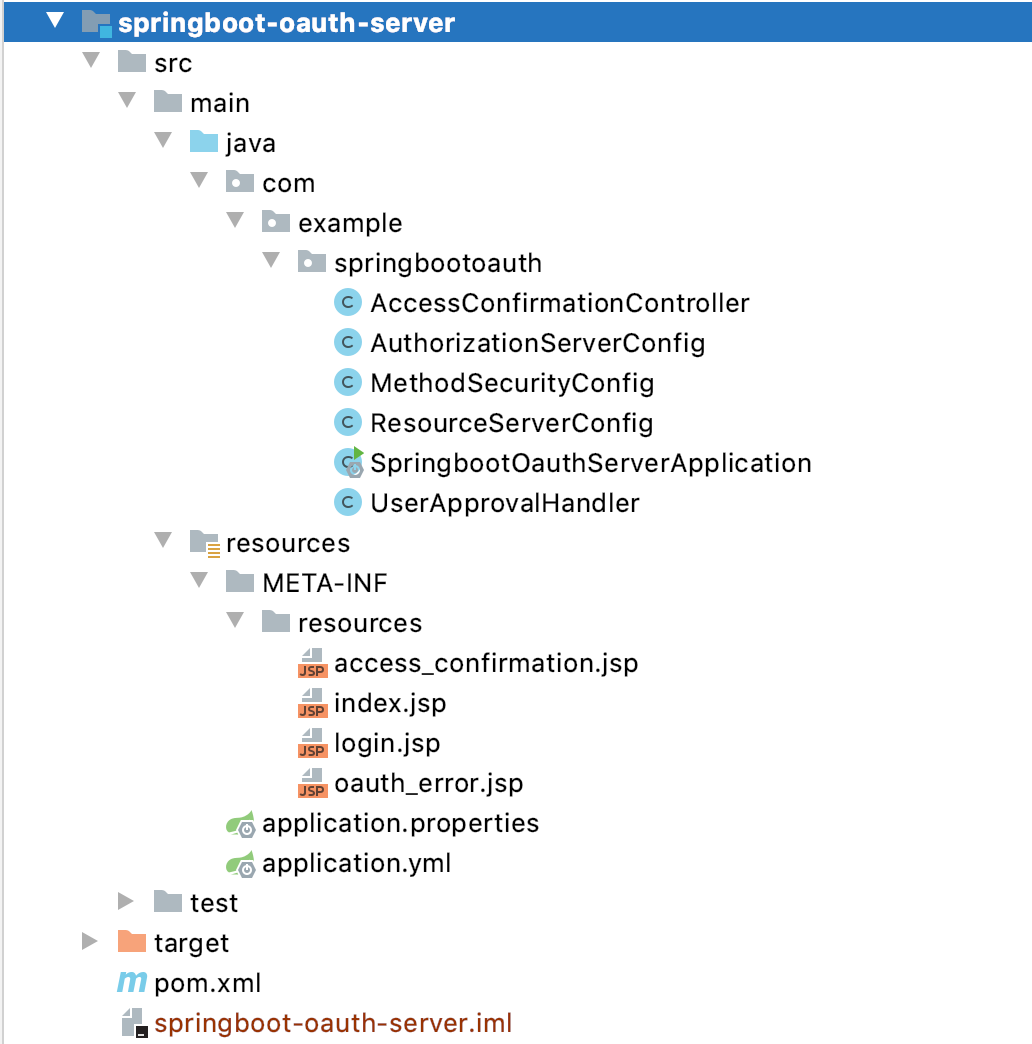
📚视图
服务端有四个视图:
- index.jsp 用于登录成功后的登出
- login.jsp 用于登录
- access_confirmation.jsp 用于确认授权
- oauth_error.jsp 用于显示授权错误信息
📖POM
<?xml version="1.0" encoding="UTF-8"?><project xmlns="http://maven.apache.org/POM/4.0.0"xmlns:xsi="http://www.w3.org/2001/XMLSchema-instance"xsi:schemaLocation="http://maven.apache.org/POM/4.0.0 http://maven.apache.org/xsd/maven-4.0.0.xsd"><parent><artifactId>springboot-demo</artifactId><groupId>com.example</groupId><version>0.0.1-SNAPSHOT</version></parent><modelVersion>4.0.0</modelVersion><artifactId>springboot-oauth-server</artifactId><dependencies><dependency><groupId>org.springframework.boot</groupId><artifactId>spring-boot-starter-tomcat</artifactId></dependency><dependency><groupId>org.apache.tomcat.embed</groupId><artifactId>tomcat-embed-jasper</artifactId></dependency><dependency><groupId>javax.servlet</groupId><artifactId>jstl</artifactId></dependency><dependency><groupId>javax.servlet</groupId><artifactId>javax.servlet-api</artifactId></dependency><dependency><groupId>javax.servlet.jsp</groupId><artifactId>javax.servlet.jsp-api</artifactId><version>2.3.1</version></dependency><dependency><groupId>org.webjars</groupId><artifactId>jquery</artifactId><version>3.4.1</version></dependency><dependency><groupId>org.webjars</groupId><artifactId>bootstrap</artifactId><version>4.3.1</version></dependency><dependency><groupId>org.webjars</groupId><artifactId>js-cookie</artifactId><version>2.1.0</version></dependency><dependency><groupId>org.webjars</groupId><artifactId>webjars-locator-core</artifactId></dependency><dependency><groupId>org.springframework.security</groupId><artifactId>spring-security-taglibs</artifactId></dependency><dependency><groupId>org.springframework.security.oauth</groupId><artifactId>spring-security-oauth2</artifactId><version>2.3.6.RELEASE</version><!-- <version>[2.3.6.RELEASE,)</version>--></dependency><dependency><groupId>org.springframework.boot</groupId><artifactId>spring-boot-starter-web</artifactId></dependency><dependency><groupId>org.springframework.boot</groupId><artifactId>spring-boot-devtools</artifactId><optional>true</optional><scope>true</scope></dependency></dependencies><build><resources><resource><directory>src/main/resources</directory><includes><include>**/*</include></includes></resource></resources><plugins><plugin><groupId>org.springframework.boot</groupId><artifactId>spring-boot-maven-plugin</artifactId><configuration><fork>true</fork></configuration></plugin></plugins></build></project>
🔧配置
server:port: 8082spring:mvc:view:suffix: ".jsp"
👏启动类
package com.example.springbootoauth;import org.springframework.boot.SpringApplication;import org.springframework.boot.autoconfigure.SpringBootApplication;import org.springframework.context.annotation.Bean;import org.springframework.http.HttpEntity;import org.springframework.http.HttpStatus;import org.springframework.http.ResponseEntity;import org.springframework.security.authentication.AuthenticationManager;import org.springframework.security.config.annotation.authentication.builders.AuthenticationManagerBuilder;import org.springframework.security.config.annotation.web.builders.HttpSecurity;import org.springframework.security.config.annotation.web.builders.WebSecurity;import org.springframework.security.config.annotation.web.configuration.EnableWebSecurity;import org.springframework.security.config.annotation.web.configuration.WebSecurityConfigurerAdapter;import org.springframework.security.core.annotation.AuthenticationPrincipal;import org.springframework.security.crypto.bcrypt.BCryptPasswordEncoder;import org.springframework.security.crypto.password.PasswordEncoder;import org.springframework.security.web.util.matcher.AntPathRequestMatcher;import org.springframework.web.bind.annotation.GetMapping;import org.springframework.web.bind.annotation.RestController;import java.security.Principal;import java.util.Collections;import java.util.Map;@RestController@SpringBootApplication@EnableWebSecurity(debug = true)//@EnableWebMvcpublic class SpringbootOauthServerApplication extends WebSecurityConfigurerAdapter {// 这是授权服务器的userInfoUri映射,用于成功获取token之后获取用户信息// userInfoUri是Provider的一个必须提供的信息@GetMapping("/user")public HttpEntity<Map<String, String>> user (@AuthenticationPrincipal Principal principal) {return new ResponseEntity<>(Collections.singletonMap("name", principal.getName()), HttpStatus.OK);}@Overrideprotected void configure (HttpSecurity http) throws Exception {// @formatter:off// 除了login.jsp外其他任何请求都需要有USER角色// 请求拒绝跳转页面是/login.jsp?authorization_error=true// 禁用/oauth/authorize的csrf// 登出地址为/logout// 登出成功过地址为/login.jsp// 登录处理地址是/login// 登录失败跳转地址是/login.jsp?authentication_error=true// 登录页面为/login.jsp// 关闭nosniff headerhttp.authorizeRequests().antMatchers("/login.jsp").permitAll().anyRequest().hasRole("USER").and().exceptionHandling().accessDeniedPage("/login.jsp?authorization_error=true").and().csrf().requireCsrfProtectionMatcher(new AntPathRequestMatcher("/oauth/authorize")).disable().logout().logoutUrl("/logout").logoutSuccessUrl("/login.jsp").and().formLogin().loginProcessingUrl("/login")// .successForwardUrl("/index.jsp").failureUrl("/login.jsp?authentication_error=true").loginPage("/login.jsp").and()// 关闭nosniff.headers().contentTypeOptions().disable();// @formatter:on}@Overridepublic void configure (WebSecurity web) {// 忽略这些资源web.ignoring().antMatchers("/webjars/**", "/favicon.ico", "/images/**");}@Overrideprotected void configure (AuthenticationManagerBuilder auth) throws Exception {// 添加一些用户测试用,到时可以直接登录auth.inMemoryAuthentication().withUser("balala")// 密码balabala(BCrypt摘要).password("$2a$10$QOhLotan6kumoHRp8Z2ajOZfBhKgaMvgqeaxrSXxrKN2FgR3hlJ9.").roles("USER").and().withUser("moxianbao")// 密码moxianbao.password("$2a$10$RpHbnvFdFoUgpK89iVnSzugfqZAfDeKvVKp3LoVBxCj6fuwqtdBlO").roles("USER");}public static void main (String[] args) {SpringApplication.run(SpringbootOauthServerApplication.class, args);}@Bean@Overridepublic AuthenticationManager authenticationManagerBean () throws Exception {return super.authenticationManagerBean();}@Beanpublic PasswordEncoder passwordEncoder () {return new BCryptPasswordEncoder();}}
😘服务器端配置
package com.example.springbootoauth;import org.springframework.beans.factory.annotation.Autowired;import org.springframework.context.annotation.*;import org.springframework.security.authentication.AuthenticationManager;import org.springframework.security.crypto.password.PasswordEncoder;import org.springframework.security.oauth2.config.annotation.configurers.ClientDetailsServiceConfigurer;import org.springframework.security.oauth2.config.annotation.web.configuration.AuthorizationServerConfigurerAdapter;import org.springframework.security.oauth2.config.annotation.web.configuration.EnableAuthorizationServer;import org.springframework.security.oauth2.config.annotation.web.configurers.AuthorizationServerEndpointsConfigurer;import org.springframework.security.oauth2.config.annotation.web.configurers.AuthorizationServerSecurityConfigurer;import org.springframework.security.oauth2.provider.ClientDetailsService;import org.springframework.security.oauth2.provider.approval.ApprovalStore;import org.springframework.security.oauth2.provider.approval.TokenApprovalStore;import org.springframework.security.oauth2.provider.request.DefaultOAuth2RequestFactory;import org.springframework.security.oauth2.provider.token.TokenStore;import org.springframework.security.oauth2.provider.token.store.InMemoryTokenStore;@Configuration@EnableAuthorizationServerpublic class AuthorizationServerConfig extends AuthorizationServerConfigurerAdapter {@Autowiredprivate AuthenticationManager authenticationManager;@Autowiredprivate PasswordEncoder passwordEncoder;@Autowiredprivate UserApprovalHandler userApprovalHandler;@Autowiredprivate TokenStore tokenStore;@Autowiredprivate ClientDetailsService clientDetailsService;@Overridepublic void configure (AuthorizationServerSecurityConfigurer security) throws Exception {super.configure(security);}@Overridepublic void configure (ClientDetailsServiceConfigurer clients) throws Exception {super.configure(clients);// 这里的客户端信息相当于前面客户端在授权服务端申请的OAuth app// demo以及encode过的abc相当于 client_id和client_secret// redirectUri就是服务器端发完code之后重定向的客户端地址// authorizedGrantTypes是支持此客户端的认证类型// scopes与资源服务器配置有关,确定了你这个客户端可以访问哪些资源// resourceIds与资源服务器配置有关,必须一致clients.inMemory().withClient("demo").secret(passwordEncoder.encode("abc")).authorizedGrantTypes("authorization_code", "password").resourceIds("rg_demo").scopes("read").redirectUris("http://localhost:8081/login/oauth2/code/moxianbao");}@BeanTokenStore tokenStore () {return new InMemoryTokenStore();}@Overridepublic void configure (AuthorizationServerEndpointsConfigurer endpoints) throws Exception {super.configure(endpoints);//password grants are switched on by injecting an AuthenticationManagerendpoints.authenticationManager(authenticationManager).tokenStore(tokenStore()).userApprovalHandler(userApprovalHandler);//refresh_token// .userDetailsService(userDetailsService);}@Beanpublic ApprovalStore approvalStore () {TokenApprovalStore store = new TokenApprovalStore();store.setTokenStore(tokenStore);return store;}// 这个bean用来记住approval、以及automatic approval,根据认证的user和client去查找保存的token,从token中查询请求的scope是否授权@Bean@Lazy@Scope(proxyMode = ScopedProxyMode.TARGET_CLASS)public UserApprovalHandler userApprovalHandler () throws Exception {UserApprovalHandler handler = new UserApprovalHandler();handler.setApprovalStore(approvalStore());handler.setRequestFactory(new DefaultOAuth2RequestFactory(clientDetailsService));handler.setClientDetailsService(clientDetailsService);handler.setUseApprovalStore(true);return handler;}}
UserApprovalHandler
package com.example.springbootoauth;import org.springframework.security.core.Authentication;import org.springframework.security.oauth2.provider.AuthorizationRequest;import org.springframework.security.oauth2.provider.ClientDetails;import org.springframework.security.oauth2.provider.ClientDetailsService;import org.springframework.security.oauth2.provider.ClientRegistrationException;import org.springframework.security.oauth2.provider.approval.ApprovalStoreUserApprovalHandler;import java.util.Collection;public class UserApprovalHandler extends ApprovalStoreUserApprovalHandler {private boolean useApprovalStore = true;private ClientDetailsService clientDetailsService;/*** Service to load client details (optional) for auto approval checks.** @param clientDetailsService a client details service*/public void setClientDetailsService (ClientDetailsService clientDetailsService) {this.clientDetailsService = clientDetailsService;super.setClientDetailsService(clientDetailsService);}/*** @param useApprovalStore the useTokenServices to set*/public void setUseApprovalStore (boolean useApprovalStore) {this.useApprovalStore = useApprovalStore;}/*** Allows automatic approval for a white list of clients in the implicit grant case.** @param authorizationRequest The authorization request.* @param userAuthentication the current user authentication* @return An updated request if it has already been approved by the current user.*/@Overridepublic AuthorizationRequest checkForPreApproval (AuthorizationRequest authorizationRequest, Authentication userAuthentication) {boolean approved = false;// If we are allowed to check existing approvals this will short circuit the decisionif (useApprovalStore) {authorizationRequest = super.checkForPreApproval(authorizationRequest, userAuthentication);approved = authorizationRequest.isApproved();} else {if (clientDetailsService != null) {Collection<String> requestedScopes = authorizationRequest.getScope();try {ClientDetails client = clientDetailsService.loadClientByClientId(authorizationRequest.getClientId());for (String scope : requestedScopes) {if (client.isAutoApprove(scope)) {approved = true;break;}}} catch (ClientRegistrationException e) {System.out.println(e.getMessage());}}}authorizationRequest.setApproved(approved);return authorizationRequest;}}
AccessConfirmationController
userApprovalPage和errorPage的endpoint:
package com.example.springbootoauth;import org.springframework.beans.factory.annotation.Autowired;import org.springframework.security.oauth2.common.util.OAuth2Utils;import org.springframework.security.oauth2.provider.AuthorizationRequest;import org.springframework.security.oauth2.provider.ClientDetails;import org.springframework.security.oauth2.provider.ClientDetailsService;import org.springframework.security.oauth2.provider.approval.Approval;import org.springframework.security.oauth2.provider.approval.ApprovalStore;import org.springframework.stereotype.Controller;import org.springframework.web.bind.annotation.RequestMapping;import org.springframework.web.bind.annotation.SessionAttributes;import org.springframework.web.servlet.ModelAndView;import java.security.Principal;import java.util.LinkedHashMap;import java.util.Map;@Controller@SessionAttributes("authorizationRequest")public class AccessConfirmationController {private ClientDetailsService clientDetailsService;private ApprovalStore approvalStore;@RequestMapping("/oauth/confirm_access")public ModelAndView getAccessConfirmation (Map<String, Object> model, Principal principal) {AuthorizationRequest clientAuth = (AuthorizationRequest) model.remove("authorizationRequest");ClientDetails client = clientDetailsService.loadClientByClientId(clientAuth.getClientId());model.put("auth_request", clientAuth);model.put("client", client);Map<String, String> scopes = new LinkedHashMap<>();for (String scope : clientAuth.getScope()) {scopes.put(OAuth2Utils.SCOPE_PREFIX + scope, "false");}for (Approval approval : approvalStore.getApprovals(principal.getName(), client.getClientId())) {if (clientAuth.getScope().contains(approval.getScope())) {scopes.put(OAuth2Utils.SCOPE_PREFIX + approval.getScope(), approval.getStatus() == Approval.ApprovalStatus.APPROVED ? "true" : "false");}}model.put("scopes", scopes);return new ModelAndView("/access_confirmation", model);}@RequestMapping("/oauth/error")public String handleError (Map<String, Object> model) {// We can add more stuff to the model here for JSP rendering. If the client was a machine then// the JSON will already have been rendered.model.put("message", "There was a problem with the OAuth2 protocol");return "/oauth_error";}@Autowiredpublic void setClientDetailsService (ClientDetailsService clientDetailsService) {this.clientDetailsService = clientDetailsService;}@Autowiredpublic void setApprovalStore (ApprovalStore approvalStore) {this.approvalStore = approvalStore;}}
😙资源服务器配置
package com.example.springbootoauth;import org.springframework.beans.factory.annotation.Autowired;import org.springframework.context.annotation.Configuration;import org.springframework.security.config.annotation.web.builders.HttpSecurity;import org.springframework.security.oauth2.config.annotation.web.configuration.EnableResourceServer;import org.springframework.security.oauth2.config.annotation.web.configuration.ResourceServerConfigurerAdapter;import org.springframework.security.oauth2.config.annotation.web.configurers.ResourceServerSecurityConfigurer;import org.springframework.security.oauth2.provider.token.TokenStore;@Configuration@EnableResourceServerpublic class ResourceServerConfig extends ResourceServerConfigurerAdapter {@AutowiredTokenStore tokenStore;@Overridepublic void configure (ResourceServerSecurityConfigurer resources) throws Exception {super.configure(resources);// 资源服务器的id// 拥有此resourceId的客户端授权可以访问此资源服务器的资源// stateless标识是否只有在token-based认证时才可以使用资源resources.resourceId("rg_demo").stateless(false).tokenStore(tokenStore);// .authenticationEntryPoint();}@Overridepublic void configure (HttpSecurity http) throws Exception {// security DSL// 在启动类有一个/user的endpoint,配置此endpoint只有在has read scope或 has ROLE_USER role时才可以访问http.requestMatchers().antMatchers("/user/**").and().authorizeRequests().antMatchers("/user").access("#oauth2.hasScope('read') or #hasRole('ROLE_USER')");}}
你可以提供多个实现此接口的实例(如果实例间有相同的配置,最后一个配置生效,也就是说你可以用@Order),这样就能达到资源分组的目的,比如上面的resourceId是rg_demo,你可以再来一个叫rg_pro,resourceId是客户端必须的配置,可以有多个。
😙方法安全配置
package com.example.springbootoauth;import org.springframework.context.annotation.Configuration;import org.springframework.security.access.expression.method.MethodSecurityExpressionHandler;import org.springframework.security.config.annotation.method.configuration.EnableGlobalMethodSecurity;import org.springframework.security.config.annotation.method.configuration.GlobalMethodSecurityConfiguration;import org.springframework.security.oauth2.provider.expression.OAuth2MethodSecurityExpressionHandler;@Configuration@EnableGlobalMethodSecurity(prePostEnabled = true, proxyTargetClass = true)public class MethodSecurityConfig extends GlobalMethodSecurityConfiguration {@Overrideprotected MethodSecurityExpressionHandler createExpressionHandler () {return new OAuth2MethodSecurityExpressionHandler();}}
我们需要覆盖默认的方法安全表达式处理器,不然没法用oauth2.hasScope SpEl。
😙客户端配置
上面的内容我们已经完成了服务器端以及资源服务器端的简单配置,接下来我们需要更改客户端,增加我们的授权服务器信息
😙增加Provider以及Registration
server:port: 8081spring:security:oauth2:client:provider:moxianbao:# 注意不要在同一host,否则session将被覆盖,无法正常认证authorizationUri: "http://10.25.92.50:8082/oauth/authorize"tokenUri: "http://10.25.92.50:8082/oauth/token"userInfoUri: "http://10.25.92.50:8082/user"clientName: "moxianbao"userNameAttribute: "name"registration:github:clientId: "github-client-id"clientSecret: "github-client-secret"google:client-id: "google-client-id"client-secret: "google-client-secret"moxianbao:clientId: "demo"clientSecret: "abc"authorizationGrantType: "authorization_code"redirectUri: "{baseUrl}/{action}/oauth2/code/{registrationId}"
一定要注意的是授权服务器与客户端绝对不能在一个host下,否则JSESSIONID会覆盖,不可能认证成功。
这里的moxianbao client provider提供了授权服务器的基本信息,包括认证地址、token地址等。
这里的moxianbao client registration要与我们在授权服务器中内置的那个client信息保持一致。
😙首页增加魔仙堡登录选项
<div>With moxianbao: <a href="/oauth2/authorization/moxianbao">click here</a></div>
🙃测试
🙃浏览器测试:
客户端首页:
点击使用moxianbao登录。
服务端登录页面: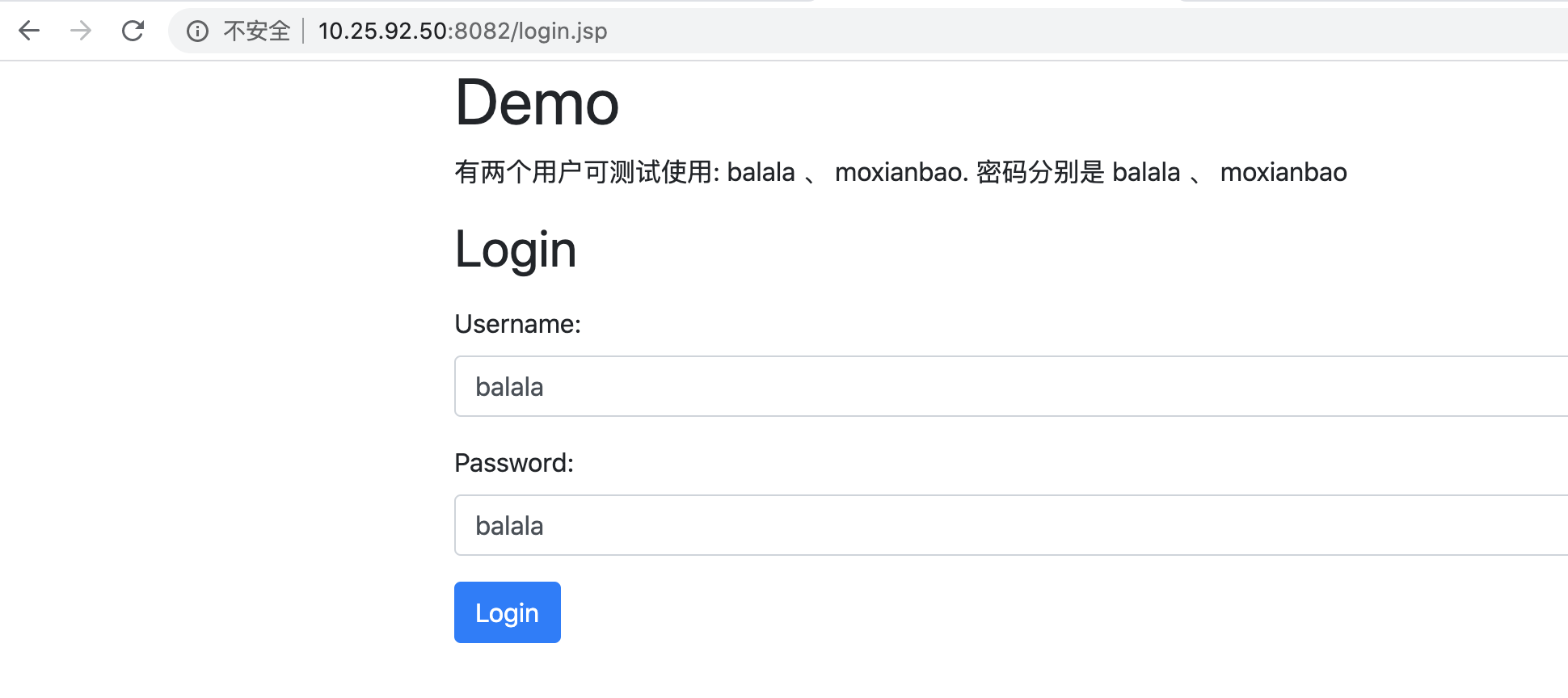
点击Login。
服务端Approval页面: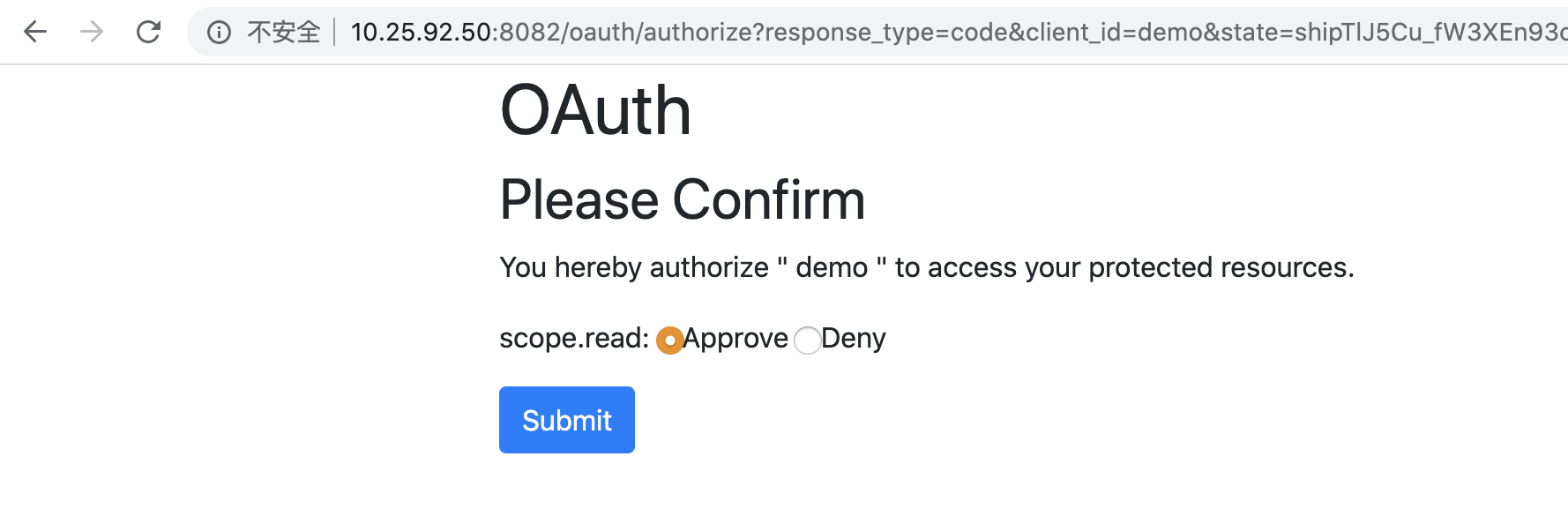
选Approve,点Submit。
客户端首页: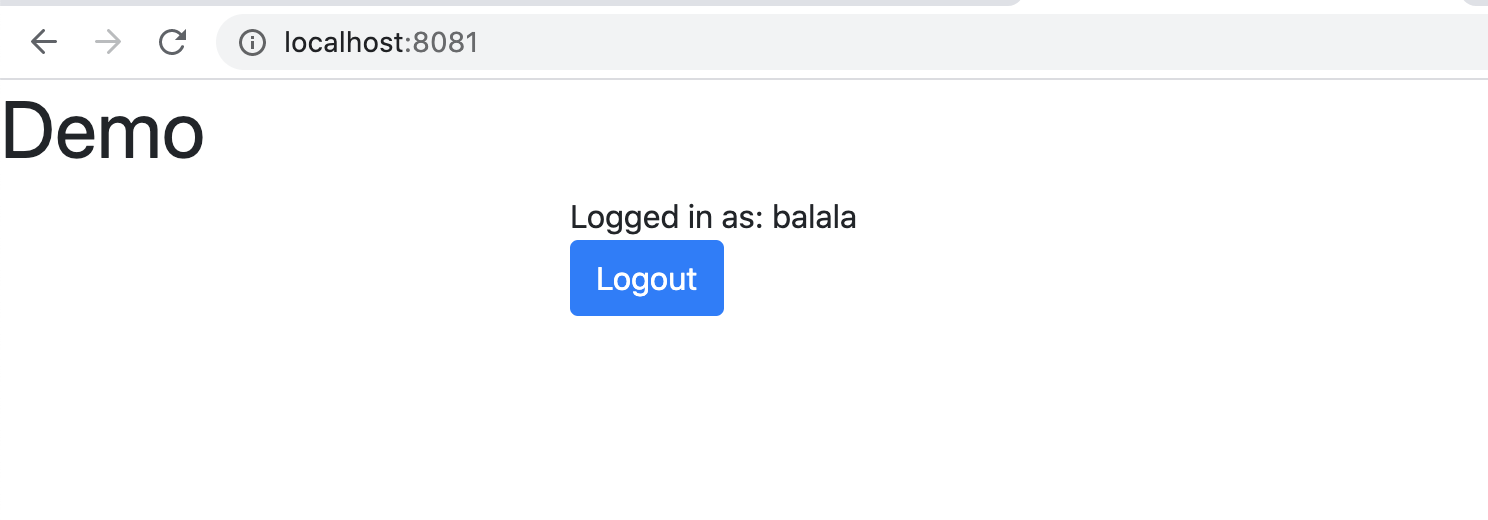
返回客户端,并读取用户信息,授权成功。
🙃Postman测试
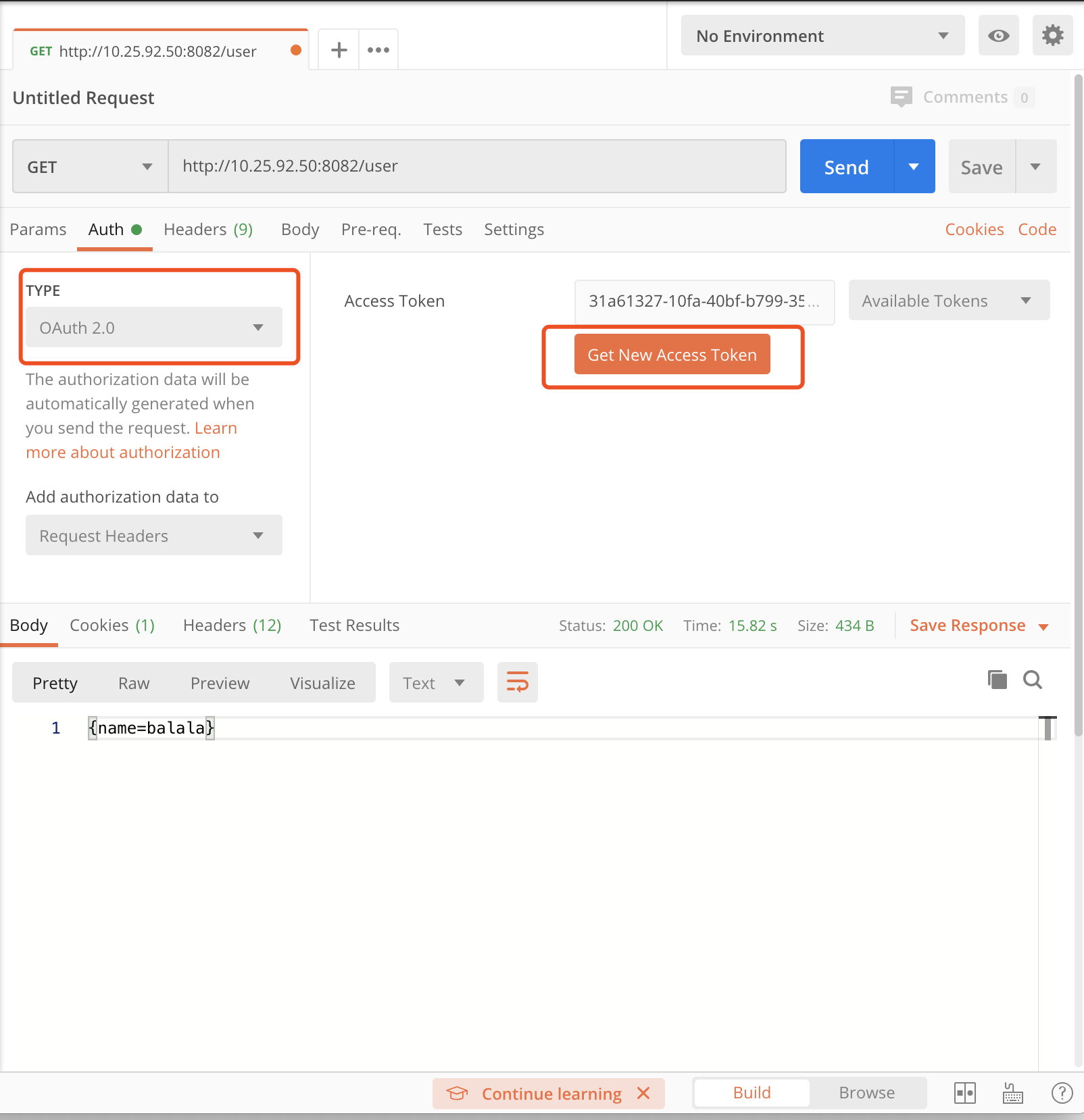
选择TYPE为OAuth2.0,点击Get New Access Token

填写信息,点击Request Token
因为我们浏览器测试时候已经Approve了,所以这里直接申请成功了(但是JSESSIONID是一样的奥:))

点击Use Token,然后我们去获取下用户信息
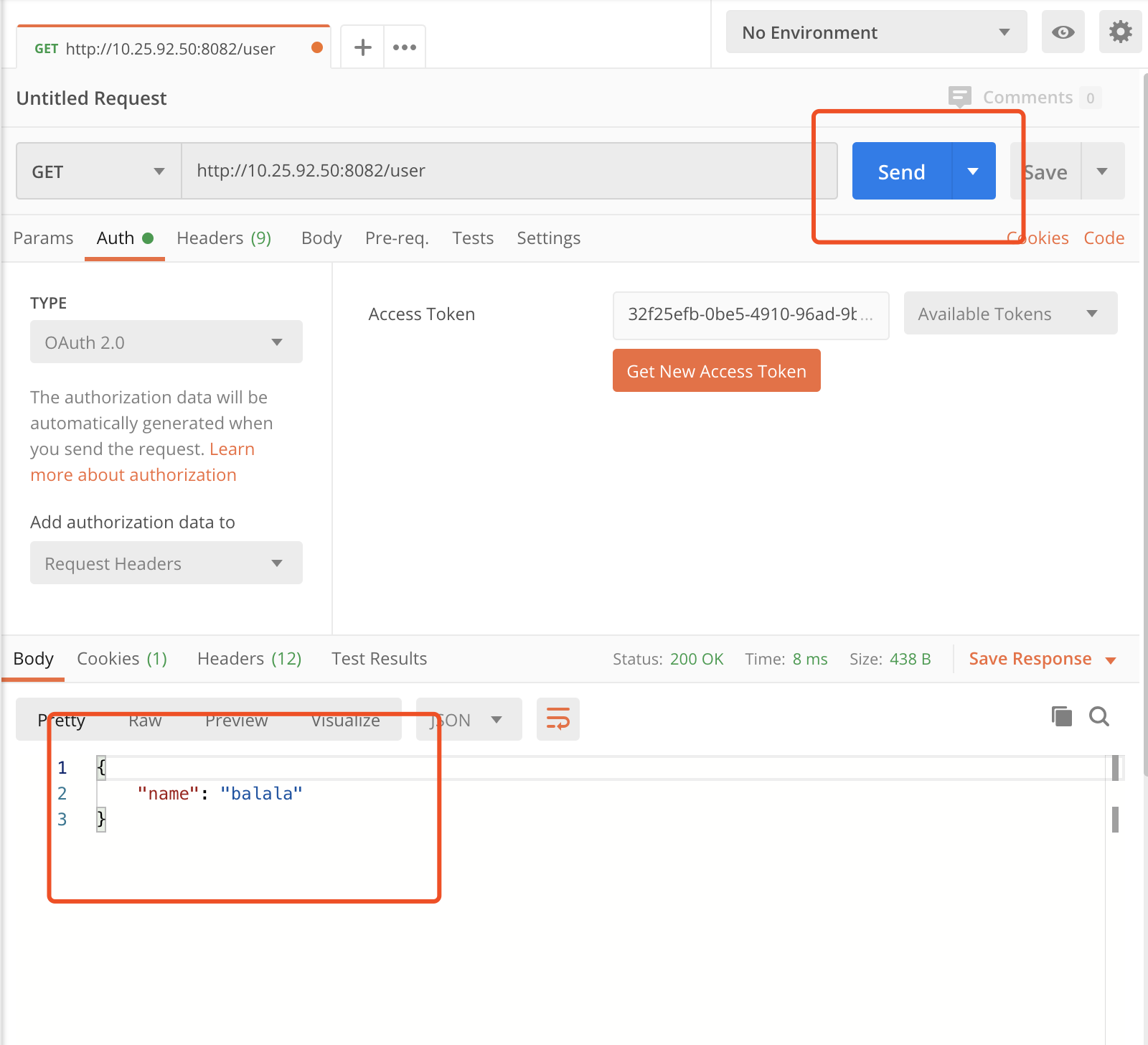
点击发送,可以看到用户信息的返回。
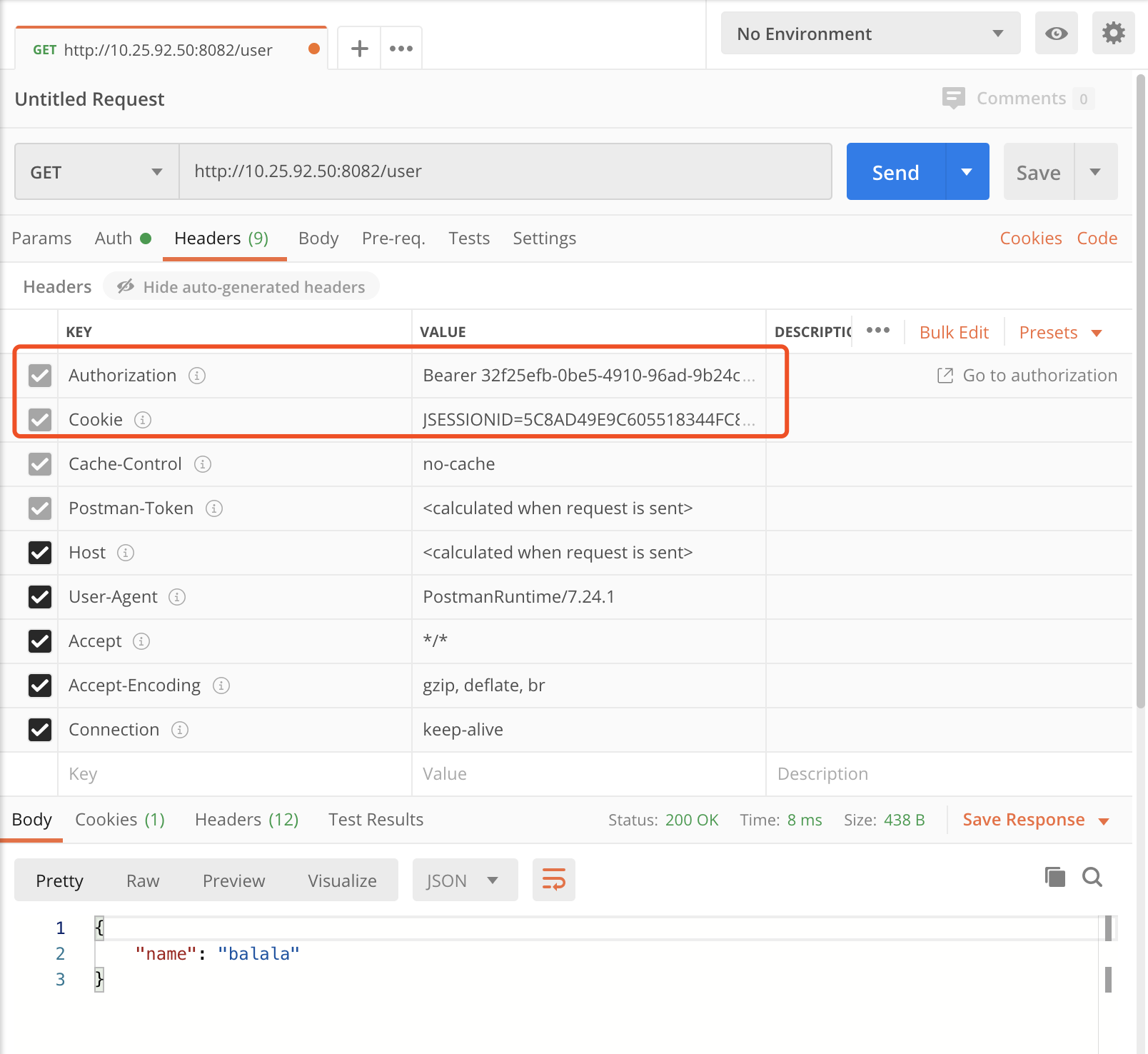
认证信息存在Header中,Authorization Bearer后面的就是Token:)
😭完
以上简单配置的基础上,再加改进,细粒度控制,持久化存储,就能成为一个”合格”的OAuth server了:)

若有收获,就点个赞吧
0 人点赞


