3.3.5. 脚本定制
什么是TH-Nebula脚本?
TH-Nebula脚本是TH-Nebula系统配合策略, 触发策略, 参与策略定义变量计算的程序.
为何需要定制TH-Nebula脚本?
因为业务千变万化, TH-Nebula并不能预知到所有的业务场景, 所以需要自定义化, 可以对一个接口写一个, 甚至多个脚本去触发策略.
如何定制TH-Nebula脚本?
TH-Nebula脚本的总体流程
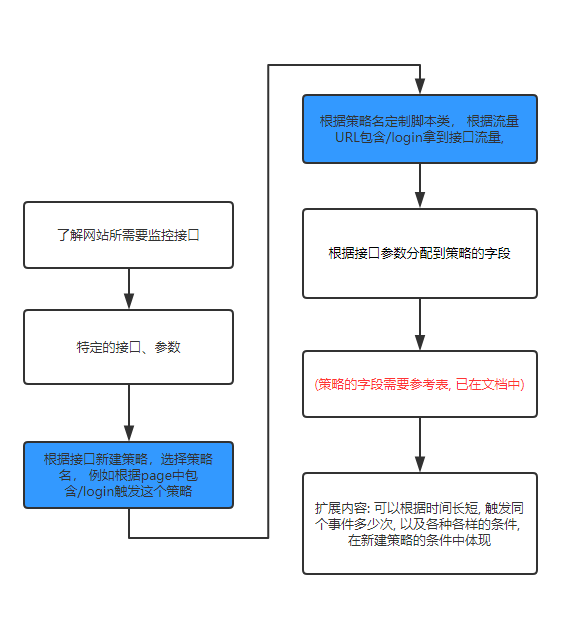
概要:
- 首先取得所需要监控网站的接口以及页面(
page) - 对接口的参数需要收集起来,并对参数要明确了解
- 对接口的类型分类为所属的策略, 根据接口参数所提供的, 在定制脚本上定制相应的类,也就是处理的函数,分配到策略上, 就可以在触发事件的时候, 通过处理函数,将事件分配到策略上, 在详情页面拿到所定制的流量数据.
简要的例子
在需要监控网站的订单页面, 某个用户提交订单, 那么在定制脚本通过监控订单接口, 拿到订单流量, 把所有的订单参数作为策略字段存到事件中去, 那么事件就会根据配备上线的策略去触发策略, 这事件就会在TH-Nebula中例如总览, 风险名单管理, 风险事件管理位置出现, 在详情页面就能拿到这订单的所有信息.
完整的例子
根据之前的例子, 新建了一个事件叫做账号-实名验证的策略, 那么它的类型如图所示它的类型为: ACCOUNT_CERTIFICATION
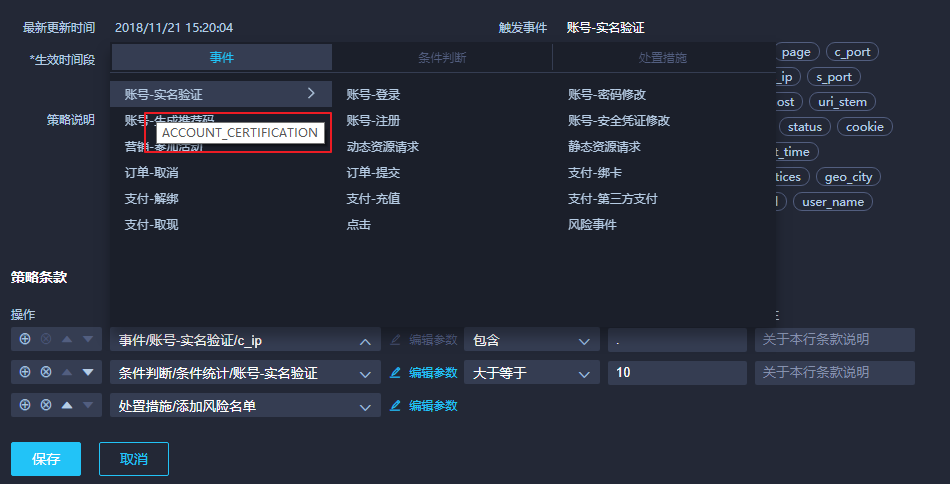
已经定制好策略, 然后在脚本中定义此策略相应的类, 以下是测试的类
例如在/etc/nebula/sniffer/sniffer.conf中配置脚本名, 以下testparser即是脚本名, 脚本的所在位置在于TH-Nebula_sniffer项目:
sniffer.conf位置:
/etc/nebula/sniffer/sniffer.conf
配置:
sources: [eth0]en0:driver: brointerface: en0ports: [80, 81, 1080, 3128, 8000, 8080, 8888, 9001, 8081-8083]start_port: 48880instances: 1parser:name: testmodule: testparser
testparser.py位置:
TH-Nebula_sniffer\TH-Nebula_sniffer\customparsers\testparser.py
配置:
#!/usr/bin/env python# -*- coding: utf-8 -*-import reimport loggingfrom threathunter_common.util import millis_nowfrom threathunter_common.event import Eventfrom ..parser import Parser, extract_common_properties, extract_http_log_eventfrom ..parserutil import extract_value_from_body, get_md5, get_json_objfrom ..msg import HttpMsglogger = logging.getLogger("sniffer.parser.{}".format("testparser"))def arg_from_get(data):d = data.split('?')[1].split('&')result = {}for e in d:a, b = e.split('=')result[a] = breturn resultdef account_test(httpmsg):if not isinstance(httpmsg, HttpMsg):returnif "/loign" not in httpmsg.uri:return# get请求通过httpmsg的uri字段获得请求参数data = httpmsg.get_dict()data = arg_from_get(data['uri'])properties = extract_common_properties(httpmsg)properties["result"] = "T"properties["new_password"] = data.get('new_password')properties["old_password"] = data.get('old_password')properties["register_realname"] = ""properties["register_channel"] = "not"properties["email"] = data.get('email')properties["user_name"] = extract_value_from_body(r_mobile_pattern, httpmsg.req_body)properties["password"] = data.get('password')properties["captcha"] = ""properties["register_verification_token"] = "none"properties["register_verification_token_type"] = "null"return Event("nebula", "ACCOUNT_CERTIFICATION", "", millis_now(), properties)#############Parser############################class TestParser(Parser):def __init__(self):super(TestParser, self).__init__()self.http_msg_parsers = [account_test,]def name(self):return "test customparsers"def get_logbody_config(self):return ["login", "user"]def get_events_from_http_msg(self, http_msg):if not http_msg:return []result = list()for p in self.http_msg_parsers:try:ev = p(http_msg)if ev:result.append(ev)except:logger.debug("fail to parse with {}".format(p))return resultdef get_events_from_text_msg(self, text_msg):return []def filter(self, msg):if not isinstance(msg, HttpMsg):return Falsereturn FalseParser.add_parser("test", TestParser())
要注意最后return中的Event第二个参数是: ACCOUNT_CERTIFICATION
这个参数决定了触发了策略的类型, 系统会根据这个类型去匹配策略, 如果触发了策略, 那么会根据策略的处理流程处理.
httpmsg是什么?
httpmsg是TH-Nebula系统中的sniffer定义的请求所包含的数据, 设备信息, IP等等所有能抓到的所有信息
流量中的请求如何体现在httpmsg中?
GET请求在httpmsg的体现
注意请求参数order=88888888888888888888 在uri中, 可以以此找到所有请求参数,这是定制脚本重点!
{'uid': '','status_code': 404,'resp_content_type': 'text/plain; charset=utf-8','resp_headers': {'CONTENT-LENGTH': '356','VARY': 'Accept-Encoding','SERVER': 'openresty','CONNECTION': 'close','DATE': 'Fri, 26 Oct 2018 03:58:30 GMT','CONTENT-TYPE': 'text/plain; charset=utf-8'},'id': ObjectId('5bd290e612a3650c2c1c440f'),'dest_port': 9001,'resp_body_len': 356,'log_body': False,'resp_body': '','req_content_type': '','debug_processing': False,'req_headers': {'ACCEPT-ENCODING': 'gzip, deflate','HOST': '112.74.58.210:9001','ACCEPT': '*/*','USER-AGENT': 'python-requests/2.11.1','CONNECTION': 'close','COOKIE': 'auth=2|1:0|10:1540368603|4:auth|44:NGJlZTQwMDI0NTExYjM2NDVkNjkzOTM1ZTJmMDllMWY=|34718dcbcac603ee1a38daaa0a05fbafc524873af0fafb0013077a53a28b2d4b; group_id=2|1:0|10:1540368603|8:group_id|4:Mg==|30789028a7e8399f5f5ef115fc050e1b3424df25b966755be7554e0048dd29a4; user=2|1:0|10:1540368603|4:user|16:Ymlnc2VjX3Rlc3Q=|4a26e0eb0a60184839666d67af744a3fc869efc82d4c413182814d8732c2875b; user_id=2|1:0|10:1540368603|7:user_id|4:Mg==|141555b29c711f95ddebea3987820fb90c30a48f506eae9f8cee9b334372ae79'},'method': 'GET','req_body': '','req_body_len': 0,'host': '112.74.58.210','referer': '','xforward': '','did': '','status_msg': 'not found','source_ip': '116.24.64.28',// 这里需要注意 uri 字段值'uri': '112.74.58.210/history?order_id=88888888888888888888','user_agent': 'python-requests/2.11.1','source_port': 60563,'dest_ip': '172.18.16.169'}
POST请求在httpmsg的体现
注意请求字段 在req_body字段中,可以以此找到所有请求参数,这是定制脚本重点
{'uid': '','status_code': 404,'resp_content_type': 'text/plain;charset=utf-8','resp_headers': {'CONTENT-LENGTH': '356','VARY': 'Accept-Encoding','SERVER': 'openresty','CONNECTION': 'close','DATE': 'Fri,26Oct201808:13:52GMT','CONTENT-TYPE': 'text/plain;charset=utf-8'},'id': ObjectId('5bd2ccc012a365682aee1fbd'),'dest_port': 9001,'resp_body_len': 356,'log_body': False,'resp_body': 'Traceback(mostrecentcalllast):\nFile"/home/threathunter/nebula/nebula_web/venv/lib/python2.7/site-packages/tornado/web.py",line1422,in_execute\nresult=self.prepare()\nFile"/home/threathunter/nebula/nebula_web/venv/lib/python2.7/site-packages/tornado/web.py",line2149,inprepare\nraiseHTTPError(self._status_code)\nHTTPError:HTTP404:NotFound\n','req_content_type': 'application/json','debug_processing': False,'req_headers': {'CONTENT-LENGTH': '78','ACCEPT-ENCODING': 'gzip,deflate','HOST': '112.74.58.210:9001','ACCEPT': '*/*','USER-AGENT': 'python-requests/2.11.1','CONNECTION': 'close','COOKIE': 'auth=2|1:0|10:1540368603|4:auth|44:NGJlZTQwMDI0NTExYjM2NDVkNjkzOTM1ZTJmMDllMWY=|34718dcbcac603ee1a38daaa0a05fbafc524873af0fafb0013077a53a28b2d4b;group_id=2|1:0|10:1540368603|8:group_id|4:Mg==|30789028a7e8399f5f5ef115fc050e1b3424df25b966755be7554e0048dd29a4;user=weihong;user_id=2|1:0|10:1540368603|7:user_id|4:Mg==|141555b29c711f95ddebea3987820fb90c30a48f506eae9f8cee9b334372ae79','CONTENT-TYPE': 'application/json'},'method': 'POST',// 这里需要注意 req_body 字段值'req_body': '{"password":"777777777","order":"999999999999999999","user":"weihong999"}','req_body_len': 78,'host': '112.74.58.210','referer': '','xforward': '','did': '','status_msg': 'notfound','source_ip': '61.141.65.209','uri': '112.74.58.210/history','user_agent': 'python-requests/2.11.1','source_port': 62840,'dest_ip': '172.18.16.169'}

若有收获,就点个赞吧
0 人点赞


