函数式编程
从 JDK 8 开始,使用了函数式编程,函数式编程的引入,大大加强了 Java 的开发能力和一直为外界所诟病的“不简洁”的毛病
概念
函数式编程时一种相对于命令式编程的一种编**程范式,不是一种具体的技术,而是一种方法论**,是一种如何搭建应用程序的方法论
为什么要使用函数式编程
函数式编程与命令式编程的区别
| 函数式编程 | 命令式编程 | |
|---|---|---|
| 关注点 | 做什么?实现什么功能? | 如何做?步骤是什么? |
public static void main(String[] args) {int[] nums = {33, 44, 55, -14, 0, 92, -123, 19};// 命令式编程:告诉程序该怎么做int min = Integer.MAX_VALUE;for (int num : nums) {if (num < min) {min = num;}}System.out.println("min = " + min);// 函数式编程:告诉我要什么int asInt = IntStream.of(nums).min().getAsInt();System.out.println("min = " + asInt);}
Lambda 表达式
lambda 表达式所可以调用的结构,必须只有一个方法
@FunctionalInterfaceinterface Interface1 {int doubleNum(int i);}public class LambdaDemo01 {public static void main(String[] args) {Interface1 i1 = (i) -> i * 2;Interface1 i2 = i -> i * 2;Interface1 i3 = (int i) -> i * 2;Interface1 i4 = (int i) -> {return i * 2;};}}
@FunctionalInterface
@FunctionalInterface 注解,说明的是下面的接口是一个函数式接口,有且只能提供一个方法,当提供多个方法的时候,编译器会报错
@FunctionalInterfaceinterface Interface1 {int doubleNum(int i);}
接口默认实现方法 default
JDK 8 以前,接口是不可以有方法实现的,JDK 8 提供了要给接口中的关键字 default,可以有默认实现方法
@FunctionalInterfaceinterface Interface1 {int doubleNum(int i);default int add(int x, int y) {return x + y;}}
函数接口
Demo
先看一个函数接口的案例,我们输入一个 int 类型的数值,然后给对这个数值进行格式化,返回 String
interface IMoneyFormat {String format(int i);}class Money {private int money;public Money(int money) {this.money = money;}public void printMoney(IMoneyFormat format) {System.out.println("存款: " + format.format(this.money));}}public class MemoryDemo {public static void main(String[] args) {Money myMoney = new Money(99999999);// lambda 表达式并不关心接口是什么,方法名是什么,只关心入参和返回值// 那么这么一说,其实定义接口就显得不必要了myMoney.printMoney(i -> new DecimalFormat("#,###").format(i));}}
lambda 表达式并不关心接口是什么,方法名是什么,只关心入参和返回值,那么这么一说,其实定义接口就显得不必要了,所以 JDK 8 提供了一个函数接口 Function
class Money {private int money;public Money(int money) {this.money = money;}public void printMoney(Function<Integer, String> format) {System.out.println("存款: " + format.apply(this.money));}}public class MemoryDemo {public static void main(String[] args) {Money myMoney = new Money(99999999);myMoney.printMoney(i -> new DecimalFormat("#,###").format(i));}}
使用函数接口 Function
public class MemoryDemo {public static void main(String[] args) {Money myMoney = new Money(99999999);Function<Integer, String> moneyFormatFunc = i -> new DecimalFormat("#,###").format(i);// 函数接口链式操作myMoney.printMoney(moneyFormatFunc.andThen(s -> "¥ " + s));}}
相关函数接口表
| 接口 | 入参 | 返回类型 | 说明 |
|---|---|---|---|
| Predicate |
T | boolean | 断言 |
| Function |
T | R | 输入 T,输出 R 的函数 |
| Consumer |
T | void | 消费一个数据(消费者) |
| Supplier |
- | T | 提供一个数据(生产者) |
| UnaryOperator |
T | T | 一元函数,输入输出类型相同 |
| BinaryOperator |
T, T | T | 二元函数,输入输出类型相同 |
| BiFunction |
T, U | R | 2 个输出的函数 |
public class FunctionDemo {public static void main(String[] args) {// 断言函数Predicate<Integer> predicate = i -> i > 0;System.out.println(predicate.test(-10));// 消费函数Consumer<String> consumer = s -> System.out.println(s);consumer.accept("hello was consumer");// 生产函数Supplier<String> supplier = ()-> "has been produced";System.out.println(supplier.get());}}
方法引用
箭头函数的左边**入参,右边是执行体**,当执行体中只有一个函数的调用,且调用的入参和左边的入参是相同的时候,就可以使用方法引用
public static void main(String[] args) {// Consumer<String> consumer = s -> System.out.println(s);Consumer<String> consumer = System.out::println;consumer.accept("test");}
方法引用总体分为三种类型,静态方法引用,非静态方法引用,构造函数引用
class Dog {private String name;private int food = 10;public Dog() {this.name = "匿名";}public Dog(String name) {this.name = name;}public static void bark(Dog dog) {System.out.println(dog.name + "-汪汪汪");}// 非静态方法前面隐藏了一个默认参数,就是对象实例,这个参数名为 this// 所以方法中可以使用 this 关键字public int eat(int num) {System.out.println(name + " 吃了 " + num + " 斤狗粮");this.food -= num;return food;}@Overridepublic String toString() {return "Dog{" + "name='" + name + '}';}}
静态方法引用:类名::方法名
// 静态方法的引用,类名::方法名// Consumer<Dog> consumer2 = dog -> Dog.bark(dog);Consumer<Dog> consumer2 = Dog::bark;Dog dog = new Dog("哮天犬");consumer2.accept(dog);
非静态方法引用:实例对象::方法名 或 类名::方法名
// 非静态方法的引用,对象实例::方法名// Function<Integer, Integer> function = num -> dog.eat(num);// Function<Integer, Integer> function = dog::eat;UnaryOperator<Integer> function = dog::eat;System.out.println("剩余狗粮: " + function.apply(3) + " 斤");// BiFunction<Dog, Integer, Integer> biFunction = (d, i) -> d.eat(i);BiFunction<Dog, Integer, Integer> biFunction = Dog::eat;System.out.println("剩余狗粮: " + biFunction.apply(dog, 2) + " 斤");
实例对象::方法名,这种情况就不描述了,我们要说一下,为什么非静态方法也可以使用 类名::方法名 这种模式呢?
首先,我们要知道非静态方法中间是可以使用 this 关键字的,而 this 关键字,我们都知道是代表当前实例对象,那么 this 是从哪里来的呢?
其实 JDK 编译的过程中,会自动给方法的加上一个参数,这个参数的类型是当前类,参数名是 this,而且一定是再第一位,是不是豁然开朗,我们用代码证明一下
public int eat(Dog this, int num) {System.out.println(name + " 吃了 " + num + " 斤狗粮");this.food -= num;return food;}
我们给 eat 方法加上了一个参数 Dog this,当加上这个参数是,其实后面对这个方法的调用,并不需要传递两个参数,就好像并没有加入这个参数
Dog dog = new Dog("哮天犬1");dog.eat(1);
是不是非常的 amazing~~~,为了更具有说服力,我们看一下编译后的字节码文件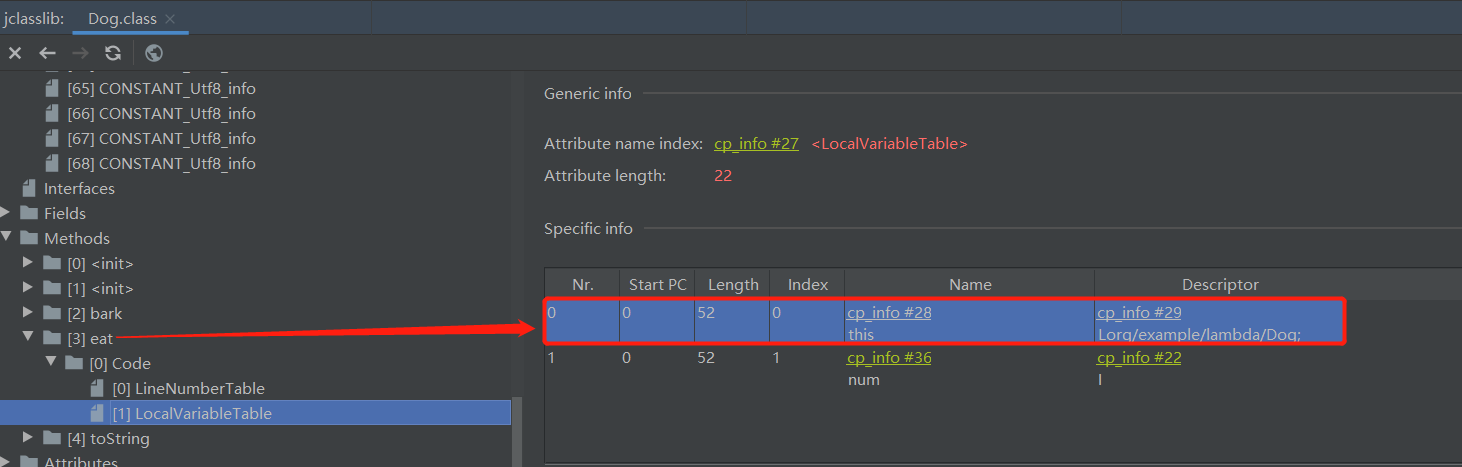
通过查看 eat 方法的本地变量表,我们看到有两个参数,其中 0 代表第一个位置的参数,可以看到类型是 Dog,名称是 this,OK,bingo~
这就解释了为什么可以使用 BiFunction
构造函数的方法引用 类名::new
构造函数分为无参构造函数,和含参构造函数
// 构造函数的方法引用,类名::new// 无参构造函数Supplier<Dog> supplier = Dog::new;System.out.println("创建了新的对象: " + supplier.get());// 含参构造函数Function<String, Dog> function1 = Dog::new;System.out.println("创建了新的对象: " + function1.apply("旺财"));
其实选择什么样的函数,主要是要分析入参和返回值类型,这样就可以分析出所需要的函数了
类型推断
@FunctionalInterfaceinterface IMath {int add(int x, int y);}@FunctionalInterfaceinterface IMath2 {int sub(int x, int y);}public class TypeDemo {public static void main(String[] args) {// 变量类型的定义IMath lambda = (x, y) -> x + y;// 数组IMath[] lambdas = {(x, y) -> x + y};// 强转Object lambda1 = (IMath) (x, y) -> x + y;// 通过返回类型IMath lambda2 = createLambda();// 方法重载的调用TypeDemo demo = new TypeDemo();demo.test((IMath) (x, y) -> x + y);demo.test((IMath2) (x, y) -> x + y);}public int test(IMath iMath) {return iMath.add(1, 3);}public int test(IMath2 iMath) {return iMath.sub(4, 2);}public static IMath createLambda() {return (x, y) -> x + y;}}
变量的引用
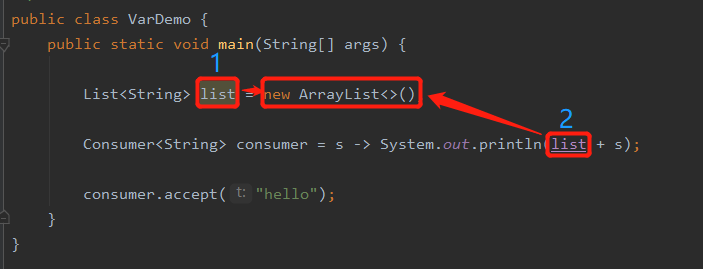
这里的 list,并没有标记为 final,那么可以说明,lambda 表达式可以不需要变量是 final 类型的了么?其实不是,只是 JDK 8 做了一些优化,让我们可以不用显示的增加 final 关键字
我们知道 Java 的变量传递是值传递,而非引用传递,通过上图,我们可以看出,传递过程是这样的,编号 1 的 list 指向 new ArrayList,当传递给 lambda 表达式的时候,编号 2 的 list 也指向 new ArrayList,所以两个变量 list 都指向同一个对象,所以,如果外部,改变了 list 的指向,那么内部就会造成数据紊乱,那么如果 编号 2 的 list 指向编号 1 的 list,然后 编号 1 的 list 指向 new ArrayList 的话,那么外部可以任意修改指向,这也证明了 Java 是值传递,而非引用传递
级联表达式和柯里化
柯里化:把多个参数的函数,转化为只有一个参数的函数
柯里化的目的:把函数标准化,所有函数都只有一个参数,可以组合使用
高阶函数:返回函数的函数
public class CurryDemo {public static void main(String[] args) {// 级联表达式Function<Integer, Function<Integer, Integer>> function = x -> y -> x + y;Integer result = function.apply(2).apply(3);System.out.println("result = " + result);Function<Integer, Function<Integer, Function<Integer, Integer>>> func = x -> y -> z -> x + y + z;System.out.println(func.apply(2).apply(2).apply(2));int[] nums = {2, 2, 2};Function f = func;for (int num : nums) {if (f instanceof Function) {Object object = f.apply(num);if (object instanceof Function) {f = (Function) object;} else {System.out.println("调用结束: " + object);}}}}}

若有收获,就点个赞吧
0 人点赞


