package.json是一个包管理文件
name:项目名称;
version:版本号;
description:项目描述;
main:入口文件;
scripts:快捷启动命令;
author:作者;
license;版权信息;
npm install 思维导图
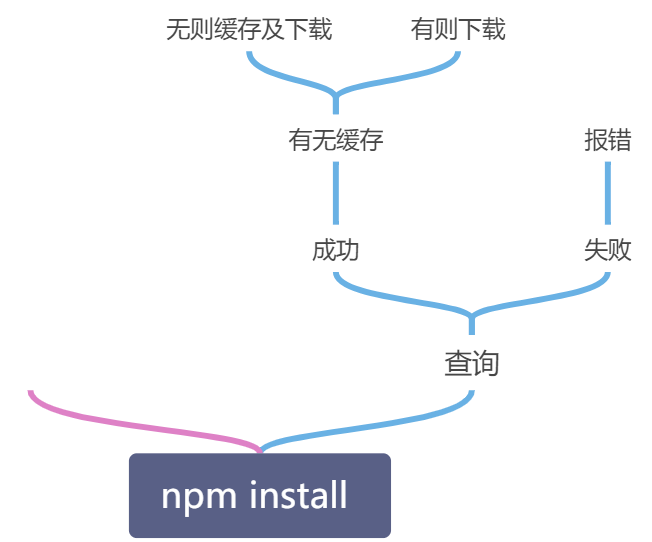 dependencies:生产环境;
devdependencies:开发环境;
区别:1:开发环境主要用与程序人员开发时所使用的开发环境;其中有许多提示,帮助编程人员寻找错误,
且所占内存较大;
2:线上环境是指正式对外服务的,功能不变的前提下其体积更小,有利于用户的体验;
发包流程
….添加用户名 密码 邮箱
npm adduser 回车
—username:用户名;
—password:密码;
—eamil:邮箱
····登录
npm login
—username:输入用户名;
—password:密码;
—eamil:邮箱;
cnpm
npm i cnpm -g
npm config get registry
npm config set registry http://registry.npm.taobao.org/
npm config set registry https://registry.npmjs.org/
yarn
npm i yarn -g
npm 是包管理器 (node package manger缩写)
nodejs遵循commonjs规范;
引入:require
let axios=require(‘axios’);
抛出:
module.exports exports
let arr=[1,2,3,4]
module.exports={
arr
}
url 是一个同意资源定位符
在地址栏输入url后回车发生了什么;
这个过程大至分为两个过程; 网络通信 和页面渲染
网络通信
1:在应用成输入url
2:解析域名 获取对应的ip地址
3:客户端发送http请求
4:传输层TCP传输报文
5:网络协议ip查询地址;
6:数据到达链路层;
7:服务器接收请求;
8:请求成功返回相应的资源
二:页面渲染
npm
npm adduser 登录
npm clear cache 清楚缓存
npm clean cache 清楚缓存
npm config set 获取
npm config get <> 设置
npm publish 发包
npm unpublish 删除包
npm install <> -g 全局安装
-的 当前路径安装;
npm owner 包作者;
npm whoami 用户名;
npm -v 版本号;
npm start npm run start 启动默认
npm init 生成包管理文件
**

若有收获,就点个赞吧
0 人点赞


