通过 Vue 或 React 写的单页面应用,都会有很多页面路由的注入,在打包构建时文件的体积就会很大,会影响应用加载速度。如果把不同的路由组件分割成不同的代码块,只有在理由被访问时才加载对应的组件,这样会极大的提高首屏加载速度,也会极大地提升用户体验。
在 Webpack 中,提供了两种方式来实现按需加载。第一种,也是优先选择方式,使用符合 ECMAScript 规范的 import() 语法,第二种是使用 Webpack 特定的 require.ensure。
import()
ES2015 loader 规范 定义了
import()方法,可以在运行时动态地加载 ES2015 模块
import()用于动态加载模块,其引用的模块及子模块会被分割打包成一个独立的 chunk。该方法的返回结果是Promise,当文件加载完成后会将模块导出给 promise.then 方法的回调。
index.html 文件
<!DOCTYPE html><html><head><meta charset="utf-8"><title>dyanmic imports</title><meta name="viewport" content="width=device-width, initial-scale=1"></head><body><button id='importBtn'>click me</button></body></html>
index.js 文件
document.querySelector('#importBtn').onclick = function () {
  console.log('我是通过import来实现按需加载的')
  const promise = import('./exporta.js')
  promise.then(function (res) {
    console.log('加载完成的async模块', res)
  })
}
exportm.js文件
console.log('我是一个async模块')
export const m = '我是一个async模块'
webpack.config.js 文件
let path = require('path')
let HtmlWebpackPlugin = require('html-webpack-plugin')
const { CleanWebpackPlugin } = require("clean-webpack-plugin");

module.exports = {
  entry: ['./src/index.js','./src/index.import.js'],
  mode: "development",
  output: {
    path: path.resolve(__dirname, "./dist"),

    filename: "[name]-[hash:6].js",
    chunkFilename: '[name].[hash:6].js'
  },

  module: {
    rules: [
      {
        test: /\.(png|jpe?g|gif)$/,
        use: {
          loader: "url-loader",
          options: {
            name: "[name].[ext]",
            outputPath: "images",
            limit: 1024 * 3, //3kb
          },
        },
      },
      {
        test: /\.(eot|woff|woff2)$/,
        use: "file-loader",
      },
      {
        test: /\.js$/,
        use: {
          loader: "babel-loader",
        },
      },
    ],
  },

  plugins: [
    new HtmlWebpackPlugin({
      template: './src/index.html',
      filename: 'index.html'
    }),
    new CleanWebpackPlugin()
  ]
}
在 package.json 中配置 “dev”: “webpack” 命令,然后在终端中执行 npm run dev 命令进行打包,结果如下:
然后我们在浏览器中预览打包出来的 index.html,查看资源请求和输出情况:
可以看到,只有 index.html 和 main-7428db.js 文件被加载了,并且 promise.then 方法的回调也没有被执行(Console 没有打印任何信息)。
我们点击页面上的按钮,再查看资源请求和输出情况: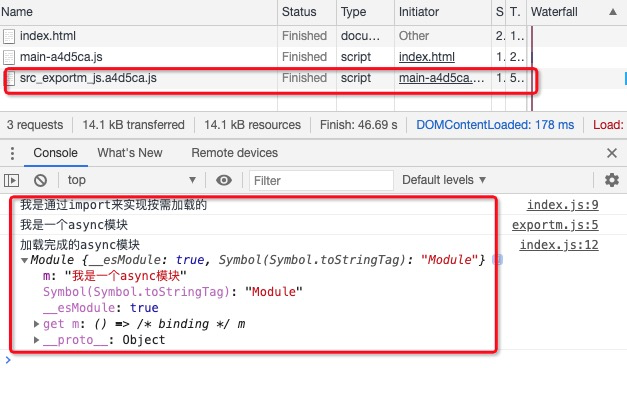
可以看到,exportm 文件被动态地加载进来了,并且 promise.then 方法的回调函数也被执行了。
require.ensure()
require.ensure(dependencies: String[], callback: function(require), errorCallback: function(error), chunkName: String)
如果你的模块使用的是 CommonJS 语法,该方法是动态加载依赖的唯一方法。require.ensure 返回一个 promise。
require.ensure 的参数:
- dependencies:字符串构成的数组,声明 callback 回调函数中所需的所有模块。
- callback:全部依赖加载完成后执行的回调函数。可以将 require作为参数传入该回调函数,在函数体中可以使用此参数,来进一步执行 require() 模块。
- errorCallback:当 webpack 加载依赖失败时,执行的回调函数。
- chunkName:由 require.ensure() 创建出的 chunk 的名字。通过将同一个 chunkName 传递给不同的 require.ensure() 调用,我们可以将它们的代码合并到一个单独的 chunk 中,从而只产生一个浏览器必须加载的 bundle。
index.html文件
<!DOCTYPE html>
<html>

<head>
  <meta charset="utf-8">
  <title>dynamic imports</title>
  <meta name="viewport" content="width=device-width, initial-scale=1">
</head>

<body>
  <button id='requireBtn'>
    click me
  </button>
</body>

</html>
index.js文件
document.querySelector('#requireBtn').onclick = function () {
  require.ensure([], function () {
    let a = require('./exportm.js')
    console.log('asynca模块加载完毕:',
      a)
  }, 'exportm')
}
exportm.js 文件
console.log('我是一个async模块')
export const m = '我是一个async模块'
webpack.config.js 文件
let path = require('path')
let HtmlWebpackPlugin = require('html-webpack-plugin')
const { CleanWebpackPlugin } = require("clean-webpack-plugin");

module.exports = {
  entry: ['./src/index.js'],
  mode: "development",
  output: {
    path: path.resolve(__dirname, "./dist"),
    filename: "[name]-[hash:6].js",
    chunkFilename: '[name].[hash:6].js'
  },

  module: {
    rules: [
      {
        test: /\.(png|jpe?g|gif)$/,
        use: {
          loader: "url-loader",
          options: {
            name: "[name].[ext]",
            outputPath: "images",
            limit: 1024 * 3, //3kb
          },
        },
      },
      {
        test: /\.(eot|woff|woff2)$/,
        use: "file-loader",
      },
      {
        test: /\.js$/,
        use: {
          loader: "babel-loader",
        },
      },
    ],
  },

  plugins: [
    new HtmlWebpackPlugin({
      template: './src/index.html',
      filename: 'index.html'
    }),
    new CleanWebpackPlugin()
  ]
}
然后在终端中执行 npm run dev 命令进行打包,结果如下:
然后我们在浏览器中预览打包出来的 index.html,查看资源请求和输出情况: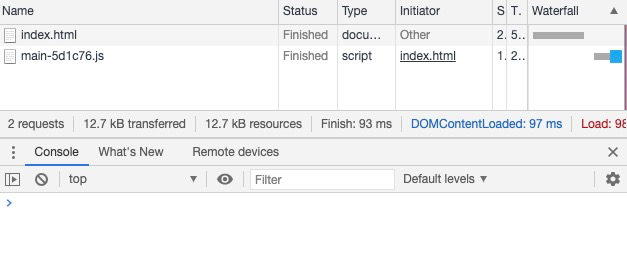
可以看到,只有 index.html 和 main-5d1c76.js 文件被加载了,并且 require.ensure 方法的回调也没有被执行(Console 没有打印任何信息)。
我们点击页面上的按钮,再查看资源请求和输出情况: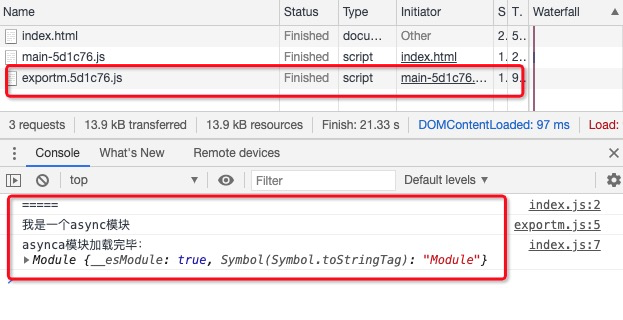
可以看到,exportm 文件被动态地加载进来了,并且 require.ensure 方法的回调函数也被执行了。
小结
当我们需要实现按需加载的功能时,我们应当优先选择符合 ECMAScript 规范的 import() 语法,如果你的模块使用的是 CommonJS 语法,我们应当选择也只能选择require.ensure()方法。

若有收获,就点个赞吧
0 人点赞


