MapReduce进阶与经典案例
- HDFS数据格式详解
数据存储空间是有限的,数据本身和增量是动态变化的,企业要追求最佳的存储与计算的性价比。数据格式描述了数据保存在文件或者记录中的规则。HDFS中分为文件格式和压缩格式。
1、文件格式
文件格式按面向的存储形式不同,分为面向行和面向列的两大类文件格式。
| 面向行/列 | 类型名称 | 是否可切分 | 优点 | 缺点 | 适用场景 |
|---|---|---|---|---|---|
| 面向行 | 文本文件格式(.txt) | 是 | 查看便编辑简单 | 无压缩占空间大、传输压力大、数据解析开销大 | 学习练习使用 |
| 面向行 | sequenceFile序列文件格式(.seq) | 是 | 原生支持、二进制kv存储、支持行和块压缩 | 本地查看不方便:小文件合并成kv结构后不易查看内部数据 | 生产环境使用、map输出的默认文件格式 |
| 面向列 | rcfile文件格式(.rc) | 是 | 数据加载快、查询快、空间利用率高、高负载能力 | 每一项都不是最高 | 学习生产均可 |
| 面向列 | orcfile文件格式(.orc) | 是 | 兼具了rcfile优点,进一步提高了读取、存储效率、新数据类型的支持 | 每一项都不是最高 | 学习生产均可 |
2、压缩格式
压缩格式按其可切分计算性,分为可切分计算和不可切分计算两种。
| 可切分性 | 类型名称 | 是否原生 | 优点 | 缺点 | 适用场景 |
|---|---|---|---|---|---|
| 可切分 | lzo(.lzo) | 否 | 压缩/解压速度快,合理的压缩率 | 压缩率比gzip低,非原生、需要native安装 | 单个文件越大,lzo优点越明显,压缩完成后>=200M为宜 |
| 可切分 | bzip2(.bz2) | 是 | 高压缩率超过gzip,原生支持、不需要native安装,用linux bzip可解压操作 | 压缩/解压速率慢 | 处理速度要求不高、压缩率要求高的情况 |
| 不可切分 | gzip(.gz) | 是 | 压缩/解压速度快,原生/native都支持,使用方便 | 不可切分,对cpu要求较高 | 压缩完成后<=128M的文件适宜 |
| 不可切分 | snappy(.snappy) | 否 | 高压缩/解压速度,合理的压缩率 | 压缩率比gzip低,非原生、需要native安装 | 适合作为map->reduce或是job数据流中间的数据传输格式 |
3、文件格式的使用
3.1 MR输出结果的默认文件格式
默认输出为txt文件格式: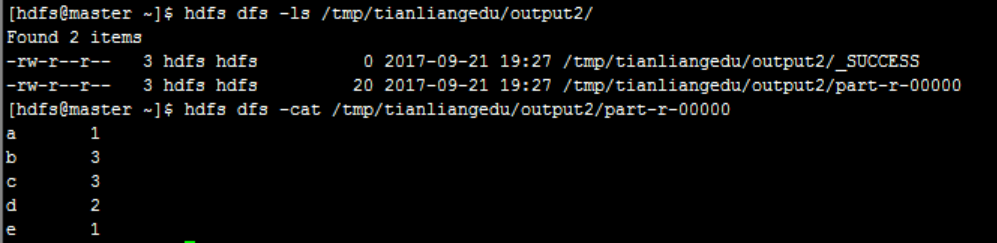
3.2 设置输出格式为gzip
通过shell命令改动,添加参数设置模板:
yarn jar jar_path main_class_path -Dk1=v1参数列表
具体应用:
yarn jar TlHadoopCore-jar-with-dependencies.jar \
com.tianliangedu.examples.WordCountV2 \
-Dmapred.output.compress=true \
-Dmapred.output.compression.codec=org.apache.hadoop.io.compress.GzipCodec \
/tmp/tianliangedu/input /tmp/tianliangedu/output19
其中,WordCount第2版-WordCountV2.java源码:
import java.io.IOException;
import java.util.StringTokenizer;
import org.apache.hadoop.conf.Configuration;
import org.apache.hadoop.fs.Path;
import org.apache.hadoop.io.IntWritable;
import org.apache.hadoop.io.Text;
import org.apache.hadoop.mapreduce.Job;
import org.apache.hadoop.mapreduce.Mapper;
import org.apache.hadoop.mapreduce.Reducer;
import org.apache.hadoop.mapreduce.lib.input.FileInputFormat;
import org.apache.hadoop.mapreduce.lib.output.FileOutputFormat;
import org.apache.hadoop.util.GenericOptionsParser;
//启动mr的driver类
public class WordCountV2 {
//map类,实现map函数<br /> public static class TokenizerMapper extends<br /> Mapper<Object, Text, Text, IntWritable> {<br /> //暂存每个传过来的词频计数,均为1,省掉重复申请空间<br /> private final static IntWritable one = new IntWritable(1);<br /> //暂存每个传过来的词的值,省掉重复申请空间<br /> private Text word = new Text();//核心map方法的具体实现,逐个<key,value>对去处理<br /> public void map(Object key, Text value, Context context)<br /> throws IOException, InterruptedException {<br /> //用每行的字符串值初始化StringTokenizer<br /> StringTokenizer itr = new StringTokenizer(value.toString());<br /> //循环取得每个空白符分隔出来的每个元素<br /> while (itr.hasMoreTokens()) {<br /> //将取得出的每个元素放到word Text对象中<br /> word.set(itr.nextToken());<br /> //通过context对象,将map的输出逐个输出<br /> context.write(word, one);<br /> }<br /> }<br /> }//reduce类,实现reduce函数<br /> public static class IntSumReducer extends<br /> Reducer<Text, IntWritable, Text, IntWritable> {<br /> private IntWritable result = new IntWritable();//核心reduce方法的具体实现,逐个<key,List(v1,v2)>去处理<br /> public void reduce(Text key, Iterable<IntWritable> values,<br /> Context context) throws IOException, InterruptedException {<br /> //暂存每个key组中计算总和<br /> int sum = 0;<br /> //加强型for,依次获取迭代器中的每个元素值,即为一个一个的词频数值<br /> for (IntWritable val : values) {<br /> //将key组中的每个词频数值sum到一起<br /> sum += val.get();<br /> }<br /> //将该key组sum完成的值放到result IntWritable中,使可以序列化输出<br /> result.set(sum);<br /> //将计算结果逐条输出<br /> context.write(key, result);<br /> }<br /> }//启动mr的driver方法<br /> public static void main(String[] args) throws Exception {<br /> //得到集群配置参数<br /> Configuration conf = new Configuration();//参数解析器<br /> GenericOptionsParser optionParser = new GenericOptionsParser(conf, args);<br /> String[] remainingArgs = optionParser.getRemainingArgs();<br /> if ((remainingArgs.length != 2)) {<br /> System.err.println("Usage: yarn jar jar_path main_class_path -D参数列表 <in> <out>");<br /> System.exit(2);<br /> }//设置到本次的job实例中<br /> Job job = Job.getInstance(conf, "天亮WordCountV2");<br /> //指定本次执行的主类是WordCount<br /> job.setJarByClass(WordCountV2.class);<br /> //指定map类<br /> job.setMapperClass(TokenizerMapper.class);<br /> //指定combiner类,要么不指定,如果指定,一般与reducer类相同<br /> job.setCombinerClass(IntSumReducer.class);<br /> //指定reducer类<br /> job.setReducerClass(IntSumReducer.class);<br /> //指定job输出的key和value的类型,如果map和reduce输出类型不完全相同,需要重新设置map的output的key和value的class类型<br /> job.setOutputKeyClass(Text.class);<br /> job.setOutputValueClass(IntWritable.class);<br /> //指定输入数据的路径<br /> FileInputFormat.addInputPath(job, new Path(remainingArgs[0]));<br /> //指定输出路径,并要求该输出路径一定是不存在的<br /> FileOutputFormat.setOutputPath(job, new Path(remainingArgs[1]));<br /> //指定job执行模式,等待任务执行完成后,提交任务的客户端才会退出!<br /> System.exit(job.waitForCompletion(true) ? 0 : 1);<br /> }<br />}<br />结果样例:<br />
3.3 设置输出格式为lzo格式
lzo非原生支持,需要先安装lzo,思考在哪些节点上安装lzo组件?
先安装lzo
安装lzo命令:
yum -y install lzo lzo-devel hadooplzo hadooplzo-native
再安装lzop
安装lzop命令:
yum install lzop
lzo应用
yarn jar TlHadoopCore-jar-with-dependencies.jar \
com.tianliangedu.core.WordCountV2 \
-Dmapred.output.compress=true \
-Dmapred.output.compression.codec=com.hadoop.compression.lzo.LzopCodec \
/tmp/tianliangedu/input /tmp/tianliangedu/output37
查看结果
将hdfs lzo文件下载到本地后,通过lzop命令查看,暂不支持直接hadoop shell解压缩lzo文件
//从hdfs中下载lzo文件
hdfs dfs -get /tmp/tianliangedu/output41/part-r-00000.lzo
//通过安装了lzo包的lzop命令解压后查看
lzop -cd part-r-00000.lzo | more
//查看效果
- MR应用之自定义Partition
1、Partition默认实现-HashPartition
//source code:
package org.apache.hadoop.mapreduce.lib.partition;
import org.apache.hadoop.classification.InterfaceAudience;
import org.apache.hadoop.classification.InterfaceStability;
import org.apache.hadoop.mapreduce.Partitioner;
/ Partition keys by their {@link Object#hashCode()}. */
@InterfaceAudience.Public
@InterfaceStability.Stable
public class HashPartitioner
/
public int getPartition(K key, V value, int numReduceTasks) {
return (key.hashCode() & Integer.MAX_VALUE) % numReduceTasks;
}
}
2、MapReduce个数的确定时机
- 在Job提交后,任务正式开始计算之前即已经确定
- Map数量的确定:由输入数据文件的总大小、数据格式、块大小综合确定,待冲刺环节详解。
- Reduce数量确定:系统根据输入数据量的大小自动确定,有固定的计算公式,待冲刺环节详解。另外,用户可以自定义设置,通过参数配置,由用户决定。本节重点介绍。
3、自定义reduce数量
yarn jar TlHadoopCore-jar-with-dependencies.jar \
com.tianliangedu.examples.WordCountV2 \
-Dmapred.output.compress=true \
-Dmapred.output.compression.codec=org.apache.hadoop.io.compress.GzipCodec \
-Dmapred.reduce.tasks=2 \
/tmp/tianliangedu/input /tmp/tianliangedu/output38
最终效果图:
4、自定义Partition实现
通过继承Partitioner类,自定义实现Partition
/*
自定义Partition的定义
/
public static class MyHashPartitioner
/** Use {@link Object#hashCode()} to partition. */<br /> public int getPartition(K key, V value, int numReduceTasks) {<br /> return (key.toString().charAt(0) < 'q' ? 0 : 1) % numReduceTasks;<br /> // return key.toString().charAt(0);<br /> }}<br />**4.1 通过代码中指定partition来实现**<br />完整代码如下:<br />import java.io.IOException;<br />import java.util.StringTokenizer;<br />import org.apache.hadoop.conf.Configuration;<br />import org.apache.hadoop.fs.Path;<br />import org.apache.hadoop.io.IntWritable;<br />import org.apache.hadoop.io.Text;<br />import org.apache.hadoop.mapreduce.Job;<br />import org.apache.hadoop.mapreduce.Mapper;<br />import org.apache.hadoop.mapreduce.Partitioner;<br />import org.apache.hadoop.mapreduce.Reducer;<br />import org.apache.hadoop.mapreduce.lib.input.FileInputFormat;<br />import org.apache.hadoop.mapreduce.lib.output.FileOutputFormat;<br />import org.apache.hadoop.util.GenericOptionsParser;
//启动mr的driver类
public class SelfDefinePartitioner {
// map类,实现map函数<br /> public static class TokenizerMapper extends<br /> Mapper<Object, Text, Text, IntWritable> {<br /> // 暂存每个传过来的词频计数,均为1,省掉重复申请空间<br /> private final static IntWritable one = new IntWritable(1);<br /> // 暂存每个传过来的词的值,省掉重复申请空间<br /> private Text word = new Text();// 核心map方法的具体实现,逐个<key,value>对去处理<br /> public void map(Object key, Text value, Context context)<br /> throws IOException, InterruptedException {<br /> // 用每行的字符串值初始化StringTokenizer<br /> StringTokenizer itr = new StringTokenizer(value.toString());<br /> // 循环取得每个空白符分隔出来的每个元素<br /> while (itr.hasMoreTokens()) {<br /> // 将取得出的每个元素放到word Text对象中<br /> word.set(itr.nextToken());<br /> // 通过context对象,将map的输出逐个输出<br /> context.write(word, one);<br /> }<br /> }<br /> }/**<br /> 自定义Partition的定义<br /> */<br /> public static class MyHashPartitioner<K, V> extends Partitioner<K, V> {/** Use {@link Object#hashCode()} to partition. */<br /> public int getPartition(K key, V value, int numReduceTasks) {<br /> return (key.toString().charAt(0) < 'q' ? 0 : 1) % numReduceTasks;<br /> // return key.toString().charAt(0);<br /> }}// reduce类,实现reduce函数<br /> public static class IntSumReducer extends<br /> Reducer<Text, IntWritable, Text, IntWritable> {<br /> private IntWritable result = new IntWritable();// 核心reduce方法的具体实现,逐个<key,List(v1,v2)>去处理<br /> public void reduce(Text key, Iterable<IntWritable> values,<br /> Context context) throws IOException, InterruptedException {<br /> // 暂存每个key组中计算总和<br /> int sum = 0;<br /> // 加强型for,依次获取迭代器中的每个元素值,即为一个一个的词频数值<br /> for (IntWritable val : values) {<br /> // 将key组中的每个词频数值sum到一起<br /> sum += val.get();<br /> }<br /> // 将该key组sum完成的值放到result IntWritable中,使可以序列化输出<br /> result.set(sum);<br /> // 将计算结果逐条输出<br /> context.write(key, result);<br /> }<br /> }// 启动mr的driver方法<br /> public static void main(String[] args) throws Exception {<br /> // 得到集群配置参数<br /> Configuration conf = new Configuration();// 参数解析器<br /> GenericOptionsParser optionParser = new GenericOptionsParser(conf, args);<br /> String[] remainingArgs = optionParser.getRemainingArgs();<br /> if ((remainingArgs.length != 2)) {<br /> System.err<br /> .println("Usage: yarn jar jar_path main_class_path -D参数列表 <in> <out>");<br /> System.exit(2);<br /> }<br /> // 设置到本次的job实例中<br /> Job job = Job.getInstance(conf, "天亮Partition");<br /> // 指定本次执行的主类是WordCount<br /> job.setJarByClass(SelfDefinePartitioner.class);<br /> // 指定map类<br /> job.setMapperClass(TokenizerMapper.class);<br /> // 指定partition类--------------------------------------------start<br /> job.setPartitionerClass(MyHashPartitioner.class);<br /> // 指定partition类--------------------------------------------end<br /> // 指定combiner类,要么不指定,如果指定,一般与reducer类相同<br /> job.setCombinerClass(IntSumReducer.class);<br /> // 指定reducer类<br /> job.setReducerClass(IntSumReducer.class);<br /> // 指定job输出的key和value的类型,如果map和reduce输出类型不完全相同,需要重新设置map的output的key和value的class类型<br /> job.setOutputKeyClass(Text.class);<br /> job.setOutputValueClass(IntWritable.class);<br /> // 指定输入数据的路径<br /> FileInputFormat.addInputPath(job, new Path(remainingArgs[0]));<br /> // 指定输出路径,并要求该输出路径一定是不存在的<br /> FileOutputFormat.setOutputPath(job, new Path(remainingArgs[1]));<br /> // 指定job执行模式,等待任务执行完成后,提交任务的客户端才会退出!<br /> System.exit(job.waitForCompletion(true) ? 0 : 1);<br /> }<br />}<br />脚本调用:<br />yarn jar TlHadoopCore-jar-with-dependencies.jar \<br />com.tianliangedu.examples.SelfDefinePartitioner \<br />-Dmapred.output.compress=true \<br />-Dmapred.output.compression.codec=org.apache.hadoop.io.compress.GzipCodec \<br />-Dmapred.reduce.tasks=2 \<br />/tmp/tianliangedu/input /tmp/tianliangedu/output40<br />效果输出:<br />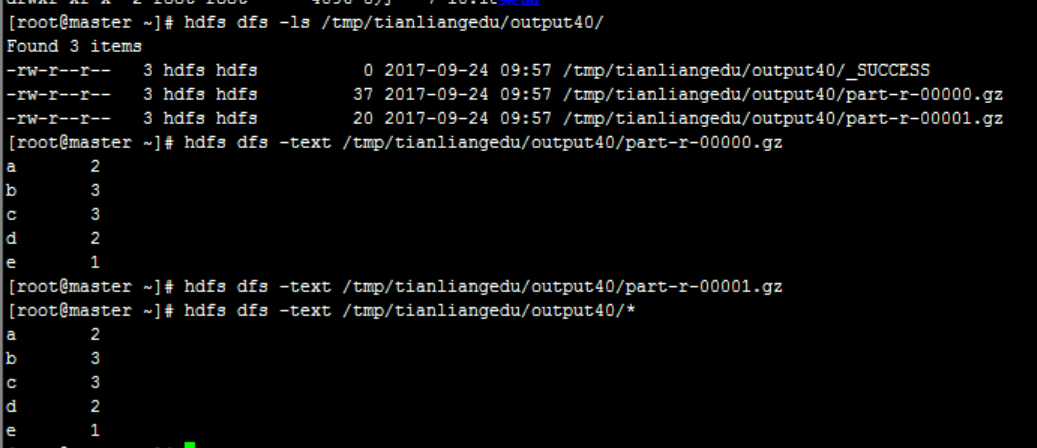
4.2 通过配置指定参数来实现
使用yarn shell命令配置自定义的partition实现。注意:由于采用系统参数设置自定义的分区类,故需要将自定义分区类作为独立的类文件,不能定义为Driver的内部类。
自定义分区类的独立类代码如下:
package com.tianliangedu.examples;
import org.apache.hadoop.mapreduce.Partitioner;
public class MyHashPartitioner
public int getPartition(K key, V value, int numReduceTasks) {
return (key.toString().charAt(0) < ‘q’ ? 0 : 1) % numReduceTasks;
}
}
不改动代码,将自定义Partition通过系统参数指定。
yarn jar TlHadoopCore-jar-with-dependencies.jar \
com.tianliangedu.examples.SelfDefinePartitioner4ShellConfigure \
-Dmapred.output.compress=true \
-Dmapred.output.compression.codec=org.apache.hadoop.io.compress.GzipCodec \
-Dmapred.reduce.tasks=2 \
-Dmapreduce.job.partitioner.class=com.tianliangedu.examples.MyHashPartitioner \
/tmp/tianliangedu/input /tmp/tianliangedu/output44
Driver类代码如下:
import java.io.IOException;
import java.util.StringTokenizer;
import org.apache.hadoop.conf.Configuration;
import org.apache.hadoop.fs.Path;
import org.apache.hadoop.io.IntWritable;
import org.apache.hadoop.io.Text;
import org.apache.hadoop.mapreduce.Job;
import org.apache.hadoop.mapreduce.Mapper;
import org.apache.hadoop.mapreduce.Partitioner;
import org.apache.hadoop.mapreduce.Reducer;
import org.apache.hadoop.mapreduce.lib.input.FileInputFormat;
import org.apache.hadoop.mapreduce.lib.output.FileOutputFormat;
import org.apache.hadoop.util.GenericOptionsParser;
//启动mr的driver类
public class SelfDefinePartitioner4ShellConfigure {
// map类,实现map函数<br /> public static class TokenizerMapper extends<br /> Mapper<Object, Text, Text, IntWritable> {<br /> // 暂存每个传过来的词频计数,均为1,省掉重复申请空间<br /> private final static IntWritable one = new IntWritable(1);<br /> // 暂存每个传过来的词的值,省掉重复申请空间<br /> private Text word = new Text();// 核心map方法的具体实现,逐个<key,value>对去处理<br /> public void map(Object key, Text value, Context context)<br /> throws IOException, InterruptedException {<br /> // 用每行的字符串值初始化StringTokenizer<br /> StringTokenizer itr = new StringTokenizer(value.toString());<br /> // 循环取得每个空白符分隔出来的每个元素<br /> while (itr.hasMoreTokens()) {<br /> // 将取得出的每个元素放到word Text对象中<br /> word.set(itr.nextToken());<br /> // 通过context对象,将map的输出逐个输出<br /> context.write(word, one);<br /> }<br /> }<br /> }// reduce类,实现reduce函数<br /> public static class IntSumReducer extends<br /> Reducer<Text, IntWritable, Text, IntWritable> {<br /> private IntWritable result = new IntWritable();// 核心reduce方法的具体实现,逐个<key,List(v1,v2)>去处理<br /> public void reduce(Text key, Iterable<IntWritable> values,<br /> Context context) throws IOException, InterruptedException {<br /> // 暂存每个key组中计算总和<br /> int sum = 0;<br /> // 加强型for,依次获取迭代器中的每个元素值,即为一个一个的词频数值<br /> for (IntWritable val : values) {<br /> // 将key组中的每个词频数值sum到一起<br /> sum += val.get();<br /> }<br /> // 将该key组sum完成的值放到result IntWritable中,使可以序列化输出<br /> result.set(sum);<br /> // 将计算结果逐条输出<br /> context.write(key, result);<br /> }<br /> }// 启动mr的driver方法<br /> public static void main(String[] args) throws Exception {<br /> // 得到集群配置参数<br /> Configuration conf = new Configuration();// 参数解析器<br /> GenericOptionsParser optionParser = new GenericOptionsParser(conf, args);<br /> String[] remainingArgs = optionParser.getRemainingArgs();<br /> if ((remainingArgs.length != 2)) {<br /> System.err<br /> .println("Usage: yarn jar jar_path main_class_path -D参数列表 <in> <out>");<br /> System.exit(2);<br /> }<br /> // 设置到本次的job实例中<br /> Job job = Job.getInstance(conf, "天亮Partition");<br /> // 指定本次执行的主类是WordCount<br /> job.setJarByClass(SelfDefinePartitioner4ShellConfigure.class);<br /> // 指定map类<br /> job.setMapperClass(TokenizerMapper.class);<br /> // 指定partition类--------------------------------------------start<br /> // job.setPartitionerClass(MyHashPartitioner.class);<br /> // 指定partition类--------------------------------------------end<br /> // 指定combiner类,要么不指定,如果指定,一般与reducer类相同<br /> job.setCombinerClass(IntSumReducer.class);<br /> // 指定reducer类<br /> job.setReducerClass(IntSumReducer.class);<br /> // 指定job输出的key和value的类型,如果map和reduce输出类型不完全相同,需要重新设置map的output的key和value的class类型<br /> job.setOutputKeyClass(Text.class);<br /> job.setOutputValueClass(IntWritable.class);<br /> // 指定输入数据的路径<br /> FileInputFormat.addInputPath(job, new Path(remainingArgs[0]));<br /> // 指定输出路径,并要求该输出路径一定是不存在的<br /> FileOutputFormat.setOutputPath(job, new Path(remainingArgs[1]));<br /> // 指定job执行模式,等待任务执行完成后,提交任务的客户端才会退出!<br /> System.exit(job.waitForCompletion(true) ? 0 : 1);<br /> }<br />}<br />效果输出:
- 只是设置分区类的方式不同,对计算结果没有任何影响
- 与之前的代码设置分区类的结果完全一致
- MR应用之读取外部配置文件-Configuration传递
1、需求说明
以之前的hdfs路径/tmp/tianliangedu/input_filter目录中的文件作为输入,加入人名白名单文件whitelist.txt过滤,获取白名单中列出的人名的报销费用列表。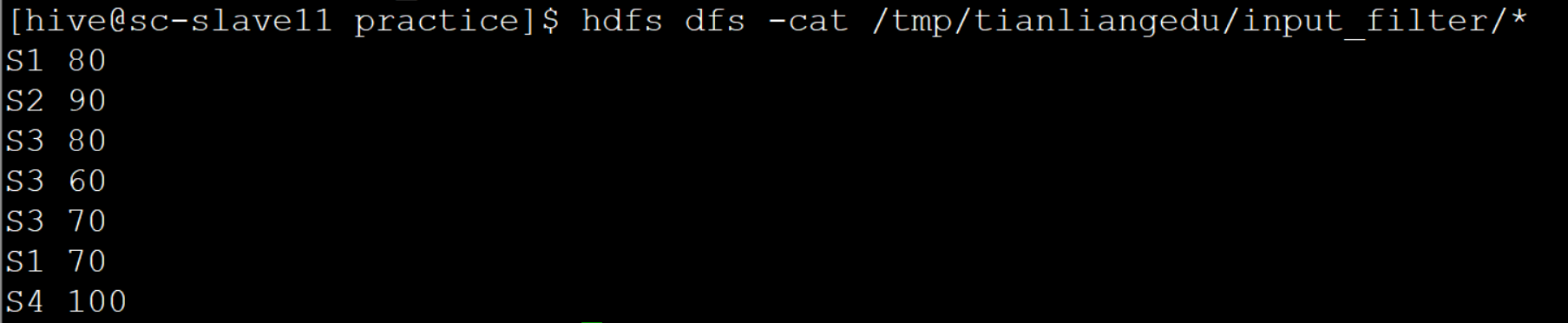
其中白名单whitelist.txt文件中的值为:
2、难点剖析
需要将whitelist.txt文件的内容传递给各个计算节点。通过Configuration传递到Map中去过滤处理。
3、步骤分解
- 实现基于input_filter目录中文件数据的一次排序,即Map和Reduce的读入和归约处理。
- 将本地文件whitelist.txt传给Driver类,读取到该文件内容txtContent
- 将txtContent通过Configuration的set方法传递给map和reduce任务
- 在map任务中通过Configuration对象的get方法获取传递过来的值txtContent
- 将txtContent解析成Set对象,对map任务中的map方法进行过滤输出
- 由于map端已经做了过滤,reduce端将不需任何改变
4、完整代码
package com.tianliangedu.core.readconfig;
import java.io.BufferedReader;
import java.io.File;
import java.io.FileInputStream;
import java.io.IOException;
import java.io.InputStreamReader;
import java.util.Arrays;
import java.util.HashSet;
import java.util.Set;
import org.apache.hadoop.conf.Configuration;
import org.apache.hadoop.fs.Path;
import org.apache.hadoop.io.IntWritable;
import org.apache.hadoop.io.Text;
import org.apache.hadoop.mapreduce.Job;
import org.apache.hadoop.mapreduce.Mapper;
import org.apache.hadoop.mapreduce.Reducer;
import org.apache.hadoop.mapreduce.lib.input.FileInputFormat;
import org.apache.hadoop.mapreduce.lib.output.FileOutputFormat;
import org.apache.hadoop.util.GenericOptionsParser;
import org.apache.log4j.Logger;
//启动mr的driver类
public class ConfigSetTransferDriver {
public static Logger logger = Logger
.getLogger(ConfigSetTransferDriver.class);
// map类,实现map函数
public static class LineProcessMapper extends
Mapper
// 暂存每个传过来的词的值,省掉重复申请空间
private Text outputKey = new Text();
private IntWritable outputValue = new IntWritable();
// 过滤whitename的set集合
private Set
//每个map任务有且仅会执行一次setup方法,用于初始化map函数执行前的所需参数
@Override
protected void setup(
Mapper
throws IOException, InterruptedException {
Configuration conf = context.getConfiguration();
String whitelistString = conf.get(“whitelist”);
String[] whiteNameArray = whitelistString.split(“\s”);
whiteNameSet.addAll(Arrays.asList(whiteNameArray));
}
// 核心map方法的具体实现,逐个
public void map(Object key, Text value, Context context)
throws IOException, InterruptedException {
// 通过context对象,将map的输出逐个输出
String tempLine = value.toString();
if (tempLine != null && tempLine.trim().length() > 0) {
String[] columnArray = tempLine.split(“\s”);
if (whiteNameSet.contains(columnArray[0])) {
outputKey.set(columnArray[0]);
outputValue.set(Integer.parseInt(columnArray[1]));
context.write(outputKey, outputValue);
}
}
}
}
// reduce类,实现reduce函数
public static class SortReducer extends
Reducer
// 核心reduce方法的具体实现,逐个
public void reduce(Text key, Iterable
Context context) throws IOException, InterruptedException {
// 加强型for,依次获取迭代器中的每个元素值
for (IntWritable val : values) {
// 将计算结果逐条输出
context.write(key, val);
}
}
}
//读取一个指定本地路径和文件编码的文件内容,转换成字符串
public static String readFile(String filePath, String fileEncoding) {
if (fileEncoding == null) {
fileEncoding = System.getProperty(“file.encoding”);
}
File file = new File(filePath);
BufferedReader br = null;
String line = null;
StringBuilder sb = new StringBuilder();
try {
br = new BufferedReader(new InputStreamReader(new FileInputStream(
file), fileEncoding));
while ((line = br.readLine()) != null) {
sb.append(line + “\n”);
}
return sb.toString();
} catch (Exception e) {
logger.info(e.getLocalizedMessage());
} finally {
if (br != null) {
try {
br.close();
} catch (IOException e) {
logger.info(e.getLocalizedMessage());
logger.info(“关闭IOUtil流时出现错误!”);
}
}
}
return null;
}
//配置文件读取与值传递
public static void readConfigAndTransfer(Configuration conf,String filePath) {
//读取本地配置文件
String source = readFile(filePath, “utf-8”);
//将配置文件中的值通过conf set的方式传递 到计算节点中
conf.set(“whitelist”, source);
//通过日志打印的方式,将读取到的值,打印出来,如不打印日志,可去除以下代码段
logger.info(“whitelist=” + source);
}
// 启动mr的driver方法
public static void main(String[] args) throws Exception {
// 得到集群配置参数
Configuration conf = new Configuration();
// 参数解析器
GenericOptionsParser optionParser = new GenericOptionsParser(conf, args);
String[] remainingArgs = optionParser.getRemainingArgs();
if ((remainingArgs.length < 3)) {
System.err
.println(“Usage: yarn jar jar_path main_class_path -D参数列表
System.exit(2);
}
// 配置参数读取与传递
readConfigAndTransfer(conf,remainingArgs[2]);
// 设置到本次的job实例中
Job job = Job.getInstance(conf, “天亮conf直接传参”);
// 指定本次执行的主类是WordCount
job.setJarByClass(ConfigSetTransferDriver.class);
// 指定map类
job.setMapperClass(LineProcessMapper.class);
// 指定reducer类
job.setReducerClass(SortReducer.class);
// 指定job输出的key和value的类型,如果map和reduce输出类型不完全相同,需要重新设置map的output的key和value的class类型
job.setOutputKeyClass(Text.class);
job.setOutputValueClass(IntWritable.class);
// 指定输入数据的路径
FileInputFormat.addInputPath(job, new Path(remainingArgs[0]));
// 指定输出路径,并要求该输出路径一定是不存在的
FileOutputFormat.setOutputPath(job, new Path(remainingArgs[1]));
// 指定job执行模式,等待任务执行完成后,提交任务的客户端才会退出!
System.exit(job.waitForCompletion(true) ? 0 : 1);
}
}
5、运行验证
5.1脚本调用
yarn jar TlHadoopCore-jar-with-dependencies.jar \
com.tianliangedu.examples.readconfig.ConfigSetTransferDriver \
-Dmapred.output.compress=true \
-Dmapred.output.compression.codec=org.apache.hadoop.io.compress.GzipCodec \
-Dmapred.reduce.tasks=1 \
/tmp/tianliangedu/input_filter /tmp/tianliangedu/output62 whitelist.txt
5.2输出效果
- 经典习题
以wordcount计算为示例,设置输出压缩格式是bz2的数据输出。
以hdfs路径/tmp/table/student_score.txt为输入,表结构为(学号,姓名,课程名称,成绩),字段间分隔符为tab,如下图所示。通过设置reduce个数为2,自定义hash partition实现将其中姓名为”张一”的放到同一个reduce中,非张一的放到其它的reduce中,输出结果字段为(学号,姓名,课程名称,成绩),按tab分隔即可。

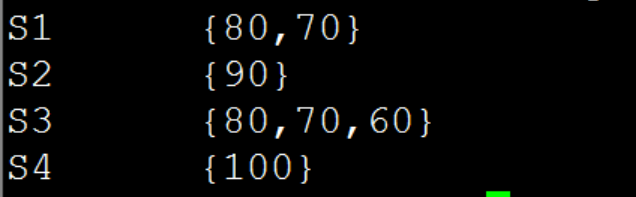
3、(已排序好文本文件的分组-流式分组)给定一个本地文本文件finance_record_sorted.txt,共2个字段(工号,报销费用),其中按工号升序排列,并用tab分隔。求对该数据进行按工号字段的分组,并在控制台输出如下图所示的结果。

若有收获,就点个赞吧
0 人点赞


