1.首先更改my.cnf的配置文件,并重启mysql
[root@localhost ~]# vim /etc/my.cnf[mysqld]skip-grant-tables[root@localhost ~]# systemctl restart mysqld
2.登录MySQL,此时不需要输入密码,直接回车即可
mysql -uroot -p
3.切换到mysql数据库,查询user表的结构,这里有需要的字段
在MySQL5.7版本中mysql数据库下已经没有password这个字段了,password字段改成了authentication_string字段。把这个复制下来,修改密码时会用到,当然也可以手打。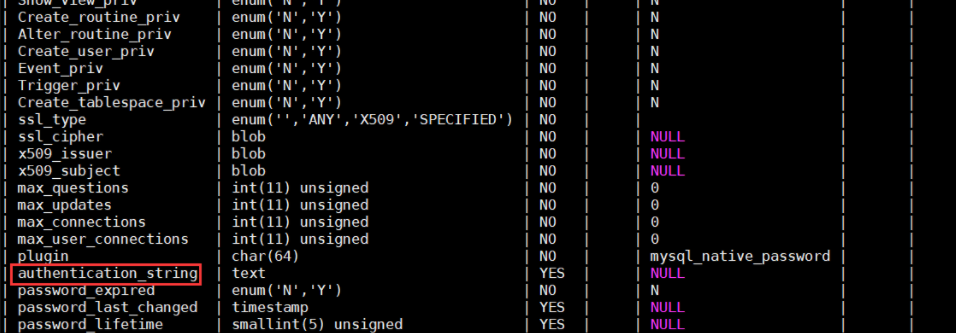
4.修改mysql的root密码并退出mysql
mysql> update user-> set authentication_string=password('ABCabc123!')-> where user='root' and host='localhost';Query OK, 0 rows affected, 1 warning (0.00 sec)Rows matched: 0 Changed: 0 Warnings: 1mysql> \qBye
5.再次修改my.cnf配置文件,将第一步添加的语句注释或删除,然后重启mysql
[root@localhost ~]# vim /etc/my.cnf[mysqld]#skip-grant-tables[root@localhost ~]# systemctl restart mysqld
6.用新密码登录mysql
[root@localhost ~]# mysql -uroot -pABCabc123!mysql: [Warning] Using a password on the command line interface can be insecure.Welcome to the MySQL monitor. Commands end with ; or \g.Your MySQL connection id is 2Server version: 5.7.14 MySQL Community Server (GPL)Copyright (c) 2000, 2016, Oracle and/or its affiliates. All rights reserved.Oracle is a registered trademark of Oracle Corporation and/or itsaffiliates. Other names may be trademarks of their respectiveowners.Type 'help;' or '\h' for help. Type '\c' to clear the current input statement.mysql>
7.修改默认密码
MySQL [(none)]> show databases;ERROR 1820 (HY000): You must reset your password using ALTER USER statement before executing this statement.
MySQL [(none)]> alter user user() identified by 'ABCabc123!';Query OK, 0 rows affected (0.00 sec)

若有收获,就点个赞吧
0 人点赞


