一、下载安装
官网地址:https://www.expressjs.com.cn/
安装
指定目录下
npm init —yes
npm i express
二、Express的使用
// 1.引入expressconst express = require('express')// 2.创建应用对象const app = express()// 3.创建路由规则app.get('/', (request,response) =>{// 设置响应response.send('hello')});// 4.监听端口,启动服务app.listen(8000,()=>{console.log("服务已启动");});
代码编辑好之后,需要启动服务,命令为node 文件名,在浏览器输入localhost:8000即可.
测试案例:
<!DOCTYPE html><html lang="en"><head><meta charset="UTF-8"><title>TestAjax</title><style>#result{width: 200px;height: 100px;border: solid 1px #2a5caa;}</style></head><body><button>发送请求</button><div id="result"></div><script>const btn = document.getElementsByTagName('button')[0];const result = document.getElementById('result');btn.onclick = function (){// 1.创建对象const xhr = new XMLHttpRequest();// 2.初始化,设置请求方法和URLxhr.open('GET','http://localhost:8000/server')// 3.发送xhr.send();// 4.事件绑定 处理服务端返回的结果xhr.onreadystatechange = function (){// 判断状态if (xhr.readyState === 4){// 判断状态码if (xhr.status === 200 && xhr.status < 300){// 处理结果result.innerHTML = xhr.response;}else{}}}}</script></body></html>
效果展示: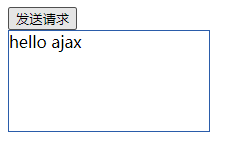
实现在地址栏传输参数
xhr.open(‘GET’,’http://localhost:8000/server?a=200&b=300‘)
三、nodemon自动重启工具
安装:npm install -g nodemon
启动:nodemon 文件名
若启动时报错,则需要执行以下操作
1.管理员身份打开powerShell
2.输入set-ExecutionPolicy RemoteSigned
3选择 y 回车,再次尝试即可

若有收获,就点个赞吧
0 人点赞


