正常情况下比较常用的包都有提供一个 声明包, 比如 react 是用 flow 开发的,也提供了 @types/react, jquery 也有 @types/jquery。 可以在 https://microsoft.github.io/TypeSearch/ 找到所有存在的类型包。
node 的包查找是先在当前文件夹找 node_modules,在它下找递归找,如果找不到则往上层目录继续找,直到顶部一样, TypeScript 类型查找也是类似的方式。
比如 jquery,
- TypeScript 编译器先在当前编译上下文找 jquery 的定义。
- 如果找不到,则会去 node_modules 中的@types (默认情况,目录可以修改)目录下去寻找对应包名的模块声明文件。
@types 下的定义都是全局的。当然也可以导入 @types 下导出的定义,使得它们的作用域变成模块内部。
typeRoots 和 types
TypeScript 会默认引入node_modules下的所有@types声明,但是开发者也可以通过修改tsconfig.json的配置来修改默认的行为.
typeRoots: 用来指定默认的类型声明文件查找路径,默认为node_modules/@types, 指定typeRoots后,TypeScript 编译器会从指定的路径去引入声明文件,而不是node_modules/@types, 比如以下配置会从typings路径下去搜索声明
{"compilerOptions": {"typeRoots": ["./typings"]}}
types: TypeScript 编译器会默认引入typeRoot下所有的声明文件,但是有时候我们并不希望全局引入所有定义,而是仅引入部分模块。这种情景下可以通过types指定模块名只引入我们想要的模块,比如以下只会引入 jquery 的声明文件
{"compilerOptions": {"types": ["jquery"]}}
本地给第三方包添加类型
可以通过 declare module 的方式定义
declare module 'str-utils' {export function strReverse(s: string): stringexport function strToLower(s: string): string;export function strToUpper(s: string): string;export function strRandomize(s: string): string;export function strInvertCase(s: string): string;}
下面链接里面的 11,12,13 题都是给第三方的库做类型定义
https://typescript-exercises.github.io/#exercise=13&file=%2Findex.ts https://lucifer.ren/blog/2020/09/27/ts-exercises/
三斜杆声明
可以放在文件的入口第一行
/// <reference path="../types/rc-audio.d.ts" />import RcAudio from "rc-audio";
遇到的问题
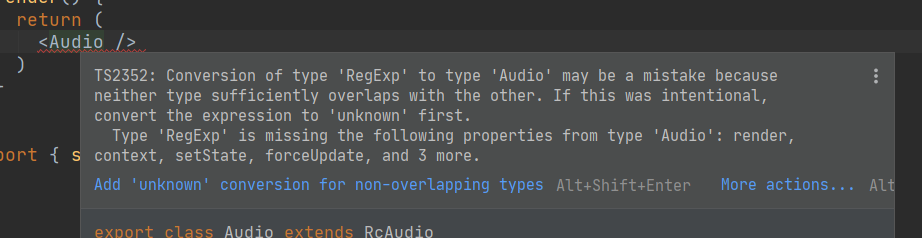
给第三方组件写文件依赖,用三划线导入, 然后用一个组件继承它。 最后暴露出去使用。使用的时候报错
custom-typings.d.ts
declare module 'rc-audio' {import * as React from 'react';export default class RcAudio extends React.Component<any, any> {}}
component.tsx
/// <reference path="../../typings/custom-typings.d.ts" />import React from "react";import RcAudio from "rc-audio";export class Audio extends RcAudio {render(): React.ReactNode {return (<div>123</div>);}}
然后在 index.ts 使用
import React from "react";import { Audio } from "./component/Component";class C extends React.Component<any, any>{render() {return (<Audio />)}}

若有收获,就点个赞吧
0 人点赞


