本例用到的数据库:
//本例用到的表create table tb_user(id int primary key auto_increment,userName varchar(30),passWord varchar(30),tel varchar(30),email varchar(30),addres varchar(30));//自行添加的数据insert into tb_user(userName,passWord,tel,email,addres) values('123456789','helloWord','12345678912','test@qq.com','上海');insert into tb_user(userName,passWord,tel,email,addres) values('987654321','helloWord','11122233344','test@qq.com','北京');
开始之前我们需要前往 .env 配置好链接的数据库![VKGXT(C2G$1BR)VWP(]}NWQ.png](/uploads/projects/lupowerful@wo38xu/d5f5faba7d24f689ce511fdcaf8fd3a6.png)
Controller层(控制层)
创建Controller:php artisan make:Controller User\UserController —resource
(ps:这里文创建的Controller 是在后面 加上 —resource的)
<?php//我们需要先导入Model层模型use App\Models\UserModel;public function index(){//$dataModel = new UserModel();$dataTable = $dataModel->getAll();return view("User/index")->with('data',$dataTable);}
View层(视图层)
新建一个 index 视图页面
<!doctype html><html lang="{{ str_replace('_', '-', app()->getLocale()) }}"><head></head><body><div align="center"><table><tr><td>id</td><td>userName</td><td>passWord</td><td>tel</td><td>email</td><td>addres</td></tr>@foreach ($data as $content)<tr><td>{{$content->id}}</td><td>{{$content->userName}}</td><td>{{$content->passWord}}</td><td>{{$content->tel}}</td><td>{{$content->email}}</td><td>{{$content->addres}}</td></tr>@endforeach</table></div></body></html>
Routes层(路由层)
<?php//配置RotesRoute::resource('user','User\UserController');
Model层(模型层)
//Model层代码<?phpnamespace App\Models;use Illuminate\Database\Eloquent\Model;class UserModel extends Model{protected $table = 'tb_user';//获取的表protected $primaryKey = 'id';//对应自增的idprotected $fillable = ['userName','passWord','tel','email','addres']; //对应列名public $timestamps = false;//数据库中没有设置时间戳,所以将他的值设为falsepublic function getAll(){return self::all();}}
最终效果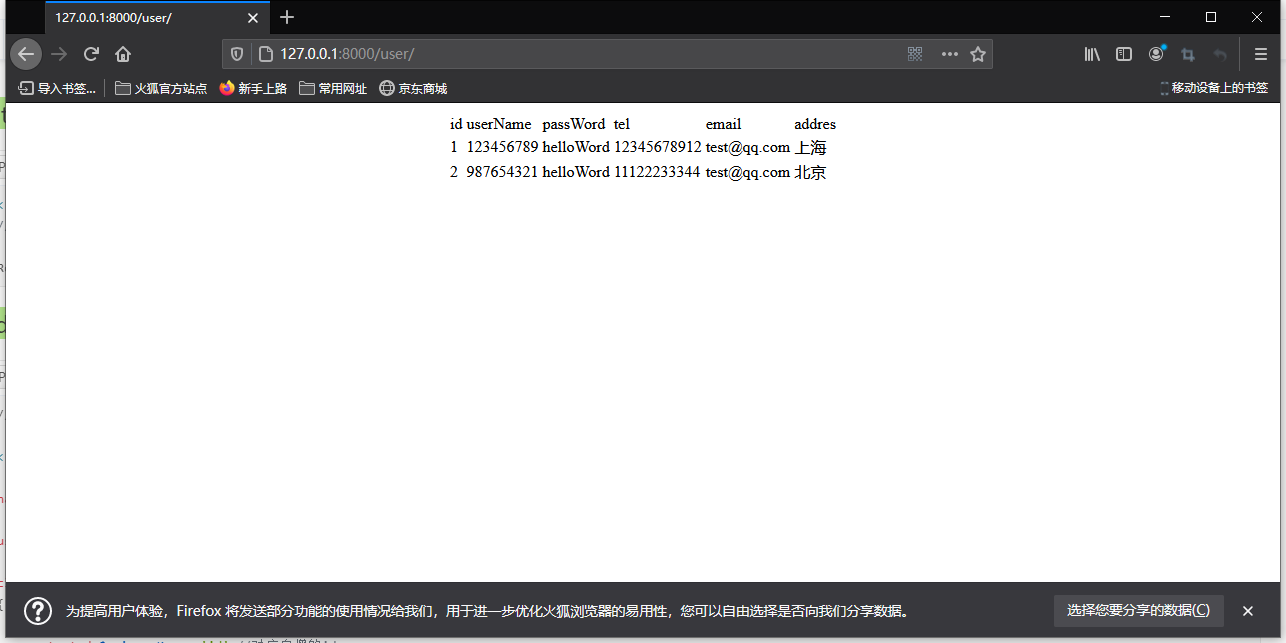

若有收获,就点个赞吧
0 人点赞


