原文:10 TypeScript features you might not be using yet or didn’t understand
10个你不了解或者还没使用的TS特性
1、怎么使用或者什么时候用unknown类型 (或者unknown v any);
2、索引访问类型(检查类型)
3、infer关键字
4、断言函数
5、什么时候使用never
6、const断言
7、override关键字
8、类中的static代码块
9、弃用支持
10、实例和静态索引签名
1、怎么和什么时候使用unknown类型(或者unknown v any)
unknown类型比any要更安全。
相同点:
let anyValue: any = "any value";anyValue = true;anyValue = 123;console.log(anyValue);let unknownValue: unknown;unknownValue = "unknown value";unknownValue = true;unknownValue = 123;console.log(unknownValue);
与any不太一样,unknown可以阻止我们用一些不知道的类型做一些事情。
下面的例子:
const anyValue: any = "any value";console.log(anyValue.add());
或者这个:
const anyValue: any = true;anyValue.typescript.will.not.complain.about.this.method();
上面的例子,在构建的时候不会有问题,但是在运行时就会报错。
当使用any类型的时候,TS编译器不会做任何的类型推断,所以,我们不能避免运行时的问题。
当使用unknown类型的时候,在构建时就会报错,IDE也会高亮错误。
下面示例:
let unknownValue: unknown;unknownValue = "unknown value";unknownValue.toString(); // Error: Object is of type 'unknown'.unknownValue = 100;const value = unknownValue + 10; // Error: Object is of type 'unknown'.unknownValue = console;unknownValue.log("test"); // Error: Object is of type 'unknown'.
每一次我们使用unknown类型时,都会报错。
为了使unknown类型能很好的工作,需要类型向下兼容。
使用类型断言:
let unknownValue: unknown;unknownValue = function () {};(unknownValue as Function).call(null);
使用类型守卫:
let unknownValue: unknown;unknownValue = "unknown value";if (typeof unknownValue === "string") unknownValue.toString();
自定义类型守卫:
let unknownValue: unknown;type User = { username: string };function isUser(maybeUser: any): maybeUser is User {return "username" in maybeUser;}unknownValue = { username: "John" };if (isUser(unknownValue))console.log(unknownValue.username);
使用断言函数:
let unknownValue: unknown;unknownValue = 123;function isNumber(value: unknown): asserts value is number {if (typeof value !== "number") throw Error("Not a number");}isNumber(unknownValue);unknownValue.toFixed();
2、索引访问类型(检索类型)
type User = {id: number;username: string;email: string;address: {city: string;state: string;country: string;postalCode: number;};addons: { name: string, id: number }[];};type id = User["id"]; // numbertype Session = User["address"];// {// city: string;// state: string;// country: string;// postalCode: string;// }type Street = User["address"]["state"]; // stringtype Addons = User["addons"][number]; // { name: string; id: number; }
上面的例子中,我们从已有的对象中,创建了新的类型,id,Session,Street,Addons。
可以直接在函数中使用:
function printAddress(address: User["address"]): void {console.log(`city: ${address.city},state: ${address.state},country: ${address.country},postalCode: ${address.postalCode}`);}
3、infer关键字
infer关键字允许你在条件语句中,从另外一个类型中推断出另一个类型。
const User = {id: 123,username: 'John',email: 'john@gmail.com',addons: [{ name: 'WriteAddon', id: 1 },{ name: 'TodoAddon', id: 2 }]};type UnpackArray<T> = T extends (infer R)[] ? R: T;type AddonType = UnpackArray<typeof User.addons>; // { name: string, id: number }
上面的案例中,我们通过addons类型推断出了一个单独的类型。
4、断言函数
有一组特定的函数,如果有未预料的事情发生会throw抛出一个错误。他们被叫做断言函数。
function assertIsString(value: unknown): asserts value is string {if (typeof value !== "string") throw Error("value is not a string");}
在上面的例子里,我们检查value值是不是string。在这个例子,我们什么都不做。不然,就会抛出一个错误。
这里有一个复杂的例子展示怎么断言对象和内部对象。
type User = {id: number;username: string;email: string;address: {city: string;state: string;country: string;postalCode: number;};};function assertIsObject(obj: unknown, errorMessage: string = 'Invalid object'): asserts obj is object {if(typeof obj !== 'object' || obj === null) throw new Error(errorMessage);}function assertIsAddress(address: unknown): asserts address is User['address'] {const errorMessage = 'Invalid address';assertIsObject(address, errorMessage);if(!('city' in address) ||!('state' in address) ||!('country' in address) ||!('postalCode' in address)) throw new Error(errorMessage);}function assertIsUser(user: unknown): asserts user is User {const errorMessage = 'Invalid user';assertIsObject(user, errorMessage);if(!('id' in user) ||!('username' in user) ||!('email' in user)) throw new Error(errorMessage);assertIsAddress((user as User).address);}
调用函数:
// Mock exampleclass UserWebService {static getUser = (id: number): User | unknown => undefined;}const user = UserWebService.getUser(123);assertIsUser(user); // if user invlid an error will be thrownuser.address.postalCode; // at this point we know that user is a valid object
5、什么时候使用never
never类型代表着一个值不会被观察到。
在一个返回类型中,这意味着函数会抛出异常或者终止程序的执行。
function plus1If1(value: number): number | never {if(value === 1) return 1 + value;throw new Error('Error was thrown');}
下面是使用promise的案例:
const promise = (value: number) => new Promise<number | never>((resolve, reject) => {if(value === 1) resolve(1 + value);reject(new Error('Error was thrown'));});
另外,永不停止的程序:
function endlessWhile(): never {while(true) {/* ... */}}
never也经常出现在,TS判断出在联合类型已没有其他类型。
function valueCheck(value: string | number) {if (typeof value === "string") {// value has type string} else if (typeof value === "number") {// value has type number} else {value; // value has type never}}
6、使用const断言
当我们用const断言构建一个字面量表达式时,我们可以给语言发信号。
- 该表达式中的字面类型都不应该被扩展(例如不必为 ‘hello’ 字符串指定
string类型) - 对象字面量有
readonly属性 - 数组字面量变成
readonly元组
下面是const实际使用的案例:
const email = 'john@gmail.com'; // type 'john@gmail.com'const phones = [8494922901, 1238399293]; // type number[]const session = { id: 123, name: 'x1keck323jKJdf1' };// type// {// id: number;// name: string;// }const username = 'John' as const; // type 'John'const roles = [ 'read', 'write'] as const; // type readonly ["read", "write"]const address = { street: 'Tokyo', country: 'Japan' } as const;// type// {// readonly street: "Tokyo";// readonly country: "Japan";// }const user = {email,phones,session,username,roles,address} as const;// {// readonly email: "john@gmail.com";// readonly phones: number[];// readonly session: {// id: number;// name: string;// };// readonly username: "John";// readonly roles: readonly ["read", "write"];// readonly address: {// readonly street: "Tokyo";// readonly country: "Japan";// };// }// With const assertion// user.email = 'jim@gmail.com' // Error// user.phones = []; // Erroruser.phones.push(859324293);// user.session = { name: 'new session name', id: 124 }; // Erroruser.session.name = 'new session name';// With const assertion + inner const assertion// user.username = 'Jim'; // Error// user.roles.push('ReadAndWrite'); // Error// user.address.city = 'Osaka'; // Error
另外,使用const断言,可以帮助我们把字符串数组转成字符串联合类型。
const roles = ['read', 'write', 'readAndWrite'] as const;type Roles = typeof roles[number];// equals to this// type Roles = "read" | "write" | "readAndWrite"// or even like thistype RolesInCapital = Capitalize<typeof roles[number]>;// equals to this// type RolesInCapital = "Read" | "Write" | "ReadAndWrite"
上面的例子,使用[number]在roles数组后面,告诉TS编译器抓取roles数组里有编号的索引值。
7、override关键字
自从4.3版本开始,我们可以在子类中使用override关键字覆盖已存在的行为。
class Employee {doWork() {console.log('I\'m working!');}}class Developer extends Employee {override doWork() {console.log('I\'m programming!')}}
我建议你修改你的配置把这个规则改成强制,只需要把noImplicitOverride改成true。
{"compilerOptions": {"noImplicitOverride": true}}
8、类中的static块。
从4.4版本开始,ts支持类中的static语法,你可以为你的静态成员写更复杂的初始化代码。
function userCount() {/* Mock data */return 15;};class User {id = 0;static count: number = 0;constructor(public username: string,public age: number) {this.id = ++User.count;}static {User.count += userCount();}}console.log(User.count); // 15new User('John', 23);new User('Suzi', 31);console.log(User.count); // 17
9、弃用的支持 Deprecation support
要标识一些东西是deprecated弃用的,可以使用JSDoc注释:
/** @deprecated use User class instead */class OldUser {}class User {/** @deprecated */constructor(public username: string, public age: number) {}/** @deprecated */static createUser(username: string, age: number) {/* ... */}static create(username: string, age: number) {/* ... */}}const oldUser = new OldUser();const user1 = new User('John', 34);const user2 = User.createUser('John', 34);const user3 = User.create('John', 34);
IDE会识别出来,并且建议不使用已经废弃的部分。
他们都有删除线,建议你不应该使用。
下面也展示了弃用的原因。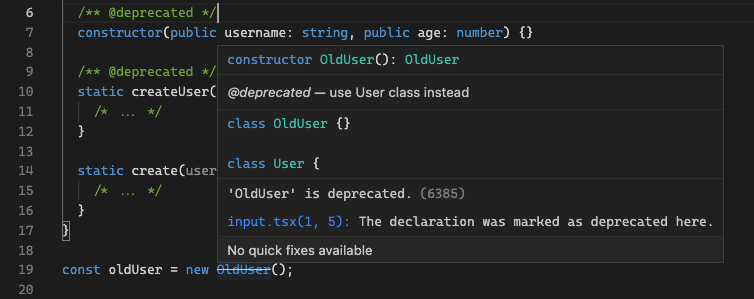
10、实例和静态索引签名
静态索引签名可以为一个值设置更多的属性 除了显示声明的。
class User {username: string;age: number;constructor(username: string,age: number) {this.username = username;this.age = age;}[propName: string]: string | number;}const user = new User('John', 23);user['phone'] = '+3434234898';const something = user['something'];
下面的例子显示了用法:
class User {username: string;age: number;constructor(username: string,age: number) {this.username = username;this.age = age;}static [propName: string]: string | number;}User['userCount'] = 0;const something = User['something'];

若有收获,就点个赞吧
0 人点赞


