本节内容
数据类型
| 数据类型 | 大小(字节) | 用途 | 格式 |
|---|---|---|---|
| INT | 4 | 整数 | |
| FLOAT | 4 | 单精度浮点数 | |
| DOUBLE | 8 | 双精度浮点数 | |
| ENUM | — | 单选,比如性别 | ENUM(‘a’,’b’,’c’) |
| SET | — | 多选 | SET(‘1’,’2’,’3’) |
| DATE | 3 | 日期 | YYYY-MM-DD |
| TIME | 3 | 时间点或持续时间 | HH:MM:SS |
| YEAR | 1 | 年份值 | YYYY |
| CHAR | 0~255 | 定长字符串 | |
| VARCHAR | 0~255 | 变长字符串 | |
| TEXT | 0~65535 | 长文本数据 |
CHAR 和 VARCHAR 的区别: 前者定长,后者变长。后者在存储字符少于额定长度时,按照实际长度来存储。
ENUM 和 SET 的区别:前者只能取枚举值其一即单选,后者可多选。
简单练习:
create database library;use library;# 创建book表create table book(book_id int primary key,book_name varchar(50) not null);# 创建reader表create table reader(reader_id int primary key,reader_name varchar(50) not null);
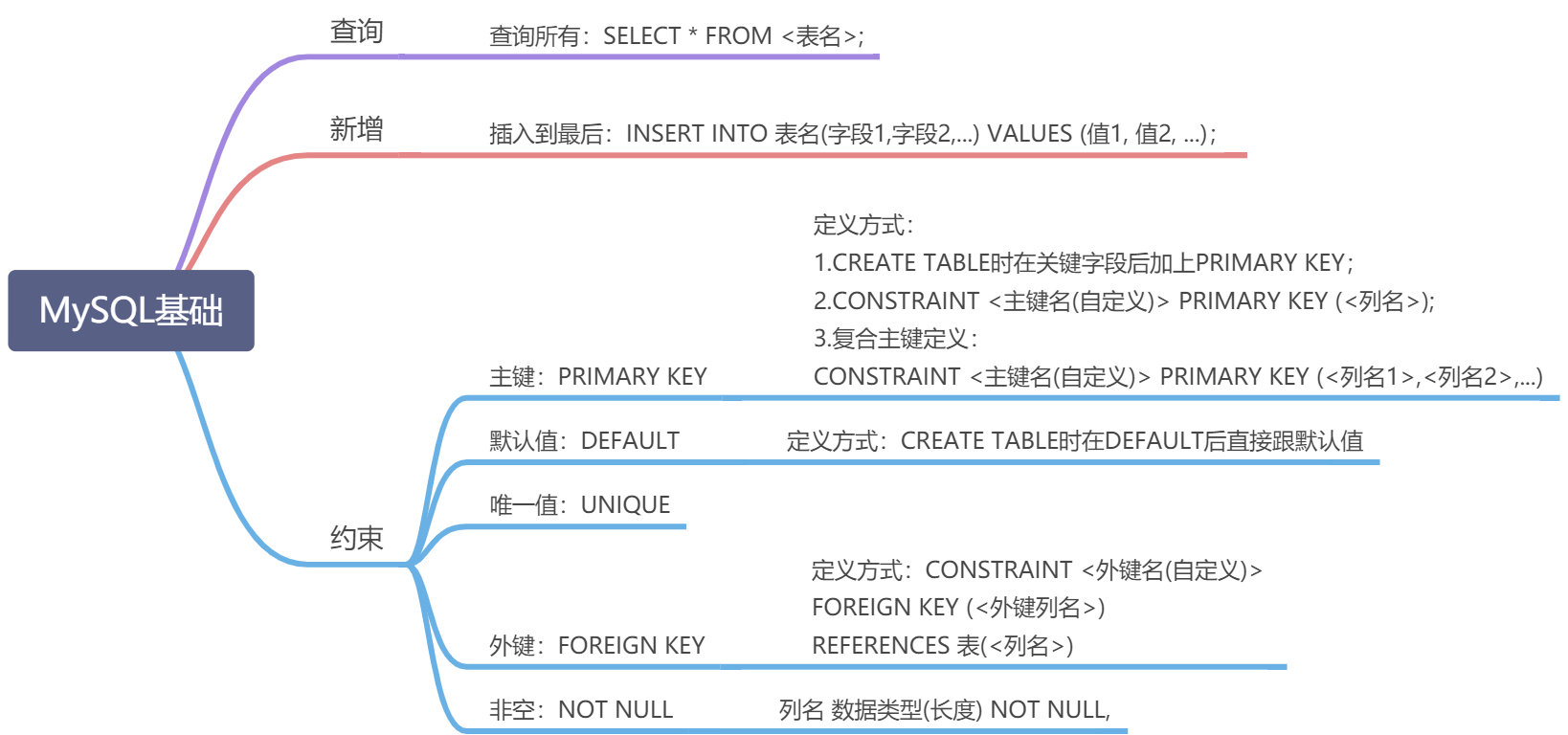
约束
| 约束类型: | 主键 | 默认值 | 唯一 | 外键 | 非空 |
|---|---|---|---|---|---|
| 关键字: | PRIMARY KEY | DEFAULT | UNIQUE | FOREIGN KEY | NOT NULL |
| 含义: | 能够唯一确定记录的字段 | 初始化的值是多少 | 一张表中的某一列的值必须是独一无二的,不能有重复值,即这列每个值都是唯一的 | 连接到另外的表中的主键 | 不能空着 |
练习1:搭建一个简单的成绩管理数据库
要求:
1.MySQL 服务处于运行状态
2.新建数据库的名称为 gradesystem
3.gradesystem 包含三个表:student、course、mark;
- student 表包含 3 列:sid(主键)、sname、gender;
- course 表包含 2 列:cid(主键)、cname;
- mark 表包含 4 列:mid(主键)、sid、cid、score ,注意与其他两个表主键之间的关系。
4.将上述表中的数据分别插入到各个表中 - 建立表时注意 id 自增和键约束
- 每个表插入语句可通过一条语句完成
步骤:
- 运行mysql
- 新建一个数据库,命名为gradesystem
- 连接gradesystem数据库,创建三张数据表:
- 学生表student
- 课程表course
- 成绩表
学生表(student):学生 id 、学生姓名和性别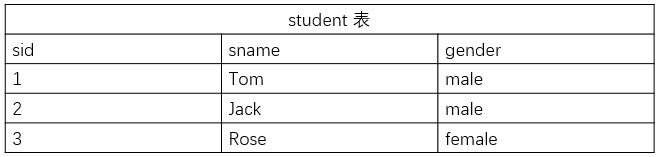
课程表:课程 id 和课程名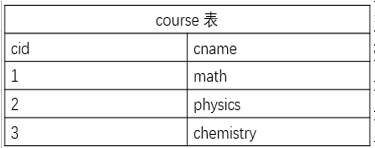
成绩表:成绩 id 、学生 id 、课程 id 和分数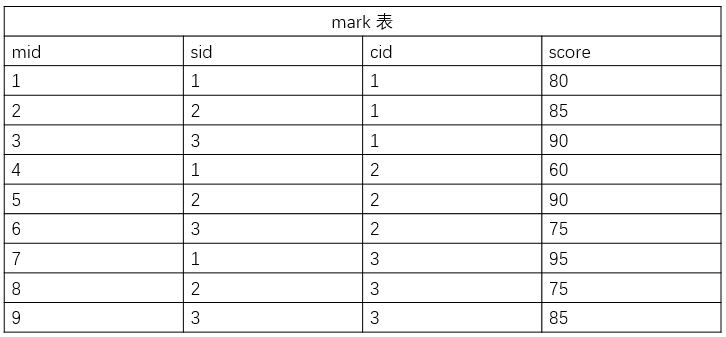
(baseenv) [qi@localhost ~]$ mysql -urootWelcome to the MySQL monitor. Commands end with ; or \g.Your MySQL connection id is 7Server version: 5.6.50 MySQL Community Server (GPL)Copyright (c) 2000, 2020, Oracle and/or its affiliates. All rights reserved.Oracle is a registered trademark of Oracle Corporation and/or itsaffiliates. Other names may be trademarks of their respectiveowners.Type 'help;' or '\h' for help. Type '\c' to clear the current input statement.mysql> show databases;+--------------------+| Database |+--------------------+| information_schema || mysql || performance_schema |+--------------------+3 rows in set (0.01 sec)mysql> CREATE DATABASE gradesystem;Query OK, 1 row affected (0.00 sec)mysql> use gradesystem;Database changedmysql> show tables;Empty set (0.00 sec)mysql> CREATE TABLE student(-> sid int NOT NULL AUTO_INCREMENT,-> sname varchar(20) NOT NULL,-> gender varchar(10) NOT NULL,-> PRIMARY KEY(sid)-> );Query OK, 0 rows affected (0.02 sec)mysql> CREATE TABLE course(-> cid int NOT NULL AUTO_INCREMENT,-> cname varchar(20) NOT NULL,-> PRIMARY KEY(cid)-> );Query OK, 0 rows affected (0.02 sec)mysql> CREATE TABLE mark(-> mid int NOT NULL AUTO_INCREMENT,-> sid int NOT NULL,-> cid int NOT NULL,-> score int NOT NULL,-> PRIMARY KEY(mid),-> FOREIGN KEY(sid) REFERENCES student(sid),-> FOREIGN KEY(cid) REFERENCES course(cid)-> );Query OK, 0 rows affected (0.02 sec)mysql> INSERT INTO student VALUES(1, 'Tom', 'male'), (2, 'Jack', 'male'), (3, 'Rose', 'female');Query OK, 3 rows affected (0.00 sec)Records: 3 Duplicates: 0 Warnings: 0mysql> INSERT INTO course VALUES (1, 'math'), (2, 'physics'), (3, 'chemistry');Query OK, 3 rows affected (0.00 sec)Records: 3 Duplicates: 0 Warnings: 0mysql> INSERT INTO mark VALUES (1, 1, 1, 80), (2, 3, 1, 85), (3, 3, 1, 90), (4, 1, 2, 60), (5, 2, 2, 90), (6, 3, 2, 75), (7, 1, 3, 95), (8, 2, 3, 75), (9, 3, 3, 85);Query OK, 9 rows affected (0.00 sec)Records: 9 Duplicates: 0 Warnings: 0

若有收获,就点个赞吧
0 人点赞


