1. 自动生成html文件
cnpm i html-webpack-plugin -S
//webpack.config.jsconst HtmlWebpackPlugin = require('html-webpack-plugin');
plugins:[new HtmlWebpackPlugin({title:'vue-webpack'})],
npm run build自动在dist生成index.html

2. 模板
将public/index.html作为模板,引入dist/index.html
//public->index.html<script src="../dist/bundle.js"></script>//删除<div id="app">html</div>
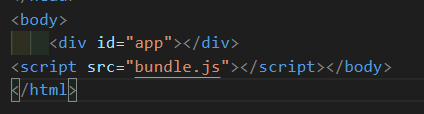
//webpack.config.jsplugins:[new HtmlWebpackPlugin({title:'vue-webpack',template:path.resolve(__dirname,"public/index.html")})],npm run builddist->index.html 就有div#app(如图)
3. 清除打包项目中多余的js
//若输出文件改动output:{path:path.resolve(__dirname,'dist'),filename:'[hash]-bundle.js'*},//npm run build//会在dist多出一个js文件//若不需要多余的js,可以引入这个
3-1. clean-webpack-plugin
cnpm i clean-webpack-plugin -S
const {CleanWebpackPlugin} = require('clean-webpack-plugin');plugins:[...+ new CleanWebpackPlugin()],
npm run build//不相干的js清除

若有收获,就点个赞吧
0 人点赞


