本篇和大家分享的是 Spring Boot 打包并结合 Shell 脚本命令部署,重点在分享一个shell 程序启动工具,希望能便利工作;
- profiles指定不同环境的配置
- maven-assembly-plugin打发布压缩包
- 分享shenniu_publish.sh程序启动工具
- linux上使用shenniu_publish.sh启动程序
profiles指定不同环境的配置
通常一套程序分为了很多个部署环境:开发,测试,uat,线上 等,我们要想对这些环境区分配置文件,可以通过两种方式:
- 通过application.yml中编码指定 profile.active=uat 方式指定
- 通过mvn中profiles来区分不同环境对应的配置文件夹,人工可以手动在idea勾选生成不同环境的包(推荐)
这里我们要讲的是第二种,首先在mvn中配置如下内容:
<profiles><profile><id>node</id><properties><!--传递给脚本的参数值--><activeProfile>node</activeProfile><package-name>${scripts_packageName}</package-name><boot-main>${scripts_bootMain}</boot-main></properties><activation><activeByDefault>true</activeByDefault></activation></profile><profile><id>node1</id><properties><activeProfile>node1</activeProfile><package-name>${scripts_packageName}</package-name><boot-main>${scripts_bootMain}</boot-main></properties></profile><profile><id>node2</id><properties><activeProfile>node2</activeProfile><package-name>${scripts_packageName}</package-name><boot-main>${scripts_bootMain}</boot-main></properties></profile></profiles>
节点粗解:
id:用来指定不同环境配置文件所在的目录,如下我这里:
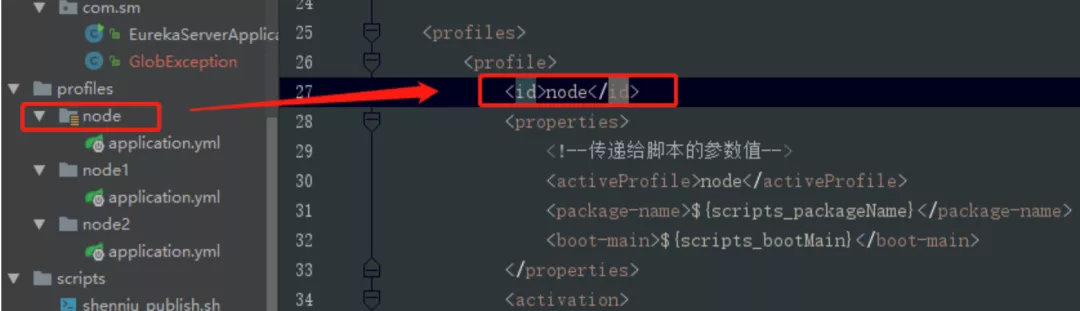
properties:该节点中的节点是可作为参数传递给其他配置文件,如我这里的package-name节点值就可以在另外的assembly.xml或者shell脚本文件中通过${package-name}获取到,如下:

activeByDefault:指定默认环境配置文件夹
maven-assembly-plugin打发布压缩包
对于springboot程序打包,可以分为jar和war,这里是jar包;有场景是咋们配置文件或者第三方等依赖包不想放到工程jar中,并且把这些文件压缩成一个zip包,方便上传到linux;此时通过maven-assembly-plugin和maven-jar-plugin就可以做到,mvn的配置如:
<plugin>
    <groupId>org.apache.maven.plugins</groupId>
    <artifactId>maven-jar-plugin</artifactId>
    <version>2.6</version>
    <configuration>
        <archive>
            <addMavenDescriptor>false</addMavenDescriptor>
            <manifest>
                <addClasspath>true</addClasspath>
                <classpathPrefix>lib/</classpathPrefix>
                <mainClass>${scripts_bootMain}</mainClass>
            </manifest>
        </archive>
        <!--打包排除项-->
        <excludes>
            <exclude>**/*.yml</exclude>
            <exclude>**/*.properties</exclude>
            <exclude>**/*.xml</exclude>
            <exclude>**/*.sh</exclude>
        </excludes>
    </configuration>
    <executions>
        <execution>
            <id>make-a-jar</id>
            <phase>compile</phase>
            <goals>
                <goal>jar</goal>
            </goals>
        </execution>
    </executions>
</plugin>

<plugin>
    <groupId>org.apache.maven.plugins</groupId>
    <artifactId>maven-assembly-plugin</artifactId>
    <version>2.4</version>
    <!-- The configuration of the plugin -->
    <configuration>
        <!-- Specifies the configuration file of the assembly plugin -->
        <descriptors>
            <descriptor>${project.basedir}/src/main/assembly/assembly.xml</descriptor>
        </descriptors>
    </configuration>
    <executions>
        <execution>
            <id>make-assembly</id>
            <phase>package</phase>
            <goals>
                <goal>single</goal>
            </goals>
        </execution>
    </executions>
</plugin>
值得注意的地方如下几点:
- mainClass节点:用来指定启动main函数入口类路径,如这里的:com.sm.EurekaServerApplication
- excludes节点:排除主jar包中配置等一些列后缀文件,因为我们要包这些配置文件放到主包外面
- descriptor节点:用来指定assembly插件对应的assembly.xml配置文件
有了上面mvn配置,我们还需要assembly.xml的配置,这里提取了结合shell脚本发布程序的配置:
<assembly xmlns="http://maven.apache.org/ASSEMBLY/2.0.0" xmlns:xsi="http://www.w3.org/2001/XMLSchema-instance"
          xsi:schemaLocation="http://maven.apache.org/ASSEMBLY/2.0.0 http://maven.apache.org/xsd/assembly-2.0.0.xsd
http://maven.apache.org/ASSEMBLY/2.0.0 ">
    <id>${activeProfile}</id>
    <!--打包成一个用于发布的zip文件-->
    <formats>
        <format>zip</format>
    </formats>
    <!--true:zip中生成一级目录(此处屏蔽,配合脚本需要profiles后缀)-->
    <includeBaseDirectory>false</includeBaseDirectory>
    <dependencySets>
        <dependencySet>
            <!--打包进zip文件的lib目录-->
            <useProjectArtifact>false</useProjectArtifact>
            <outputDirectory>${package-name}-${activeProfile}/lib</outputDirectory>
            <unpack>false</unpack>
        </dependencySet>
    </dependencySets>

    <fileSets>
        <!-- 配置文件打包进zip文件的conf目录 -->
        <fileSet>
            <directory>${project.basedir}/src/main/profiles/${activeProfile}</directory>
            <outputDirectory>${package-name}-${activeProfile}/conf</outputDirectory>
            <includes>
                <include>**/*</include>
                <!--<include>*.xml</include>-->
                <!--<include>*.properties</include>-->
                <!--<include>*.yml</include>-->
            </includes>
        </fileSet>

        <!--启动脚本打包进zip文件-->
        <fileSet>
            <directory>${project.basedir}/src/main/scripts</directory>
            <outputDirectory></outputDirectory>
            <includes>
                <include>**/*</include>
            </includes>
            <!-- 文件文件权限为777 -->
            <fileMode>777</fileMode>
            <!-- 目录权限为777 -->
            <directoryMode>777</directoryMode>
            <!--脚本中参数变量为pom中的值 关键-->
            <filtered>true</filtered>
        </fileSet>

        <!-- 项目编译出来的jar打包进zip文件 -->
        <fileSet>
            <directory>${project.build.directory}</directory>
            <outputDirectory>${package-name}-${activeProfile}/</outputDirectory>
            <includes>
                <include>*.jar</include>
            </includes>
        </fileSet>
    </fileSets>
</assembly>
重点节点介绍:
- formats节点:把配置文件和jar包等压缩成什么文件格式,这里可以有:zip,tar等
- fileMode节点:指定scripts目录下脚本文件(这里是:shenniu_publish.sh)在linux上文件权限为777
- filtered节点:脚本中参数变量为pom的profiles中properties的值(该配置,是把mvn中属性值映射生成到sh文件中,如:${package-name})
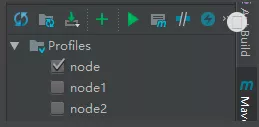
完成上面配置后,此时我们可以通过idea上勾选切换不同环境来打zip包,如图:
分享shenniu_publish.sh程序启动工具
上面步骤完成了zip格式的发布包,我们再分享下启动程序的shell脚本,该脚本具有的功能如:
- 解压zip+启动jar包
- 启动jar包
- 停止对应jar运行
- 重启jar程序
目前该shell中封装了两种启动jar命令的方式:
- java -cp
- java -jar
如图命令格式:

来看全部的shell代码:
#!/usr/bin/env bash
#可变参数变量
languageType="javac" #支持 java,javac,netcore 发布
#参数值由pom文件传递
baseZipName="${package-name}-${activeProfile}" #压缩包名称 publish-test.zip的publish
packageName="${package-name}" #命令启动包名 xx.jar的xx
mainclass="${boot-main}" #java -cp启动时,指定main入口类;命令:java -cp conf;lib\*.jar;${packageName}.jar ${mainclass}

#例子
# baseZipName="publish-test" #压缩包名称 publish-test.zip的publish
# packageName="publish" #命令启动包名 publish.jar的xx

#固定变量
basePath=$(cd `dirname $0`/; pwd)
baseZipPath="${basePath}/${baseZipName}.zip"  #压缩包路径
baseDirPath="${basePath}" #解压部署磁盘路径
pid= #进程pid

#解压
function shenniu_unzip()
{
    echo "解压---------------------------------------------"
    echo "压缩包路径:${baseZipPath}"
    if [ ! `find ${baseZipPath}` ]
    then
        echo "不存在压缩包:${baseZipPath}"
    else
        echo "解压磁盘路径:${baseDirPath}/${baseZipName}"
        echo "开始解压..."

        #解压命令
        unzip -od ${baseDirPath}/${baseZipName} ${baseZipPath}

        #设置执行权限
        chmod +x ${baseDirPath}/${baseZipName}/${packageName}

        echo "解压完成。"
    fi
}

#检测pid
function getPid()
{
    echo "检测状态---------------------------------------------"
    pid=`ps -ef | grep -n ${packageName} | grep -v grep | awk '{print $2}'`
    if [ ${pid} ]
    then
        echo "运行pid:${pid}"
    else
        echo "未运行"
    fi
}

#启动程序
function start()
{
    #启动前,先停止之前的
    stop
    if [ ${pid} ]
    then
        echo "停止程序失败,无法启动"
    else
        echo "启动程序---------------------------------------------"

        #选择语言类型
        read -p "输入程序类型(java,javac,netcore),下一步按回车键(默认:${languageType}):" read_languageType
        if [ ${read_languageType} ]
        then
            languageType=${read_languageType}
        fi
        echo "选择程序类型:${languageType}"

        #进入运行包目录
        cd ${baseDirPath}/${baseZipName}

        #分类启动
        if [ "${languageType}" == "javac" ]
        then
            if [ ${mainclass} ]
            then
                nohup java -cp conf:lib\*.jar:${packageName}.jar ${mainclass} >${baseDirPath}/${packageName}.out 2>&1 &
               #nohup java -cp conf:lib\*.jar:${packageName}.jar ${mainclass} >/dev/null 2>&1 &
            fi
        elif [ "${languageType}" == "java" ]
        then
            nohup java -jar ${baseDirPath}/${baseZipName}/${packageName}.jar >/dev/null 2>&1 &
            # java -jar ${baseDirPath}/${baseZipName}/${packageName}.jar
        elif [ "${languageType}" == "netcore" ]
        then
            #nohup dotnet run ${baseDirPath}/${baseZipName}/${packageName} >/dev/null 2>&1 &
            nohup ${baseDirPath}/${baseZipName}/${packageName} >/dev/null 2>&1 &
        fi

        #查询是否有启动进程
        getPid
        if [ ${pid} ]
        then
            echo "已启动"
            #nohup日志
            tail -n 50 -f ${baseDirPath}/${packageName}.out
        else
            echo "启动失败"
        fi
    fi
}

#停止程序
function stop()
{
    getPid
    if [ ${pid} ]
    then
        echo "停止程序---------------------------------------------"
        kill -9 ${pid}

        getPid
        if [ ${pid} ]
        then
            #stop
            echo "停止失败"
        else
            echo "停止成功"
        fi
    fi
}

#启动时带参数,根据参数执行
if [ ${#} -ge 1 ]
then
    case ${1} in
        "start")
            start
        ;;
        "restart")
            start
        ;;
        "stop")
            stop
        ;;
        "unzip")
            #执行解压
            shenniu_unzip
            #执行启动
            start
        ;;
        *)
            echo "${1}无任何操作"
        ;;
    esac
else
    echo "
    command如下命令:
    unzip:解压并启动
    start:启动
    stop:停止进程
    restart:重启

    示例命令如:./shenniu_publish start
    "
fi
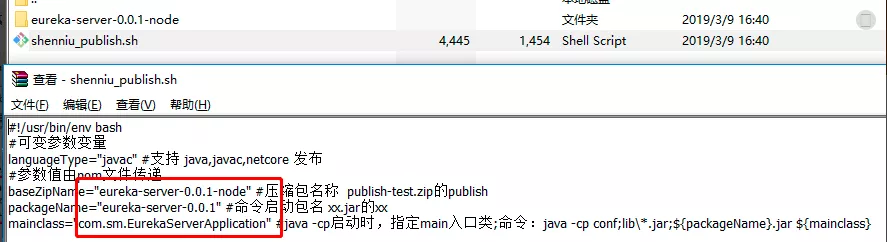
正如上面小节说的,shell中的参数 package-name,activeProfile,boot-main 都是由mvn中profiles的properties中提供,是可变的参数,脚本代码本身不需要人工去修改,只需要变的是mvn的参数即可;其实在我们生成zip包的时候,shell中的参数就被替换了,可以看zip中shell文件内容如:
img
把生成的zip上传到linux上,通过命令解压:
1 unzip -od eureka-server-0.0.1-node eureka-server-0.0.1-node.zip
其实shell脚本中包含有解压命令,但是我在打包时放在了zip中,所以只能通过手动解压了,当然可以调整;此时进入加压目录如此:

注:这里第一次执行./shenniu_publish.sh脚本时候,提示了错误信息;是由于我是在windows上编辑的这个脚本,其空格等和linux上不一样,所以运行会有问题,要解决可以使用vim命令在linux把该文件转成linux格式,如下命令:
1 vim shenniu_publish.sh
2 set ff=unix
3 :wq
执行完后,再来运行脚本./shenniu_publish.sh,此时有如下提示:
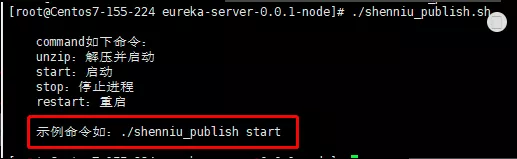
此刻我们文件是解压状态,因此只需要start命令启动程序即可:
img
到这里shenniu_publish.sh脚本使用就完成了,只要脚本没有提示错误,基本都能启动jar服务;其他restart和stop命令也如此执行就行: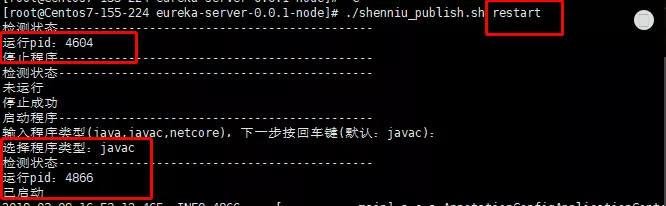
img
可以去研究下shell代码,希望该脚本能给你带来效率和好的学习思路,下面是测试用例git地址,脚本在eureka-server项目中:https://github.com/shenniubuxing3/springcloud-Finchley.SR2
——————————————————————————————————————-
转载自:https://www.cnblogs.com/wangrudong003/p/10502043.html

若有收获,就点个赞吧
0 人点赞


