安装java
1)到jdk官网下载tar包,上传到linux
2)解压并设置环境变量
JAVA_HOME=/opt/jdk1.8.0_171PATH=$JAVA_HOME/bin:$PATHsource /etc/profile 使配置生效
安装maven
1)到maven官网下载tar包,上传到linux
2)解压并配置阿里云私服地址,vim …/conf/settings.xml
<mirror>
    <id>alimaven</id>
    <name>aliyun maven</name>
    <url>http://maven.aliyun.com/nexus/content/groups/public/</url>
    <mirrorOf>central</mirrorOf>
 </mirror>
3)配置环境变量
MAVEN_HOME=/opt/apache-maven-3.5.4
PATH=$MAVEN_HOME/bin:$PATH

source /etc/profile 使配置生效
安装git
1)移除旧版git
[root@Git ~]# yum remove git ## 移除原来的版本
2)安装所需软件包
[root@Git ~]# yum install curl-devel expat-devel gettext-devel openssl-devel zlib-devel
[root@Git ~]# yum install gcc-c++ perl-ExtUtils-MakeMaker
[root@Git ~]# yum -y install autoconf
3)下载安装
[root@Git ~]# cd /opt
[root@Git ~]# wget https://www.kernel.org/pub/software/scm/git/git-2.7.3.tar.gz
[root@Git ~]# tar -zxvf git-2.7.3.tar.gz
4)配置编译安装
[root@Git ~]# cd git-2.7.3
[root@Git ~]# make configure
[root@Git ~]# ./configure --prefix=/opt/git ##配置目录
[root@Git ~]# make prefix=/opt/git
[root@Git ~]# make install
5)加入环境变量
GIT_HOME=/opt/git
PATH=$GIT_HOME/bin:$PATH

source /etc/profile 使配置生效
6)测试
[root@Git ~]# git --version
安装Jenkins
1)官网下载Jenkins.war并上传到linux下面的/opt/下面
2)启动
java -jar Jenkins.war &
出现如下界面表示启动成功。复制密码去登录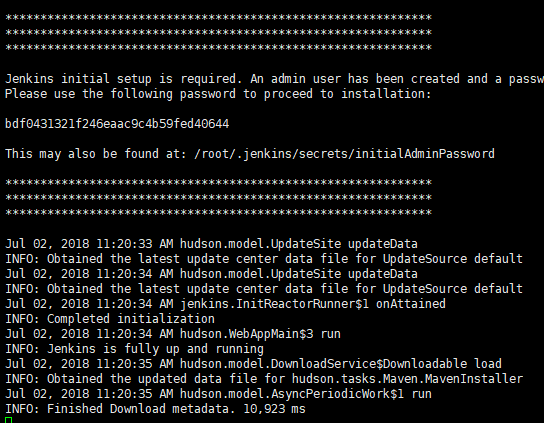
3)通过ip访问:http://123.207.149.12:8080
发现访问不通,然后关闭防火墙后即可访问通了
service iptables stop # 关闭防火墙
重新访问如下: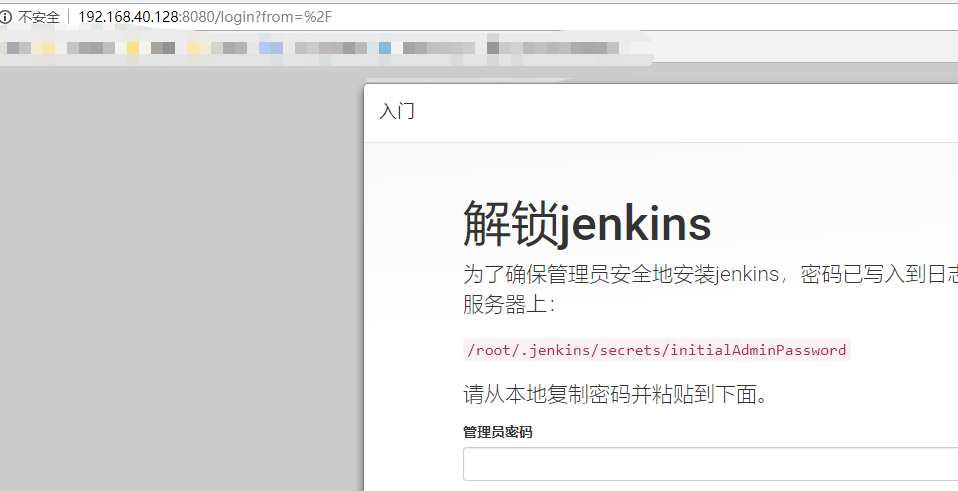
然后输入密码,安装推荐的插件即可到首页。
安装zookeeper可视化工具-zkui
Apache 官方提供;
ZKUI可视化的环境要求:
1、zkui 的基本环境概述
jdk 环境 :jdk-1.8
zookeeper 环境: zookeeper-3.5.3
maven 环境: maven-3.5.4
zkui 环境: zkui-2.0
下载
$ git clone https://github.com/DeemOpen/zkui.git
Cloning into 'zkui'...
remote: Counting objects: 527, done.
remote: Total 527 (delta 0), reused 0 (delta 0), pack-reused 526
Receiving objects: 100% (527/527), 478.39 KiB | 164.00 KiB/s, done.
Resolving deltas: 100% (217/217), done.
打包
$ cd zkui
$ mvn clean package -DskipTests=true
... package info ...
[INFO] ------------------------------------------------------------------------
[INFO] BUILD SUCCESS
[INFO] ------------------------------------------------------------------------
[INFO] Total time: 7.472 s
[INFO] Finished at: 2018-08-28T11:15:34+08:00
[INFO] ------------------------------------------------------------------------
运行
# 将config.cfg复制到上一步生成的jar文件所在目录。
$ cp config.cfg ./target/config.cfg
$ java -jar ./target/zkui-2.0-SNAPSHOT-jar-with-dependencies.jar
Aug 28, 2018 11:17:48 AM com.googlecode.flyway.core.metadatatable.MetaDataTableImpl createIfNotExists
信息: Creating Metadata table: "PUBLIC"."schema_version"
Aug 28, 2018 11:17:48 AM com.googlecode.flyway.core.command.DbMigrate migrate
信息: Current version of schema "PUBLIC": << Empty Schema >>
Aug 28, 2018 11:17:48 AM com.googlecode.flyway.core.command.DbMigrate applyMigration
信息: Migrating schema "PUBLIC" to version 1
Aug 28, 2018 11:17:48 AM com.googlecode.flyway.core.command.DbMigrate logSummary
信息: Successfully applied 1 migration to schema "PUBLIC" (execution time 00:00.081s).
log4j:WARN No appenders could be found for logger (org.eclipse.jetty.util.log).
log4j:WARN Please initialize the log4j system properly.
log4j:WARN See http://logging.apache.org/log4j/1.2/faq.html#noconfig for more info.
注: 配置文件中的zookeeper地址默认是localhost:2181,若需要监听其他机器上的zk,修改
config.cfg配置文件中的zkServer配置。测试
访问http://localhost:9090,如能正常访问并看到如下界面,则运行正常。
默认账密:# 角色为ADMIN username: admin password: manager # 角色为USER username: appconfig password: appconfig
zkui登录界面主界面

主界面

若有收获,就点个赞吧
0 人点赞


