什么是MybatisPlus
MyBatis-Plus(简称 MP)是一个 MyBatis 的增强工具,在 MyBatis 的基础上只做增强不做改变,为简化开发、提高效率而生(提供了快速使用mybatis的方式)。
官网:https://mybatis.plus/ 或 https://mp.baomidou.com/
MP特性
- 无侵入:只做增强不做改变,引入它不会对现有工程产生影响,如丝般顺滑
- 损耗小:启动即会自动注入基本 CURD,性能基本无损耗,直接面向对象操作
- 强大的 CRUD 操作:内置通用 Mapper、通用 Service,仅仅通过少量配置即可实现单表大部分 CRUD 操作,更有强大的条件构造器,满足各类使用需求
- 支持 Lambda 形式调用:通过 Lambda 表达式,方便的编写各类查询条件,无需再担心字段写错
- 支持主键自动生成:支持多达 4 种主键策略(内含分布式唯一 ID 生成器 - Sequence),可自由配置,完美解决主键问题
- 支持 ActiveRecord 模式:支持 ActiveRecord 形式调用,实体类只需继承 Model 类即可进行强大的 CRUD 操作
- 支持自定义全局通用操作:支持全局通用方法注入( Write once, use anywhere )
- 内置代码生成器:采用代码或者 Maven 插件可快速生成 Mapper 、 Model 、 Service 、 Controller 层代码,支持模板引擎,更有超多自定义配置等您来使用
- 内置分页插件:基于 MyBatis 物理分页,开发者无需关心具体操作,配置好插件之后,写分页等同于普通 List 查询
- 分页插件支持多种数据库:支持 MySQL、MariaDB、Oracle、DB2、H2、HSQL、SQLite、Postgre、SQLServer 等多种数据库
- 内置性能分析插件:可输出 Sql 语句以及其执行时间,建议开发测试时启用该功能,能快速揪出慢查询
- 内置全局拦截插件:提供全表 delete 、 update 操作智能分析阻断,也可自定义拦截规则,预防误操作
依赖和yml配置
maven依赖<dependency><groupId>com.baomidou</groupId><artifactId>mybatis-plus</artifactId><version>3.4.2</version></dependency>==============================================springboot整合的MP依赖<!--mybatisplus起步依赖--><dependency><groupId>com.baomidou</groupId><artifactId>mybatis-plus-boot-starter</artifactId><version>3.4.2</version></dependency>
DataSource相关配置:
# datasource
spring:
  datasource:
    url: jdbc:mysql://192.168.137.130:3306/mp?useUnicode=true&characterEncoding=UTF-8&serverTimezone=UTC
    username: root
    password: root
    driver-class-name: com.mysql.jdbc.Driver

#mybatis-plus配置控制台打印完整带参数SQL语句
mybatis-plus:
  configuration:
    log-impl: org.apache.ibatis.logging.stdout.StdOutImpl
入门编码
实体类:
package cn.baibao.sh.pojo;

import com.baomidou.mybatisplus.annotation.TableName;
import lombok.Data;

/**
 * @Description:baibao
 * @Version: V1.0
 */
@TableName("tb_user") // 指定表名
@Data
@NoArgsConstructor
@AllArgsConstructor
@Builder
public class User {
    private Long id;
    private String userName;
    private String password;
    private String name;
    private Integer age;
    private String email;
}
@TableName(“tb_user”) : 如果数据库的表名和实体类一致时可以省略
编写mapper:
package cn.baibao.sh.mapper;

import com.baomidou.mybatisplus.core.mapper.BaseMapper;
import cn.baibao.sh.pojo.User;
/**
 * 使用mp定义Mapper,需要让Mapper接口继承 BaseMapper接口。
 */
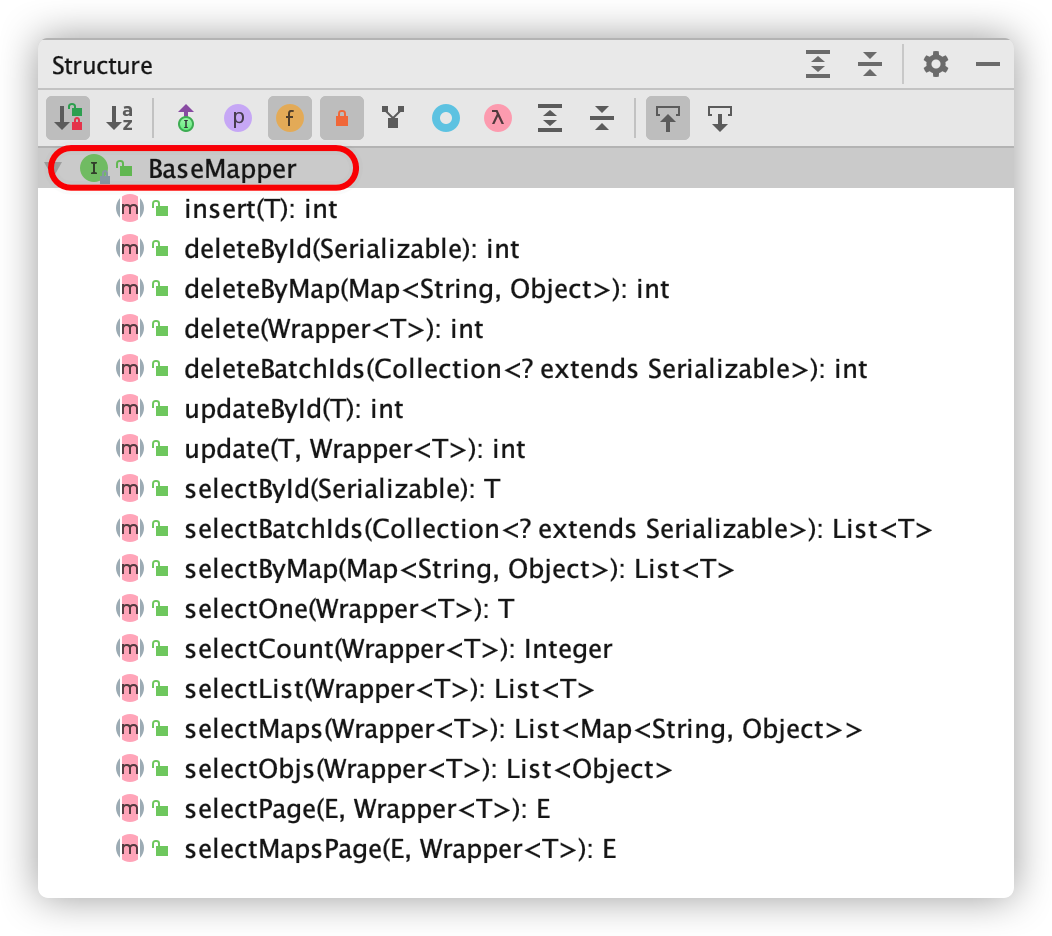
public interface UserMapper extends BaseMapper<User> {

}
启动类增加 @MapperScan 注解
package cn.baibao.sh;

import org.mybatis.spring.annotation.MapperScan;
import org.springframework.boot.SpringApplication;
import org.springframework.boot.autoconfigure.SpringBootApplication;

@SpringBootApplication
@MapperScan("com.itheima.sh.mapper")
public class MpApplication {
    public static void main(String[] args) {
        SpringApplication.run(MpApplication.class, args);
    }
}
测试
package cn.baibao.sh;

import cn.baibao.sh.mapper.UserMapper;
import cn.baibao.sh.pojo.User;
import org.junit.jupiter.api.Test;
import org.springframework.beans.factory.annotation.Autowired;
import org.springframework.boot.test.context.SpringBootTest;

@SpringBootTest
public class UserMapperTest {

    @Autowired
    private UserMapper userMapper;
    /**
     * 根据id查询
     */
    @Test
    public void testSelectById() {
        User user = userMapper.selectById(1L);
        System.out.println(user);
    }
}
MP主键生成策略—@TableId
注意事项:
1.如果主键对应的实体类属性中没有设置主键的生成策略,那么MP自动为主键生成值,且回填到实体对象下;
2.如果未指定主键生成策略,即使表的主键是主键自增,也不会使用主键自增;
在测试插入操作时,我们发现数据库表中主键id设置了自增,但是却生成了一段很长的数字(没有使用数据库自带的主键自增),这是什么原因呢?
注解@TableId
@TableId注解作用:
1.标识实体类中主键对应属性;
2.定义主键生成策略;
@TableId使用:
添加在实体类的主键对应的成员属性上即可;
主键生成策略:
是指为数据库生成主键的方式,我们前面学的数据库主键自增也是一种生成主键的策略,当然除了数据库服务端帮助我们维护主键之外,客户端也可以对主键值进行生成维护。
示例:
//指定主键自增的生成策略
@TableId(value = "user_id",type = IdType.AUTO)
private Integet userId;
MP提供的常用主键生成策略如下:
| 生成策略 | 应用场景 | 特点 |
|---|---|---|
| IdType.AUTO | 数据库主键自增(确保数据库设置了 主键自增 否则无效) | 1.使用数据库自带的主键自增值; 2.数据库自增的主键值会回填到实体类中; 3.数据库服务端生成的; |
| IdType.ASSIGN_ID | 主键类型为number类型或数字类型String | 1.MP客户端生成的主键值; 2.生成的主键值是数字形式的字符串 3.主键对应的类型可以是数字类型或者数字类型的字符串 4.底层基于雪花算法,让数据库的唯一标识也参与id的生成运算,保证id在分布式环境下,全局唯一(避免id的主键冲突问题); |
| IdType.ASSIGN_UUID | 主键类型为 string(包含数字和字母组成) | 1.生成的主键值包含数字和字母组成的字符串; 2.注意事项:如果数据库中主键值是number类型的,可不可用 |
| IdType.INPUT | 自己设置id |
说明:
在IdType.ASSIGN_ID生成ID的过程让时间戳、数据库服务器标识、序列化号等参与运算,保证分布式环境下ID的唯一性,避免主键冲突;
MP普通列注解-@TableField
1.通过@TableField(“表列名”) 指定映射关系
以下情况可以省略:
- 名称一样
- 数据库字段使用_分割,实体类属性名使用驼峰名称(自动开启驼峰映射)
2.忽略某个字段的查询和插入@TableField(exist = false)
示例:
/**
 * 实体类的属性名和数据库的字段名自动映射:
 *  1. 名称一样
 *  2. 数据库字段使用_分割,实体类属性名使用驼峰名称
 */

@TableName("tb_user")
@Data
public class User {
    //设置id生成策略:AUTO 数据库自增
    @TableId(type = IdType.AUTO)
    private Long id;
    //@TableField("user_name")
    private String userName;
    private String password;
    @TableField("t_name")
    private String name;
    private Integer age;
    private String email;
    //增删改查操作时,忽略该属性
    @TableField(exist = false)
    private String address;
}
MP实现分页查询
首先要配置—->分页拦截器
package cn.baibao.sh.config;
import com.baomidou.mybatisplus.annotation.DbType;
import com.baomidou.mybatisplus.extension.plugins.MybatisPlusInterceptor;
import com.baomidou.mybatisplus.extension.plugins.inner.PaginationInnerInterceptor;
import org.springframework.context.annotation.Bean;
import org.springframework.context.annotation.Configuration;

/**
 * @Description:baibao
 * @Version: V1.0
 */
@Configuration
public class MybatisPlusConfig {
    @Bean
    public MybatisPlusInterceptor mybatisPlusInterceptor() {
        MybatisPlusInterceptor interceptor = new MybatisPlusInterceptor();

        PaginationInnerInterceptor paginationInterceptor = new PaginationInnerInterceptor(DbType.MYSQL);
        // 设置请求的页面大于最大页后操作, true调回到首页,false 继续请求  默认false
        // paginationInterceptor.setOverflow(false);
        // 设置最大单页限制数量,-1不受限制
        paginationInterceptor.setMaxLimit(-1L);
        interceptor.addInnerInterceptor(paginationInterceptor);
        return interceptor;
    }

}
查询测试
/**
  * 分页查询:
  *  1. 当前页码:currentPage
  *  2. 每页显示条数:size
  *
  *  注意:使用mp的分页要设置一个拦截器!!!
*/
@Test
public void testSelectPage() {
  int current = 1;//当前页码
  int size = 2;//每页显示条数
  IPage<User> page = new Page(current,size);
  userMapper.selectPage(page,null);
  List<User> records = page.getRecords();//当前页的数据
  long pages = page.getPages();//总页数 2
  long total = page.getTotal();//总记录数 4
  System.out.println(records);
  System.out.println(pages);
  System.out.println(total);
}
QueryWrapper实现基础查询
基础比较查询
Wrapper接口:
1、QueryWrapper
LambdaQueryWrapper
2、UpdateWrapper
LambdaUpdateWrappe
QueryWrapper常用API与sql对比
| 操作符 | sql示例 | API实现方法 | 说明 |
|---|---|---|---|
| = | … where 字段名称 = xxx | QueryWrapper:eq(…) 方法 | 等于 |
| <> | … where 字段名称 <> xxx | QueryWrapper:ne(…) 方法 | 不等于 |
| > | … where 字段名称 > xxx | QueryWrapper:gt(…) 方法 | 大于 |
| >= | … where 字段名称 >= xxx | QueryWrapper:ge(…) 方法 | 大于等于 |
| <= | … where 字段名称 <= xxx | QueryWrapper:le(…) 方法 | 小于等于 |
| between | … where 字段名称 between 值1 and 值2 | QueryWrapper:between(…) 方法 | 区间值 |
| notBetween | … where 字段名称 notbetween 值1 and 值2 | QueryWrapper:notBetween(…) 方法 | 不在区间值 |
| in | … where 字段名称 in (值1,值2 …) | QueryWrapper:in(…) 方法 | 多值等于 |
| notIn | … where 字段名称 notIn (值1,值2 …) | QueryWrapper:notIn(…) 方法 | 非多值等于 |
注意:sql中反向查询eg:not like != 等等,查询时是不会走索引的;
QueryWrapper逻辑查询or
1.通过QueryWrapper多条件查询时,默认使用and关键字拼接SQL;
2.通过QueryWrapper调用or()方法时,底层会使用or关键字拼接方法左右的查询条件;

QueryWrapper模糊查询like
like("表列名","条件值");     作用:查询包含关键字的信息,底层会自动添加匹配关键字,比如:%条件值%
likeLeft("表列名","条件值"); 作用:左侧模糊搜索,也就是查询以指定条件值结尾的数据,比如:%条件值
likeRight("表列名","条件值");作用:右侧模糊搜索,也就是查询以指定条件值开头的数据,比如:条件值%

QueryWrapper排序查询
orderByAsc      升序排序
orderByDesc     降序排序

QueryWrapper限定字段查询
wrapper.select("字段1","字段2",......)

QueryWrapper实现分页条件查询
    //参数1:分页对象
//参数2:查询条件
mapper.selectPage(page,wrapper);
LambdaQueryWrapper查询
使用QueryWrapper开发存在的问题
1、使用QueryWrapper查询数据时需要手写对应表的列名信息,及其容易写错,开发体验不好;
2、使用QueryWrapper查询数据时,表的列名硬编码书写,后期一旦表结构更改,则会带来很大的修改工作量,维护性较差;
3、LambdaQueryWrapper可以解决上述出现问题,开发推荐使用;
LambdaQueryWrapper实现删除和更新操作
/**
     * 条件删除
     * @throws Exception
*/
@Test
public void testWrapper5() throws Exception{

  LambdaQueryWrapper<User> wrapper = Wrappers.<User>lambdaQuery().eq(User::getUserName, "武大郎");
  int i = userMapper.delete(wrapper);
  System.out.println(i);
}

/**
     * 条件更新
     * @throws Exception
*/
@Test
public void testWrapper6() throws Exception{

  /**
     * UPDATE tb_user SET t_name=? WHERE (id = ?)
     */
  // 参数1: 最新的值
  User user = new User();
  user.setUserName("张三丰");

  // 参数2:更新时条件
  LambdaQueryWrapper<User> wrapper = Wrappers.<User>lambdaQuery();
  wrapper.eq(User::getId, 15);

  int update = userMapper.update(user, wrapper);
  System.out.println(update);
}


/**
     * 条件更新
     * @throws Exception
     */
@Test
public void testWrapper7() throws Exception{
  /**
         * UPDATE tb_user SET t_name=?, user_name=? WHERE (id = ?)
         */
  // 参数1: 最新的值
  // 参数2:更新时条件
  LambdaUpdateWrapper<User> wrapper = Wrappers.<User>lambdaUpdate();
  wrapper.eq(User::getId, 15)
    .set(User::getUserName, "张三丰666")
    .set(User::getName,"zsf666");

  int update = userMapper.update(null, wrapper);
  System.out.println(update);
}
自定义查询接口实现分页查询
1)自定义接口中直接传入Page分页对象即可;
package cn.baibao.mapper;

import com.baomidou.mybatisplus.core.mapper.BaseMapper;
import com.baomidou.mybatisplus.core.metadata.IPage;
import cn.baibao.pojo.User;
import org.apache.ibatis.annotations.Param;

import java.util.List;

/**
 * @Description 定义mapper接口
 * @Created by itheima
 */
//@Mapper
public interface UserMapper extends BaseMapper<User> {
    /**
     * 查询大于指定id的用户信息,并分页查询实现
     * @param page
     * @param id
     * @return
     */
    IPage<User> findGtIdByPage(IPage<User> page, @Param("id") Long id);
}
2)定义xml映射文件
<?xml version="1.0" encoding="UTF-8" ?>
<!DOCTYPE mapper
        PUBLIC "-//mybatis.org//DTD Mapper 3.0//EN"
        "http://mybatis.org/dtd/mybatis-3-mapper.dtd">
<mapper namespace="com.itheima.mapper.UserMapper">

    <select id="findGtIdByPage" resultType="com.itheima.pojo.User">
        select * from tb_user where id > #{id}
    </select>
</mapper>
3)测试
/**
     * @Description 自定义sql分页查询实现
     */
@Test
public void test19(){
    IPage<User> page=new Page<>(2,3);
    IPage<User> users = userMapper.findGtIdByPage(page, 3l);
    System.out.println(users.getRecords());
    System.out.println(user.getPages());
    System.out.println(user.getTotal());
}
MP实现Service封装
MybatisPlus为了开发更加快捷,对业务层也进行了封装,直接提供了相关的接口和实现类;
我们在进行业务层开发时,可以继承它提供的接口和实现类,使得编码更加高效;
实现流程
1.定义一个服务扩展接口,该接口继承公共接口IService;
2.定义一个服务实现类,该类继承ServiceImpl
核心API介绍
代码实现:
【1】定义服务扩展接口
//在公共接口的基础上扩展
public interface UserService extends IService<User> {

}
【2】定义服务实现
@Service
public class UserServiceImpl extends ServiceImpl<UserMapper, User> implements UserService {}
【3】测试
package cn.baibao;

import com.baomidou.mybatisplus.core.conditions.query.LambdaQueryWrapper;
import com.baomidou.mybatisplus.core.conditions.query.QueryWrapper;
import com.baomidou.mybatisplus.core.conditions.update.LambdaUpdateWrapper;
import com.baomidou.mybatisplus.core.metadata.IPage;
import com.baomidou.mybatisplus.core.toolkit.Wrappers;
import com.baomidou.mybatisplus.extension.plugins.pagination.Page;
import cn.baibao.mapper.UserMapper;
import cn.baibao.pojo.User;
import cn.baibao.service.UserService;
import org.junit.jupiter.api.Assertions;
import org.junit.jupiter.api.Test;
import org.omg.PortableInterceptor.USER_EXCEPTION;
import org.springframework.beans.factory.annotation.Autowired;
import org.springframework.boot.test.context.SpringBootTest;

import java.util.Arrays;
import java.util.HashMap;
import java.util.List;

/**
 * @Description
 * @Created by itheima
 */
@SpringBootTest
public class MpTestService {
    @Autowired
    private UserService userService;

    /**
     * @Description 测试查询操作 根据id查询
     */
    @Test
    public void test1(){
        User user = userService.getById(3l);
        System.out.println(user);
    }

    /**
     * @Description 测试条件查询,且仅返回一个
     * getOne:sql查询的结果必须为1条或者没有,否则报错 !!!!
     */
    @Test
    public void test2(){
        LambdaQueryWrapper<User> wrapper = Wrappers.lambdaQuery(User.class);
        wrapper.gt(User::getAge,20);
        User one = userService.getOne(wrapper);
        System.out.println(one);
    }

    /**
     * @Description 根据条件批量查询
     */
    @Test
    public void test3(){
        LambdaQueryWrapper<User> wrapper = Wrappers.lambdaQuery(User.class);
        wrapper.gt(User::getAge,20);
        List<User> list = userService.list(wrapper);
        System.out.println(list);
    }

    /**
     * @Description 根据条件批量查询并分页
     */
    @Test
    public void test4(){
        LambdaQueryWrapper<User> wrapper = Wrappers.lambdaQuery(User.class);
        wrapper.gt(User::getAge,20);
        //构建分页对象
        IPage<User> page=new Page<>(2,3);
        userService.page(page,wrapper);
        System.out.println(page.getRecords());
        System.out.println(page.getPages());
        System.out.println(page.getTotal());
    }

    /**
     * @Description 测试服务层save保存单条操作
     */
    @Test
    public void test5(){
        User user1 = User.builder().name("wangwu").userName("laowang4").
                email("444@163.com").age(20).password("333").build();
        boolean isSuccess = userService.save(user1);
        System.out.println(isSuccess?"保存成功":"保存失败");
    }

    /**
     * @Description 测试服务层批量保存
     */
    @Test
    public void test6(){
        User user2 = User.builder().name("wangwu2").userName("laowang2").
                email("444@163.com").age(20).password("333").build();
        User user3 = User.builder().name("wangwu3").userName("laowang3").
                email("444@163.com").age(20).password("333").build();
        boolean isSuccess = userService.saveBatch(Arrays.asList(user2, user3));
        System.out.println(isSuccess?"保存成功":"保存失败");
    }

    /**
     * @Description 根据id删除操作
     */
    @Test
    public void test7(){
        boolean isSuccess = userService.removeById(17l);
        System.out.println(isSuccess?"保存成功":"保存失败");
    }

    /**
     * @Description 根据条件批量删除
     */
    @Test
    public void test8(){
        LambdaQueryWrapper<User> wrapper = Wrappers.lambdaQuery(User.class);
        wrapper.gt(User::getId,12)
                .gt(User::getAge,20);
        boolean remove = userService.remove(wrapper);
        System.out.println(remove);
    }

    /**
     * @Description 测试根据id更新数据
     */
    @Test
    public void test9(){
        //UPDATE tb_user SET password=?, t_name=? WHERE id=?
        User user2 = User.builder().name("wangwu2").password("333").id(3l).build();
        boolean success = userService.updateById(user2);
        System.out.println(success);

    }

    /**
     * @Description 测试根据条件批量更新
     */
    @Test
    public void test10(){
        LambdaUpdateWrapper<User> wrapper = Wrappers.lambdaUpdate(User.class);
        //UPDATE tb_user SET age=? WHERE (id IN (?,?,?))
        wrapper.in(User::getId,Arrays.asList(1l,3l,5l)).set(User::getAge,40);
        boolean update = userService.update(wrapper);
        System.out.println(userService);

    }
}
注意事项:
1.ServiceImpl父类已经注入了UserMapper对象,名称叫做baseMapper,所以当前实现类直接可以使用baseMapper完成操作
2.因为ServiceImpl已经实现了IService下的方法,所以当前服务类没有必要再次实现
思想:共性的业务代码交给框架封装维护,非共性的业务,在接口UserService定义,然后在当前的服务类下实现;
MP代码生成器
在开发中当有一个新的业务要实现时,通常我们需要构建一下信息:
- 定义PO类
数据库表和实体类的映射 Java Bean。 - 定义DAO层
需要编写接口 Mapper ,接口 Mapper 需要去继承 MP 中的 BaseMapper 接口。 - 定义Service层
编写 Service 层接口和实现类。
业务接口需要去继承 MP 中的 IService,业务实现类需要继承 MP 中的 ServiceImpl 和 实现业务接口。 - 定义Controller层
编写 Controller 并标注 Spring MVC 中的相关注解。
显然上述存在固定的流程,且存在大量重复操作,you now 代码价值低且没效率!
所以我们可以把一些基本的CRUD封装起来,用的时候,直接生成!!
实现方法有两种:
方法一:代码生成器
通过MP代码生成器可以生成模板性的代码,减少手工操作的繁琐,使开发人员聚焦于业务开发之上,提升开发效率;
AutoGenerator 类是MyBatis-Plus 的核心代码生成器类,通过 AutoGenerator 可以快速生成 Mapper接口、Entity实体类、Mapper XML、Service、Controller 等各个模块的代码,极大的提升了开发效率。
gitee开源链接:https://gitee.com/jitheima/mp_generator.git
完整代码:
以后在项目中使用时,先在本工程生成,然后就可以把代码拷贝到对应的项目目录中使用了;
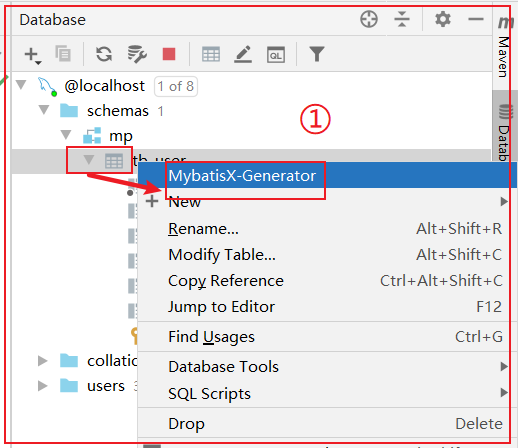
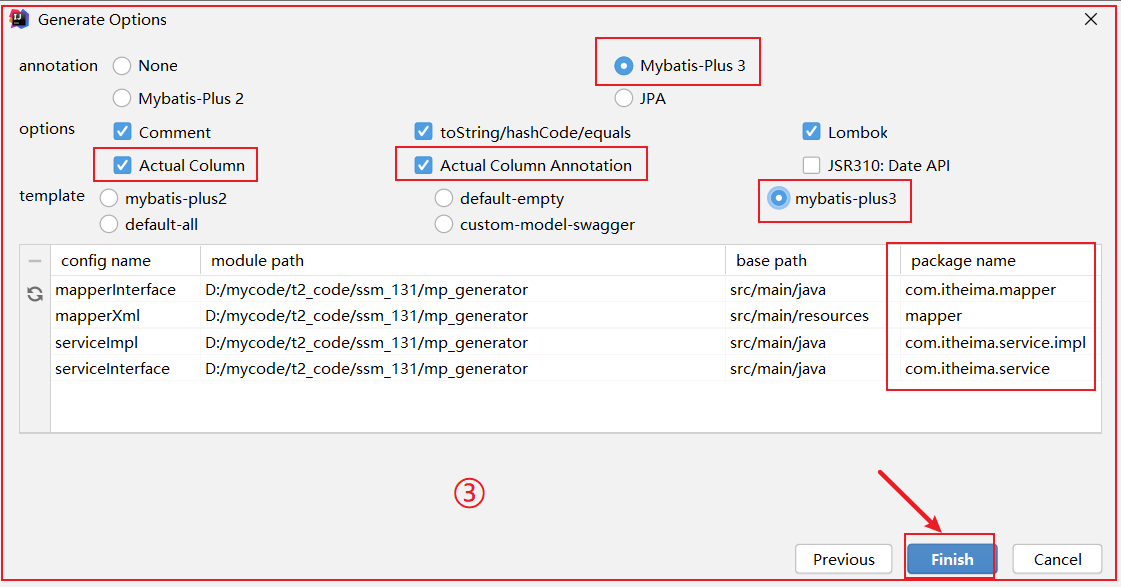
方法二:MybatisX插件
MybatisX 是一款基于 IDEA 的快速开发插件,为效率而生
安装方法:打开 IDEA,进入 File -> Settings -> Plugins -> Browse Repositories,输入 mybatisx 搜索并安装。
功能:
- Java 与 XML 调回跳转
- Mapper 方法自动生成 XML


若有收获,就点个赞吧
0 人点赞


