常用命令
#1、查看当前数据库版本select version();+-----------+| version() |+-----------+| 5.7.29 |+-----------+#2、查看其它库的所有表show tables from 库名;#3、查看表结构desc 表名;#4、字段可以使用着重号#5、字段可以使用“AS”或“空格”起别名select name as 名字,sex as 性别 from emp;select name 名字,sex 性别 from emp;#如果别名里有特殊符号,需要给别名加上双引号或者单引号select salary as "out out" from emp;#6、去重查询员工表中涉及到的所有的部门编号select distinct department_id from emp;#7、MySQL拼接使用concat()select concat(last_name,first_name) as 姓名 from emp;select concat('a','b') as 结果;#8、MySQL查询表达式select last_name,salary * 10 as 结果 from emp;#9、ifnull(a,b)函数,如果a的值为null就使用b的值代替a原有的值#查询员工号为176的员工的姓名和部门号和年薪select last_name,department_id,salary*12*(1+ifnull(commission_pct,0)) as 年薪 from emp where employee_id=176#10、查询常量select 常量值;#注意:字符型和日期型的常量值必须用单引号引起来,数值型不需要#11、isnull()函数#判断某字段或表达式是否为null,如果是,则返回1,否则返回0
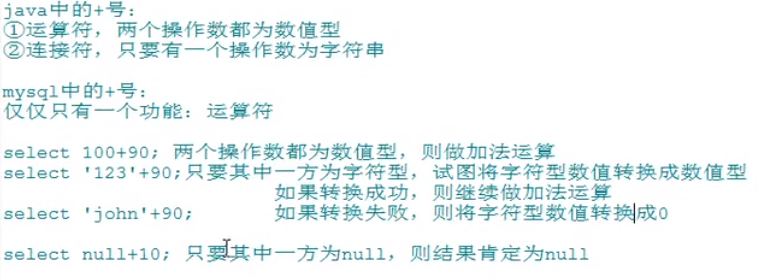
+号的作用
查询(where子句)
/*以下是 SQL SELECT 语句使用 WHERE 子句从数据表中读取数据的通用语法:SELECT field1, field2,...fieldN FROM table_name1, table_name2...[WHERE condition1 [AND [OR]] condition2.....查询语句中你可以使用一个或者多个表,表之间使用逗号, 分割,并使用WHERE语句来设定查询条件。你可以在 WHERE 子句中指定任何条件。你可以使用 AND 或者 OR 指定一个或多个条件。WHERE 子句也可以运用于 SQL 的 DELETE 或者 UPDATE 命令。WHERE 子句类似于程序语言中的 if 条件,根据 MySQL 表中的字段值来读取指定的数据。*/use RUNOOB;SELECT * FROM runoob_tbl WHERE runoob_author = '菜鸟教程';1、按条件表达式筛选#查询部门编号不等于90号的员工名和部门编号select last_name,department_id from emp where department_id<>90;2、按逻辑表达式进行筛选(用于连接条件表达式)not如果连接条件本身为false,结果为true,反之为false#查询部门编号不是在90到110之间,或者工资高于15000的员工信息select * from emp where not(department_id>=90 and department_id<=110) or salary>15000;3、模糊查询like、between and、in、is null/is not null①、like特点:可以判断字符型或者数值型一般和通配符搭配使用通配符:% 任意多个字符,包含0个字符_ 任意单个字符查询员工名中包含字符a的员工信息select * from emp where last_name like '%a%';查询员工名中第三个字符为e,第五个字符为a的员工名和工资select last_name,salary from emp where last_name like '__e_a%';查询员工名中第二个字符为_的员工名select last_name from emp where last_name like '_\_%';select last_name from emp where last_name like '_$_%' escape '$';#(推荐使用)②、between and查询员工编号在100到120之间的员工信息select * from emp where employee_id >=100 and employee_id <=120;select * from emp where employee_id between 100 and 120;③、in查询员工的工种编号是IT_PROG、AD_VP、AD_PRES中的一个员工名和工种编号select last_name , job_id from emp where job_id in (IT_PROG,AD_VP,AD_PRES);④、is null/is not null= <>不能用于判断null值查询没有奖金的员工名和奖金率select last_name ,commission_pct from emp where commission_pct is null;查询有奖金的员工名和奖金率select last_name, commission_pct from emp where commission is not null;<=> 安全等于select last_name ,commission_pct from emp where commission_pct <=> null;安全等于既可以判断null值,也可以判断普通数值
如果我们想在 MySQL 数据表中读取指定的数据,WHERE 子句是非常有用的。
使用主键来作为 WHERE 子句的条件查询是非常快速的。
如果给定的条件在表中没有任何匹配的记录,那么查询不会返回任何数据。
排序查询
语法
以下是 SQL SELECT 语句使用 ORDER BY 子句将查询数据排序后再返回数据:
SELECT field1, field2,…fieldN FROM table_name1, table_name2…
ORDER BY field1 [ASC [DESC][默认 ASC]], [field2…] [ASC [DESC][默认 ASC]]
你可以使用任何字段来作为排序的条件,从而返回排序后的查询结果。
你可以设定多个字段来排序。
你可以使用 ASC 或 DESC 关键字来设置查询结果是按升序或降序排列。 默认情况下,它是按升序排列。
你可以添加 WHERE…LIKE 子句来设置条件。
排序采用 order by 子句,order by 后面跟上排序字段,排序字段可以放多个,多个采用逗号间隔,order by默认采用升序(asc),如果存在 where 子句,那么 order by 必须放到where 语句后面。
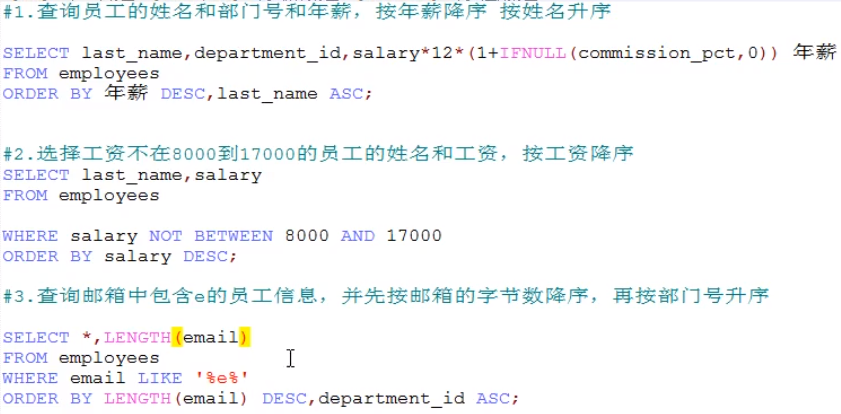
use RUNOOB;#升序SELECT * FROM runoob_tbl ORDER BY runoob_id ASC;#降序SELECT * FROM runoob_tbl ORDER BY runoob_id DESC;#查询部门编号>=90的员工信息,按入职时间的先后进行排序select * from emp where department_id>=90 order by hiredate asc;#按年薪的高低显示员工的信息和年薪【按表达式排序】select * , salary*12*(1+ifnull(commission_pct,0)) as 年薪 from emp order by salary*12*(1+ifnull(commission_pct,0)) desc;#按年薪的高低显示员工的信息和年薪【按别名排序】select * , salary*12*(1+ifnull(commission_pct,0)) as 年薪 from emp order by 年薪 desc;#按姓名的长度显示员工的姓名和工资【按函数排序】select length(last_name) as 字节长度,last_name,salary from emp order by length(last_name) desc;#查询员工信息,要求先按工资升序,再按员工编号降序【按多个字段排序】select * from emp order by salary asc , employee_id desc;#order by一般放在查询语句的最后,limit子句除外
常用函数
#字符函数#1、upper(变大写),lower(变小写)select upper('john');select lower('john');#将姓变大写,名变小写,然后拼接select concat(upper(last_name),lower(first_name)) as 姓名 from emp;#2、substr、substring#姓名中首字母大写,其他字符小写,然后用_拼接显示出来select concat(upper(substr(last_name,1,1)),'_',lower(substr(last_name,2))) as output from emp#3、instr返回子串第一次出现的索引,如果找不到返回0select instr('杨不悔爱上了殷六侠','殷六侠') as output;#4、trimselect trim('a' from 'aaaaaaa张aaaaa翠山aaaaaaaa') as output;output张aaaaa翠山#5、lpad/rpadlpad用指定的字符实现左填充指定长度select lpad('殷素素',2,'*') as output;rpad用于指定的字符实现右填充指定长度select rpad('殷素素',12,'ab') as output;#6、replace#7、concat#8、ifnull#9、isnull#数学函数#1、round四舍五入select(-1.55)select(-1.67,2)#2、ceil向上取整,返回>=该参数的最小整数select ceil(-1.02);#3、floor向下取整,返回<=该参数的最大整数select floor(-9.99);#4、truncate 截断select truncate(1.6999,1);#5、mod取余select mod(10,3);select 10%3;#日期函数#1、now返回当前系统的日期和时间select now();#2、curdate返回当前系统的日期,不包含时间select curdate();#3、curtime返回当前系统的时间,不包含日期select curtime();#4、获取指定的部分,年、月、日、小时、分钟、秒select year(now()) as ;#5、str_to_date将字符通过指定的格式转换成日期#6、date_format将日期转换成字符#其他函数select version();select database();select user();#流程控制函数#if()类似于Java的三元运算符select if(10>5,'大','小');select last_name,commission_pct,if(commossion_pct is null,'没有奖金,呵呵','有奖金嘻嘻') as 备注 from emp;#case函数#case函数使用一(when后面跟常量)select salary as 原始工资,department_id,case department_idwhen 30 then salary*1.1when 40 then salary*1.2when 50 then salary*1.3else salaryend as 新工资from emp;#case函数使用二(when后面跟表达式)select salary,casewhen salary>20000 then 'A'when salary>15000 then 'B'when salary>10000 then 'C'else 'D'end as 工资级别from emp;#分组函数#sum 求和、avg 平均值、min最小值、max 最大值、count 计算个数#sum和avg一般用于处理数值型,max,min可以处理任何类型#以上分组函数都忽略null值#和distinct搭配使用select sum(distinct salary),sum(salary) from emp;select count(distinct salary),count(salary) from emp;
分组查询
#和分组函数一同查询的字段要求是 group by后的字段#使用 group by 语句 将数据表按名字进行分组,并统计每个人有多少条记录:SELECT name, COUNT(*) FROM employee_tbl GROUP BY name;#添加分组前筛选条件#查询邮箱中包含a字符的,每个部门的平均工资select avg(salary),department_id from emp where email like '%a%' group by department_id;#查询有奖金的每个领导手下员工的最高工资select max(salary),manager_id from emp where commission_pct is not null group by manager_id;#添加分组后筛选条件(与分组前筛选的数据源不一样,分组函数做条件肯定是放在having子句中)#查询哪个部门的员工数>2select count(*),department_id from emp group by department_id having count(*)>2;#查询每个工种有奖金的员工的最高工资>12000的工种编号和最高工资select max(salary),job_id from emp where commission_pct is not null group by job_id having max(salary)>12000;#按员工姓名的长度分组,查询每一组的员工个数,筛选员工个数>5的有哪些select count(*) ,length(last_name) from emp group by length(last_name) having count(*) >5;#按多字段进行分组#查询每个部门每个工种的员工的平均工资select avg(salary),department_id,job_id from emp group by department_id,job_id;#添加排序#查询每个部门每个工种的员工的平均工资,并且按平均工资的高低显示。select avg(salary),department_id,job_id from emp where department_id is not null group by job_id,department_id having avg(salary)>10000 order by avg(salary) desc;
使用 WITH ROLLUP
WITH ROLLUP 可以实现在分组统计数据基础上再进行相同的统计(SUM,AVG,COUNT…)。
例如我们将以上的数据表按名字进行分组,再统计每个人登录的次数:
SELECT name, SUM(singin) as singin_count FROM employee_tbl GROUP BY name WITH ROLLUP;
其中记录 NULL 表示所有人的登录次数。
我们可以使用 coalesce 来设置一个可以取代 NUll 的名称,coalesce 语法:
select coalesce(a,b,c);
参数说明:如果a==null,则选择b;如果b==null,则选择c;如果a!=null,则选择a;如果a b c 都为null ,则返回为null(没意义)。
以下实例中如果名字为空我们使用总数代替:
SELECT coalesce(name, '总数'), SUM(singin) as singin_count FROM employee_tbl GROUP BY name WITH ROLLUP;
连接查询
#使用MySQL的INNER JOIN(也可以省略 INNER 使用 JOIN,效果一样)来连接以上两张表来读取runoob_tbl表中所有runoob_author字段在tcount_tbl表对应的runoob_count字段值:SELECT a.runoob_id,a.runoob_author,b.runoob_count FROM runoob_tbl a INNER JOIN tcount_tbl b ON a.runoob_author = b.runoob_author;#以上 SQL 语句等价于:SELECT a.runoob_id,a.runoob_author,b.runoob_count FROM runoob_tbl a,tcount_tbl b WHERE a.runoob_author = b.runoob_author;#如果为表起了别名,则查询的字段就不能使用原来的表名去限定#1、等值连接#查询有奖金的员工名、部门名select last_name,department_name,commission_pct from emp e,dept d where e.department_id=d.department_id and e.commission_pct is not null;#查询有奖金的每个部门的部门名和部门的领导编号和该部门的最低工资select department_name,d.manager_id,min(salary) from dept d,emp e where d.department_id=e.department_id and commission_pct is not null group by department_name,d.manager_id;#查询每个工种的工种名和员工的个数,并且按员工个数降序select job_title,count(*) from emp e,jobs j where e.job_id=j.job_id group by job_title order by count(*) desc;#2、非等值连接#查询员工的工资和工资级别select salary ,grade_level from emp e ,job_grades g where salary between g.lowest_sal and g.highest_sal and g.grade_level='A';#3、自连接#查询员工名和上级的名称select e.employee_id,e.last_name,m.employee_id,e.last_name from emp e,emp m where e.manager_id=e.employee_id;#sql99语法select 查询列表from 表1 别名 【连接类型】join 表2 别名on 连接条件【where 筛选条件】【group by 分组】【having 筛选条件】【order by 排序列表】#内连接#等值连接#查询员工名、部门名select last_name,department_name from dept d inner join emp e on e.department_id=d.department_id#查询每个部门的员工个数select count(*),department_name from emp e inner join dept d on e.department_id = d.department_id group by department_name;#在上一个案例基础上筛选员工个数>3的记录,并排序select count(*),department_name from emp e inner join dept d on e.department_id = d.department_id group by department_name having>3 order by count(*) desc;#非等值连接#查询工资级别的个数>20的个数,并且按工资级别降序select count(*),grade_level from emp e join job_grades g on e.salary between g.lowest_sal and g.highest_sal group by grade_level having count(*)>20 order by grade_level desc;#自连接#查询姓名中包含字符k的员工的姓名、上级的名字select e.last_name,m.last_name from emp e join emp m on e.manager=m.employee_id where e.last_name like '%k%';#外连接#MySQL left join 与 join 有所不同。MySQL LEFT JOIN 会读取左边数据表的全部数据,即便右边表无对应数据。#查询男朋友不在男神表的女神名select b.name,bo.* from beauty b left outer join boys bo on b.boyfriend_id = bo.id where bo.id is null;#MySQL RIGHT JOIN 会读取右边数据表的全部数据,即便左边边表无对应数据。
子查询
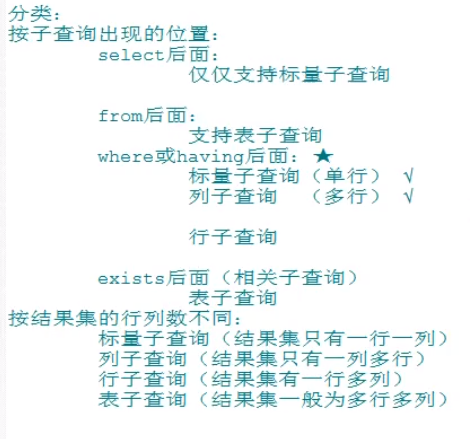
#出现在其他语句中的select语句,称为子查询或内查询。外部的查询语句,称为主查询或外查询/*where或having后面特点:①、子查询放在小括号内②、子查询一般放在条件的右侧③、标量子查询,一般搭配着单行操作符使用> < >= <= = <>列子查询,一般搭配着多行操作符使用in any/some all④、*/#1、标量子查询#谁的工资比Abel高#①查询Able的工资select salary from emp where last_name = 'Abel';#②查询员工的信息,满足salary>①结果select * from emp where salary>(select salary from emp where last_name = 'Abel');#返回job_id与141号员工相同,salary比143号员工多的员工的姓名,job_id和工资#①查询141号员工的job_idselect job_id from emp where employee_id = 141;#②查询143号员工的salaryselect salary from emp where employee_id = 143;#查询员工的姓名,job_id和工资,要求job_id=①并且salary>②select last_name,job_id,salary from emp where job_id=(select job_id from emp where employee_id = 141)and salary>(select salary from emp where employee_id = 143);#查询最低工资大于50号部门最低工资的部门id和其最低工资#①查询50号部门的最低工资select min(salary) from emp where department_id=50;#②查询每个部门的最低工资select min(salary) ,department_id from emp group by department_id;#③在②的基础上进行筛选,满足min(salary)>①select min(salary) ,department_id from emp group by department_id having min(salary)> (select min(salary) from emp where department_id=50);#2、列子查询#返回location_id是1400或1700的部门中的所有员工姓名#①查询location_id是1400或1700的部门编号select distinct department_id from dept where location_id in(1400,1700);#②查询员工姓名,要求部门编号是①列表中的某一个select last_name from emp where department_id in(select distinct department_id from dept where location_id in(1400,1700);)#select后面#查询员工名=102的部门名select (select department_name,e.department_id from dept d inner join emp e on d.department_id=e.department_id where e.employee_id=102) as 部门名;#from后面#查询每个部门的平均工资的工资等级select ag_dept.*,g.grade_level from (select avg(salary) ag,department_id from emp group by department_id) ag_dep inner join job_grades g on ag_dep.ag between lowest_sal and highest_sal;
分页查询
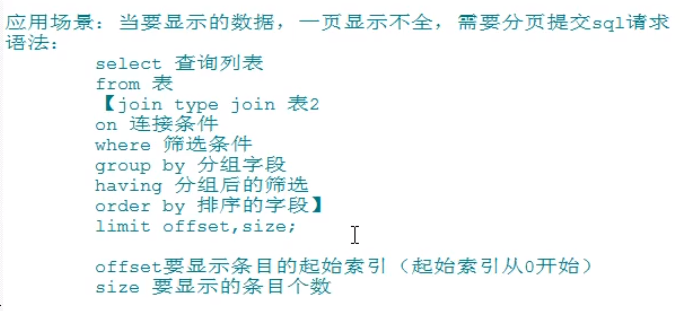
#查询前5条员工信息select * from emp limit 0,5;select * from emp limit 5;#查询第11条到第25条select * from emp limit 10,15;#有奖金的员工信息,并且工资较高的前10名显示出来select * from emp where commission_pct is not null order by salary desc limit 10;
联合查询
描述
MySQL UNION 操作符用于连接两个以上的 SELECT 语句的结果组合到一个结果集合中。多个 SELECT 语句会删除重复的数据。
UNION 语句:用于将不同表中相同列中查询的数据展示出来;(不包括重复数据)
UNION ALL 语句**:用于将不同表中相同列中查询的数据展示出来;(包括重复数据)
USE RUNOOB;SELECTcountryFROMWebsites UNIONSELECTcountryFROMappsORDER BYcountry;USE RUNOOB;SELECTcountryFROMWebsites UNION ALLSELECTcountryFROMappsORDER BYcountry;SELECTcountry,NAMEFROMWebsitesWHEREcountry = 'CN' UNION ALLSELECTcountry,app_nameFROMappsWHEREcountry = 'CN'ORDER BYcountry;

若有收获,就点个赞吧
0 人点赞


