组件定义
以一个输入框组件为例,这里分别展示类组件和函数组件上关于ts的实践
类组件
import React from 'react';export interface IInputProps {value?: string;defaultValue?: string;onChange?: (value?: string) => void;}interface IInputState {innerValue: string;}class Input extends React.Component<IInputProps, IInputState> {// 设置默认props// 这里的类型需要设置成Partial,因为有些非空类型在默认props上不是必须的static defaultProps: Partial<IInputProps> = {defaultValue: '',};// 此处声明类组件的状态state: IInputState = {// 组件内初始状态由props上传入的defaultValue初步决定// 若没有传入defaultValue,再自行使用内部决定的初始值innerValue: this.props.defaultValue ?? '',};componentDidUpdate(prevProps: IInputProps, prevState: IInputState) {// 使用 componentDidUpdate 时需要声明相应的 props 和 state 类型}/*** 通过判断是否有在props上传入value字段确认是否为受控组件*/get isControlled() {return 'value' in this.props;}/*** 当前展示出来的内容* 如果是受控模式,展示外部value* 如果是非受控模式,展示内部innerValue*/get displayValue() {return this.isControlled ? this.props.value : this.state.innerValue;}handleChangeValue = (value?: string) => {// 如果是非受控组件,那么需要维持内部的状态if (!this.isControlled) {this.setState({ innerValue: value ?? '' });}// 不论当前组件是否受控/非受控,都需要保证触发props.onChangethis.props.onChange?.(value);};// 此处的类型声明,可以移动到 <input /> 标签的 onChange 属性上,会有相应的类型提示handleInputChange: React.InputHTMLAttributes<HTMLInputElement>['onChange'] = (event,) => {this.handleChangeValue(event.target.value);};render() {return (<input value={this.displayValue} onChange={this.handleInputChange} />);}}export default Input;
在类组件上使用ts,主要注意点包括以下方面:
- 继承自
React.Component需要声明props和state的类型,通常组件的IProps需要导出,但是IState一般不导出 打开
打开React.Component的类型声明,你可以发现这个泛型的默认类型是{},也就是说,如果你的类组件不声明任何泛型,那么ts直接就不允许你在this.props或this.state上操作任何属性 最坏的打算就是写
.tsx文件时extends React.Component<any, any> - 类组件的
defaultProps可以以static属性设置,但是需要手动声明类型,因为组件的默认props只是IProps的局部配置,所以这里使用一个ts工具类型Partial
- 类组件的
state可以以类字段的方式声明,此时需要自己手动去标注类型是IState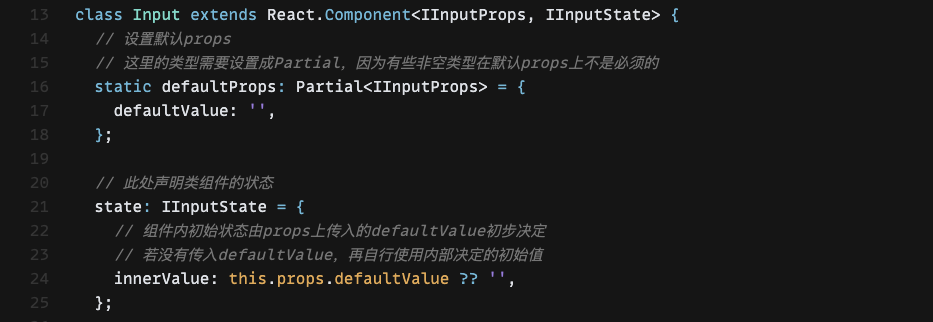 也可以使用
也可以使用constructor去声明,但是却需要声明constructor上props的类型 不论使用哪一种方式,都避不开需要手动声明类型,
React.Comopnent上的泛型并没有智能到可以推断构造函数时的state类型 - 使用一些生命周期函数时,有些地方的类型避免不了需要自己去声明,例如使用
componentDidUpdate需要自己声明props和state的类型
- 使用其他组件的props时,声明类型可以通过代码提示去实现,例如本例子中的
<input />标签的onChange函数,可以通过鼠标悬浮到上面即可获得代码提示 记得多导出
记得多导出IProps,它很有用,当使用导出组件的时候,一个props上的字段类型,可以通过IProps计算得出
函数组件
```tsx import React from ‘react’;
export interface IInputProps { value?: string; defaultValue?: string; onChange?: (value?: string) => void; }
// 使用React.VFC声明箭头函数的类型是React的函数组件
const Input: React.VFC
// 使用React.useState声明内部状态,通过泛型声明类型
const [innerValue, setInnerValue] = React.useState
const isControlled = ‘value’ in props;
const displayValue = isControlled ? value : innerValue;
const handleChangeValue = (value?: string) => { if (!isControlled) { setInnerValue(value ?? ‘’); } onChange?.(value); };
const handleInputChange: React.InputHTMLAttributes< HTMLInputElement
[‘onChange’] = (event) => { handleChangeValue(event.target.value); };
return ; };
// 由于声明了类型是React.VFC,可以识别出defaultProps的类型 Input.defaultProps = { defaultValue: ‘’, };
export default Input;
在函数组件上使用ts,要点如下:1. 必须声明函数组件的类型是`React.FC`或`React.VFC`,FC和VFC的差异仅仅在于是否有在`props`上设置`{ children?: React.ReactNode }`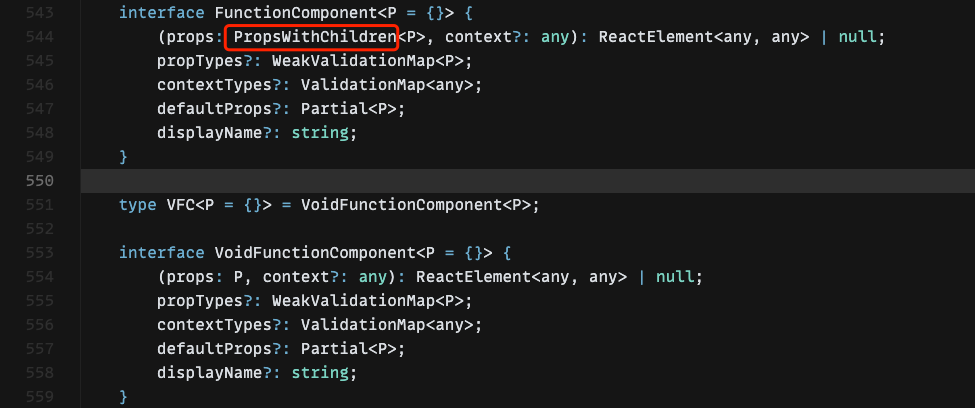正是这里的`PropsWithChildren`包裹的props类型,为我们的props设置了children类型,本例子中的Input组件,由于类型是`React.VFC`,没有children类型声明,如果设置children将会报错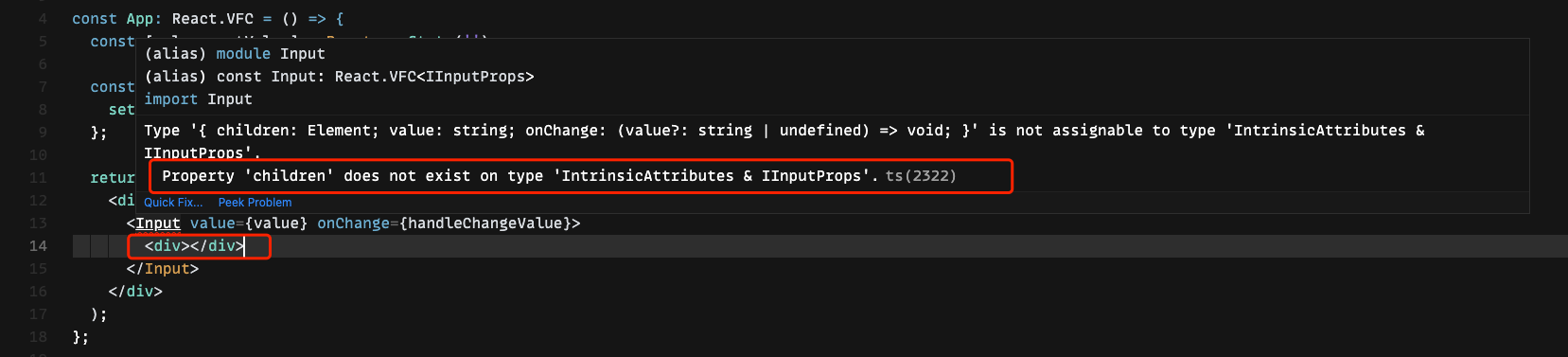关于具体要使用FC还是VFC,主要看应用场景1. `React.useState`可以通过泛型声明内部状态的类型,此外也可以通过类型推导1. 声明为`React.FC`类型的函数组件,还可以获得`defaultProps` `displayName` 属性的类型提示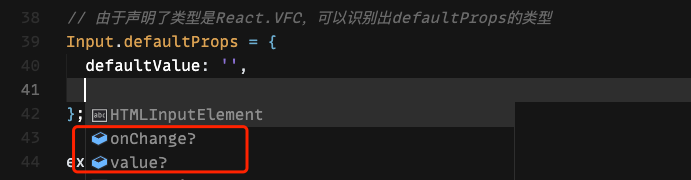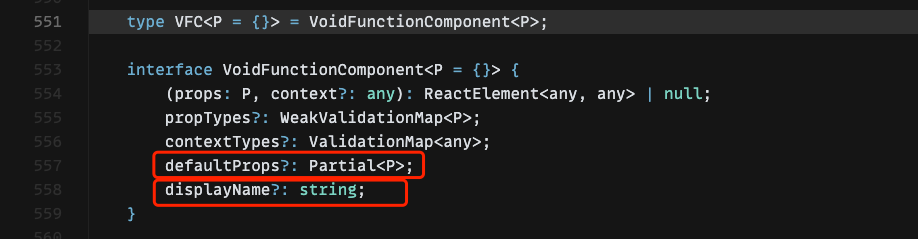可以看出一个组件props上的`defaultProps`应该是`Partial`类型工具计算出来的,正如我们在类组件上使用的一样<a name="eLxjN"></a>#### 函数泛型组件除了可以用箭头函数来声明函数组件以外,使用普通的`fucntion`也可以声明组件,但是却没有了`React.FC`的ts的类型提示,但这不是说明了`function`声明的组件完全是`React.FC`的下位替代,当需要使用到泛型组件时,就避不开需要使用`function`声明。```tsximport React from 'react';interface IOptionProps<T> {value: T;children: string;}function Option<T>(props: IOptionProps<T>) {return null;}interface IBaseOption<T> {value: T;label: string;}interface IBaseSelectProps<T> {onChange?: (value?: T) => void;value?: T;defaultValue?: T;}interface ISelectPropsWithOptions<T> extends IBaseSelectProps<T> {options: IBaseOption<T>[];}interface ISelectPropsWithChildren<T> extends IBaseSelectProps<T> {children: React.ReactNode;}type ISelectProps<T> = ISelectPropsWithOptions<T> | ISelectPropsWithChildren<T>;// 使用ts函数重载声明两种允许的props类型function Select<T>(props: ISelectPropsWithOptions<T>): React.ReactElement;function Select<T>(props: ISelectPropsWithChildren<T>): React.ReactElement;function Select<T>(props: ISelectProps<T>) {let options: IBaseOption<T>[] = [];// 使用类型防卫来识别不同props类型if ('children' in props) {const list =React.Children.map(props.children, (child) => {// 类型防卫;return后面的语句可以保证child类型必定是 ReactElementif (!React.isValidElement<IOptionProps<T>>(child)) {return;}if (child.type === Option) {return {value: child.props.value,label: child.props.children,} as IBaseOption<T>;}}) ?? [];if (list.length > 0) {options = list;}} else if ('options' in props) {options = props.options;}const [innerValue, setInnerValue] = React.useState<T | undefined>(props.defaultValue,);const isControlled = 'value' in props;const displayValue = isControlled ? props.value : innerValue;const handleChangeValue = (value?: T) => {if (!isControlled) {setInnerValue(value);}props.onChange?.(value);};const handleSelectChange: React.SelectHTMLAttributes<HTMLSelectElement>['onChange'] = (event) => {handleChangeValue(event.target.value as any);};return (<select// @ts-ignorevalue={displayValue}onChange={handleSelectChange}>{options.map((item) => (// 此处由于有约束 select 的 value 必须是 string 或 number// 由于使用了泛型类型而没有约束必须是 string 或 number// 为了展示用例,此处特意忽略类型检查// @ts-ignore<option key={item.value} value={item.value}>{item.label}</option>))}</select>);}const ComplexedSelect = Object.assign(Select, { Option });export default ComplexedSelect;
 在组件后加上尖括号即可手动确定泛型,本处若声明为string,则设置
1是number会报错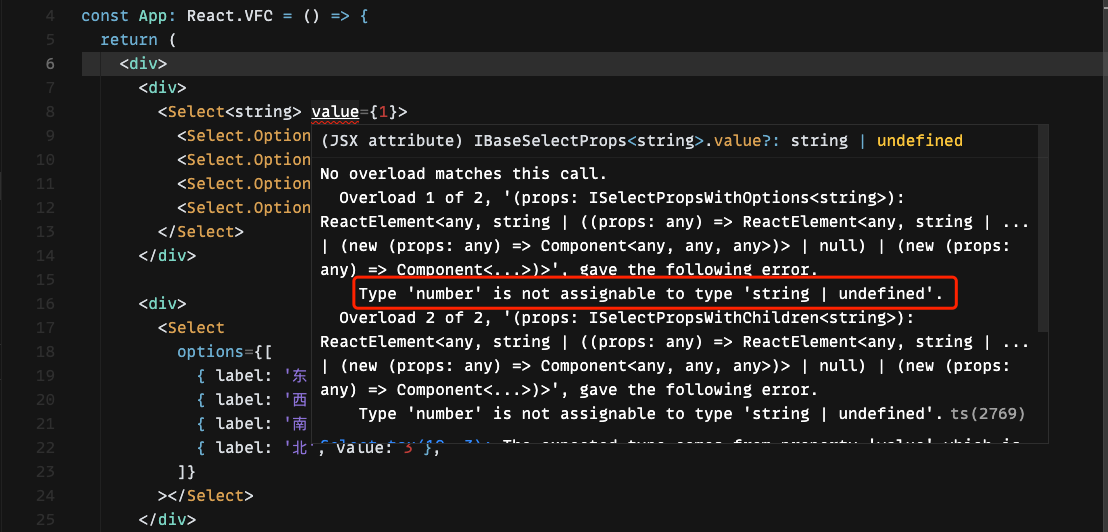 另一种确认泛型的方法是使用类型推导,如果预先设置options的value类型,那么
T会被推导为number类型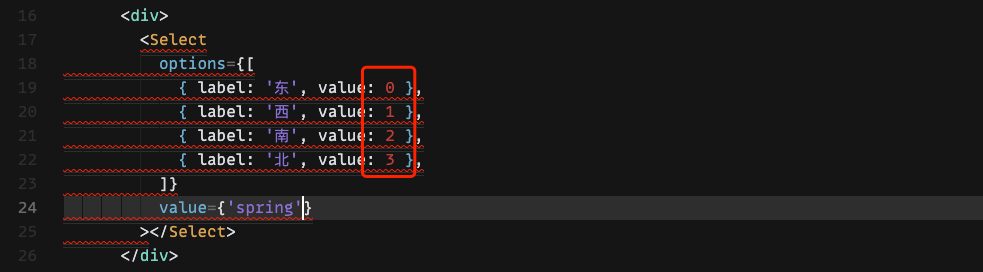
像本处的value设置成string类型,直接就识别报错了
使用函数组件的重载,可以限定传入的props类型,本用例中传入的options和children是水火不容的,如果传入其中一个再传入其他另一个就会报错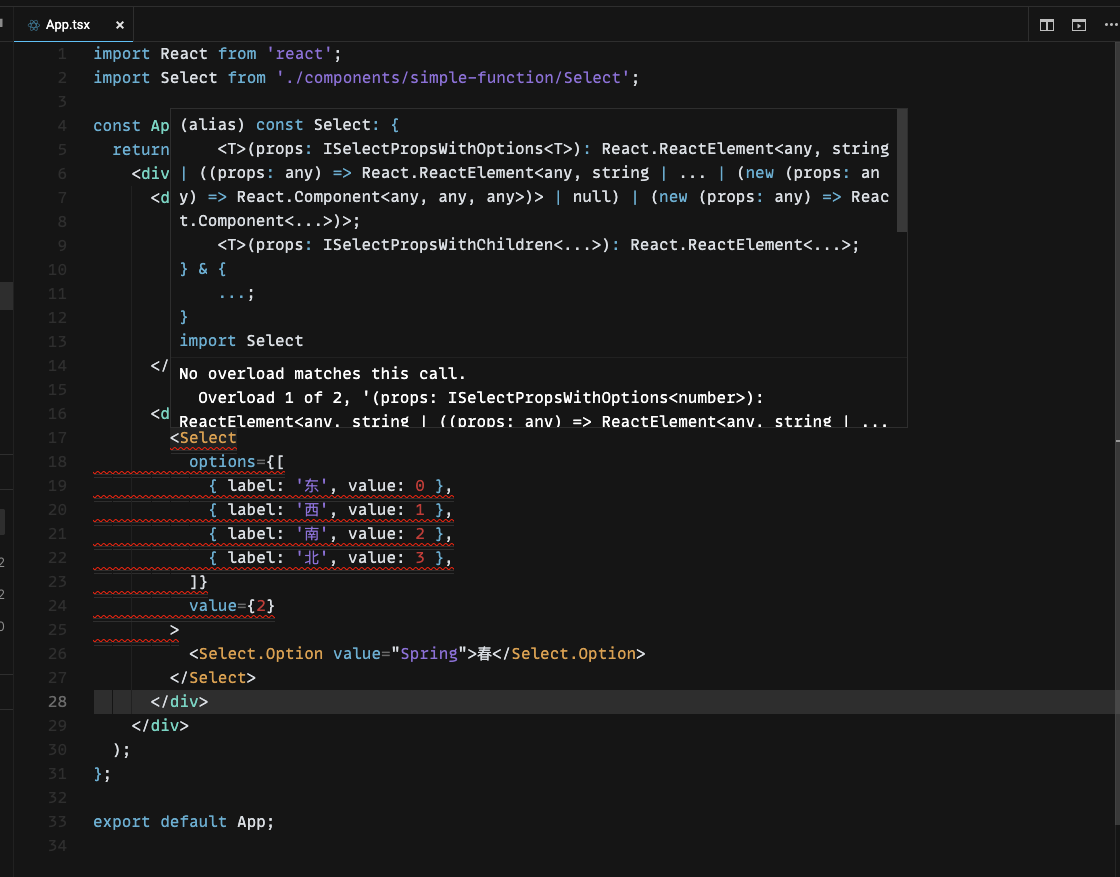 使用函数重载可以保证我们想要的props是正好数量的字段,不会多也不会少
所有组件的类型
React.ComponentType<P>表示类组件和函数组件的联合定义
type ComponentType<P = {}> = ComponentClass<P> | FunctionComponent<P>;
以上类型定义拷贝自React的类型定义,这个类型在写HOC时很有用
function withState<P extends WrappedComponentProps>(WrappedComponent: React.ComponentType<P>) {// ...// 返回处理后的结点}
forwarding refs
转发组件内的ref,就是使用React.useRef来获得JSX的引用,并且进行操作
import { Modal } from 'antd';import React from 'react';export interface IMyModalRef {open: () => void;close: () => void;}export interface IMyModalProps {}const MyModal = React.forwardRef<IMyModalRef, IMyModalProps>((props, ref) => {const [visible, setVisible] = React.useState(false);React.useImperativeHandle(ref, () => ({open() {setVisible(true);},close() {setVisible(false);},}));return (<Modalvisible={visible}title="forwarding refs"onCancel={() => {setVisible(false);}}><div>modal</div></Modal>);});export default MyModal;
使用时,在React.useRef<T>上将刚刚导出的IMyModalRef泛型声明
import { Button } from 'antd';import 'antd/dist/antd.css';import React from 'react';import MyModal, { IMyModalRef } from './components/forwarding-refs/MyModal';const App: React.VFC = () => {const modalRef = React.useRef<IMyModalRef>(null);return (<div><MyModal ref={modalRef} /><div><ButtononClick={() => {modalRef.current?.open();}}>OPEN MODAL</Button></div></div>);};export default App;
使用React.forwardRef少数地方有奇效,但是不是很推荐使用这个api,因为这会显得不是很符合React的哲学—“修改props/state,自动更新,数据流自上而下”,推荐用法是大部分地方遵守React哲学,少数地方可以下克上,针对特殊的地方可以使用转发ref
类组件和函数组件的差异
可以说如果要使用ts来书写react,类组件完全毫无优势可言,但是class上使用泛型会比function上简单很多,书写泛型组件的时候我更加推荐使用class组件,但是class组件却做不到重载,例如ant-design的Select组件无法区分options和children是否同时传入,即使两个props都写,ant-design的ts检查也识别不出来。
这里推荐ts在react中的实践就是,80%使用React.FC/React.VFC,FC的预置类型定义可以帮助你做简单的类型检查,10%的场景用function,泛型组件、props重载都需要function组件才能做到,10%的场景使用class组件,一些难以书写的泛型组件,还是得使用class来帮忙。
不好的实践
不要直接使用export default导出函数组件
// Badexport default (props: IProps) => {return (<div></div>);}// Badexport default function(props: IProps) {return (<div></div>);}// Betterexport default function Foo(props: IProps) {return (<div></div>);}
如果非要这么做,请使用命名的function进行定义
使用前两种方式导出的组件在React Inspector查看时会显示为Unknown,如果是在storybook则会显示成No Display Name

若有收获,就点个赞吧
0 人点赞


