public class LogAttribute : ActionFilterAttribute {private string LogFlag { get; set; }private string ActionArguments { get; set; }/// <summary>/// 请求体中的全部值/// </summary>private string RequestBody { get; set; }private Stopwatch Stopwatch { get; set; }public LogAttribute(string logFlag) {LogFlag = logFlag;}public override void OnActionExecuting(ActionExecutingContext context) {base.OnActionExecuting(context);// 后续添加了获取请求的请求体,若是在实际项目中不须要删除便可long contentLen = context.HttpContext.Request.ContentLength == null ? 0 : context.HttpContext.Request.ContentLength.Value;if (contentLen > 0) {// 读取请求体中全部内容System.IO.Stream stream = context.HttpContext.Request.Body;if (context.HttpContext.Request.Method == "POST") {stream.Position = 0;}byte[] buffer = new byte[contentLen];stream.Read(buffer, 0, buffer.Length);// 转化为字符串RequestBody = System.Text.Encoding.UTF8.GetString(buffer);}ActionArguments = Newtonsoft.Json.JsonConvert.SerializeObject(context.ActionArguments);Stopwatch = new Stopwatch();Stopwatch.Start();}public override void OnActionExecuted(ActionExecutedContext context) {base.OnActionExecuted(context);Stopwatch.Stop();string url = context.HttpContext.Request.Host + context.HttpContext.Request.Path + context.HttpContext.Request.QueryString;string method = context.HttpContext.Request.Method;string qs = ActionArguments;dynamic result = context.Result.GetType().Name == "EmptyResult" ? new { Value = "无返回结果" } : context.Result as dynamic;string res = "在返回结果前发生了异常";try {if (result != null) {res = Newtonsoft.Json.JsonConvert.SerializeObject(result.Value);}} catch (System.Exception) {res = "日志未获取到结果,返回的数据没法序列化";}LogException.AddLog($"\n 方法:{LogFlag} \n " +$"地址:{url} \n " +$"方式:{method} \n " +$"请求体:{RequestBody} \n " +$"参数:{qs}\n " +$"结果:{res}\n " +$"耗时:{Stopwatch.Elapsed.TotalMilliseconds} 毫秒(指控制器内对应方法执行完毕的时间)");}}
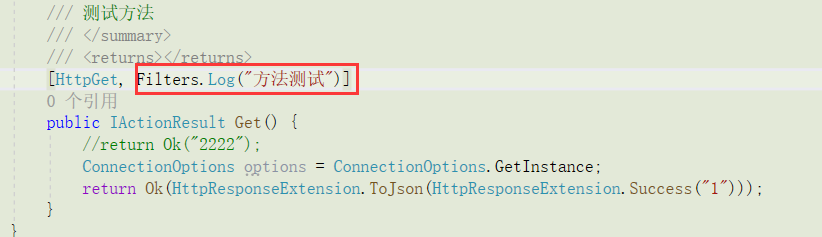
使用方式
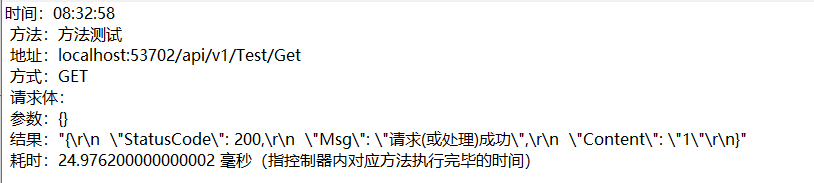
运行结果

若有收获,就点个赞吧
0 人点赞


