模块联邦
动机
- Module Federation的动机是为了不同开发小组间共同开发一个或者多个应用
- 应用将被划分为更小的应用块,一个应用块,可以是比如头部导航或者侧边栏的前端组件,也可以是数据获取逻辑的逻辑组件
- 每个应用块由不同的组开发
- 应用或应用块共享其他其他应用块或者库
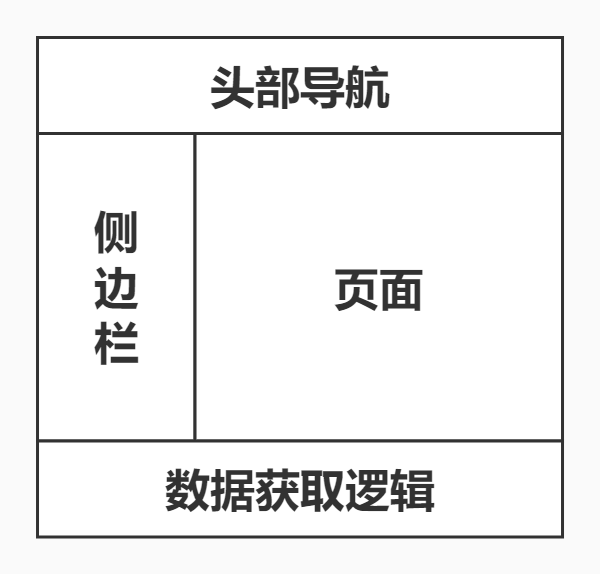
Module Federation
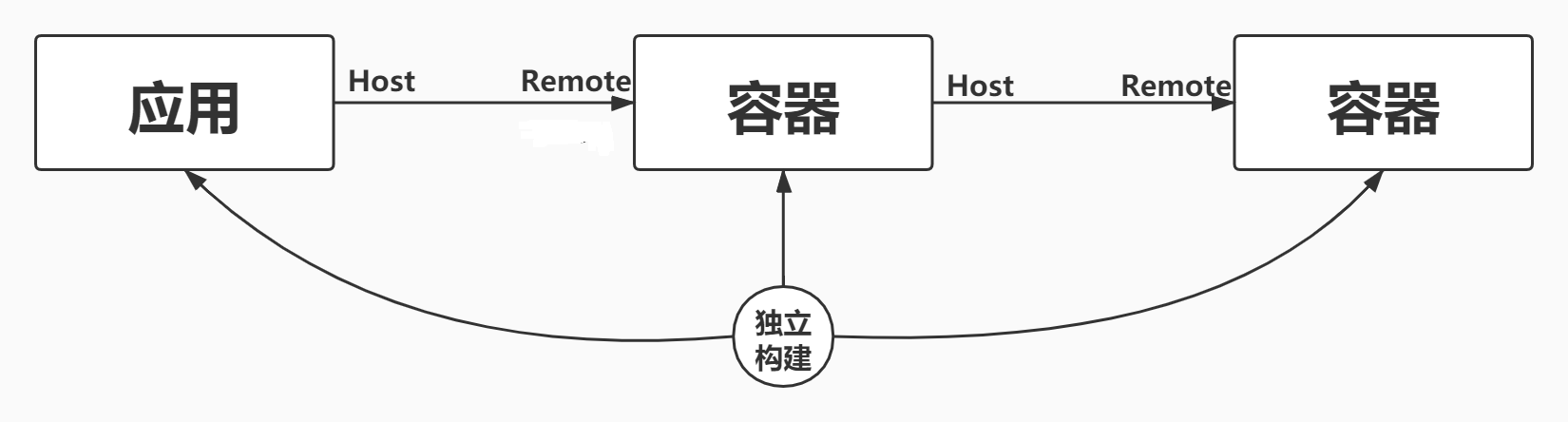
- 使用Module Federation时,每个应用块都是一个独立的构建,这些构建都将编译为容器
- 容器可以被其他应用或者其他容器应用
- 一个被引用的容器被称为remote, 引用者被称为host,remote暴露模块给host, host则可以使用这些暴露的模块,这些模块被成为remote模块
实战
| 字段 | 类型 | 含义 |
|---|---|---|
| name | string | 必传值,即输出的模块名,被远程引用时路径为${name}/${expose} |
| library | object | 声明全局变量的方式,name为umd的name |
| filename | string | 构建输出的文件名 |
| remotes | object | 远程引用的应用名及其别名的映射,使用时以key值作为name |
| exposes | object | 被远程引用时可暴露的资源路径及其别名 |
| shared | object | 与其他应用之间可以共享的第三方依赖,使你的代码中不用重复加载同一份依赖 |
remote
let path = require("path");let webpack = require("webpack");let HtmlWebpackPlugin = require("html-webpack-plugin");const ModuleFederationPlugin = require("webpack/lib/container/ModuleFederationPlugin");module.exports = {mode: "development",entry: "./src/index.js",output: {publicPath: "http://localhost:3000/",},devServer: {port: 3000},module: {rules: [{test: /\.jsx?$/,use: {loader: 'babel-loader',options: {presets: ["@babel/preset-react"]},},exclude: /node_modules/,},]},plugins: [new HtmlWebpackPlugin({template:'./public/index.html'}),new ModuleFederationPlugin({filename: "remoteEntry.js", // 生成的文件名name: "remote",// 唯一标志exposes: { // 对外暴漏 key:别名 value: 本地的文件路径"./NewsList": "./src/NewsList","./button":"./src.button" // 暴漏多个模块, 比如},remotes: { // Module Federation 的共享可以是双向的host: "host@http://localhost:8000/remoteEntry.js"}shared:{// shared配置主要是用来避免项目出现多个公共依赖react: { singleton: true },"react-dom": { singleton: true }}})]}
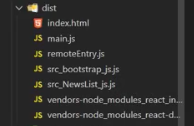
vendors-…共享依赖,但是不能保证版本的一致性,默认会使用更高版本的(react16 react 17)
remote\src\index.js
import("./bootstrap");
remote\src\bootstrap.js
import React from "react"; import ReactDOM from "react-dom"; import App from "./App"; ReactDOM.render(<App />, document.getElementById("root"));
remote\src\App.js
import React from "react"; import NewsList from './NewsList';
const RemoteSlides = React.lazy(() => import("host/Slides"))
const App = () => (
  <div>
  <h2>本地组件NewsList</h2>
  <NewsList />
  <React.Suspense fallback="Loading Slides">
     <RemoteSlides />
   </React.Suspense>
  </div>
);
  export default App;
remote\src\NewsList.js
import React from "react"; export default ()=>( <div>新闻列表</div> )

host
host\webpack.config.js
let path = require("path");
let webpack = require("webpack");
let HtmlWebpackPlugin = require("html-webpack-plugin");
const ModuleFederationPlugin = require("webpack/lib/container/ModuleFederationPlugin");
module.exports = {
    mode: "development",
    entry: "./src/index.js",
    output: {
        publicPath: "http://localhost:8000/",
    },
    devServer: {
        port: 8000
    },
    module: {
        rules: [
            {
                test: /\.jsx?$/,
                use: {
                    loader: 'babel-loader',
                    options: {
                        presets: ["@babel/preset-react"]
                    },
                },
                exclude: /node_modules/,
            },
        ]
    },
    plugins: [
        new HtmlWebpackPlugin({
            template: './public/index.html'
        }),
        new ModuleFederationPlugin({
            filename: "remoteEntry.js",
            name: "host",
            exposes: {
                  "./Slides": "./src/Slides",
             }
            remotes: { // 远程引入的应用 "remote@.."中的remote是跟远程的name对应
          //这里remote1跟import引入第一个路径对应
                remote1: "remote@http://localhost:3000/remoteEntry.js"
            },
          shared:{// shared配置主要是用来避免项目出现多个公共依赖
                react: { singleton: true },
                "react-dom": { singleton: true }
              }
        })
    ]
}
host\src\index.js
import("./bootstrap");
host\src\bootstrap.js
import React from "react";
import ReactDOM from "react-dom";
import App from "./App";
ReactDOM.render(<App />, document.getElementById("root"));
host\src\App.js
import React from "react";
import Slides from './Slides';
const RemoteNewsList = React.lazy(() => import("remote1/NewsList"));
//也可以这样引入TopAwait 是webpack5新语法 const RemoteNewsList = await import("remote/NewsList")
// 本地组件可以异步或同步引入;远程组件异步引入
// 引入远程暴露的NewsList的模块

const App = () => (
  <div>
    <h2 >本地组件Slides, 远程组件NewsList</h2>
    <Slides />
    <React.Suspense fallback="Loading NewsList">
      <RemoteNewsList />
    </React.Suspense>
  </div>
);
export default App;
host\src\Slides.js
import React from "react";
export default ()=>(
    <div>轮播图</div>
)
EMP是一个面向未来的,基于Webpack5 Module Federation搭建的微前端解决方案

若有收获,就点个赞吧
0 人点赞


