1 Vue Router 基础使用步骤
1 脚手架搭建 vue 项目,如果未使用 vue-router,再手动安装 vue-router,创建几个路由视图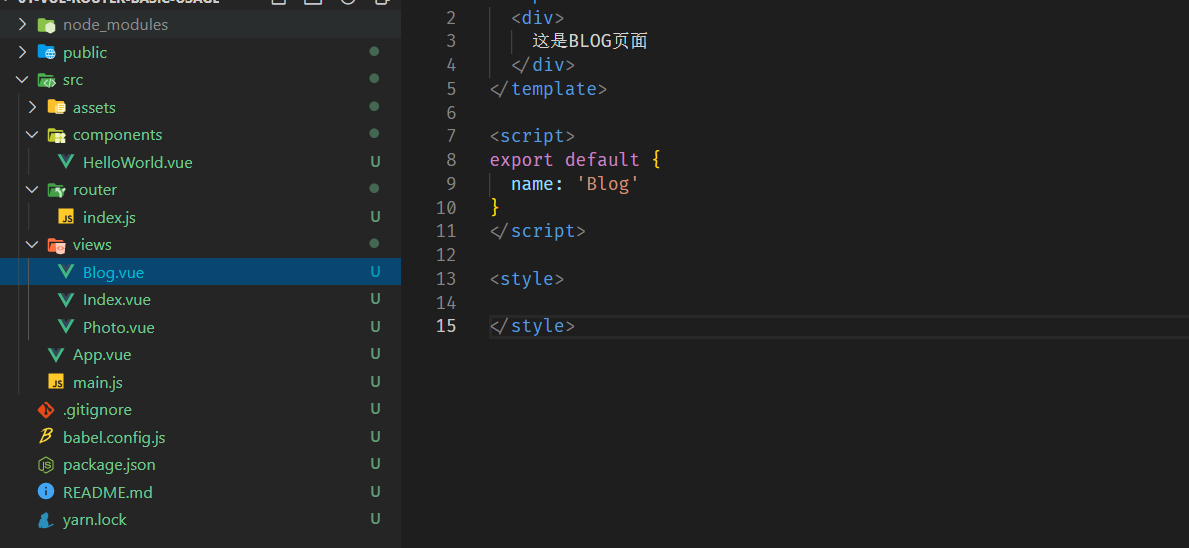
2 新建router 模块
// router/index.jsimport Vue from 'vue';import VueRouter from 'vue-router';import Index from '../views/Index.vue';Vue.use(VueRouter);const routes = [{path: '/',name: 'Index',component: Index,},{path: '/blog',name: 'Blog',component: () =>import(/** webpackChunkName: "blog" */ '../views/Blog.vue'),},{path: '/photo',name: 'Photo',component: () =>import(/** webpackChunkName: "blog" */ '../views/Photo.vue'),},{path: '/hello',name: 'HelloWorld',component: () =>import(/** webpackChunkName: "blog" */ '../components/HelloWorld.vue'),},];const router = new VueRouter({routes,});export default router;
3 在模板中添加路由出口
<template><div id="app"><div><img alt="Vue logo" src="./assets/logo.png"></div><!-- <HelloWorld msg="Welcome to Your Vue.js App"/> --><div id="nav"><router-link to="/" >Index</router-link>|<router-link to="/blog" >Blog</router-link>|<router-link to="/photo" >Photo</router-link></div><router-view></router-view></div></template><script>// import HelloWorld from './components/HelloWorld.vue'export default {name: 'App',components: {// HelloWorld}}</script><style>#app {font-family: Avenir, Helvetica, Arial, sans-serif;-webkit-font-smoothing: antialiased;-moz-osx-font-smoothing: grayscale;text-align: center;color: #2c3e50;margin-top: 60px;}</style>
4 vue 实例中添加router
import Vue from 'vue'import App from './App.vue'import router from './router'Vue.config.productionTip = falsevar app = new Vue({router, // 此处引入router,就会在创建实例的时候,添加$router、$route对象,$route是当前路由的数据(规则、路径、参数等)// $router 路由对象,是router的一个实例,其中提供了一些路由相关的方法,路由对象的信息,以及currentRoute,当前路由的数据render: h => h(App),}).$mount('#app')console.log(app)
2 动态路由
在路由 path 中添加占位符,来传递参数
...{path: '/about/:id',name: 'About',props: true, // 开启 props, 会把 URL 中的参数传递给组件 在组件中通过 props 来接受 URL 参数// 懒加载component: () => import(/* webpackChunkName: "about" */ '../views/About.vue')}...
接收参数时两种方式,直接通过 $route 对象,$route.params.id 获取;或者通过在路由中开启 props,此时 URL 中的参数会传递给组件,组件中通过 props 来接收;
<template><div class="about"><h1>This is an about page: {{$route.params.id}}</h1><br><h1>通过开启 props 获取: {{id}}</h1></div></template><script>export default {name: 'About',props: ['id']}</script>
3 嵌套路由
通过在路由中添加 children 实现嵌套路由
...{path: '/',component: Layout,children: [{name: 'index',path: '/',component: Index},{name: 'About',path: '/about/:id',props: true,component: () => import(/* webpackChunkName: "about" */ '@/views/About.vue')}]},...
4 编程式导航
通过方法动态操作 $router 封装的方法
...this.$router.push('/')...this.$router.replace('/login')...this.$router.push({name: 'About', params: {id: 1}})...this.$router.go(-2)...
5 Hash 模式和 History 模式的区别
Hash 模式是基于锚点,以及 Onhashchange 事件
History 模式是基于 HTML5 中的 History API: history.pushState() (ie10以后才支持) history.replaceState()
6 History 模式
History 模式需要服务器的支持,在服务端应该除了静态资源外都返回单页应用的index.html
在 node + express 的服务中,需要添加 connect-history-api-fallback 模块作为中间件
...const history = require('connect-history-api-fallback')...// 注册处理history模式的中间件app.use(history())...
在 nginx 中,需要在 location 中添加 try_file 属性,并配置找不到资源时的路径
...server {listen 80;server_name localhost;location / {root html;index index.html index.htm;try_files $uri $uri/ /index.html;}
7 VueRouter 实现原理
Hash 模式
URL 中 # 后面的内容作为路径地址
监听 hashchange 事件
根据当前路由地址找到对应组件重新渲染
History 模式
通过 history.pushState() 方法改变地址栏
监听 popstate 事件
根据当前路由地址找到对应组件重新渲染
8 VueRouter 模拟实现
1 分析
Vue.use() 方法可以传入对象或者方法,如果传入函数,Vue.use 会首先调用这个函数,如果传入对象的话,会调用这个对象的 install 方法
定义个 VueRouter 类,类中要有 install 的静态方法,其构造函数方法传入的参数是个对象,对象中有个 routes 数组,里面就是路由规则,路径,名称组件等;
新加一个 Vue 实例,在实例的构造函数中传入了一个 VueRouter 实例;
2 实现静态方法 install
首先判断当前插件是否已经被安装;其次,把vue的实例记录到全局变量当中;再次把创建 vue 实例时传入的router 对象注入到 Vue 实例中
let _Vue = nullexport default class VueRouter {static install(Vue) {// 1. 判断当前插件是否已经被安装if(VueRouter.install.installed) {return}VueRouter.install.installed = true// 2. 把 vue 的构造函数记录到全局变量中来_Vue = Vue// 3. 把创建 Vue 实例时传入的router 对象注入到 Vue 实例上// 混入_Vue.mixin({beforeCreate() {if(this.$options.router) {_Vue.prototype.$router = this.$options.router}},})}}
3 实现构造方法
...constructor(options) {this.options = options // 记录构造函数中传入的对象this.routerMap = {} // 记录构造函数中传入对象的routes(路由规则)解析后的结果,键值对(路由地址=>路由组件)this.data = _Vue.observable({ // 响应式的对象current: '/' // 存储当前的路由地址,默认为斜线})}...
4 createRouterMap
...createRouterMap() {// 遍历所有的路由规则,并解析成键值对,存储到 routerMap 中this.options.routes.forEach(route => {this.routerMap[route.path] = route.component})}...
5 initComponents,创建router-link组件
...initComponents(Vue) {Vue.component('router-link', {props: {to: String},template:'<a :href="to"><slot></slot></a>'})}...
6 包装方法并调用
_Vue.mixin({beforeCreate() {if(this.$options.router) {_Vue.prototype.$router = this.$options.routerthis.$options.router.init() // 调用init 方法}},})...init() {this.createRouterMap()this.initComponents(_Vue)}...
此时用当前自定义的vuerouter 取代原因的 vuerouter,运行,报错 runtime 版本的vue,编译器不支持 template,有两种解决方案,一种通过 配置 vue.config.js,运行完整版本的vue的编译器
// vue.config.jsmodule.exports = {runtimeCompiler: true}
另一种,通过render函数,改写 initComponents 方法
initComponents(Vue) {Vue.component('router-link', {name: 'RouterLink',props: {to: String},// template:'<a :href="to"><slot></slot></a>',render: function(h) {return h('a', {attrs: {href: this.to}}, [this.$slots.default])}})}
7 route-view 组件
...const self = thisVue.component('router-view', {render(h) {// 当前路由地址const component = self.routerMap[self.data.current]return h(component)}})...
此时打开浏览器,点击home、about,页面有刷新但是内容没发生变化;页面闪动说明有请求服务器,但是我们希望的是在客户端处理,所以要在router-link里面去阻止浏览器的默认行为,并且点击后调用 pushstate 方法,将地址更新到浏览器历史中,然后更新 $router.data.current,因为data 是个响应式对象,变化以后会自动加载对应的组件并且渲染到视图上
...Vue.component('router-link', {name: 'RouterLink',props: {to: String},// template:'<a :href="to"><slot></slot></a>',render(h) {return h('a', {attrs: {href: this.to},on: {click: this.clickHandler}}, [this.$slots.default])},methods: {clickHandler (e) {// 调用 pushstate 方法改变地址栏的地址history.pushState({},'',this.to)// 更换视图this.$router.data.current = this.to// 阻止浏览器的默认行为e.preventDefault();}},})...
到此为止,点击router-link后切换视图并且添加地址到浏览器历史中已经实现,但是在用浏览器的前进后退按钮时,视图并未发生变化,此时就要去用popstate方法监听浏览器的变化
initEvent() {window.addEventListener('popstate', () => {this.data.current = window.location.pathname})}

若有收获,就点个赞吧
0 人点赞


