- eureka—-服务的注册中心,springcloud的所有模块都必须注册到eureka,包括eureka自己
- feign—-写进controller层替代原来的controller层方法,可以掩盖服务真正的路径,并自动拉取和使用服务
- gateway
- ribbon
- hystrix
Eureka
1.1 导入pom文件
<dependency><groupId>org.springframework.cloud</groupId><artifactId>spring-cloud-starter-netflix-eureka-server</artifactId></dependency>
1.2 编写application.yml
eureka:client:service-url:defaultZone: ${defaultZone:http://127.0.0.1:10087/eureka}# true表示注册自己,如果eureka只有一个,则不注册自己并且不拉取服务register-with-eureka: true# true表示拉取服务fetch-registry: truespring:application:name: eureka-serverserver:port: ${port:10086}
1.3 编写启动类
@SpringBootApplication@EnableEurekaServerpublic class EurekaServerApplication {public static void main(String[] args) {SpringApplication.run(EurekaServerApplication.class);}}
1.4 启动方法
启动第一个注册中心,以10086端口启动,注册服务到http://127.0.0.1:10087/eureka
启动第二个注册中心,以10087端口启动,注册服务到http://127.0.0.1:10086/eureka.使用jvm配置的方法启动:-Dport=10087 -DdefaultZone=http://127.0.0.1:10086/eureke
服务提供方
1.1 导入pom文件
<!--eureka依赖--><dependency><groupId>org.springframework.cloud</groupId><!--这里使用的是client,因为虽然是服务提供方,但是相对于注册中心,他只是注册中心的一个成员--><artifactId>spring-cloud-starter-netflix-eureka-client</artifactId></dependency><!--web依赖--><dependency><groupId>org.springframework.boot</groupId><artifactId>spring-boot-starter-web</artifactId></dependency>
1.2 导入application.yml
server:port: 9091spring:application:name: user-serviceeureka:client:service-url:defaultZone: http://127.0.0.1:10086/eurekainstance:ip-address: 127.0.0.1prefer-ip-address: true
1.3 编写启动类
@SpringBootApplication@EnableEurekaClientpublic class userServiceApplication {public static void main(String[] args) {SpringApplication.run(userServiceApplication.class);}}
Feign(服务消费方)
1.1 导入pom文件
<dependency><groupId>org.springframework.boot</groupId><artifactId>spring-boot-starter-web</artifactId></dependency><dependency><groupId>org.springframework.cloud</groupId><artifactId>spring-cloud-starter-openfeign</artifactId></dependency><dependency><groupId>org.springframework.cloud</groupId><artifactId>spring-cloud-starter-netflix-eureka-client</artifactId></dependency>
1.2 编写application.yml
server:port: 10100spring:application:name: feigneureka:client:service-url:defaultZone: http://127.0.0.1:10086/eureka
含义:这个项目以端口10100启动,从http://127.0.0.1:10086/eureka上注册和拉取服务
1.3 编写启动类
@SpringBootApplication@EnableFeignClientspublic class ConsumerApplication {public static void main(String[] args) {SpringApplication.run(ConsumerApplication.class, args);}}
1.4 编写FeignClient
//注解的含义是,从注册中心拉取'user-service'并且根据@FeignClient("user-service")public interface Client {@RequestMapping("/user/{id}")public Map get(@PathVariable("id") int id);}
1.5 编写FeignController
@RestController@RequestMapping("/feign")public class Controller {@Autowired//注入上一步的FeignClientprivate Client client;@RequestMapping("{id}")public Map get(@PathVariable int id){//访问本端口/feign/8,会调用FeignClient接口,真正的去调取服务user-service/user/8return client.get(id);}}
1.6 开启熔断保护
(feign已经默认开启了ribbon负载均衡)
1.6.1 修改application.yml文件
//application.ymlfeign:hystrix:enabled: true #开启hystrix熔断保护,默认是关闭的
1.6.2 新建异常处理类
//注入到spring中@Component//继承之前写的Client接口,这个Client没有特别的含义,是1.4步骤写的类public class ClientFallback implements Client {@Overridepublic Map get(int id) {HashMap<Object, Object> map = new HashMap<>();map.put("msg","信息出错了");return map;}}
1.6.3 修改Client类
@FeignClient(value="user-service",fallback = ClientFallback.class) //在这里加了一个fallback,其他未变public interface Client {@RequestMapping("/user/{id}")public Map get(@PathVariable int id);}
1.7 日志级别
1.7.1 在application.yml中添加
logging:level:com.example: debug
1.7.2 编写logconfig类
@Configurationpublic class LogConfig {@BeanLogger.Level feignLogLevel(){return Logger.Level.FULL;}}
这里指定的Level级别是FULL,Feign支持4种级别:
- NONE:不记录任何日志信息,这是默认值。
- BASIC:仅记录请求的方法,URL以及响应状态码和执行时间
- HEADERS:在BASIC的基础上,额外记录了请求和响应的头信息
- FULL:记录所有请求和响应的明细,包括头信息、请求体、元数据
1.7.3 修改Client类
@FeignClient(value="user-service",fallback = ClientFallback.class,configuration = LogConfig.class)
1.8 最终的模块结构
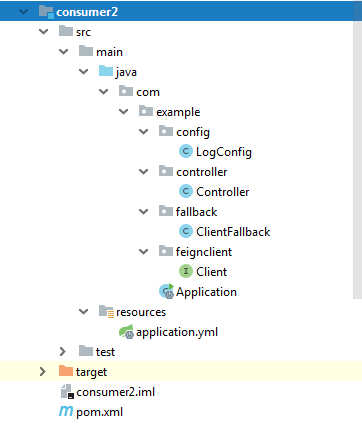
易错点总结:
- 启动类的注解有以下几种
- @SpringBootApplication 最基本的启动类注解,所有的启动类都必须有
- @EnableEurekaServer 注册中心eureka使用的注解,表明这是一个注册中心
- @EnableEurekaClient 注册中心的注册者类注解
- @EnableDiscoveryClient 注册中心的9注册者类注解,最好使用它替代上一个注解
- @EnableFeignClients feign模块的启动类注解,其作用是扫描feign客户端和注册到注册中心(相当于集成了@EnableDiscoveryClient)

若有收获,就点个赞吧
0 人点赞


