在本教程中,您将学习如何简单设置Sequelize。
pnpm install sequelize mysql2
如果使用sequelize操作mysql数据库,需要安装对应的驱动。
其他的数据库,比如
都有各自对应的驱动程序。
安装
可以通过npm或者yarn安装Sequelize:
npm install --save sequelize
除此,您还必须手动安装所选数据库的驱动程序:
# One of the following:
$ npm install --save pg pg-hstore # Postgres
$ npm install --save mysql2
$ npm install --save mariadb
$ npm install --save sqlite3
$ npm install --save tedious # Microsoft SQL Server
连接到数据库
要连接到数据库,必须创建Sequelize实例。可以通过将连接参数单独传递给Sequelize构造函数,或者直接传递一个连接URI来。
const { Sequelize } = require('sequelize');

// 方式1: Passing a connection URI
const sequelize = new Sequelize('sqlite::memory:') // Example for sqlite
const sequelize = new Sequelize('postgres://user:pass@example.com:5432/dbname') // Example for postgres

// 方式2: Passing parameters separately (sqlite)
const sequelize = new Sequelize({
  dialect: 'sqlite',
  storage: 'path/to/database.sqlite'
});

// 方式3: Passing parameters separately (other dialects)
const sequelize = new Sequelize('database', 'username', 'password', {
  host: 'localhost',
  dialect: /* one of 'mysql' | 'mariadb' | 'postgres' | 'mssql' */
});
Sequelize构造函数可以接收很多选项。它们记录在API参考(https://sequelize.org/v6/class/src/sequelize.js~Sequelize.html#instance-constructor-constructor)中。
测试连接
你可以用 .authenticate() 方法用于测试连接是否正常。
try {
  await sequelize.authenticate();
  console.log('Connection has been established successfully.');
} catch (error) {
  console.error('Unable to connect to the database:', error);
}

基于Promise的:
sequelize
  .authenticate()
  .then(() => {
    console.log('Connection has been established successfully.');
  })
  .catch(err => {
    console.error('Unable to connect to the database:', err);
  });
关闭连接
Sequelize默认保持打开连接,之后就可以在所有查询中使用同一个连接。如果需要关闭连接,可以调用sequelize.close()(该方法是异步的,返回一个Promise)。
术语约定
请注意,在上面的示例中,Sequelize指的是库本身,而sequelize指的是Sequelize的一个实例,它表示和一个数据库的连接。这是推荐的惯例,将在整个文档中遵循。
阅读文档的提示
我们鼓励您在阅读Sequelize文档时在本地运行代码示例。这将帮助你更快地学习。最简单的方法是使用SQLite方言:
const { Sequelize, Op, Model, DataTypes } = require("sequelize");
const sequelize = new Sequelize("sqlite::memory:");

// Code here! It works!
要尝试其他方言(在本地安装比较困难),您可以使用Sequelize SSCCE(https://github.com/papb/sequelize-sscce) GitHub存储库,它允许您直接从GitHub上运行所有支持的方言的代码,无需任何设置!
新数据库vs现有的数据库
如果您是从头开始一个项目,而您的数据库仍然是空的,那么可以从一开始就使用Sequelize,以便自动创建数据库中的每个表。
此外,如果您想使用Sequelize连接到一个已经充满了表和数据的数据库,那么它也可以工作!Sequelize在这两种情况下都为你提供了保障。
使用日志
Promise与async/await
Sequelize提供的大多数方法都是异步的,因此会返回Promise。它们是基于ES6的Promise 实现的,因此您可以开箱即用地使用Promise API(例如,使用then、catch、finally)。
当然,使用async和await也一样好用。
2019年v5版本的文档:使用的是Bluebird。
在前面示例中,广泛使用了.then,也就是说Sequelize使用Promise。
这意味着,如果你的Node版本支持,就可以通过Sequelize使用ES2017的async/await语法进行异步调用。
另外,所有SequelizePromise实际上都是BluebirdPromise,所以你也可以使用丰富的Bluebird API(如:final、tap、tapCatch、map、mapSeries等)。
如果要设置任何特定于Bluebird的选项,则可以使用Sequelize.Promise访问Sequelize内部使用的Bluebird构造函数。
创建sequelize实例
const Sequelize = require('sequelize');

// 方式:分别传入参数
const sequelize = new Sequelize('database', 'username', 'password', {
  host: 'localhost',
  dialect: /* 'mysql' | 'mariadb' | 'postgres' | 'mssql' 之一 */
});

// 方式2:传入连接URI
const sequelize = new Sequelize('postgres://user:pass@example.com:5432/dbname');
配置方言dialect
Sequelize独立于特定的方言(数据库),这意味着你必须自己将相应的数据库连接器安装到项目中。
- MySQL
- MariaDB
- SQLite
- PostgreSQL
- MSSQL
MySQL
为了使Sequelize与MySQL配合良好,需要安装mysql2@^1.5.2或更高版本。然后,可以像这样使用它:
const sequelize = new Sequelize(‘database’, ‘username’, ‘password’, {
dialect: ‘mysql’
})
注意:可以通过设置dialectOptions参数将选项直接传递到方言库。
连接池配置
如果你在单进程中连接到数据库,则应仅创建一个Sequelize实例。
Sequelize可以在初始化时建立连接池了,可以通过构造函数的options参数,即options.pool配置此连接池,如下所示:
const sequelize = new Sequelize(/* ... */, {
  // ...
  pool: {
    max: 5,  // 连接池中最大的连接数量
    min: 0, // 最小数量
    acquire: 30000,
    idle: 10 * 1000 // 如果一个连接池 10s之内没有被使用,则释放
  }
});
如果在多进程中连接数据库,那么应该为每个进程创建一个实例,但每个进程的连接池应有一个合适的大小,以确保符合最大连接总数。例如:你希望最大连接池大小为90,并且有三个进程,则每个进程的Sequelize实例的最大连接池大小应为30。
一个进程一个实例。
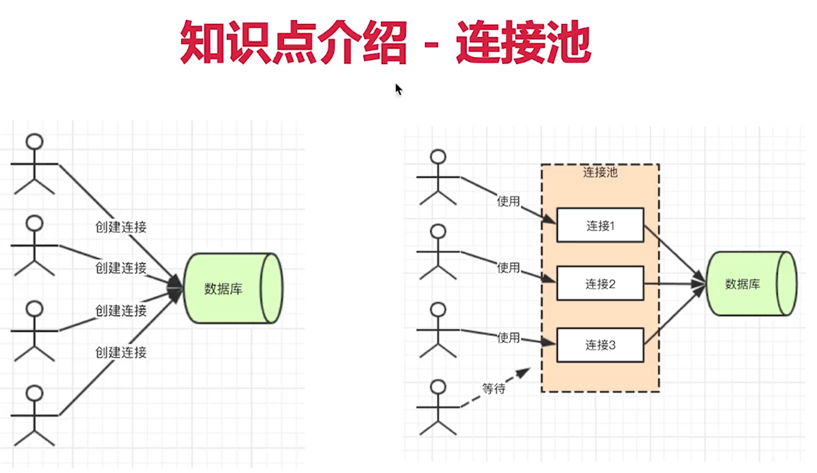
不使用连接池的话,每个用户进来都会创建一个链接,mysql的连接好像是8小时,到了点就会断开。
这种方式很浪费。
一般上线的项目都使用连接池,连接池是常驻内存的,里面管理了很多连接,有用户进来就会使用连接,用户走了,连接就会断开。如果人太多,还会进行排队。
这样就能实现,随来随用,随用随走。
这样性能会很好。
开发环境下,就使用普通的连接就行。
线上环境,和测试环境,使用连接池就行。
define
测试连接
使用.authenticate()函数测试连接是否正常
sequelize
  .authenticate()
  .then(() => {
    console.log('Connection has been established successfully.');
  })
  .catch(err => {
    console.error('Unable to connect to the database:', err);
  });
关闭连接
sync
在初始化Sequelize实例之后,如果需要将定义的Model同步生成数据表,则可以调用sync方法:
let seq = new Sequelize
seq.sync()
猜测是,以表为单位进行同步:
1.若没有这个表,则会根据Model动态生成
2.若存在这个表,则不再对表进行任何操作,修改了model,也不会再对数据库中的表产生同步的作用。
建议:修改了Model之后,手动到数据库中修改对应的表结构。
seq.sync({
force: true
})
强制同步。
只要源码发生改变,则根据清空数据库,根据Model生成所有的表。
所以,轻易不要使用这个属性。
方式1
通过Sequelize.Model.init(attributes, options):
const Model = Sequelize.Model;

class User extends Model {}

User.init({
  // 定义attributes,即数据表中的field
  username: {
    type: Sequelize.STRING,
    allowNull: false // 不为空,默认为true
  }
}, {
  // options
  sequelize,
  modelName: 'user'
});
方式2
const User = sequelize.define('user', {
  username: {
    type: Sequelize.STRING,
    allowNull: false
  }
}, {
  // options
});
在内部,sequelize.define会调用Model.init。
在上面代码中,会告诉Sequelize期望数据库中有名为users的表,其包含username字段。
默认情况下,表名会自动使用复数形式(通过inflection库来实现)。可以通过配置options中的freezeTableName选项来禁用这一特性:
{
freezeTableName: true
}
这个配置项,即可用在difine方法的options中,也可以在初始化Sequelize的define中。
可以以使用Sequelize构造函数中的define选项来禁用所有模型的这一形为。
另外,默认情况下,Sequelize 还会为每个模型定义id(主键)、createdAt和updatedAt字段。
当然,也可以更改此行为,请参考模型定义章节或模型配置API以了解更多信息。
模型与数据库同步
如果你想 Sequelize 通过定义的模型自动创建表(或修改已存在的表),可以使用sync方法,如下所示:
// 注意: `force: true` 选项会在表存在时首先删除表
User.sync({ force: true }).then(() => {
  // 现在 `users` 表会与模型定义一致
  return User.create({
    firstName: 'John',
    lastName: 'Hancock'
  });
});
一次同步所有模型
可以使用sequelize.sync()方法来同步所有模型,而不是调用每个模型的sync()方法。
生产注意事项
在生产环境中,你应该考虑使用“Migration”来替代调用sync()。了解更多,请参考迁移(Migrations)章节。
基本查询示例
Sequelize是基于Promise的。
// 查询所有 users
User.findAll().then(users => {
  console.log("All users:", JSON.stringify(users, null, 4));
});

// 创建一个新 user
User.create({ firstName: "Jane", lastName: "Doe" }).then(jane => {
  console.log("Jane's auto-generated ID:", jane.id);
});

// 删除每个名为 "Jane" 的记录
User.destroy({
  where: {
    firstName: "Jane"
  }
}).then(() => {
  console.log("Done");
});


// 修改每个`lastName`为`null`的记录修改为"Doe"
User.update({ lastName: "Doe" }, {
  where: {
    lastName: null
  }
}).then(() => {
  console.log("Done");
});
Sequelize有很多查询选项,可以通过查询章节了解更多。如果确实需要原始 SQL 查询,也可以进行原始查询。
模型基本使用
数据检索/查找器(Finder)
Finder方法用于从数据库查询数据。它们不会返回普通对象,而是返回模型实例。因为finder方法返回模型实例,所以你可以按照实例文档的所述在查询结果上调用任何模型实例方法。
在本章节,将介绍一些查找器方法可以执行的操作。
find - 搜索数据库中一个特定元素
// 根据已知ID查询
Project.findByPk(123).then(project => {
  // project 会是 Project 的实例,而且为表中 id 为 123 的存储内容
  // 如果未定义此类条目,则将为 null
})

// 根据属性查询
Project.findOne({ where: {title: 'aProject'} }).then(project => {
  // project 会是所匹配到的第一条`title`为'aProject'的 Project || null
})


Project.findOne({
  where: {title: 'aProject'},
  attributes: ['id', ['name', 'title']]
}).then(project => {
  // project 会是所匹配到的第一条`title`为'aProject'的 Project || null
  // project.get('title') 将包含该项目的名称
})
findOrCreate - 搜索一个特定元素不存在时则新建
findOrCreate方法可用于检查数据库中是否已存在某个元素。如果已存在,则返回相应的实例。 如果该元素不存在,则将创建它。
假设我们有一个有User模型的空数据库,其有一个username和一个job属性。
对于创建的情况,可以在where选项后面添加defaults。
findAndCountAll - 搜索数据库中多个元素,同时返回数据和总数
findAndCountAll是一个结合了findAll和count便捷方法(请参见下文),在处理与分页相关的查询时非常有用。在这一查询中,可以用来检索有limit和offset的数据,返回结果除检索数据外还会有记录总数。
本方法查询成功后,将收到有以下两个属性的对象:
- count - 整数,表示由where子句和其它过滤条件检索到的数据总数
- rows - 对象数组,由where子句和其它过滤条件匹配到的,及limit和offset的数据范围内的数据
Project
  .findAndCountAll({
     where: {
        title: {
          [Op.like]: 'foo%'
        }
     },
     offset: 10,
     limit: 2
  })
  .then(result => {
    console.log(result.count);
    console.log(result.rows);
  });
它还支持include查询,仅会将标记为required的包含项添加到计数部分。
如果,在检索用户的同时,同时想查出其概况信息:
User.findAndCountAll({ include: [ { model: Profile, required: true } ], limit: 3 });
因为Profile设置了required,所以结果是内连接查询,也就只有有profile信息的用户才会被统计。如果不设置required,则不管有没有profile都会被统计。
另外,添加where条件后,会自动设置required:
User.findAndCountAll({ include: [ { model: Profile, where: { active: true }} ], limit: 3 });
在以上查询中,因为添加了where条件,所以会自动将required设置为true。
传给findAndCountAll的选项参数,与findAll相同(参见下节)。
findAll - 搜索数据库中多个元素
// find multiple entries
Project.findAll().then(projects => {
  // projects will be an array of all Project instances
})

// search for specific attributes - hash usage
Project.findAll({ where: { name: 'A Project' } }).then(projects => {
  // projects will be an array of Project instances with the specified name
})

// search within a specific range
Project.findAll({ where: { id: [1,2,3] } }).then(projects => {
  // projects will be an array of Projects having the id 1, 2 or 3
  // this is actually doing an IN query
})

Project.findAll({
  where: {
    id: {
      [Op.and]: {a: 5},           // AND (a = 5)
      [Op.or]: [{a: 5}, {a: 6}],  // (a = 5 OR a = 6)
      [Op.gt]: 6,                // id > 6
      [Op.gte]: 6,               // id >= 6
      [Op.lt]: 10,               // id < 10
      [Op.lte]: 10,              // id <= 10
      [Op.ne]: 20,               // id != 20
      [Op.between]: [6, 10],     // BETWEEN 6 AND 10
      [Op.notBetween]: [11, 15], // NOT BETWEEN 11 AND 15
      [Op.in]: [1, 2],           // IN [1, 2]
      [Op.notIn]: [1, 2],        // NOT IN [1, 2]
      [Op.like]: '%hat',         // LIKE '%hat'
      [Op.notLike]: '%hat',       // NOT LIKE '%hat'
      [Op.iLike]: '%hat',         // ILIKE '%hat' (case insensitive)  (PG only)
      [Op.notILike]: '%hat',      // NOT ILIKE '%hat'  (PG only)
      [Op.overlap]: [1, 2],       // && [1, 2] (PG array overlap operator)
      [Op.contains]: [1, 2],      // @> [1, 2] (PG array contains operator)
      [Op.contained]: [1, 2],     // <@ [1, 2] (PG array contained by operator)
      [Op.any]: [2,3]            // ANY ARRAY[2, 3]::INTEGER (PG only)
    },
    status: {
      [Op.not]: false           // status NOT FALSE
    }
  }
})
实例
这里的实例,指的是通过Model.create创建的实例,它就是该Model的实例。
let user = await User.create({
    username, password, avatar, email
})

console.log('user是User Model的实例:', user instanceof User)

非持久化实例
let user = await User.build()
user.save() // 也返回一个promise
持久化实例
let user = await User.create()
实例身上有update、destroy
创建
const User = require('./user')

await User.create({})
查询
// 查询所有记录
await User.findAll()


// 查询一条记录,根据主键,一般就是id
await User.findByPk

// 查询一条记录,条件查询
findOne({where: {username: 1}})

// 查询指定记录,条件查询
await User.findAll({
  where: {
    username: 'lee'
  }
})


// 字段查询
User.findAll({
  attributes: ['id', 'name'],
  limit: 10,
  order:[["id","asc"]] // 查询的结果升序排序
});

等同于
SELECT id, name ...

// 查询并计算记录条数
const res = await UserModel.findAndCountAll({
    where: {
      // 模糊查询
      name: {
        $like: '%小%',
      },

      // 精确查询
      age: 18
    },
    limit: size,
    offset: size * (page - 1),
  })

res { count: 记录数, rows: [] }


// 查询不到则创建记录
findOrCreate()
排序
asc:ascend 上升
desc:descend 下降
分页查询
// 查询第一页10条数据,结果按id字段降序排序
await User.findAll({
  limit: 10,
  offset: 0,
  order:[["id","desc"]]
});

// 查询10条记录
Project.findAll({ limit: 10 })

// 略过8条记录
Project.findAll({ offset: 8 })

// Skip 5 instances and fetch the 5 after that
Project.findAll({ offset: 5, limit: 5 })
更新
DD
// 方式1:先查询出记录,再调用结果的update方法进行更新:
const id = 106;
const user = await User.findByPk(id);

if (!user) {
  ctx.status = 404;
  return;
}

await user.update({ name:"李四", age:43 });

// 方式2:将id为1的用户,重命名为lee
await User.update({name: 'lee'}, {
  where: {
    id: 1
}
})

UPDATE
删除
// 方式1:先查询出记录,再调用结果的destory方法进行删除
const user = await User.findByPk(id);
await user.destory();


// 方式2
await User.destroy({
  where: {
    username: '小',
  }
})

DELETE FORM users WHERE username = '小'
查询操作符
Sequelize公开了可用于创建更复杂比较的符号运算符:
const Op = Sequelize.Op
[Op.and]: [{a: 5}, {b: 6}] // (a = 5) AND (b = 6)
[Op.or]: [{a: 5}, {a: 6}] // (a = 5 OR a = 6)
[Op.gt]: 6, // > 6 [Op.gte]: 6, // >= 6
[Op.lt]: 10, // < 10 [Op.lte]: 10, // <= 10
[Op.ne]: 20, // != 20 [Op.eq]: 3, // = 3
[Op.is]: null // IS NULL
[Op.not]: true, // IS NOT TRUE
[Op.between]: [6, 10], // BETWEEN 6 AND 10
[Op.notBetween]: [11, 15], // NOT BETWEEN 11 AND 15
[Op.in]: [1, 2], // IN [1, 2]
[Op.notIn]: [1, 2], // NOT IN [1, 2]
[Op.like]: ‘%hat’, // LIKE ‘%hat’
[Op.notLike]: ‘%hat’ // NOT LIKE ‘%hat’
[Op.iLike]: ‘%hat’ // ILIKE ‘%hat’ (case insensitive) (PG only)
[Op.notILike]: ‘%hat’ // NOT ILIKE ‘%hat’ (PG only)
[Op.startsWith]: ‘hat’ // LIKE ‘hat%’
[Op.endsWith]: ‘hat’ // LIKE ‘%hat’
[Op.substring]: ‘hat’ // LIKE ‘%hat%’
[Op.regexp]: ‘^[h|a|t]’ // REGEXP/~ ‘^[h|a|t]’ (MySQL/PG only)
[Op.notRegexp]: ‘^[h|a|t]’ // NOT REGEXP/!~ ‘^[h|a|t]’ (MySQL/PG only)
[Op.iRegexp]: ‘^[h|a|t]’ // ~ ‘^[h|a|t]’ (PG only)
[Op.notIRegexp]: ‘^[h|a|t]’ // !~ ‘^[h|a|t]’ (PG only)
[Op.like]: { [Op.any]: [‘cat’, ‘hat’]} // LIKE ANY ARRAY[‘cat’, ‘hat’] - also works for iLike and notLike
[Op.overlap]: [1, 2] // && [1, 2] (PG array overlap operator)
[Op.contains]: [1, 2] // @> [1, 2] (PG array contains operator)
[Op.contained]: [1, 2] // <@ [1, 2] (PG array contained by operator)
[Op.any]: [2,3] // ANY ARRAY[2, 3]::INTEGER (PG only)
[Op.col]: ‘user.organization_id’ // = “user”.”organization_id”, with dialect specific column identifiers, PG in this example
[Op.gt]: { [Op.all]: literal(‘SELECT 1’) } // > ALL (SELECT 1)
联表查询
表之间的关系:
1对1
1对多
多对1
多对多
hasOne
belongsTo
hasMany
belongsMany
查询的时候,使用include属性:
User.findOne({
where: {

},

include: [{
   model: Article,
   where: {

   }
}]
})
使用原生SQL查询
https://itbilu.com/nodejs/npm/sequelize-docs-v5.html#raw-queries
每个Model上都有一个sequelize实例,通过实例就可以执行原生SQL语句:
sequelize.query('select * from users').then(([results, metadata])=>{

})

若有收获,就点个赞吧
0 人点赞


