- 一、字符集
- Example MySQL config file for small systems.
- This is for a system with little memory (<= 64M) where MySQL is only used
- from time to time and it’s important that the mysqld daemon
- doesn’t use much resources.
- MySQL programs look for option files in a set of
- locations which depend on the deployment platform.
- You can copy this option file to one of those
- locations. For information about these locations, see:
- http://dev.mysql.com/doc/mysql/en/option-files.html">http://dev.mysql.com/doc/mysql/en/option-files.html
- In this file, you can use all long options that a program supports.
- If you want to know which options a program supports, run the program
- with the “—help” option.
- The following options will be passed to all MySQL clients
- password = your_password
- Here follows entries for some specific programs
- The MySQL server
- Don’t listen on a TCP/IP port at all. This can be a security enhancement,
- if all processes that need to connect to mysqld run on the same host.
- All interaction with mysqld must be made via Unix sockets or named pipes.
- Note that using this option without enabling named pipes on Windows
- (using the “enable-named-pipe” option) will render mysqld useless!
- skip-networking
- Uncomment the following if you want to log updates
- binary logging format - mixed recommended
- binlog_format=mixed
- Causes updates to non-transactional engines using statement format to be
- written directly to binary log. Before using this option make sure that
- there are no dependencies between transactional and non-transactional
- tables such as in the statement INSERT INTO t_myisam SELECT * FROM
- t_innodb; otherwise, slaves may diverge from the master.
- binlog_direct_non_transactional_updates=TRUE
- Uncomment the following if you are using InnoDB tables
- innodb_data_home_dir = /usr/local/mysql/data
- innodb_data_file_path = ibdata1:10M:autoextend
- innodb_log_group_home_dir = /usr/local/mysql/data
- You can set .._buffer_pool_size up to 50 - 80 %
- of RAM but beware of setting memory usage too high
- innodb_buffer_pool_size = 16M
- innodb_additional_mem_pool_size = 2M
- Set .._log_file_size to 25 % of buffer pool size
- innodb_log_file_size = 5M
- innodb_log_buffer_size = 8M
- innodb_flush_log_at_trx_commit = 1
- innodb_lock_wait_timeout = 50
- Remove the next comment character if you are not familiar with SQL
- safe-updates
- 5.7版本下修改:在my.cnf文件下[mysqld]下增加然后重启服务器
- 8.0版本下修改:
一、字符集
- 字符集设置
查看数据库字符集
show create database table_name;show variables like 'character_%';
查看数据库比较级
show variables like 'collation_%';
修改字符集(mysql8.0不需要修改,默认字符集为utf-8)
- 查看mysql安装目录 ```sql select @@datadir; select @@basedir;
- 修改配置文件查看my.cnf应该存在的位置```shellmysql --help|grep 'my.cnf'
- mac版本默认没有my.cnf配置文件,可以找一个配置文件,将配置文件拷贝到上面查到的目录中的一个地址
```shell
Example MySQL config file for small systems.
This is for a system with little memory (<= 64M) where MySQL is only used
from time to time and it’s important that the mysqld daemon
doesn’t use much resources.
MySQL programs look for option files in a set of
locations which depend on the deployment platform.
You can copy this option file to one of those
locations. For information about these locations, see:
http://dev.mysql.com/doc/mysql/en/option-files.html
In this file, you can use all long options that a program supports.
If you want to know which options a program supports, run the program
with the “—help” option.
The following options will be passed to all MySQL clients
[client]
default-character-set=utf8
password = your_password
port = 3306 socket = /tmp/mysql.sock
Here follows entries for some specific programs
The MySQL server
[mysqld]
default-storage-engine=INNODB
character-set-server=utf8
collation-server=utf8_general_ci
port = 3306
socket = /tmp/mysql.sock
skip-external-locking
key_buffer_size = 16K
max_allowed_packet = 1M
table_open_cache = 4
sort_buffer_size = 64K
read_buffer_size = 256K
read_rnd_buffer_size = 256K
net_buffer_length = 2K
thread_stack = 128K
Don’t listen on a TCP/IP port at all. This can be a security enhancement,
if all processes that need to connect to mysqld run on the same host.
All interaction with mysqld must be made via Unix sockets or named pipes.
Note that using this option without enabling named pipes on Windows
(using the “enable-named-pipe” option) will render mysqld useless!
skip-networking
server-id = 1
Uncomment the following if you want to log updates
log-bin=mysql-bin
binary logging format - mixed recommended
binlog_format=mixed
Causes updates to non-transactional engines using statement format to be
written directly to binary log. Before using this option make sure that
there are no dependencies between transactional and non-transactional
tables such as in the statement INSERT INTO t_myisam SELECT * FROM
t_innodb; otherwise, slaves may diverge from the master.
binlog_direct_non_transactional_updates=TRUE
Uncomment the following if you are using InnoDB tables
innodb_data_home_dir = /usr/local/mysql/data
innodb_data_file_path = ibdata1:10M:autoextend
innodb_log_group_home_dir = /usr/local/mysql/data
You can set .._buffer_pool_size up to 50 - 80 %
of RAM but beware of setting memory usage too high
innodb_buffer_pool_size = 16M
innodb_additional_mem_pool_size = 2M
Set .._log_file_size to 25 % of buffer pool size
innodb_log_file_size = 5M
innodb_log_buffer_size = 8M
innodb_flush_log_at_trx_commit = 1
innodb_lock_wait_timeout = 50
[mysqldump]
quick
max_allowed_packet = 16M
[mysql]
no-auto-rehash
Remove the next comment character if you are not familiar with SQL
safe-updates
[myisamchk]
key_buffer_size = 8M
sort_buffer_size = 8M
[mysqlhotcopy]
interactive-timeout
[mysqld] transaction-isolation=READ-COMMITTED
- 修改文件权限,不然启动会报错```shellsudo chmod 664 my.cnf
重新启动mysql,启动失败的话就重新启动一下电脑;
systemctl restart mysqld;
登录mysql,执行
show variables like 'character_%';
mysql字符修改成功
修改数据库或表字符
alter database database_name charset utf8;alter table table_name charset utf8;
查看数据库和表字符
show create database database_name;show create table table_name;
- 各级别的字符集
MySQL有4个级别的字符集和比较规则,分别是:
- 服务器级别;
- 数据库级别;
- 表级别;
- 列级别;
注意:创建数据库表或者列时可以在后面增加一个charcter set来指定字符集,mysql8默认是utf-8。客户端编码必须和服务器character_set_client一致,解码必须和服务器character_set_results一致。
二、大小写规范
- 查看系统设置 ```sql show variables like ‘%lower_case_table_name%’;
5.7版本下修改:在my.cnf文件下[mysqld]下增加然后重启服务器
lower_case_table_names=1
8.0版本下修改:
停止mysql服务; 删除数据目录 /var/lib/mysql 目录 在mysql配置文件 my.cnf中添加 lower_case_table_names=1 启动服务器。
- 0(默认):大小写敏感;- 1:大小写不敏感,sql语句和数据库表都是以小写形式存储在磁盘上;- 2:创建的表和数据库依据语句上格式存放,凡是查找都是转换为小写进行。<a name="ATAjh"></a>### 三、mysql数据目录(linux)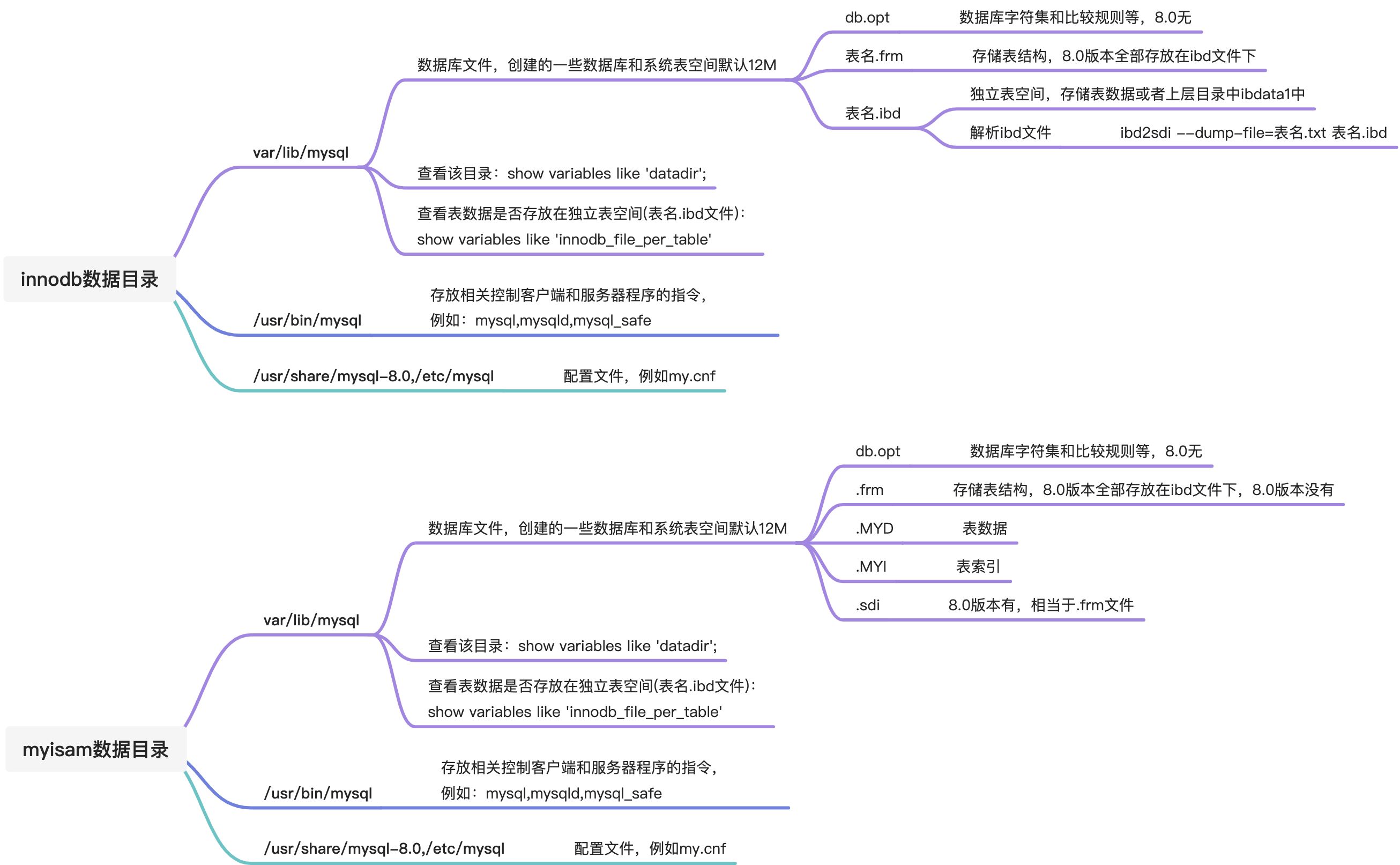<a name="rCVgy"></a>### 四、用户与权限管理```sql-- 创建用户create user 'kanlina' identified by '123456';create user 'kanlina'@'localhost' identified by '123456';-- 修改用户update mysql.user set user = 'kanlina1' where user = 'kanlina';flush privileges;-- 删除用户drop user 'kanlina1';drop user 'kanlina'@'localhost';
-- 设置当前用户密码 以下@'localhost'可省略alter user user() identified by '123456';set password = '123456'; -- mysql 8.0取消-- 修改其他用户密码alter user '用户名'@'localhost' identified by '密码';set password for '用户名'@'hostname'='密码';-- 密码过期策略alter user 'kanlina'@'localhost' password expire;-- 设置过期时间create user 'kanlina'@'localhost' password expire interval 90 day;alter user 'kanlina'@'localhost' password expire interval 90 day;-- 永不过期create user 'kanlina'@'localhost' password expire interval never;alter user 'kanlina'@'localhost' password expire interval never;-- 延用全局过期策略create user 'kanlina'@'localhost' password expire interval default;alter user 'kanlina'@'localhost' password expire interval default;-- 或者配置文件中加入default_password_lifetime-- 密码重用策略set persist password_history = 6; #设置不能选择最近使用过的6个密码set persist password_reuse_interval = 365; #设置不能选择最近一年内的密码-- 系统变量设置密码password_history --规定密码重用数量password_reuse_interval --规定密码重用的周期
-- 授予权限grant 权限1,权限2,...权限n on 数据库名称.表名称 to 用户名@用户地址 [identified by '密码口令']; #如果没有该用户则创建新用户grant select,update,delete,insert on test.acc_line_mapping to 'kanlina';grant all privileges on *.* to 'kanlina'@'%'; #和root权限一样,但是无法赋予其他用户权限-- 查看权限show grants;-- 回收权限revoke 权限1,权限2,...权限n on 数据库名称.表名称 from '用户名';
五、角色(mysql8.0有)
-- 创建角色create role 'manager','stoker';--给角色分配权限grant privileges on table_name to 'role_name'[@'localhost'];--查询权限show privileges\G;--查看角色的权限show grants for 'manager'@'%';--回收角色权限revoke update on 数据库.表 from '角色名';--删除角色drop role '角色名';--给用户赋予角色grant '角色名' to '用户';--激活角色set default role all to '角色名';--查询已激活角色select current_role();--显示是否永久激活show variables like 'activate_all_roles_on_login';--设置永久激活set global activate_all_roles_on_login=on;

若有收获,就点个赞吧
0 人点赞


