1. 概述
ELK
ELK是ElasticSearch、Logstash、Kibana三大开源框架字母大写简称。市面上也被称为Elastic Stack。ElasticSearch是一种分布式全文搜索引擎,Logstash是ELK的中央数据流引擎,用于从不同目标(文件/数据存储/MQ)收集的不同格式数据,经过过滤后支持输出到不同目的地(文件/MQ/Redis/ElasticSearch/Kafka)等。Kibana可以将ElasticSearch的数据通过友好的页面展示出来,提供实时分析的功能。
ElasticSearch
ElasticSearch,简称es,es是一个开源的高扩展的分布式全文检索引擎,它可以近乎实时的存储、检索数据;本身扩展性很好,可以扩展到上百台服务器,处理PB级别的数据。es也使用Java开发并使用Lucence作为其核心来实现所有的索引和搜索的功能,但是它的目的是通过简单的RESTful API来隐藏Lucence的复杂性,从而让全文搜索变得简单。
2. 安装
使用华为云下载
- ElasticSearch: https://mirrors.huaweicloud.com/elasticsearch/?C=N&O=D
- Logstash: https://mirrors.huaweicloud.com/logstash/?C=N&O=D
- Kibana: https://mirrors.huaweicloud.com/kibana/?C=N&O=D
配置ElasticSearch
- elasticsearch.yml:主要配置文件
- jvm.options:JVM配置文件
- log4j2.properties:日志配置文件
配置跨域,在elasticsearch.yml中添加:
http.cors.enabled: truehttp.cors.allow-origin: '*'
机器内存比较小的,减小JVM堆大小:
-Xms512m-Xmx512m
启动ElasticSearch
双击bin目录下的elasticsearch.bat文件即可启动,访问localhost:9200即可看到相关信息。
可视化
$ get clone https://github.com/mobz/elasticsearch-head$ cnpm install$ npm run start
配置Kibana
在config/kibana.yml中添加:
i18n.locale: "zh-CN"
启动Kibana
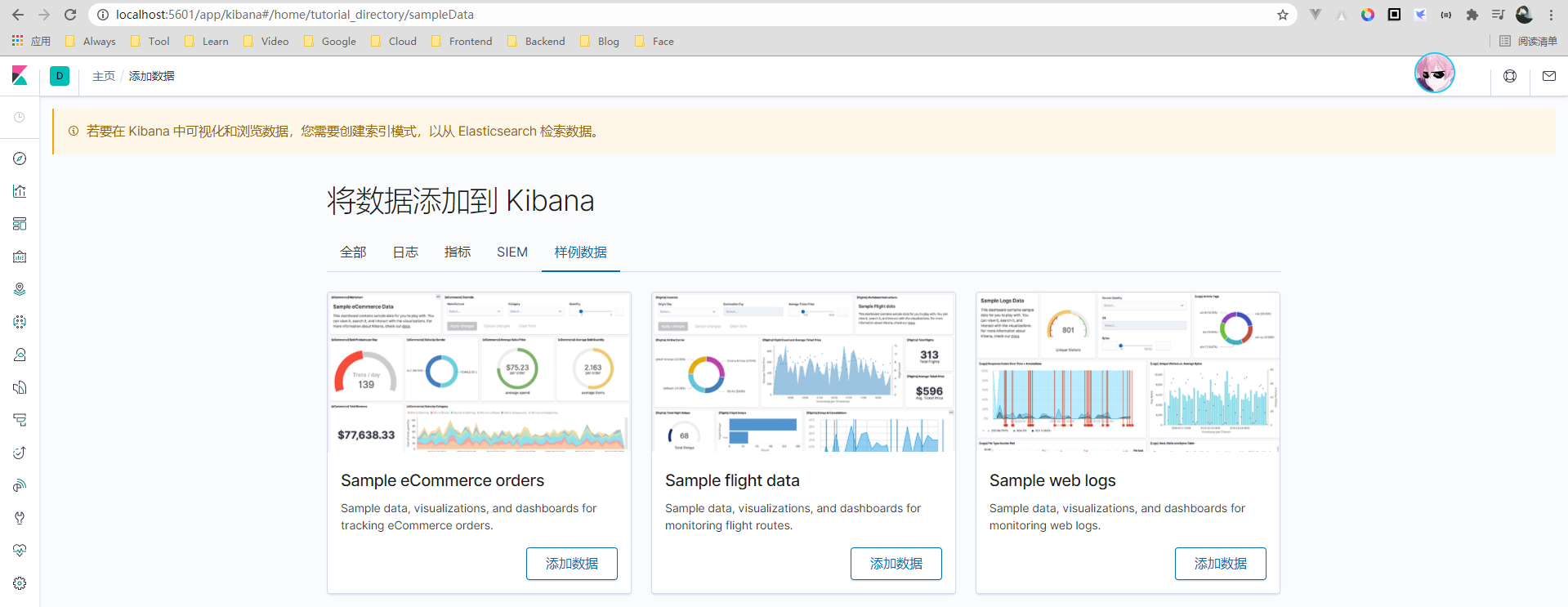
双击bin目录下的kibana.bat文件即可启动,访问localhost:5601即可看到界面。
3. 核心
ElasticSearch与关系型数据库对比
| Relational DB | ElasticSearch |
|---|---|
| 数据库(database) | 索引(indices) |
| 表(tables) | 类型(type) |
| 行(rows) | 文档(documents) |
| 字段(columns) | 字段(fields) |
ElasticSearch中可以包含多个索引,每个索引中中可以包含多个类型,每个类型下可以包含多个文档,每个文档可以包含多个域。
物理设计
ElasticSearch在后台把每个索引划分成多个分片,每分分片可以在集群中的不同服务间迁移。
逻辑设计
一个索引类型中,包含多个文档,比如说文档1,文档2。当我们索引一篇文档时,可以通过这样的顺序找到它:索引 > 类型 > 文档ID,通过这个组合我们就能索引到某个具体的文档。注意:ID不必是整数,实际上它是个字符串。
4. IK分词器
安装
1、下载-github: https://github.com/medcl/elasticsearch-analysis-ik/releases/tag/v7.6.1
2、下载完毕之后,在ElasticSearch的plugins文件夹新建ik文件夹,并把解压内容复制进去
3、在ElasticSearch的bin目录下打开命令行,输入elasticsearch-plugin list,可以看到所有插件
PS C:\Java\es\elasticsearch-7.6.1\bin> .\elasticsearch-plugin listfuture versions of Elasticsearch will require Java 11; your Java version from [C:\Program Files\Java\jdk1.8.0_221\jre] does not meet this requirementik
说明
IK提供了两个分词算法:ik_smart和ik_max_word,其中ik_smart为最少切分(不存在重复切分),ik_max_word为最细粒度划分(任何可能组成词的都会分出来)。
测试
ik_smart测试:
GET _analyze{"analyzer": "ik_smart","text": "枫叶凋零"}
{"tokens" : [{"token" : "枫叶","start_offset" : 0,"end_offset" : 2,"type" : "CN_WORD","position" : 0},{"token" : "凋零","start_offset" : 2,"end_offset" : 4,"type" : "CN_WORD","position" : 1}]}
ik_max_word分词:
GET _analyze{"analyzer": "ik_max_word","text": "文化工作"}
{"tokens" : [{"token" : "文化工作","start_offset" : 0,"end_offset" : 4,"type" : "CN_WORD","position" : 0},{"token" : "文化","start_offset" : 0,"end_offset" : 2,"type" : "CN_WORD","position" : 1},{"token" : "化工","start_offset" : 1,"end_offset" : 3,"type" : "CN_WORD","position" : 2},{"token" : "工作","start_offset" : 2,"end_offset" : 4,"type" : "CN_WORD","position" : 3}]}
自定义分词
自己需要的词,比如名字,需要自己加入到分词器的字典中。
需要在ElasticSearch的plugins/ik/config下新建一个字典khighness.dic(扩展名为.dic),在里面添加词,比如自己的名字,然后在IKAnalyzer.cfg.xml中添加如下配置:
<entry key="ext_dict">khighness.dic</entry>
5. CRUD
测试
(1)创建索引
- 字符串类型:text、keyword
- 数值类型:long、integer、short、byte、double、float、half、scaled float
- 日期类型:date
- 布尔类型:boolean
- 二进制类型:binary
PUT /k{"mappings": {"properties": {"name": {"type": "text"},"age": {"type": "long"},"birth": {"type": "date"}}}}
(2)添加字段
PUT /k/_mapping{"properties": {"phone": {"type": "text"}}}
(3)添加数据
POST k/_doc/1{"name":"Khighness","age":19,"birth":"2001-09-11","phone":"13611339955"}POST k/_doc/2{"name":"FlowerK","age":17,"birth":"2001-07-24","phone":"18371398911"}
(4)查询所有
GET k/_search
(5)查询指定ID
GET k/_doc/1
(6)条件查询
GET k/_search?q=age:19
(7)指定ID全量修改
POST k/_doc/1{"name":"Khighness","age":19,"birth":"2001-09-11","phone":"1823676372"}
(8)指定id部分字段修改
POST k/_update/2{"doc": {"age":18}}
(9)删除索引
DELETE /k
(10)查看索引情况
GET _cat/indices?v
(11)获取健康值
GET _cat/indices?v
6. 集成
Maven
<parent><groupId>org.springframework.boot</groupId><artifactId>spring-boot-starter-parent</artifactId><version>2.3.2.RELEASE</version></parent><properties><project.build.sourceEncoding>UTF-8</project.build.sourceEncoding><maven.compiler.source>1.8</maven.compiler.source><maven.compiler.target>1.8</maven.compiler.target><java.version>1.8</java.version><elasticsearch.version>7.6.2</elasticsearch.version><fastjson.version>1.2.75</fastjson.version></properties><dependencies><dependency><groupId>org.springframework.boot</groupId><artifactId>spring-boot-starter-web</artifactId></dependency><dependency><groupId>org.springframework.boot</groupId><artifactId>spring-boot-starter-test</artifactId></dependency><dependency><groupId>org.springframework.boot</groupId><artifactId>spring-boot-starter-data-elasticsearch</artifactId></dependency><dependency><groupId>org.elasticsearch.client</groupId><artifactId>elasticsearch-rest-high-level-client</artifactId><version>${elasticsearch.version}</version></dependency><dependency><groupId>org.projectlombok</groupId><artifactId>lombok</artifactId></dependency><dependency><groupId>com.alibaba</groupId><artifactId>fastjson</artifactId><version>${fastjson.version}</version></dependency></dependencies>
添加客户端bean
import org.apache.http.HttpHost;import org.elasticsearch.client.RestClient;import org.elasticsearch.client.RestHighLevelClient;import org.springframework.context.annotation.Bean;import org.springframework.context.annotation.Configuration;/*** @author KHighness* @since 2021-03-20*/@Configurationpublic class ElasticSearchConfig {@Beanpublic RestHighLevelClient restHighLevelClient() {RestHighLevelClient client = new RestHighLevelClient(RestClient.builder(new HttpHost("127.0.0.1", 9200, "http")));return client;}}
API测试
import com.alibaba.fastjson.JSON;import org.elasticsearch.action.admin.indices.delete.DeleteIndexRequest;import org.elasticsearch.action.bulk.BulkRequest;import org.elasticsearch.action.bulk.BulkResponse;import org.elasticsearch.action.delete.DeleteRequest;import org.elasticsearch.action.delete.DeleteResponse;import org.elasticsearch.action.get.GetRequest;import org.elasticsearch.action.get.GetResponse;import org.elasticsearch.action.index.IndexRequest;import org.elasticsearch.action.index.IndexResponse;import org.elasticsearch.action.search.SearchRequest;import org.elasticsearch.action.search.SearchResponse;import org.elasticsearch.action.support.master.AcknowledgedResponse;import org.elasticsearch.action.update.UpdateRequest;import org.elasticsearch.action.update.UpdateResponse;import org.elasticsearch.client.RequestOptions;import org.elasticsearch.client.RestHighLevelClient;import org.elasticsearch.client.indices.CreateIndexRequest;import org.elasticsearch.client.indices.CreateIndexResponse;import org.elasticsearch.client.indices.GetIndexRequest;import org.elasticsearch.common.unit.TimeValue;import org.elasticsearch.common.xcontent.XContentType;import org.elasticsearch.index.query.MatchAllQueryBuilder;import org.elasticsearch.index.query.QueryBuilders;import org.elasticsearch.index.query.TermQueryBuilder;import org.elasticsearch.search.SearchHit;import org.elasticsearch.search.builder.SearchSourceBuilder;import org.elasticsearch.search.fetch.subphase.FetchSourceContext;import org.junit.jupiter.api.Test;import org.springframework.beans.factory.annotation.Autowired;import org.springframework.beans.factory.annotation.Qualifier;import org.springframework.boot.test.context.SpringBootTest;import top.parak.entity.User;import java.io.IOException;import java.util.ArrayList;import java.util.List;import java.util.Map;import java.util.concurrent.TimeUnit;/*** @author KHighness* @since 2021-03-20*/@SpringBootTestpublic class ElasticSearchTest {@Autowired@Qualifier("restHighLevelClient")private RestHighLevelClient client;// 创建索引@Testvoid test1() throws IOException {CreateIndexRequest request = new CreateIndexRequest("khighness");CreateIndexResponse response = client.indices().create(request, RequestOptions.DEFAULT);System.out.println(response);}// 是否存在@Testvoid test2() throws IOException {GetIndexRequest request = new GetIndexRequest("khighness");boolean exists = client.indices().exists(request, RequestOptions.DEFAULT);System.out.println(exists);}// 删除索引@Testvoid test3() throws IOException {DeleteIndexRequest request = new DeleteIndexRequest("khighness");AcknowledgedResponse response = client.indices().delete(request, RequestOptions.DEFAULT);System.out.println(response.isAcknowledged());}// 创建文档@Testvoid test4() throws IOException {User kHighness = User.builder().age(19).name("KHighness").build();User flowerK = User.builder().age(19).name("FlowerK").build();User rubbishK = User.builder().age(19).name("RubbishK").build();User unknownK = User.builder().age(19).name("UnknownK").build();IndexRequest request = new IndexRequest().index("khighness").id("1").timeout(TimeValue.timeValueSeconds(1));request.source(JSON.toJSONString(kHighness), XContentType.JSON);IndexResponse response = client.index(request, RequestOptions.DEFAULT);System.out.println(response.toString());}// 是否存在@Testvoid test5() throws IOException {GetRequest request = new GetRequest("khighness", "1");request.fetchSourceContext(new FetchSourceContext(false));boolean exists = client.exists(request, RequestOptions.DEFAULT);System.out.println(exists);}// 文档信息@Testvoid test6() throws IOException {GetRequest request = new GetRequest("khighness", "1");GetResponse response = client.get(request, RequestOptions.DEFAULT);Map<String, Object> map = response.getSourceAsMap();for (Map.Entry<String, Object> entry : map.entrySet()) {System.out.println(entry.getKey() + ": " + entry.getValue());}}// 更新文档@Testvoid test7() throws IOException {UpdateRequest request = new UpdateRequest("khighness", "1");request.timeout("1s");User kHighness = User.builder().age(17).name("KHighness").build();request.doc(JSON.toJSONString(kHighness), XContentType.JSON);UpdateResponse response = client.update(request, RequestOptions.DEFAULT);System.out.println(response.toString());}// 删除文档@Testvoid test8() throws IOException {DeleteRequest request = new DeleteRequest("khighness", "1");request.timeout("1s");DeleteResponse response = client.delete(request, RequestOptions.DEFAULT);System.out.println(response.status());}// 批量插入@Testvoid test9() throws IOException {BulkRequest bulkRequest = new BulkRequest();bulkRequest.timeout("10s");List<User> userList = new ArrayList<>();userList.add(User.builder().age(19).name("KHighness").build());userList.add(User.builder().age(19).name("FlowerK").build());userList.add(User.builder().age(19).name("RubbishK").build());userList.add(User.builder().age(19).name("UnknownK").build());for (int i = 0; i < userList.size(); i++) {bulkRequest.add(new IndexRequest("khighness").id("" + (i + 1)).source(JSON.toJSONString(userList.get(i)), XContentType.JSON));}BulkResponse response = client.bulk(bulkRequest, RequestOptions.DEFAULT);System.out.println(response.hasFailures()); // 返回false代表成功}// 查询@Testvoid test10() throws IOException {// 搜索请求SearchRequest request = new SearchRequest("khighness");// 查询条件SearchSourceBuilder builder = new SearchSourceBuilder();// 构建高亮builder.highlighter();// term:精确匹配TermQueryBuilder tempQuery = QueryBuilders.termQuery("age", "19");// match:模糊查询MatchAllQueryBuilder matchQuery = QueryBuilders.matchAllQuery();// 设置查询和限时builder.query(tempQuery).timeout(new TimeValue(60, TimeUnit.SECONDS));request.source(builder);SearchResponse response = client.search(request, RequestOptions.DEFAULT);System.out.println(JSON.toJSONString(response.getHits()));for (SearchHit documentFields : response.getHits().getHits()) {System.out.println(documentFields.getSourceAsMap());}}}

若有收获,就点个赞吧
0 人点赞


