- HTTP服务器:要开发HTTP服务器程序,从头处理TCP连接,解析HTTP是不现实的。这些工作实际上已经由Node.js自带的http模块完成了。应用程序并不直接和HTTP协议打交道,而是操作http模块提供的request和response对象。
request对象封装了HTTP请求,我们调用request对象的属性和方法就可以拿到所有HTTP请求的信息;
response对象封装了HTTP响应,我们操作response对象的方法,就可以把HTTP响应返回给浏览器。
'use strict'const http = require('http');let server = http.createServer((request, response) => {console.log(request.method, request.url);// 将HTTP响应200写入response, 同时设置Content-Type: text/html:response.writeHead(200, {'Content-Type': 'text/html'});// 将HTTP响应的HTML内容写入response:response.end('<h1>Hello world!</h1>');})// 让服务器监听8080端口:server.listen(8080);console.log("Server is running at http://127.0.0.1:8080/");
在命令提示符下运行该程序,可以看到以下输出:
$ node hello.jsServer is running at http://127.0.0.1:8080/
不要关闭命令提示符,直接打开浏览器输入http://localhost:8080,即可看到服务器响应的内容: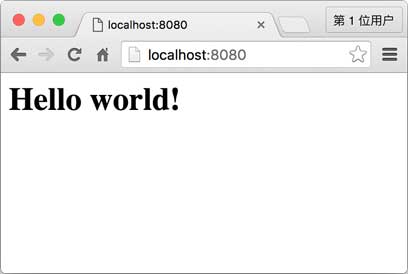
同时,在命令提示符窗口,可以看到程序打印的请求信息:
GET: /GET: /favicon.ico
- 文件服务器
让我们继续扩展一下上面的Web程序。我们可以设定一个目录,然后让Web程序变成一个文件服务器。要实现这一点,我们只需要解析request.url中的路径,然后在本地找到对应的文件,把文件内容发送出去就可以了。
解析URL需要用到Node.js提供的url模块,它使用起来非常简单,通过parse()将一个字符串解析为一个Url对象:
'use strict'const url = require('url');// 通过url.parse来解析url,并返回一个对象console.log(url.parse('http://user:pass@host.com:8080/path/to/file?query=string#hash'));
结果如下:
Url {protocol: 'http:',slashes: true,auth: 'user:pass',host: 'host.com:8080',port: '8080',hostname: 'host.com',hash: '#hash',search: '?query=string',query: 'query=string',pathname: '/path/to/file',path: '/path/to/file?query=string',href: 'http://user:pass@host.com:8080/path/to/file?query=string#hash' }
处理本地文件目录需要使用Node.js提供的path模块,它可以方便地构造目录:
'use strict'const path = require('path');// // 解析当前目录:let workPath = path.resolve('.');// // 组合完整的文件路径:当前目录+'pub'+'index.html':let pt = path.join(workPath,'pub','index.html');console.log(pt);// D:\研究生\学习\Nodejs\http\pub\index.html
使用path模块可以正确处理操作系统相关的文件路径。在Windows系统下,返回的路径类似于C:\Users\michael\static\index.html,这样,我们就不关心怎么拼接路径了。
最后,我们实现一个文件服务器file_server.js:
'use strict'const fs = require('fs'),http = require('http'),path = require('path'),url = require('url');let root = path.resolve(process.argv[2] || '.');console.log(root);let server = http.createServer((request, response) => {var pathname = url.parse(request.url).pathname;// 获得对应的本地文件路径,类似 '/srv/www/css/bootstrap.css':var filePath = path.join(root, pathname);fs.stat(filePath,(err,stats) => {if(!err && stats.isFile()) {console.log('200' + request.url);response.writeHead(200);fs.createWriteStream(filePath).pipe(response);}else {console.log('404' + request.url);response.writeHead(404);response.end('404 Not Found');}})})server.listen(8080);console.log('Server is running at http://127.0.0.1:8080/');
没有必要手动读取文件内容。由于response对象本身是一个Writable Stream,直接用pipe()方法就实现了自动读取文件内容并输出到HTTP响应。
在命令行运行node file_server.js /path/to/dir,把/path/to/dir改成你本地的一个有效的目录,然后在浏览器中输入http://localhost:8080/index.html:

若有收获,就点个赞吧
0 人点赞


