
飞书是字节跳动旗下一款企业级协同办公软件,本文将介绍如何基于飞书开放平台的身份验证能力,使用 Lua 实现企业级组织架构的登录认证网关。
登录流程
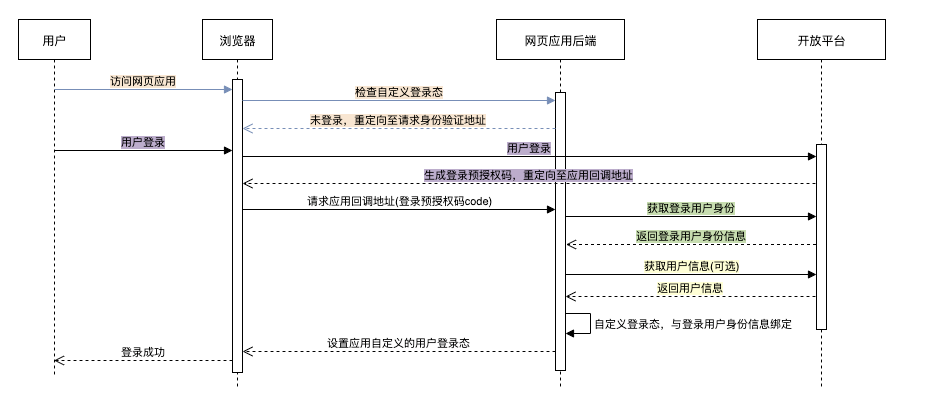
让我们首先看一下飞书第三方网站免登的整体流程:
第一步: 网页后端发现用户未登录,请求身份验证;
第二步: 用户登录后,开放平台生成登录预授权码,302跳转至重定向地址;
第三步: 网页后端调用获取登录用户身份校验登录预授权码合法性,获取到用户身份;
第四步: 如需其他用户信息,网页后端可调用获取用户信息(身份验证)。
Lua 实现
飞书接口部分实现
获取应用的 access_token
function _M:get_app_access_token()local url = "https://open.feishu.cn/open-apis/auth/v3/tenant_access_token/internal/"local body = {app_id = self.app_id,app_secret = self.app_secret}local res, err = http_post(url, body, nil)if not res thenreturn nil, errendif res.status ~= 200 thenreturn nil, res.bodyendlocal data = json.decode(res.body)if data["code"] ~= 0 thenreturn nil, res.bodyendreturn data["tenant_access_token"]end
通过回调 code 获取登录用户信息
function _M:get_login_user(code)local app_access_token, err = self:get_app_access_token()if not app_access_token thenreturn nil, "get app_access_token failed: " .. errendlocal url = "https://open.feishu.cn/open-apis/authen/v1/access_token"local headers = {Authorization = "Bearer " .. app_access_token}local body = {grant_type = "authorization_code",code = code}ngx.log(ngx.ERR, json.encode(body))local res, err = http_post(url, body, headers)if not res thenreturn nil, errendlocal data = json.decode(res.body)if data["code"] ~= 0 thenreturn nil, res.bodyendreturn data["data"]end
获取用户详细信息
获取登录用户信息时无法获取到用户的部门信息,故这里需要使用登录用户信息中的 open_id 获取用户的详细信息,同时 user_access_token 也是来自于获取到的登录用户信息。
function _M:get_user(user_access_token, open_id)local url = "https://open.feishu.cn/open-apis/contact/v3/users/" .. open_idlocal headers = {Authorization = "Bearer " .. user_access_token}local res, err = http_get(url, nil, headers)if not res thenreturn nil, errendlocal data = json.decode(res.body)if data["code"] ~= 0 thenreturn nil, res.bodyendreturn data["data"]["user"], nilend
登录信息
JWT 登录凭证
我们使用 JWT 作为登录凭证,同时用于保存用户的 open_id 和 department_ids。
-- 生成 tokenfunction _M:sign_token(user)local open_id = user["open_id"]if not open_id or open_id == "" thenreturn nil, "invalid open_id"endlocal department_ids = user["department_ids"]if not department_ids or type(department_ids) ~= "table" thenreturn nil, "invalid department_ids"endreturn jwt:sign(self.jwt_secret,{header = {typ = "JWT",alg = jwt_header_alg,exp = ngx.time() + self.jwt_expire},payload = {open_id = open_id,department_ids = json.encode(department_ids)}})end-- 验证与解析 tokenfunction _M:verify_token()local token = ngx.var.cookie_feishu_auth_tokenif not token thenreturn nil, "token not found"endlocal result = jwt:verify(self.jwt_secret, token)ngx.log(ngx.ERR, "jwt_obj: ", json.encode(result))if result["valid"] thenlocal payload = result["payload"]if payload["department_ids"] and payload["open_id"] thenreturn payloadendreturn nil, "invalid token: " .. json.encode(result)endreturn nil, "invalid token: " .. json.encode(result)end
使用 Cookie 存储登录凭证
ngx.header["Set-Cookie"] = self.cookie_key .. "=" .. token
组织架构白名单
我们在用户登录时获取用户的部门信息,或者在用户后续访问应用时解析登录凭证中的部门信息,根据设置的部门白名单,判断用户是否拥有访问应用的权限。
-- 部门白名单配置_M.department_whitelist = {}function _M:check_user_access(user)if type(self.department_whitelist) ~= "table" thenngx.log(ngx.ERR, "department_whitelist is not a table")return falseendif #self.department_whitelist == 0 thenreturn trueendlocal department_ids = user["department_ids"]if not department_ids or department_ids == "" thenreturn falseendif type(department_ids) ~= "table" thendepartment_ids = json.decode(department_ids)endfor i=1, #department_ids doif has_value(self.department_whitelist, department_ids[i]) thenreturn trueendendreturn falseend
更多网关配置
同时支持 IP 黑名单和路由白名单配置。
-- IP 黑名单配置_M.ip_blacklist = {}-- 路由白名单配置_M.uri_whitelist = {}function _M:auth()local request_uri = ngx.var.uringx.log(ngx.ERR, "request uri: ", request_uri)if has_value(self.uri_whitelist, request_uri) thenngx.log(ngx.ERR, "uri in whitelist: ", request_uri)returnendlocal request_ip = ngx.var.remote_addrif has_value(self.ip_blacklist, request_ip) thenngx.log(ngx.ERR, "forbided ip: ", request_ip)return ngx.exit(ngx.HTTP_FORBIDDEN)endif request_uri == self.logout_uri thenreturn self:logout()endlocal payload, err = self:verify_token()if payload thenif self:check_user_access(payload) thenreturnendngx.log(ngx.ERR, "user access not permitted")self:clear_token()return self:sso()endngx.log(ngx.ERR, "verify token failed: ", err)if request_uri ~= self.callback_uri thenreturn self:sso()endreturn self:sso_callback()end
使用
本文就不赘述 OpenResty 的安装了,可以参考我的另一篇文章《在 Ubuntu 上使用源码安装 OpenResty》。
下载
cd /path/togit clone git@github.com:ledgetech/lua-resty-http.gitgit clone git@github.com:SkyLothar/lua-resty-jwt.gitgit clone git@github.com:k8scat/lua-resty-feishu-auth.git
配置
lua_package_path "/path/to/lua-resty-feishu-auth/lib/?.lua;/path/to/lua-resty-jwt/lib/?.lua;/path/to/lua-resty-http/lib/?.lua;/path/to/lua-resty-redis/lib/?.lua;/path/to/lua-resty-redis-lock/lib/?.lua;;";server {access_by_lua_block {local feishu_auth = require "resty.feishu_auth"feishu_auth.app_id = ""feishu_auth.app_secret = ""feishu_auth.callback_uri = "/feishu_auth_callback"feishu_auth.logout_uri = "/feishu_auth_logout"feishu_auth.app_domain = "feishu-auth.example.com"feishu_auth.jwt_secret = "thisisjwtsecret"feishu_auth.ip_blacklist = {"47.1.2.3"}feishu_auth.uri_whitelist = {"/"}feishu_auth.department_whitelist = {"0"}feishu_auth:auth()}}
配置说明
app_id用于设置飞书企业自建应用的App IDapp_secret用于设置飞书企业自建应用的App Secretcallback_uri用于设置飞书网页登录后的回调地址(需在飞书企业自建应用的安全设置中设置重定向 URL)logout_uri用于设置登出地址app_domain用于设置访问域名(需和业务服务的访问域名一致)jwt_secret用于设置 JWT secretip_blacklist用于设置 IP 黑名单uri_whitelist用于设置地址白名单,例如首页不需要登录认证department_whitelist用于设置部门白名单(字符串)
应用权限说明
- 获取部门基础信息
- 获取部门组织架构信息
- 以应用身份读取通讯录
- 获取用户组织架构信息
- 获取用户基本信息
开源
本项目已完成且已在 GitHub 上开源:k8scat/lua-resty-feishu-auth,希望大家可以动动手指点个 Star,表示对本项目的肯定与支持!

若有收获,就点个赞吧
0 人点赞


