1、主要性能排序:
冗余从好到坏:raid 1 raid 10 raid 5 raid 0
性能从好到坏:raid 0 raid 10 raid 5 raid 1
成本从低到高:raid 0 raid 5 raid 1 raid 10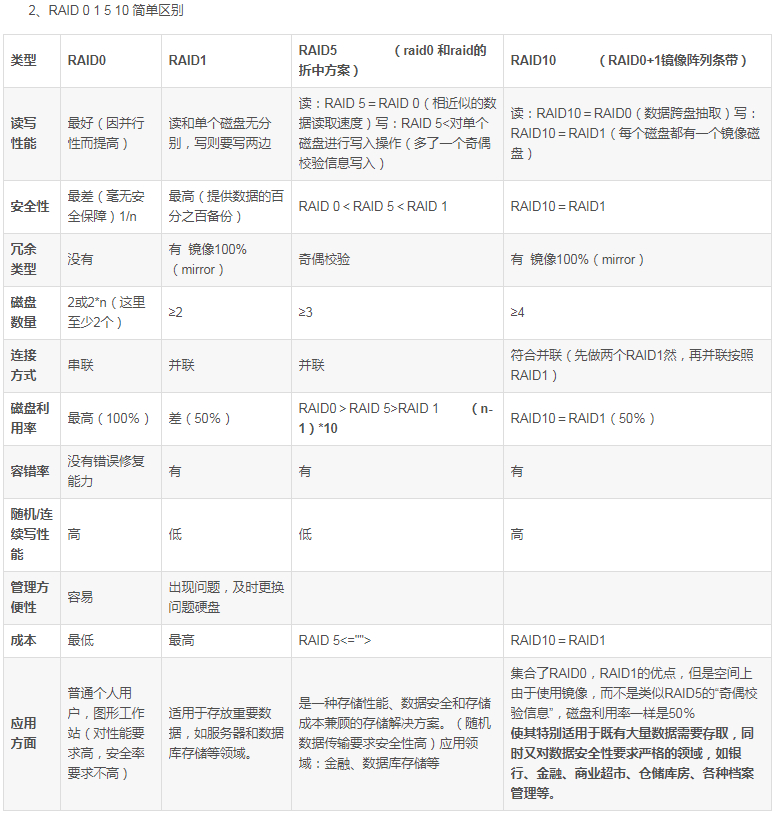

操作步骤
一: 划分磁盘(磁盘分区)
[root@linux001 ~]# fdisk /dev/sdbWelcome to fdisk (util-linux 2.23.2).Changes will remain in memory only, until you decide to write them.Be careful before using the write command.Command (m for help): nPartition type:p primary (0 primary, 0 extended, 4 free)e extendedSelect (default p): pPartition number (1-4, default 1):First sector (2048-41943039, default 2048):Using default value 2048Last sector, +sectors or +size{K,M,G} (2048-41943039, default 41943039): +200MPartition 1 of type Linux and of size 200 MiB is setCommand (m for help): t #修改文件格式为fdSelected partition 1Hex code (type L to list all codes): fdChanged type of partition 'Linux' to 'Linux raid autodetect'Command (m for help): pDisk /dev/sdb: 21.5 GB, 21474836480 bytes, 41943040 sectorsUnits = sectors of 1 * 512 = 512 bytesSector size (logical/physical): 512 bytes / 512 bytesI/O size (minimum/optimal): 512 bytes / 512 bytesDisk label type: dosDisk identifier: 0x0bf1ea4aDevice Boot Start End Blocks Id System/dev/sdb1 2048 411647 204800 fd Linux raid autodetectCommand (m for help): wThe partition table has been altered!Calling ioctl() to re-read partition table.Syncing disks.
使用同样的方法创建其他3个硬盘分区
[root@linux001 ~]# fdisk -l (以去除无用信息)Device Boot Start End Blocks Id System/dev/sdb1 2048 411647 204800 fd Linux raid autodetect/dev/sdc1 2048 411647 204800 fd Linux raid autodetect/dev/sdd1 2048 411647 204800 fd Linux raid autodetect/dev/sde1 2048 411647 204800 fd Linux raid autodetect
二: 使用mdadm命令创建RAID5
RAID的设备名称为/dev/mdx ,其中X为序列号从0开始
[root@linux001 ~]# mdadm --create --help #使用mdadm命令,--help有参考

若有收获,就点个赞吧
0 人点赞


