设置密码复杂度
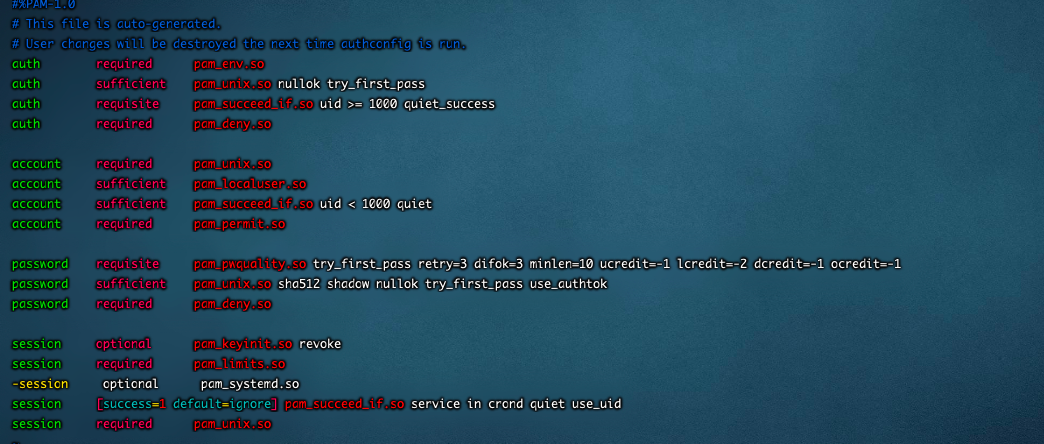
vim /etc/pam.d/system-authpassword requisite pam_pwquality.so try_first_pass retry=3 difok=3 minlen=10 ucredit=-1 lcredit=-2 dcredit=-1 ocredit=-1大写字母(ucredit),两个小写字母(lcredit),一个数字(dcredit)和一个标点符号(ocredit)新密码和旧密码不同的位数(difok=3)设置密码登录失败重试时间auth required pam_tally2.so onerr=fail deny=3 unlock_time=300 even_deny_root root_unlock_time=300
配置密码生存天数
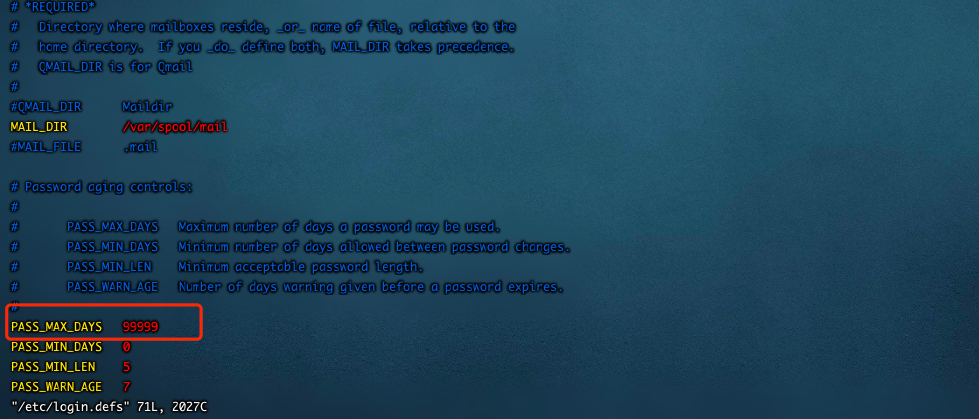
vim /etc/login.defsPASS_MAX_DAYS 90
禁止root用户远程登录
vim /etc/ssh/sshd_configPermitRootLogin noservice sshd restart(不要执行)

只允许wheel组内的用户能够SU到超级管理员用户;
vim /etc/pam.d/su修改配置文件;放开注释或者添加auth required pam_wheel.so use_uid使用命令 usermod -G wheel 用户名 #添加username到wheel组内;

1、添加用户,首先用adduser命令添加一个普通用户,命令如下:#adduser tommy//添加一个名为tommy的用户#passwd tommy //修改密码Changing password for user tommy.New UNIX password: //在这里输入新密码Retype new UNIX password: //再次输入新密码passwd: all authentication tokens updated successfully.
172.17.117.252
审计 adduser audit
passwd audit Zhong_xin_123
安全 adduser safeuser
passwd safeuser Zhong_xin_123
admin :adduser admin
passwd admin Zhong_xin_123 使用命令 usermod -G wheel admin
#添加username到wheel组内;
usermod -a -G root test 加到root组
vim /etc/passwd
test:x:0:0::/home/test:/bin/sh
修改/etc/profile
HISTSIZE=1000HISTSIZE=0export TMOUT=600 在最后一行添加

若有收获,就点个赞吧
0 人点赞


