概念
- spring实现web模块,简化web开发
- SpringMVC == spring模块划分中的Web模块
- SpringMVC思想是有一个前端控制器能拦截所有请求,并智能派发;
- 这个前端控制器是一个servlet,应该在web.xml中配置;
运行流程
- 客户端点击链接会发送 http://localhost:8080/index.jsp
- 来到tomcat服务器
- SpringMVC的前端控制器收到请求
- 看请求地址和哪个@RequestMapping注解匹配,来找到哪个Controller的哪个方法
- 前端控制器找到目标Controller和目标方法,直接利用反射执行目标方法
- 返回值就是要去的页面
- 拿到返回值后,使用视图解析器拼串得到完整的页面地址
- 前端控制器转发到页面
web.xml
DispatcherServlet
<servlet><servlet-name>springDispatcherServlet</servlet-name><servlet-class>org.springframework.web.servlet.DispatcherServlet</servlet-class><init-param><!--contextConfigLocation:指定SpringMVC配置文件位置--><param-name>contextConfigLocation</param-name><param-value>classpath:springmvc.xml</param-value></init-param><!--servlet启动加载,servlet原本是第一次访问创建对象;load-on-startup:服务器启动的时候创建对象,值越小以优先级越高,越先创建对象;--><load-on-startup>1</load-on-startup></servlet><servlet-mapping><servlet-name>springDispatcherServlet</servlet-name><!--/* 和 / 都是拦截所有请求/* 的范围更大,会拦截到jsp页面:*.jsp;而 / 不会--><url-pattern>/</url-pattern></servlet-mapping>
若在web.xml中不指定spring的配置文件的位置
<init-param><!--contextConfigLocation:指定SpringMVC配置文件位置--><param-name>contextConfigLocation</param-name><param-value>classpath:springmvc.xml</param-value></init-param>
默认去找
/WEB-INF/springDispatcherServlet-servlet.xml
即
<servlet-name>springDispatcherServlet</servlet-name>
/WEB-INF/<servlet-name>-servlet.xml
服务器的大web.xml中有一个DefaultServlet是url-pattern = /
我们的配置中前端控制器url-pattern = /
<servlet-mapping><servlet-name>springDispatcherServlet</servlet-name><!--/* 和 / 都是拦截所有请求/* 的范围更大,会拦截到jsp页面:*.jsp;而 / 不会--><url-pattern>/</url-pattern></servlet-mapping>
处理 *.jsp 是tomcat做的事;所有项目的小web.xml都是继承于大web.xml
Defaultservlet是Tomcat中处理静态资源的
- 除过jsp,和servlet外剩下的都是静态资源
- index.html:静态资源,tomcat就会在服务器下找到这个资源并返回;·
- 我们前端控制器的/禁用了tomcat服务器中的Defaultservlet
- 所以静态资源会来到DispathcerServlet,找哪个方法的@ReuqestMapping是index.html
- 必然没有,所以无法访问
- jsp能访问的原因是,tomcat中的JspServlet的url-pattern是 .jsp .jspx,而DispatcherServlet没有覆盖这个配置
若DispatcherServlet配置 /*,则拦截所有请求
所以应当写 / ,也可以迎合REST风格
@RequestMapping
基本属性
method:限定请求方式
- method= RequestMethod.POST:只接受这种类型的请求;默认是什么都可以
- 不是规定的方式报错:4xx,客户端错误
params:支持简单的表达式
- param1:表示请求必须包含名为param1的请求参数
- params={“username”}
- 发送请求必须包含名为username的请求参数
- 没带404
- !param1:表示请求必须不包含名为param1的请求参数
- param1 = xxx:表示请求必须包含名为param1的请求参数且值为xxx
- param1 != xxx:表示请求必须包含名为param1的请求参数且值不为xxx
- 复杂表达式:params={“username=123”, “pwd”, “!age”}
- 请求的参数必须包含username且值为123,必须包含pwd,不许不包含age
headers:支持简单的表达式;规定请求头
User-Agent:浏览器信息
谷歌User-Agent:
Mozilla/5.0 (Windows NT 10.0; Win64; x64) AppleWebKit/537.36 (KHTML, like Gecko) Chrome/80.0.3987.163 Safari/537.36
火狐User-Agent:
Mozilla/5.0 (Windows NT 10.0; Win64; x64; rv:75.0) Gecko/20100101 Firefox/75.0
只允许火狐访问的配置
headers = {"User-Agent=Mozilla/5.0 (Windows NT 10.0; Win64; x64; rv:75.0) Gecko/20100101 Firefox/75.0"}
consumes:
只接收内容类型为xxx的请求,即规定请求头中的Content-Type
produces:
告诉浏览器返回的内容类型是xxx,即给响应头中加入Content-Type:text/html;charset=utf-8
Ant风格的URL
RequestMapping的模糊匹配功能URL地址可以写模糊的通配符:? : 能替代任意一个字符* : 能替代任意多个字符,和一层路径** : 能替代多层路径
@PathVariable
路径上的占位符
语法:{变量名}
只能占一层路径
/*** /user/{dynamicParam}*/@RequestMapping("/user/{name}")public String pathVariableTest(@PathVariable("name") String name){System.out.println("路径上的占位符为:" + name);System.out.println("pathVariableTest...");return "success";}
REST
REST:即Representational State Transfer(资源/表现层状态转化)
- 是目前最流行的一种互联网软件架构。它结构清晰、符合标准、易于理解、扩展方便所以正得到越来越多网站的采用。
- 资源(Resources):网络上的一个实体,或者说是网络上的一个具体信息。它可以是一段文本、一张图片、一首歌曲、一种服务,总之就是一个具体的存在。可以用一个URI(统一资源定位符)指向它,每种资源对应一个特定的URI。要获取这个资源,访问它的URI就可以,因此URI即为每一个资源的独一无二的识别符。
- 表现层(Representation):把资源具体呈现出来的形式,叫做它的表现层
- 比如,文本可以用txt格式表现,也可以用HTML格式、XML格式、JSON格式表现,甚至可以采用二进制格式。
- 状态转化(State Transfer):每发出一个请求,就代表了客户端和服务器的一次交互过程。HTTP协议,是一个无状态协议,即所有的状态都保存在服务器端。因此,如果客户端想要操作服务器,必须通过某种手段,让服务器端发生“状态转化”(State Transfer)。而这种转化是建立在表现层之上的,所以就是“表现层状态转化”。
- 具体说,就是HTTP协议里面,四个表示操作方式的动词:GET、POST、PUT、 DELETE
- 它们分别对应四种基本操作:
GET用来获取资源,POST用来新建资源,PUT用来更新资源, DELETE用来删除资源。
REST推荐url写法:/资源名/资源标识符
例:user/1
然后根据HTTP协议中的操作区分请求的CRUD
SpringMVC中的Filter,可以把普通的请求转化为规定形式的请求
<filter><filter-name>HiddenHttpMethodFilter</filter-name><filter-class>org.springframework.web.filter.HiddenHttpMethodFilter</filter-class></filter><filter-mapping><filter-name>HiddenHttpMethodFilter</filter-name><url-pattern>/*</url-pattern></filter-mapping>
- 创建一个post类型的表单
- 表单项中携带一个_method的参数,此值即为DELETE、PUT
HiddenHttpMethodFilter
public static final String DEFAULT_METHOD_PARAM = "_method";private String methodParam = DEFAULT_METHOD_PARAM;@Overrideprotected void doFilterInternal(HttpServletRequest request, HttpServletResponse response, FilterChain filterChain)throws ServletException, IOException {HttpServletRequest requestToUse = request;//若表单是POSTif ("POST".equals(request.getMethod()) && request.getAttribute(WebUtils.ERROR_EXCEPTION_ATTRIBUTE) == null) {//获取表单上_method带来的值String paramValue = request.getParameter(this.methodParam);//_method有值if (StringUtils.hasLength(paramValue)) {//将_method转换为大写String method = paramValue.toUpperCase(Locale.ENGLISH);if (ALLOWED_METHODS.contains(method)) {//重写request.getMethod();requestToUse = new HttpMethodRequestWrapper(request, method);}}}filterChain.doFilter(requestToUse, response);}
SpringMVC获取请求带来的信息
原生携带请求参数:<a href=”handler01?name=jjj>handler01
给方法的形参列表中写上和请求参数名相同的变量,此变量即可接收请求参数
- @RequestParam:获取请求参数;参数默认必须携带
- 例: ```java @RequestParam(“username”) String name //即: name = request.getParameter(“username);
value():指定要获取的参数的key required():参数是否必须携带 defaultValue():若没携带的默认值
- @RequestHeader:获取请求头中的某个key值- 原生:```javarequest.getHeader("User-Agent")
- 例:
@RequestHeader("User-Agent") String userAgent//即:userAgent = request.getHeader("User-Agent")
@CookieValue:获取某个cookie的值
原生:
Cookie[] cookies = request.getCookies();for(Cookie c : cookies){if("JSESSIONID".equals(c.getName())){String cv = c.getValue();}}
例:
@CookieValue("JSESSIONID") String jsessionid
SpringMVC可以直接在参数上写原生API
HttpServletRequestHttpServletResponseHttpSessionjava.security.PrincipalLocale:国际化有关的区域信息对象InputStreamServletInputStream inputStream = request.getInputStream();OutputStreamServletOutputStream outputStream = response.getOutputStream();ReaderBufferedReader reader = request.getReader();WriterPrintWriter writer = response.getWriter();
@RequestMapping(value = "/nativeAPI")public String nativeAPI(HttpSession httpSession,HttpServletRequest request,HttpServletResponse response){httpSession.setAttribute("session", "session域");request.setAttribute("request", "请求域");return "success";}
提交的数据可能有乱码
请求乱码:
GET:修改server.xml,添加URIEncoding=”UTF-8”
<Connector port="8080" protocol="HTTP/1.1"URIEncoding="UTF-8"connectionTimeout="20000"redirectPort="8443" useBodyEncodingForURI="true"/>
POST:在第一次获取请求之前设置
request.setCharacterEncoding("UTF-8");
响应乱码:
response.setContentType("text/html;charset=utf-8);
- 写一个filter;SpringMVC中有这个filter
- CharacterEncodingFilter
<filter><filter-name>CharacterEncodingFilter</filter-name><filter-class>org.springframework.web.filter.CharacterEncodingFilter</filter-class><init-param><param-name>encoding</param-name><param-value>UTF-8</param-value></init-param><init-param><param-name>forceEncoding</param-name><param-value>true</param-value></init-param></filter><filter-mapping><filter-name>CharacterEncodingFilter</filter-name><url-pattern>/*</url-pattern></filter-mapping>
- CharacterEncodingFilter
数据输出
BindingAwareModelMap(隐含模型)
SpringMVC除过使用原生的request和session,还能将数据带给页面的办法
- 在方法形参表中传入Map、Model或ModelMap:
- 这些参数里保存的数据都会放在请求域中,可以再页面获取
- org.springframework.validation.support.BindingAwareModelMap
- BindingAwareModelMap中保存的数据都会放在请求域中
```java @RequestMapping(“/handle01”) public String handle01(MapMap(interface(jdk)) Model(interface(spring))↓ |ModelMap(class) |↓ ↓ExtendedModelMap↓BindingAwareModelMap
@RequestMapping(“/handle02”) public String handle02(Model model){ model.addAttribute(“key”, “value2”); System.out.println(model.getClass()); System.out.println(“handle02…”); return “output”; }
@RequestMapping(“/handle03”) public String handle03(ModelMap modelMap){ modelMap.addAttribute(“key”, “value3”); System.out.println(modelMap.getClass()); System.out.println(“handle03…”); return “output”; }
2. 方法的返回值可以变为ModelAndView- 既包含视图信息(页面地址),也包含模型数据(给页面带的数据),数据放在请求域中```java@RequestMapping("/handle04")public ModelAndView handle04(){ModelAndView mv = new ModelAndView("output");mv.addObject("key", "value4");System.out.println("handle04...");return mv;}
ModelAttribute
执行全更新的sql时会有风险:
- 例:修改user
- 问题描述:若表单中未填入money,则SpringMVC自动创建的User对象的money将为null,此时会覆盖掉数据库中原先的money字段,本意是不修改money,但执行全更新sql后会覆盖掉原字段
- 解决方法:执行更新sql时,SpringMVC不创建User对象,而是从数据库中取出相应id的一个User对象,且携带数据库中的值;然后根据表单中携带的数据决定是否进行数据更新:携带了就覆盖,没携带就保持原值
源码
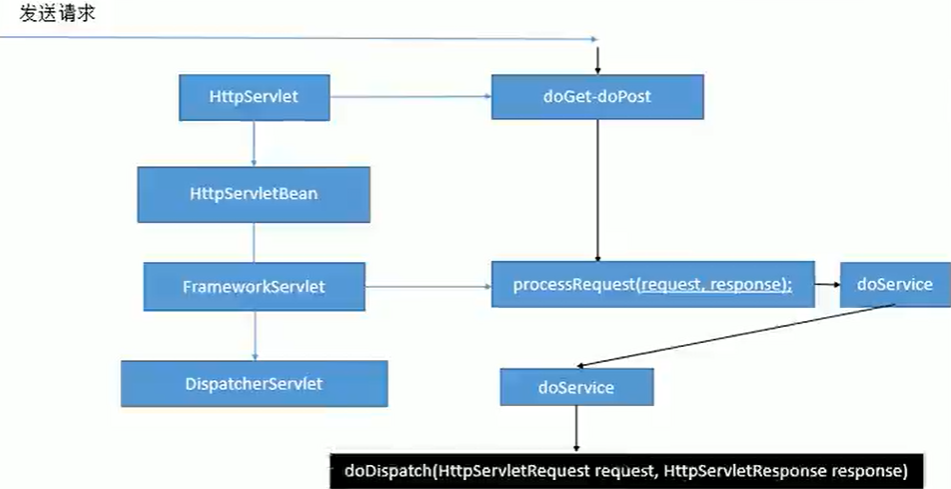
doDispatch()细节
protected void doDispatch(HttpServletRequest request, HttpServletResponse response) throws Exception {HttpServletRequest processedRequest = request;HandlerExecutionChain mappedHandler = null;boolean multipartRequestParsed = false;WebAsyncManager asyncManager = WebAsyncUtils.getAsyncManager(request);try {ModelAndView mv = null;Exception dispatchException = null;try {//1.检查是否是文件上传请求processedRequest = checkMultipart(request);multipartRequestParsed = (processedRequest != request);// Determine handler for the current request.//2.根据当前其请求找到能处理的Controller类;拿到执行链mappedHandler = getHandler(processedRequest);//3.若没有找到可以处理的Controller类,则抛异常/404if (mappedHandler == null) {noHandlerFound(processedRequest, response);return;}// Determine handler adapter for the current request.//4.拿到能执行这个Controller的所有方法的适配器//(反射工具RequestMappingHandlerAdapter)HandlerAdapter ha = getHandlerAdapter(mappedHandler.getHandler());// Process last-modified header, if supported by the handler.//5.获取请求方式String method = request.getMethod();boolean isGet = "GET".equals(method);if (isGet || "HEAD".equals(method)) {long lastModified = ha.getLastModified(request, mappedHandler.getHandler());if (new ServletWebRequest(request, response).checkNotModified(lastModified) && isGet) {return;}}//执行所有拦截器的preHandleif (!mappedHandler.applyPreHandle(processedRequest, response)) {return;}// Actually invoke the handler.//*6.使用适配器执行处理(handler)/控制(controller)器中的方法,方法返回值作为视图名,放入一个ModelAndView中mv = ha.handle(processedRequest, response, mappedHandler.getHandler());if (asyncManager.isConcurrentHandlingStarted()) {return;}//7.若返回的ModelAndView没有视图名,则使用默认视图名applyDefaultViewName(processedRequest, mv);mappedHandler.applyPostHandle(processedRequest, response, mv);}catch (Exception ex) {dispatchException = ex;}catch (Throwable err) {// As of 4.3, we're processing Errors thrown from handler methods as well,// making them available for @ExceptionHandler methods and other scenarios.dispatchException = new NestedServletException("Handler dispatch failed", err);}//*8.将mv转发到目标页面processDispatchResult(processedRequest, response, mappedHandler, mv, dispatchException);}catch (Exception ex) {triggerAfterCompletion(processedRequest, response, mappedHandler, ex);}catch (Throwable err) {triggerAfterCompletion(processedRequest, response, mappedHandler,new NestedServletException("Handler processing failed", err));}finally {if (asyncManager.isConcurrentHandlingStarted()) {// Instead of postHandle and afterCompletionif (mappedHandler != null) {mappedHandler.applyAfterConcurrentHandlingStarted(processedRequest, response);}}else {// Clean up any resources used by a multipart request.if (multipartRequestParsed) {cleanupMultipart(processedRequest);}}}}
步骤:
- DispatcherServlet收到请求
- 调用doDispatch()方法
- getHandler():根据当前请求地址找到能处理的Controller
- getHandlerAdapter():根据当前Controller类获取能执行Controller类中方法的适配器
- 使用适配器(RequestMappingHandlerAdapter)执行目标方法
- 目标方法执行后返回一个ModelAndView对象mv
- 根据mv信息转发到具体的页面,且可以再请求域中取出mv中的数据
getHandler()细节:
getHandler()方法会返回目标Controller类的执行器链(HandlerExecutionChain)
mappedHandler = getHandler(processedRequest);

getHandler()内部:
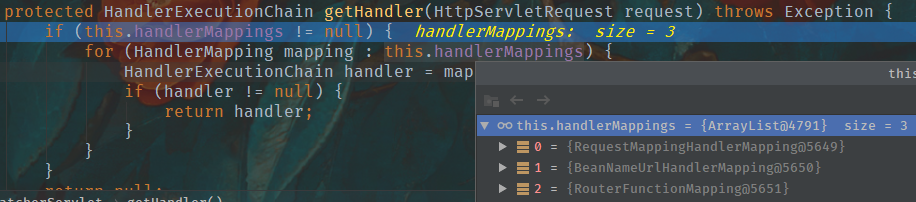
protected HandlerExecutionChain getHandler(HttpServletRequest request) throws Exception {if (this.handlerMappings != null) {for (HandlerMapping mapping : this.handlerMappings) {HandlerExecutionChain handler = mapping.getHandler(request);if (handler != null) {return handler;}}}return null;}
handlerMappings(处理器映射):保存了每一个Controller能处理哪些请求的方法的映射信息
getHandlerAdapter()细节:
通过目标Controller类的执行器链(HandlerExecutionChain)mappedHandler获得适配器ha
HandlerAdapter ha = getHandlerAdapter(mappedHandler.getHandler());
protected HandlerAdapter getHandlerAdapter(Object handler) throws ServletException {if (this.handlerAdapters != null) {for (HandlerAdapter adapter : this.handlerAdapters) {if (adapter.supports(handler)) {return adapter;}}}throw new ServletException("No adapter for handler [" + handler +"]: The DispatcherServlet configuration needs to include a HandlerAdapter that supports this handler");}
DispatcherServlet有几个引用类型的属性:SpringMVC九大组件
SpringMVC在工作的时候,关键位置都是由这些组建完成
共同点:全部都是接口;接口就是规范;提供了强大的扩展性
/** MultipartResolver used by this servlet. *///文件上传解析器@Nullableprivate MultipartResolver multipartResolver;/** LocaleResolver used by this servlet. *///区域信息解析器,和国际化有关@Nullableprivate LocaleResolver localeResolver;/** ThemeResolver used by this servlet. *///主题解析器,强大的主体效果更换(一般不用)@Nullableprivate ThemeResolver themeResolver;/** List of HandlerMappings used by this servlet. *///handler映射信息@Nullableprivate List<HandlerMapping> handlerMappings;/** List of HandlerAdapters used by this servlet. *///handler适配器@Nullableprivate List<HandlerAdapter> handlerAdapters;/** List of HandlerExceptionResolvers used by this servlet. *///handler异常解析器@Nullableprivate List<HandlerExceptionResolver> handlerExceptionResolvers;/** RequestToViewNameTranslator used by this servlet. *///请求-视图名转换器@Nullableprivate RequestToViewNameTranslator viewNameTranslator;/** FlashMapManager used by this servlet. *///SprngMVC中允许重定向携带数据的功能@Nullableprivate FlashMapManager flashMapManager;/** List of ViewResolvers used by this servlet. *///视图解析器@Nullableprivate List<ViewResolver> viewResolvers;
九大组件的初始化
/*** This implementation calls {@link #initStrategies}.*/@Overrideprotected void onRefresh(ApplicationContext context) {initStrategies(context);}/*** Initialize the strategy objects that this servlet uses.* <p>May be overridden in subclasses in order to initialize further strategy objects.*/protected void initStrategies(ApplicationContext context) {initMultipartResolver(context);initLocaleResolver(context);initThemeResolver(context);initHandlerMappings(context);initHandlerAdapters(context);initHandlerExceptionResolvers(context);initRequestToViewNameTranslator(context);initViewResolvers(context);initFlashMapManager(context);}
可以在web.xml中修改DispatcherServlet中的某些属性
<init-param><param-name>detectAllHandlerMappings</param-name><param-value>false</param-value></init-param>
初始化HandlerMapping
/*** Initialize the HandlerMappings used by this class.* <p>If no HandlerMapping beans are defined in the BeanFactory for this namespace,* we default to BeanNameUrlHandlerMapping.*/private void initHandlerMappings(ApplicationContext context) {this.handlerMappings = null;if (this.detectAllHandlerMappings) {// Find all HandlerMappings in the ApplicationContext, including ancestor contexts.Map<String, HandlerMapping> matchingBeans =BeanFactoryUtils.beansOfTypeIncludingAncestors(context, HandlerMapping.class, true, false);if (!matchingBeans.isEmpty()) {this.handlerMappings = new ArrayList<>(matchingBeans.values());// We keep HandlerMappings in sorted order.AnnotationAwareOrderComparator.sort(this.handlerMappings);}}else {try {HandlerMapping hm = context.getBean(HANDLER_MAPPING_BEAN_NAME, HandlerMapping.class);this.handlerMappings = Collections.singletonList(hm);}catch (NoSuchBeanDefinitionException ex) {// Ignore, we'll add a default HandlerMapping later.}}// Ensure we have at least one HandlerMapping, by registering// a default HandlerMapping if no other mappings are found.if (this.handlerMappings == null) {this.handlerMappings = getDefaultStrategies(context, HandlerMapping.class);if (logger.isTraceEnabled()) {logger.trace("No HandlerMappings declared for servlet '" + getServletName() +"': using default strategies from DispatcherServlet.properties");}}}
组件的初始化:
- 有些组件在容器中使用类型找,有些使用id找
- 在容器中找这个组件,若没有找到就使用默认配置
mv = ha.handle(processedRequest, response, mappedHandler.getHandler());细节
mav = invokeHandlerMethod(request, response, handlerMethod);
转发forward
@RequestMapping("/hello1")public String hello1() {System.out.println("hello1");return "../../hello";}/*** forward:转发到一个页面* forward:/hello.jsp:转发到当前项目下的hello.jsp* 不会使用视图解析器进行拼串*/@RequestMapping("/hello2")public String hello2() {System.out.println("hello2");return "forward:/hello.jsp";}/*** forward:多次转发*/@RequestMapping("/hello3")public String hello3() {System.out.println("hello3");return "forward:hello2";}
重定向redirect
/*** redirect:重定向* 原生的Servlet重定向/路径需要加上项目名* response.sendRedirect("/hello.jsp")* SpringMVC会自动为路径拼接项目名*/@RequestMapping("/hello4")public String hello4() {System.out.println("hello4");return "redirect:/hello.jsp";}/*** redirect:多次重定向*/@RequestMapping("/hello5")public String hello5() {System.out.println("hello5");return "redirect:hello4";}
forward和redirect前缀都不会使用视图解析器拼串
SpringMVC视图解析原理
方法执行后的返回值会作为页面地址参考,转发或重定向到页面
视图解析器可能会进行页面地址的拼串
去页面的方法
processDispatchResult(processedRequest, response, mappedHandler, mv, dispatchException);
试图渲染流程:将请求域中的数据在页面展示,页面就是用来渲染模型数据的
渲染页面
render(mv, request, response);
View与ViewResolver
ViewResolver的作用:根据视图名(方法的返回值)得到View对象如何根据视图名(方法的返回值)得到View对象?
@Nullableprotected View resolveViewName(String viewName, @Nullable Map<String, Object> model,Locale locale, HttpServletRequest request) throws Exception {if (this.viewResolvers != null) {//遍历所有的ViewResolverfor (ViewResolver viewResolver : this.viewResolvers) {//根据视图名(方法的返回值)得到View对象View view = viewResolver.resolveViewName(viewName, locale);if (view != null) {return view;}}}return null;}
resolveViewName(viewName, locale);细节:
@Override@Nullablepublic View resolveViewName(String viewName, Locale locale) throws Exception {if (!isCache()) {return createView(viewName, locale);}else {Object cacheKey = getCacheKey(viewName, locale);View view = this.viewAccessCache.get(cacheKey);if (view == null) {synchronized (this.viewCreationCache) {view = this.viewCreationCache.get(cacheKey);if (view == null) {// Ask the subclass to create the View object.//*根据方法的返回值创建View对象view = createView(viewName, locale);if (view == null && this.cacheUnresolved) {view = UNRESOLVED_VIEW;}if (view != null && this.cacheFilter.filter(view, viewName, locale)) {this.viewAccessCache.put(cacheKey, view);this.viewCreationCache.put(cacheKey, view);}}}}else {if (logger.isTraceEnabled()) {logger.trace(formatKey(cacheKey) + "served from cache");}}return (view != UNRESOLVED_VIEW ? view : null);}}
createView(viewName, locale);细节
@Overrideprotected View createView(String viewName, Locale locale) throws Exception {// If this resolver is not supposed to handle the given view,// return null to pass on to the next resolver in the chain.if (!canHandle(viewName, locale)) {return null;}// Check for special "redirect:" prefix.//redirect前缀:创建RedirectView对象if (viewName.startsWith(REDIRECT_URL_PREFIX)) {String redirectUrl = viewName.substring(REDIRECT_URL_PREFIX.length());RedirectView view = new RedirectView(redirectUrl,isRedirectContextRelative(), isRedirectHttp10Compatible());String[] hosts = getRedirectHosts();if (hosts != null) {view.setHosts(hosts);}return applyLifecycleMethods(REDIRECT_URL_PREFIX, view);}// Check for special "forward:" prefix.//forward前缀:InternalResourceViewif (viewName.startsWith(FORWARD_URL_PREFIX)) {String forwardUrl = viewName.substring(FORWARD_URL_PREFIX.length());InternalResourceView view = new InternalResourceView(forwardUrl);return applyLifecycleMethods(FORWARD_URL_PREFIX, view);}// Else fall back to superclass implementation: calling loadView.//两个前缀都不是:创建父类默认的view对象return super.createView(viewName, locale);}
得到view对象(InternalResourceView)
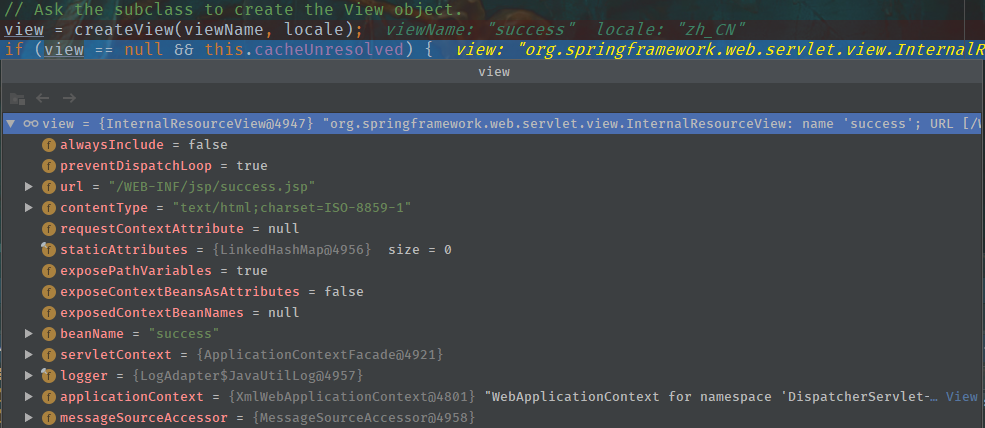
视图解析器得到View对象的流程:
所有配置好的视图解析器都会尝试根据视图名(返回值)得到View对象,能得到就return,得不到就找下一个
调用View对象的render方法(DispatcherServlet)view.render(mv.getModelInternal(), request, response);
/*** Prepares the view given the specified model, merging it with static* attributes and a RequestContext attribute, if necessary.* Delegates to renderMergedOutputModel for the actual rendering.* @see #renderMergedOutputModel*/@Overridepublic void render(@Nullable Map<String, ?> model, HttpServletRequest request,HttpServletResponse response) throws Exception {if (logger.isDebugEnabled()) {logger.debug("View " + formatViewName() +", model " + (model != null ? model : Collections.emptyMap()) +(this.staticAttributes.isEmpty() ? "" : ", static attributes " + this.staticAttributes));}Map<String, Object> mergedModel = createMergedOutputModel(model, request, response);prepareResponse(request, response);//*渲染要给页面输出的数据renderMergedOutputModel(mergedModel, getRequestToExpose(request), response);}
InternalResourceView的方法renderMergedOutputModel:
/*** Render the internal resource given the specified model.* This includes setting the model as request attributes.*/@Overrideprotected void renderMergedOutputModel(Map<String, Object> model, HttpServletRequest request, HttpServletResponse response) throws Exception {// Expose the model object as request attributes.//*将模型中的数据放到请求域中exposeModelAsRequestAttributes(model, request);// Expose helpers as request attributes, if any.exposeHelpers(request);// Determine the path for the request dispatcher.String dispatcherPath = prepareForRendering(request, response);// Obtain a RequestDispatcher for the target resource (typically a JSP).RequestDispatcher rd = getRequestDispatcher(request, dispatcherPath);if (rd == null) {throw new ServletException("Could not get RequestDispatcher for [" + getUrl() +"]: Check that the corresponding file exists within your web application archive!");}// If already included or response already committed, perform include, else forward.if (useInclude(request, response)) {response.setContentType(getContentType());if (logger.isDebugEnabled()) {logger.debug("Including [" + getUrl() + "]");}rd.include(request, response);}else {// Note: The forwarded resource is supposed to determine the content type itself.if (logger.isDebugEnabled()) {logger.debug("Forwarding to [" + getUrl() + "]");}rd.forward(request, response);}}
将模型中的所有数据取出放在请求域中
/*** Expose the model objects in the given map as request attributes.* Names will be taken from the model Map.* This method is suitable for all resources reachable by {@link javax.servlet.RequestDispatcher}.* @param model a Map of model objects to expose* @param request current HTTP request*/protected void exposeModelAsRequestAttributes(Map<String, Object> model,HttpServletRequest request) throws Exception {model.forEach((name, value) -> {if (value != null) {request.setAttribute(name, value);}else {request.removeAttribute(name);}});}
总结:视图解析器为了得到View对象,View对象可以渲染视图:转发(将模型数据放在请求域中)或重定向到页面
JstlView
<!--配置视图解析器--><bean class="org.springframework.web.servlet.view.InternalResourceViewResolver"p:prefix="/WEB-INF/jsp/"p:suffix=".jsp"p:viewClass="org.springframework.web.servlet.view.JstlView"/>
- 导包jstl时会自动创建一个JstlView,JstlView可以快速方便的支持国际化功能
国际化:
JavaWeb国际化步骤:
- 得得到一个Locale对象
- 使用ResourceBundle绑定国际化资源文件
- 使用ResourceBundle.getString(“key”)获取到国际化配置文件中的值
- web页面的国际化,fmt标签库来做
<fmt:setlocale><fmt:setBundle><fmt:message>
Jstl
让Spring管理国际化资源就行
<!--让SpringMVC管理国际化资源文件:配置一个资源文件管理器注意:id必须为:messageSource--><bean id="messageSource" class="org.springframework.context.support.ResourceBundleMessageSource"p:basename="i18n"/>
直接去页面使用
<fmt:message>
注意:
- 一定要过SpringMVC的视图解析流程,否则:
- 不能写前缀:forward、redirect
- forward:new InternalResourceView();
- redirect:new RedirectView();
- 且创建这两个对象的构造参数中都没有locale,所以必须使用默认的View
- 因为需要过SpringMVC的视图解析流程,所以得在Controller类中写方法,这样代码会很冗余
- 解决方法:
<!--发送一个请求 login 直接来到WEB-INF/jsp/login.jsp页面mvc名称空间下有一个请求映射标签path:指定哪个请求--><mvc:view-controller path="/hello/login" view-name="login"/><!--开启mvc注解驱动模式后,mvc:view-controller不会使其他方法失效--><mvc:annotation-driven/>
- 解决方法:
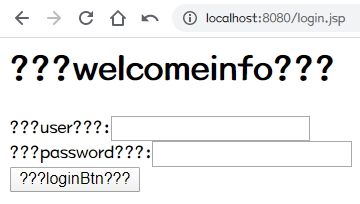
扩展:加深视图解析器和视图对象
- 视图解析器根据方法的返回值得到视图对象;
- 多个视图解析器都会尝试能否得到视图对象
- 视图对象不同就可以具有不同功能;
自定义视图解析器和视图对象
package com.jjj.view;import org.springframework.core.Ordered;import org.springframework.core.annotation.Order;import org.springframework.web.servlet.View;import org.springframework.web.servlet.ViewResolver;import java.util.Locale;/*** @author <a href="jinyu52370@163.com">JJJ</a>* @date 2020/5/17 23:00*/public class MySeTuViewResolver implements ViewResolver, Ordered {private Integer order = 0;public void setOrder(Integer order) {this.order = order;}@Overridepublic View resolveViewName(String viewName, Locale locale) throws Exception {if (viewName.startsWith("hso:")){return new MySeTuView();}return null;}@Overridepublic int getOrder() {return order;}}
package com.jjj.view;import org.springframework.web.servlet.View;import javax.servlet.http.HttpServletRequest;import javax.servlet.http.HttpServletResponse;import java.util.Map;/*** @author <a href="jinyu52370@163.com">JJJ</a>* @date 2020/5/17 23:02*/public class MySeTuView implements View {@Overridepublic String getContentType() {return "text/html";}@Overridepublic void render(Map<String, ?> model, HttpServletRequest request, HttpServletResponse response) throws Exception {System.out.println("之前保存的数据:" + model);response.getWriter().write("<h1>即将展示涩图</h1>");}}
<!--自定义视图解析器order:默认的视图解析器的优先级最低:Integer.MAX_VALUE--><bean id="mySeTuViewResolver" class="com.jjj.view.MySeTuViewResolver"p:order="1"/>
流程:
- 让自定义的视图解析器工作(视图解析器必须放在ioc容器中)
- 得到自定义视图对象
- 自定义视图对象自定义渲染逻辑
response.getWriter().write("<h1>即将展示涩图</h1>");
CRUD
create; retrieve; update; delete
通过 SpringMVC的表单标签可以实现将模型数据中的属性和HTML表单元素相绑定,以实现表单数据更便捷编辑和表单值的回显
用了表单标签的页面可能会报这个错误:请求域中没有一个command类型的对象
java.lang.IllegalStateException:Neither BindingResult nor plain target object for bean name 'command' available as request attribute
数据转换&数据格式化&数据校验
SpringMVC封装自定义类型对象时,javaBean要和页面提交的数据进行一一绑定
- 页面提交的所有数据都是字符串: Integer age,Date birth;
牵扯到以下操作:
- 数据绑定期间的数据类型转换:String -> Integet;
- 数据绑定期间的数据格式化问题:birth=1999-05-07 -> Date=1999/05/07 1999.05.07
- 数据校验:提交的数据必须是合法的
- 前端校验:js+正则表达式
- 后端校验:重要数据必须
自定义类型转换器
- 步骤
- 实现接口ConversionService:其中有很多Converter工作
- Converter是ConversionService中的组件,需要将WebDataBinder中的ConversionService设置成加了自定义类型转换器的ConversionService ```java package com.jjj.component;
import com.jjj.entity.User; import org.springframework.core.convert.converter.Converter;
/**
- @author JJJ
@date 2020/5/19 21:30 */ public class MyStringToUser implements Converter
User user = new User();System.out.println("页面提交的将要转换的字符串:" + s);if (s.contains("/")){String[] split = s.split("/");user.setName(split[0]);user.setAge(Integer.parseInt(split[1]));user.setBirthday(split[2]);user.setPassword(split[3]);user.setMoney(Double.valueOf(split[4]));user.setAddress(split[5]);return user;}return null;
} } ```
- 配置出ConversionService
```java
---<a name="24c6c82b"></a>## 关于<mvc:annotation- driven/>```xml<mvc:annotation-driven/>
会自动注册:
- RequestMapping Mapping
- RequestMapping Adapter
- ExceptionHandlerException Resolve
还捋提供以下支持:
- 支持使用 ConversionService实例对表单参数进行类型转换
- 支持使用@NumberFormat annotation、@ DateTimeFormat注解完成数据类型的格式化
- 支持使用@vaid注解对 JavaBean实例进行JSR 303验证
- 支持使用@RequestBody和@ResponseBody注解
<mvc:default-servlet-handler/><mvc:annotation-driven/>
现象:
- 都没配?动态资源@RequestMapping映射的资源能访问,静态资源(.html.js,. img)不能访问
- 加上mvc: default-serv1et-hand1er/,不加mvc: annotation- driven/,静态资源ok,动态资源完蛋
- 都加上,静态动态都能访问
<!--使用FormattingConversionServiceFactoryBean,既具有自定义的类型转换,也可以格式化--><bean id="conversionService" class="org.springframework.format.support.FormattingConversionServiceFactoryBean"><property name="converters"><bean class="com.jjj.component.MyStringToUser"/></property></bean>
数据校验
前端校验不安全,重要数据一定要后端校验
SpringMVC可以使用JSR 303做数据校验
JSR303
- JSR303是Java为Bean数据合法性校验提供的标准框架,它已经包含在JavaEE6.0中
JSR303通过在Bean属性上标注类似于@NotNull、@Max等标准的注解指定校验规则,并通过标准的验证接口Bean进行验证 | 注解 | 功能说明 | | —- | —- | | @Null | 被注释的元素必须为nuIl | | @NotNull | 被注释的元素必须不为null | | @AssertTrue | 被注释的元素必须为true | | @AssertFalse | 被注释的元素必须为 false | | @Min(value) | 被注释的元素必须是一个数字,基值必须大于等于指定的最小值 | | @Max(value) | 被注释的元素必须是一个数字,其值必须小于等于指定的最大值 | | @DecimalMin(value) | 被注释的元素必须是一个数字,其值必须大于等于指定的最小值 | | @DecimalMax(value) | 被注释的元素必须是一个数字,其值必须小于等于指定的最大值 | | @Size(max, min) | 被注释的元素的大小必须在指定的范围内 | | @Digits(integer, fraction) | 被注释的元素必须是一个数字,其值必须在可接受的范围内 | | @Past | 被注释的元素必须是一个过去的日期 | | @Future | 被注释的元素必须是一个未来的日期 | | @Pattern(value) | 被注释的元素必须符合指定的正则表达式 |
JSR303规范:Hibernate validator扩展注解(第三方校验框架)
快速开始后端校验
- 导包
给bean上加校验注解
public class User {private Integer id;@NotEmpty@Length(min = 6, max = 18)private String name;private Integer age;@DateTimeFormat(pattern = "yyyy-MM-dd")@Pastprivate Date birthday;@NotEmptyprivate String password;@NumberFormat(pattern = "#,###,###.##")private Double money;private String address;}
在SpringMVC封装对象的时候,告诉springMVC这个bean需要校验
@RequestMapping(value = "/user", method = RequestMethod.POST)public String addUser(@Valid User user, BindingResult bindingResult){System.out.println(user);if (bindingResult.hasErrors()){System.out.println("有校验错误");return "add";}System.out.println("添加了" + userService.addUser(user) + "条数据");return "redirect:/users";}
校验结果
给需要校验的bean后加BindingResult,这个BindingResult就是封装前一个bean的校验结果public String addUser(@Valid User user, BindingResult bindingResult)
根据不同的校验结果做不同的业务
if (bindingResult.hasErrors()){System.out.println("有校验错误");return "add";}System.out.println("添加了" + userService.addUser(user) + "条数据");return "redirect:/users";
AJAX
- SpringMVC快速完成ajax功能
- 返回数据是json就行
- 页面发送ajax
步骤
导包
<!-- https://mvnrepository.com/artifact/com.fasterxml.jackson.core/jackson-databind --><dependency><groupId>com.fasterxml.jackson.core</groupId><artifactId>jackson-databind</artifactId></dependency><!-- https://mvnrepository.com/artifact/com.fasterxml.jackson.core/jackson-core --><dependency><groupId>com.fasterxml.jackson.core</groupId><artifactId>jackson-core</artifactId></dependency><!-- https://mvnrepository.com/artifact/com.fasterxml.jackson.core/jackson-annotations --><dependency><groupId>com.fasterxml.jackson.core</groupId><artifactId>jackson-annotations</artifactId></dependency>
拦截器HandlerInterceptor
允许运行目标方法之前进行一些拦截工作,或目标方法执行之后进行一些其他处理
preHandle:在目标方法之前调用;返回boolean:true(chain.doFilter())放行;false不放行
postHandle:在目标方法之后调用:目标方法调用之后
afterCompletion:在请求整个完成之后:来到目标页面(chain.doFilter());资源响应之后
使用步骤:
- 实现HandlerInterceptor接口
在SpringMVC中注册
<!--拦截器--><mvc:interceptors><!--配置某个拦截器;默认拦截所有请求--><bean class="com.jjj.component.MyFirstInterceptor"/><!--配置某个拦截器;可以有更详细的信息--><!--<mvc:interceptor>--><!--只拦截test01请求--><!--<mvc:mapping path="/interceptor/test01"/>--><!--<bean class="com.jjj.component.MyFirstInterceptor"/>--><!--</mvc:interceptor>--></mvc:interceptors>
执行流程:跟filter一样
正常流程:拦截器.preHandle -> 目标方法 -> 拦截器.postHandle -> 页面 -> 拦截器.afterCompletion
preHandle...test01...postHandle...success.jspafterCompletion...
异常流程:
- preHandle不放行(return false)就没有以后的流程
- 只要放行了,afterCompletion都会执行
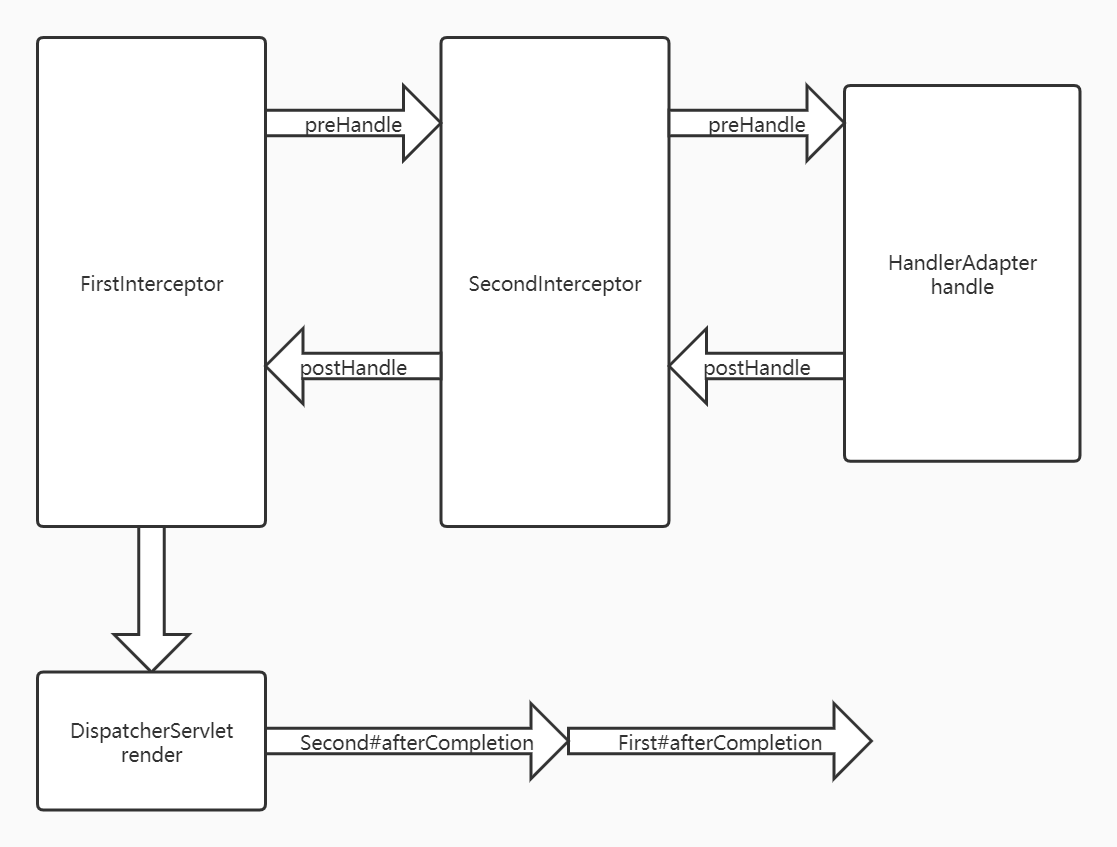
多拦截器:
正常流程:
MyFirstInterceptor...preHandle...MySecondInterceptor...preHandle...test01...MySecondInterceptor...postHandle...MyFirstInterceptor...postHandle...success.jspMySecondInterceptor...afterCompletion...MyFirstInterceptor...afterCompletion...
异常流程:
- 不放行:
- 都不放行:之后都没有
- first放行,second不放行:放行的拦截器的afterCompletion总会执行
MyFirstInterceptor...preHandle...MySecondInterceptor...preHandle...MyFirstInterceptor...afterCompletion...
拦截器的preHandle:按照xml中的配置顺序执行
拦截器的postHandle:逆序
拦截器的afterCompletion:逆序
放行的拦截器的afterCompletion总会执行
源码
protected void doDispatch(HttpServletRequest request, HttpServletResponse response) throws Exception {HttpServletRequest processedRequest = request;HandlerExecutionChain mappedHandler = null;boolean multipartRequestParsed = false;WebAsyncManager asyncManager = WebAsyncUtils.getAsyncManager(request);try {ModelAndView mv = null;Exception dispatchException = null;try {processedRequest = checkMultipart(request);multipartRequestParsed = (processedRequest != request);// Determine handler for the current request.//拿到方法的执行链,包含拦截器mappedHandler = getHandler(processedRequest);if (mappedHandler == null) {noHandlerFound(processedRequest, response);return;}// Determine handler adapter for the current request.HandlerAdapter ha = getHandlerAdapter(mappedHandler.getHandler());// Process last-modified header, if supported by the handler.String method = request.getMethod();boolean isGet = "GET".equals(method);if (isGet || "HEAD".equals(method)) {long lastModified = ha.getLastModified(request, mappedHandler.getHandler());if (new ServletWebRequest(request, response).checkNotModified(lastModified) && isGet) {return;}}//拦截器的preHandle执行;只要有一个拦截器返回false,目标方法之后都不会执行,直接跳到afterCompletionif (!mappedHandler.applyPreHandle(processedRequest, response)) {return;}// Actually invoke the handler.//目标方法执行mv = ha.handle(processedRequest, response, mappedHandler.getHandler());if (asyncManager.isConcurrentHandlingStarted()) {return;}applyDefaultViewName(processedRequest, mv);//拦截器的postHandle;目标方法正常执行才会走到这步mappedHandler.applyPostHandle(processedRequest, response, mv);}catch (Exception ex) {dispatchException = ex;}catch (Throwable err) {// As of 4.3, we're processing Errors thrown from handler methods as well,// making them available for @ExceptionHandler methods and other scenarios.dispatchException = new NestedServletException("Handler dispatch failed", err);}//页面渲染;出现异常跳到afterCompletionprocessDispatchResult(processedRequest, response, mappedHandler, mv, dispatchException);}//任何期间有异常;执行afterCompletioncatch (Exception ex) {triggerAfterCompletion(processedRequest, response, mappedHandler, ex);}catch (Throwable err) {triggerAfterCompletion(processedRequest, response, mappedHandler,new NestedServletException("Handler processing failed", err));}finally {if (asyncManager.isConcurrentHandlingStarted()) {// Instead of postHandle and afterCompletionif (mappedHandler != null) {mappedHandler.applyAfterConcurrentHandlingStarted(processedRequest, response);}}else {// Clean up any resources used by a multipart request.if (multipartRequestParsed) {cleanupMultipart(processedRequest);}}}}
↓
applyPreHandle
boolean applyPreHandle(HttpServletRequest request, HttpServletResponse response) throws Exception {HandlerInterceptor[] interceptors = getInterceptors();if (!ObjectUtils.isEmpty(interceptors)) {for (int i = 0; i < interceptors.length; i++) {HandlerInterceptor interceptor = interceptors[i];//若拦截器preHandle返回false,即不放行if (!interceptor.preHandle(request, response, this.handler)) {//不执行后续,调用afterCompletiontriggerAfterCompletion(request, response, null);return false;}//放行,记录索引this.interceptorIndex = i;}}return true;}
preHandle细节:first放行,second不放行
| 次数 | interceptor | 操作 |
|---|---|---|
| 第一次 | ConversionServiceExposingInterceptor | interceptorIndex = 0 |
| 第二次 | MyFirstInterceptor | interceptorIndex = 1 |
| 第三次 | MySecondInterceptor | 不放行 -> 执行triggerAfterCompletion() -> 倒序遍历 -> i == 1 |
已经放行了的拦截器的afterCompletion总会执行
↓
applyPostHandle
void applyPostHandle(HttpServletRequest request, HttpServletResponse response, @Nullable ModelAndView mv)throws Exception {HandlerInterceptor[] interceptors = getInterceptors();if (!ObjectUtils.isEmpty(interceptors)) {//倒序遍历for (int i = interceptors.length - 1; i >= 0; i--) {HandlerInterceptor interceptor = interceptors[i];interceptor.postHandle(request, response, this.handler, mv);}}}
↓
页面渲染
private void processDispatchResult(HttpServletRequest request, HttpServletResponse response,@Nullable HandlerExecutionChain mappedHandler, @Nullable ModelAndView mv,@Nullable Exception exception) throws Exception {boolean errorView = false;if (exception != null) {if (exception instanceof ModelAndViewDefiningException) {logger.debug("ModelAndViewDefiningException encountered", exception);mv = ((ModelAndViewDefiningException) exception).getModelAndView();}else {Object handler = (mappedHandler != null ? mappedHandler.getHandler() : null);mv = processHandlerException(request, response, handler, exception);errorView = (mv != null);}}// Did the handler return a view to render?if (mv != null && !mv.wasCleared()) {//页面渲染render(mv, request, response);if (errorView) {WebUtils.clearErrorRequestAttributes(request);}}else {if (logger.isTraceEnabled()) {logger.trace("No view rendering, null ModelAndView returned.");}}if (WebAsyncUtils.getAsyncManager(request).isConcurrentHandlingStarted()) {// Concurrent handling started during a forwardreturn;}if (mappedHandler != null) {// Exception (if any) is already handled..//正常执行:拦截器的afterCompletion;//异常执行:外部方法catch中依旧执行afterCompletionmappedHandler.triggerAfterCompletion(request, response, null);}}
afterCompletion
void triggerAfterCompletion(HttpServletRequest request, HttpServletResponse response, @Nullable Exception ex)throws Exception {HandlerInterceptor[] interceptors = getInterceptors();if (!ObjectUtils.isEmpty(interceptors)) {//倒序遍历for (int i = this.interceptorIndex; i >= 0; i--) {HandlerInterceptor interceptor = interceptors[i];try {interceptor.afterCompletion(request, response, this.handler, ex);}catch (Throwable ex2) {logger.error("HandlerInterceptor.afterCompletion threw exception", ex2);}}}}
多拦截器执行流程
国际化
- 写国际化资源文件
- 让SpringMVC的ResourceBundleMessageSource管理国际化资源
- 去页面取值
SpringMVC中,区域信息是由区域信息解析器LocaleResolver得到的,默认会用AcceptHeaderLocaleResolver
@Overridepublic Locale resolveLocale(HttpServletRequest request) {Locale defaultLocale = getDefaultLocale();if (defaultLocale != null && request.getHeader("Accept-Language") == null) {return defaultLocale;}//得到区域信息Locale requestLocale = request.getLocale();List<Locale> supportedLocales = getSupportedLocales();if (supportedLocales.isEmpty() || supportedLocales.contains(requestLocale)) {return requestLocale;}Locale supportedLocale = findSupportedLocale(request, supportedLocales);if (supportedLocale != null) {return supportedLocale;}return (defaultLocale != null ? defaultLocale : requestLocale);}
点击链接切换国际化
实现LocaleResolver接口
package com.jjj.component;import org.springframework.web.servlet.LocaleResolver;import javax.servlet.http.HttpServletRequest;import javax.servlet.http.HttpServletResponse;import java.util.Locale;/*** @author <a href="jinyu52370@163.com">JJJ</a>* @date 2020/5/24 18:01** 自定义区域信息解析器*/public class MyLocaleResolver implements LocaleResolver {/*** 解析返回locale*/@Overridepublic Locale resolveLocale(HttpServletRequest request) {String localeStr = request.getParameter("locale");//若携带了locale参数,就使用参数指定的区域信息if (localeStr != null && !"".equals(localeStr)){return new Locale(localeStr.split("_")[0], localeStr.split("_")[1]);}//否则,使用请求头的localereturn request.getLocale();}/*** 修改locale*/@Overridepublic void setLocale(HttpServletRequest request, HttpServletResponse response, Locale locale) {throw new UnsupportedOperationException("Cannot change HTTP accept header - use a different locale resolution strategy");}}
jsp页面
<a href="/i18n/toLoginPage?locale=zh_CN">中文</a>|<a href="/i18n/toLoginPage?locale=en_US">English</a>
springMVC配置文件
<!--自定义区域信息解析器--><bean id="localeResolver" class="com.jjj.component.MyLocaleResolver"/>
AcceptHeaderLocaleResolver:使用请求头的区域信息
public class AcceptHeaderLocaleResolver implements LocaleResolver {@Overridepublic Locale resolveLocale(HttpServletRequest request) {Locale defaultLocale = getDefaultLocale();if (defaultLocale != null && request.getHeader("Accept-Language") == null) {return defaultLocale;}Locale requestLocale = request.getLocale();List<Locale> supportedLocales = getSupportedLocales();if (supportedLocales.isEmpty() || supportedLocales.contains(requestLocale)) {return requestLocale;}Locale supportedLocale = findSupportedLocale(request, supportedLocales);if (supportedLocale != null) {return supportedLocale;}return (defaultLocale != null ? defaultLocale : requestLocale);}@Overridepublic void setLocale(HttpServletRequest request, @Nullable HttpServletResponse response, @Nullable Locale locale) {throw new UnsupportedOperationException("Cannot change HTTP accept header - use a different locale resolution strategy");}}
FixedLocaleContextResolver:使用系统默认的区域信息
public class FixedLocaleContextResolver implements LocaleContextResolver {@Overridepublic LocaleContext resolveLocaleContext(ServerWebExchange exchange) {return new TimeZoneAwareLocaleContext() {@Overridepublic Locale getLocale() {return locale;}@Override@Nullablepublic TimeZone getTimeZone() {return timeZone;}};}@Overridepublic void setLocaleContext(ServerWebExchange exchange, @Nullable LocaleContext localeContext) {throw new UnsupportedOperationException("Cannot change fixed locale - use a different locale context resolution strategy");}}
SessionLocaleResolver
CookieLocaleResolver
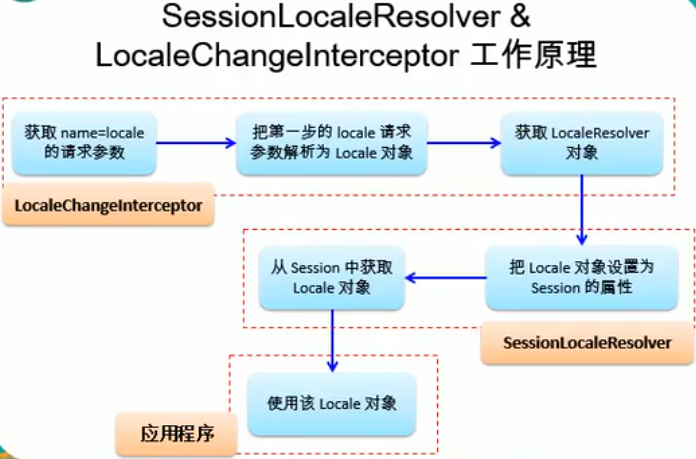
filter和interceptor的使用时机
如果某些功能,需要其他组件配合完成,就使用拦截器(可以Autowried组件)
异常处理
默认是此HandlerExcptionResolver
ExceptionHandlerExceptionResolver:@ExceptionHandler
ResponseStatusExceptionResolver:@ResponseStatus
DefaultHandlerExceptionResolver:判断是否是SpringMVC自带的异常
普通bean中的处理异常方法
/*** 告诉SpringMVC,这个方法专门处理这个类的异常* 1.在参数表中写上Exception变量,可以接收发生的异常* 2.参数表中不能写Model* 3.可以返回ModelAndView* 4.精确优先*/@ExceptionHandler(ArithmeticException.class)public ModelAndView arithmeticException(ArithmeticException e) {System.out.println("handleException01..." + e);ModelAndView modelAndView = new ModelAndView();modelAndView.addObject("e", e);modelAndView.setViewName("error");return modelAndView;}
全局处理异常的类
/*** @author <a href="jinyu52370@163.com">JJJ</a>* @date 2020/5/24 21:48** 1.集中处理所有异常的类* 2.加入到ioc中:@ControllerAdvice* 3.全局处理异常类和某个bean的处理异常方法同时存在,bean的优先*/@ControllerAdvicepublic class MyCentralizedException {/*** 告诉SpringMVC,这个方法专门处理这个类的异常* 1.在参数表中写上Exception变量,可以接收发生的异常* 2.参数表中不能写Model* 3.可以返回ModelAndView* 4.精确优先*/@ExceptionHandler(Exception.class)public ModelAndView handleException(Exception e) {System.out.println("全局handleException..." + e);ModelAndView modelAndView = new ModelAndView();modelAndView.addObject("e", e);modelAndView.setViewName("error");return modelAndView;}}
SpringMVC自己的异常
HttpRequestMethodNotSupportedException
由DefaultHandlerExceptionResolver处理
@Override@Nullableprotected ModelAndView doResolveException(HttpServletRequest request, HttpServletResponse response, @Nullable Object handler, Exception ex) {try {if (ex instanceof HttpRequestMethodNotSupportedException) {return handleHttpRequestMethodNotSupported((HttpRequestMethodNotSupportedException) ex, request, response, handler);}else if (ex instanceof HttpMediaTypeNotSupportedException) {return handleHttpMediaTypeNotSupported((HttpMediaTypeNotSupportedException) ex, request, response, handler);}else if (ex instanceof HttpMediaTypeNotAcceptableException) {return handleHttpMediaTypeNotAcceptable((HttpMediaTypeNotAcceptableException) ex, request, response, handler);}else if (ex instanceof MissingPathVariableException) {return handleMissingPathVariable((MissingPathVariableException) ex, request, response, handler);}else if (ex instanceof MissingServletRequestParameterException) {return handleMissingServletRequestParameter((MissingServletRequestParameterException) ex, request, response, handler);}else if (ex instanceof ServletRequestBindingException) {return handleServletRequestBindingException((ServletRequestBindingException) ex, request, response, handler);}else if (ex instanceof ConversionNotSupportedException) {return handleConversionNotSupported((ConversionNotSupportedException) ex, request, response, handler);}else if (ex instanceof TypeMismatchException) {return handleTypeMismatch((TypeMismatchException) ex, request, response, handler);}else if (ex instanceof HttpMessageNotReadableException) {return handleHttpMessageNotReadable((HttpMessageNotReadableException) ex, request, response, handler);}else if (ex instanceof HttpMessageNotWritableException) {return handleHttpMessageNotWritable((HttpMessageNotWritableException) ex, request, response, handler);}else if (ex instanceof MethodArgumentNotValidException) {return handleMethodArgumentNotValidException((MethodArgumentNotValidException) ex, request, response, handler);}else if (ex instanceof MissingServletRequestPartException) {return handleMissingServletRequestPartException((MissingServletRequestPartException) ex, request, response, handler);}else if (ex instanceof BindException) {return handleBindException((BindException) ex, request, response, handler);}else if (ex instanceof NoHandlerFoundException) {return handleNoHandlerFoundException((NoHandlerFoundException) ex, request, response, handler);}else if (ex instanceof AsyncRequestTimeoutException) {return handleAsyncRequestTimeoutException((AsyncRequestTimeoutException) ex, request, response, handler);}}catch (Exception handlerEx) {if (logger.isWarnEnabled()) {logger.warn("Failure while trying to resolve exception [" + ex.getClass().getName() + "]", handlerEx);}}return null;}
SimpleMappingExceptionResourceBundle
通过配置的方式进行异常处理
优先级最低
SpringMVC和Spring整合
目的:分工明确
- SpringMVC的配置文件就来配置和网站转发逻辑以及网站功能有关的
- 视图解析器,文件上传解析器,支持ajax…
- Spring的配置文件来配置和业务有关的
- 事务控制,数据源…
解决方法:
合并配置文件:
<import resource="spring.xml"/>
分容器:
Spring管理业务逻辑组件:扫描时排除控制器和异常管理类
<context:component-scan base-package="com.jjj"><context:exclude-filter type="annotation" expression="org.springframework.stereotype.Controller"/><context:exclude-filter type="annotation" expression="org.springframework.web.bind.annotation.ControllerAdvice"/></context:component-scan>
SpringMVC管理控制器组件:只扫描控制器和异常管理类
<context:component-scan base-package="com.jjj" use-default-filters="false"><context:include-filter type="annotation" expression="org.springframework.stereotype.Controller"/><context:include-filter type="annotation" expression="org.springframework.web.bind.annotation.ControllerAdvice"/></context:component-scan>
Spring作为父容器;SpringMVC作为子容器
- 当从SpringMVC管理的Controller中装配Spring管理的Service组件时,可以装配;反之不可
- 即:子容器可以装配父容器的组件

若有收获,就点个赞吧
0 人点赞


