Background
前几天和小老板开会讨论数据结果,中间有一些现象无法解释,需要查看两个基因表达量的相关性。一般来讲,Seurat的FeatureScatter可以解决这个事情,但是单细胞测序数据得到的表达量矩阵非常稀疏,基因的表达量在大部分细胞中为0,只有一小部分细胞表达目标基因,同一个细胞同时表达两个基因的个数十分有限,这就导致出图问题严重,相关性系数比较低低。举个栗子:查看MYH1与MYOG的相关性。
FeatureScatter(sc, feature1 = "MYH1",feature2 = "MYOG", cols = cols.high)
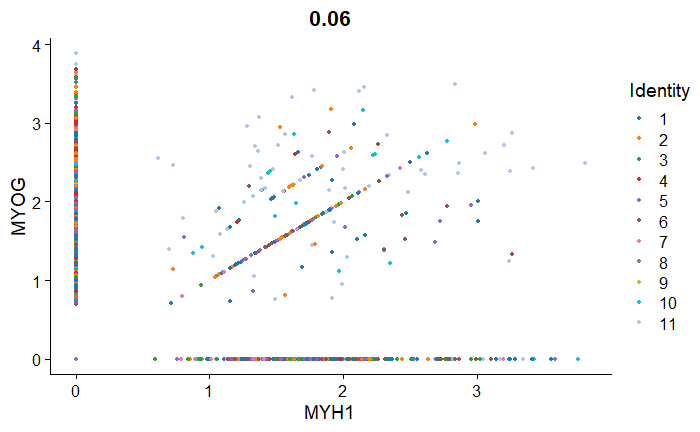
可以看出来大部分的细胞只表达两个基因中的一个,大量的点沿着x轴或y轴分布。为了解决这个问题,小老板甩给我个链接,我坚信他并不是为了解决这个问题,可能只是单纯的想要我画个酷炫的图。
文章链接如下:
A single-cell transcriptomic atlas of thymus organogenesis resolves cell types and developmental maturation
作者已经把整个文章分析流程的代码上传到了GitHub,妥妥的学习宝藏[欢迎小伙伴共同学习讨论],链接如下:
thymusatlastools
主要使用的函数为TACS(Transcript averaged cell score),可以搜到这个函数的相关介绍:
TACS: Make a FACS-like plot from a single-cell RNA-seq dataset
文章中绘制的图为一个2D密度图,看上去与FACS的结果非常相似,根据作者设定的阈值,整个绘图区域被分为四个象限,同时计算出落在不同象限中的细胞占比。
Methods
为了复现这个图,先得弄明白score是如何计算的,在文章methods部分:
TACS (Transcript-averaged cell scoring)—For each of two query transcripts, 100 transcripts with similar expression patterns are selected and ranked by their Pearson correlation with the query. In a process akin to compensation, the intersection of the transcript lists is removed from each list. The log normalized expression of the resulting genes are then averaged within each cell, and the resulting quantities are plotted.
文章作者分别计算了两个目标基因(two query transcripts)与余下所有基因的皮尔森相关系数,分别降序排序后,取前100个。这样就分别找到了与两个目标基因表达模式最相似的前100个基因,把两个基因集去除重复,每个细胞内对余下的基因表达量去平均值即得到该目标基因的TACS。文章作者对于目标基因进行了类似于sampling的操作,使用与之最相似的基因预测其表达量的方法非常巧妙。同时热心小伙伴也提出了Pearson相关系数极易受极端值影响,不知道文章作者是否考虑到了这个问题,但是我们在自己进行分析时可以同时尝试两种方法。计算出两个基因的TACS就可以做图了。
Practice
接下来尝试用自己的数据绘制该图。
在代码部分,文章作者构建了大量函数,各种操作令人眼花缭乱,叹为观止。(第一次认识了%<>%这个符号)
作为刚刚入门的新人,学习高水平文章的代码是非常高效的自我提升方式。在此不多赘述,我们直接到TACS部分。
该代码部分链接如下:
TACS
#### Transcript averaged cell scoring (TACS) plot
```{r}
#' Make a FACS-like plot from a single-cell rna-seq dataset.

#'

#' @param dge Seurat object

#' @param gene1 Horizontal axis on plot mimics this gene. Character, usually length 1 but possibly longer.

#' @param gene2 Vertical axis on plot mimics this gene. Character, usually length 1 but possibly longer.

#' @param genesets_predetermined If FALSE, plot the sum of many genes similar to gene1 instead of gene1 alone (same

#' for gene2). See ?get_similar_genes. If TRUE, plot the sum of only the genes given.

#' @param num_genes_add Each axis shows a simple sum of similar genes. This is how many (before removing overlap). Integer.

#' @param return_val If "all", returns a list with several internal calculations revealed.

#' If "plot", returns just a ggplot object. If "seurat", returns a Seurat object with gene scores added.

#' @param cutoffs If given, divide plot into four quadrants and annotate with percentages. Numeric vector of length 2.

#' @param dge_reference Seurat object. This function relies on gene-gene correlation. If your dataset is perturbed in a way

#' that would substantially alter gene-gene correlations, for example if different time points are present or certain

#' cell types are mostly depleted, you can feed in a reference dge, and TACS will choose axes based on the reference data.


#' @param density If TRUE, plot contours instead of points.

#' @param ... Extra params for stat_density2d.

#'

#' This function is based on a simple scheme: choose genes similar to the ones specified

#' and average them to reduce the noise.

#'

#' @export

#'

TACS = function( dge, gene1, gene2, cutoffs = NULL,

                 return_val = "plot", density = F,

                 facet_by = NULL,

                 include_panel_with_all = FALSE,

                 facet_levels =

                   FetchData(dge, facet_by)[[1]] %>% factor %>% levels %>%

                   c(rep("all", include_panel_with_all), .),

                 col = stats::setNames( scales::hue_pal()( length( facet_levels ) - include_panel_with_all ),

                                        facet_levels[ ( include_panel_with_all + 1 ) : length( facet_levels )] ),

                 num_genes_add = 100, genesets_predetermined = F, dge_reference = dge, ... ){

  # Get gene sets to average

  if(genesets_predetermined){

    g1_similar = gene1

    g2_similar = gene2

  } else {

    g1_similar = get_similar_genes(dge_reference, gene1, num_genes_add) %>% c( gene1, . )

    g2_similar = get_similar_genes(dge_reference, gene2, num_genes_add) %>% c( gene2, . )

    shared = intersect(g1_similar, g2_similar)

    g1_similar %<>% setdiff(shared)

    g2_similar %<>% setdiff(shared)

  }


  # Average gene sets to get scores

  g1_score = rowMeans(FetchDataZeroPad(dge, g1_similar))

  g2_score = rowMeans(FetchDataZeroPad(dge, g2_similar))

  g1_score_name = paste0(gene1[1], "_score")

  g2_score_name = paste0(gene2[1], "_score")


  #Add scores as metadata. Extract with faceting var into plotting data.

  dge %<>% AddMetaData(g1_score, col.name = g1_score_name)

  dge %<>% AddMetaData(g2_score, col.name = g2_score_name)

  plot_df = FetchData(dge, c(g1_score_name, g2_score_name, facet_by))


  # Augment data to form extra panel with everything

  if( include_panel_with_all ){

    plot_df_all = plot_df

    plot_df_all[[facet_by]] = "all"

    plot_df = rbind(plot_df, plot_df_all)

    col = c(col, "all"="black")

  }

  # Prepare to facet

  if(!is.null(facet_by)) {

    plot_df[[facet_by]] %<>% factor(levels = facet_levels, ordered = T) %>% droplevels

  }


  # Form plot

  p = ggplot(plot_df)

  if(density){

    p = p + stat_density2d( aes_string( x = g1_score_name, y = g2_score_name,

                                        colour = facet_by, alpha = "..level.." ), bins = 50 ) +

      scale_alpha_continuous( range = c(0.4, 1) ) +

      scale_color_manual(values = col)

  } else {

    p = p + geom_point( aes_string( x=g1_score_name, y=g2_score_name ) )

  }

  p = p + expand_limits(y=0, x=0)

  # Facet if desired

  if(!is.null(facet_by)) {

    p = p + facet_wrap(as.formula(paste0("~", facet_by)))

  }


  # Add quadrants and percentages

  if( !is.null(cutoffs)){

    p %<>% add_quadrants(g1_score_name = g1_score_name,

                         g2_score_name = g2_score_name,

                         cutoffs = cutoffs,

                         facet_by = facet_by)

  }


  # Return everything or just a plot or just a seurat object

  if( return_val == "all" ){

    return( list( plot = p,

                  dge = dge,

                  genes = list( gene1 = gene1, gene2 = gene2 ),

                  score_names = c( g1_score_name, g2_score_name ),

                  genesets = list( g1_similar, g2_similar ),

                  cutoffs = cutoffs,

                  plot_df = plot_df ) )

  } else if( return_val == "seurat" ){

    return(dge)

  } else if( return_val == "plot" ){

    return( p )

  } else {

    stop(" return_val should be 'all', 'seurat', or 'plot'. ")

  }

}


#' Split a scatterplot (or similar) into quadrants and label percentages in each quadrant.

#'

#' @param dge Seurat object

#' @param cutoffs numeric vector of length 2. Where to delineate the quadrants.

#' @param facet_by optional facetting variable. Percents are calculated separately for each facet.

#'

#' This is a helper for TACS, but it's exported in case it becomes useful.

#'

#' @export

#'

add_quadrants = function(p, g1_score_name, g2_score_name, cutoffs, facet_by = NULL){


  # Calculate percentages

  p = p + geom_vline(data = data.frame(xint=cutoffs[1]), aes(xintercept=xint))

  p = p + geom_hline(data = data.frame(yint=cutoffs[2]), aes(yintercept=yint))

  percentages = p$data[c(g1_score_name, g2_score_name, facet_by)]

  percentages[[g1_score_name]] %<>% is_greater_than(cutoffs[1])

  percentages[[g2_score_name]] %<>% is_greater_than(cutoffs[2])

  percentages %<>% table %>% (reshape2::melt)

  if(!is.null(facet_by)) {

    percentages = percentages[order(percentages[[facet_by]]), ]

    for( facet_level in unique(p$data[[facet_by]])){

      percentages[percentages[[facet_by]] == facet_level, "value"] %<>% percentify()

    }

  } else {

    percentages$value %<>% percentify()

  }


  # Form annotation DF with correct facet and attempt sensible placement of percentages

  for( i in seq_along(percentages$value)){

    if(percentages$value[i]==0){next}

    annot_df = data.frame(

      x = ifelse( percentages[i, g1_score_name], cutoffs[1]*2, cutoffs[1]*0.35) ,

      y = ifelse( percentages[i, g2_score_name], cutoffs[2]*2, cutoffs[2]*0.25) ,

      label = paste0( round(percentages$value[i], 1), "%") )

    if(!is.null(facet_by)) {

      annot_df[[facet_by]] = percentages[i, facet_by]

    }

    p = p + geom_text( data = annot_df, aes(x=x,y=y,label=label) )

  }


  return(p)

}
首先,作者根据get_similar_genes函数得到与目标基因最相关的基因,计算TACS,随后使用ggplot2绘图,主要函数为density2d。最后计算在不同象限的细胞占比,geom_text标注即可。
我没办法直接调用文章作者的代码进行绘图,因为作者构建了太多的函数,同时也有很多中间数据作为输入,但是大体思路有了以后,我们依然可以参考作者的代码进行修改,以达到我们自己的目的。
下面是我自己进行修改后的function,cutoff需要自己进行设定[一般需要运行一遍才能设定],没有追求代码的高效性(其实是dplyr没玩熟),达到目的即可。
## 主要输入为Normalized data与metadata即可,前者用于计算TACS,后者用于绘图,配置颜色,分组等
## 默认你的环境中已经有Seurat object
## 也可以把函数中sc修改为metadata,需要做一些调整

## 把Normalized Data提出保存为dataframe,节约时间
data <- as.data.frame(sc@assays$RNA@data)

## gene1为第一个目标基因
## gene2为第二个目标基因
## method默认为pearson,也可以修改为其他,?cor
## facet_by可以为metadata中的分类,比如时间点,疾病或正常组织等
## topn默认为100,选择相关性最高的100个作为sampling参考,可以自行调整
## cutoffs需自行设置

TACS <- function(gene1, gene2, method = "pearson", facet_by, topn = 100, cutoffs){
  ## normalizaed data
  data.t <- t(data) %>%
    as.data.frame()
  ## gene1 score
  gene1.cor <- data.frame(gene = colnames(data.t),
                          cor = as.numeric(apply(data.t, 2, function(x) cor(data.t[,gene1], x, method = method))))
  gene1.cor <- gene1.cor[order(gene1.cor$cor, decreasing = TRUE),]
  gene1.similar <- gene1.cor$gene[1:topn]

  ## gene2 score
  gene2.cor <- data.frame(gene = colnames(data.t),
                          cor = as.numeric(apply(data.t, 2, function(x) cor(data.t[,gene2], x, method = method))))
  gene2.cor <- gene2.cor[order(gene2.cor$cor, decreasing = TRUE),]
  gene2.similar <- gene2.cor$gene[1:topn]

  ## intersection of two genesets
  gene1.gene2.intersect <- intersect(gene1.similar, gene2.similar)
  gene1.similar <- setdiff(gene1.similar, gene1.gene2.intersect)
  gene2.similar <- setdiff(gene2.similar, gene1.gene2.intersect)


  gene1.similar.data <- data[rownames(data) %in% gene1.similar,]
  gene2.similar.data <- data[rownames(data) %in% gene2.similar,]
  gene1.similar.expression <- apply(gene1.similar.data, 2, mean) %>% as.numeric()
  gene2.similar.expression <- apply(gene2.similar.data, 2, mean) %>% as.numeric()

  ## Add them to metadata
  sc <- AddMetaData(sc, gene1.similar.expression, col.name = gene1)
  sc <- AddMetaData(sc, gene2.similar.expression, col.name = gene2)

  facet_by <- facet_by
  plot_df <- FetchData(sc, c(gene1, gene2, facet_by))
  include_panel_with_all <- TRUE
  facet_levels <- FetchData(sc, facet_by)[[1]] %>%
    factor %>%
    levels %>%
    c(rep("all", include_panel_with_all), .)

  col <- stats::setNames( scales::hue_pal()( length( facet_levels ) -include_panel_with_all ), facet_levels[ ( include_panel_with_all + 1 ) : length( facet_levels )] )

  ## dataframe for plotting
  plot_df_all <- plot_df
  plot_df_all[[facet_by]] <- "all"
  plot_df <- rbind(plot_df, plot_df_all)
  col <- c(col, "all"="black")

  p <- ggplot(plot_df) +
    stat_density2d( aes_string( x = gene1, y = gene2, colour = facet_by, alpha = "..level.." ), bins = 150,size = 0.8) +
    scale_alpha_continuous( range = c(0.4, 1) ) +
    scale_color_manual(values = col) +
    expand_limits(y=0, x=0) +
    facet_wrap(as.formula(paste0("~", facet_by)))
  cutoffs <- cutoffs

  p <- p + geom_vline(data = data.frame(xint=cutoffs[1]), aes(xintercept=xint))
  p <- p + geom_hline(data = data.frame(yint=cutoffs[2]), aes(yintercept=yint))
  percentages <- p$data[c(gene1, gene2, facet_by)]
  percentages[[gene1]] %<>% is_greater_than(cutoffs[1])
  percentages[[gene2]] %<>% is_greater_than(cutoffs[2])
  percentages %<>% table %>% (reshape2::melt)
  percentages$percent <- rep(NA, nrow(percentages))

  for(i in seq(1, nrow(percentages), by = 4)){
    tmp <- percentages[i : (i + 3),]
    percentages$percent[i : (i+3)] <- round(tmp$value/sum(tmp$value), digits = 5)
    }
  percentages = percentages[order(percentages[[facet_by]]), ]

  for( facet_level in unique(p$data[[facet_by]])){
    percentages[percentages[[facet_by]] == facet_level, "percent"] <- percentages[percentages[[facet_by]] == facet_level, "percent"] * 100
    }
  for( i in seq_along(percentages$percent)){
    if(percentages$percent[i]==0){next}
    annot_df = data.frame(
      x = ifelse( percentages[i, gene1], cutoffs[1]*2, cutoffs[1]*0.35) ,
      y = ifelse( percentages[i, gene2], cutoffs[2]*2, cutoffs[2]*0.25) ,
      label = paste0( round(percentages$percent[i], 1), "%") )
    if(!is.null(facet_by)) {
      annot_df[[facet_by]] = percentages[i, facet_by]
      }
    p <- p +
          geom_text( data = annot_df, aes(x=x,y=y,label=label) ,fontface='bold')
    }
  p <- p +
    xlab(paste0(gene1, " score")) +
    ylab(paste0(gene2, " score")) +
    theme_bw(base_size = 12) +
    theme(panel.grid.major = element_blank(),
          panel.grid.minor = element_blank(),
          axis.line = element_line(color="black"),
          axis.ticks = element_line(color="black"),
          axis.text = element_text(color = "black"),
          plot.title = element_text(hjust = .5, face = "bold"),
          legend.title = element_text(face = "bold"),
          legend.text = element_text(face = "bold"),
          axis.title = element_text(face = "bold"),
          axis.title.x = element_text(face = "bold"),
          axis.title.y = element_text(face = "bold"),
          axis.text.x = element_text(face = "bold"),
          axis.text.y = element_text(face = "bold"),
          strip.text = element_text(face = "bold"),
          legend.position = "")
  p
  }

 p.test <- TACS.v2(gene1 = "MYH1", gene2 = "MYOG", facet_by = "Condition", topn = 100,cutoffs = c(1.0, 0.8))

Conclusion
- 文章作者提出了TACS概念,用于解决单细胞数据中,基因表达大量为0的问题。我google了一下,只搜一篇文章且是基于上游数据计算。没有深究。
- 该图可以很好的体现两个基因的相关性,同时根据阈值得到不同象限细胞所占比例,利用不同的分组得到不同条件下基因的相关性,对于研究疾病 vs 正常提供了更为直观的对比。
- 图很高级。
无法保证以上复现过程完全可靠,如有问题,欢迎联系,讨论修改

若有收获,就点个赞吧
0 人点赞


