UML图(帮助我们了解整个系统)
- 类图
- 序列图
-
PowerDesigner(设计表工具PD)
PD里工具图标
- Globale View 工具,全局预览
- 放大镜,点击放大
- 缩写镜,点击缩小
- Table 工具,创建表,单击右键结束
- 操作步骤
- new model 新建模型
- 选择 model types 模型类型
- 选择 Physical Data Model PDM物理数据模型
- 选择DBMS(database manage system)数据库管理系统
- 选择mysql 5.0
作用
- 可视化工具,可以看出表的字段、字段类型,长度。通过绘制的表和表之间的连线,可以看出系统的表与表之间一对一、一对多、多对多的关系,从表蓝色线指向主表。
- 该工具直接将绘制的图形生成对应的建立表的SQL语句 (preview)
- 消除不同语法支持,消除不同数据库之间大部分差异,方便开发
生成.sql
- 表名mysql习惯小写,oracle习惯大写
- 字段名称mysql小写,oracle习惯大写
- constraint 约束,主键语法不同
- 字符串类型mysql叫varchar,oracle叫VARCHAR2
- 日期类型,mysql叫datatime,oracle叫TIMESTAMP 时间戳
- 浮点数类型,mysql叫decimal,oracle叫number,NUMERIC
```sql
drop table if exists tb_student;
mysql
/==============================================================/ / Table: tb_student / /==============================================================/ create table tb_student ( id int not null, name varchar(30), birthday datetime, salary decimal(8,2), primary key (id) );
drop table TB_STUDENT cascade constraints;
Oracle
/==============================================================/ / Table: TB_STUDENT / /==============================================================/ create table TB_STUDENT ( ID INT not null, NAME VARCHAR2(30), BIRTHDAY TIMESTAMP, SALARY NUMERIC(8, 2), constraint PK_TB_STUDENT primary key (ID) ); ```
SQL面试语句
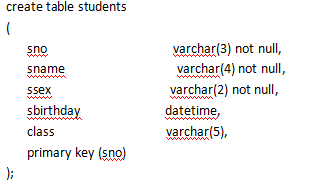


1. 查询students表的所有记录
- select sno,sname,ssex,sbirthday,class
- from students;
- 查询students表中的所有记录的sname、ssex和class列
- select sname,ssex,class
- from students;
- 查询编号为101的同学记录
- select sno,sname,ssex,sbirthday,class
- from students
- where sno = ‘101’;
- 查询姓“王”的同学记录
- select sno,sname,ssex,sbirthday,class
- from students
- where sname like ‘王%’;
- 查询不姓“王”的同学记录
- select sno,sname,ssex,sbirthday,class
- from students
where sname not like ‘王%’;
查询scores表中成绩在60到80之间的所有记录
- select sno,cno,degree
- from scores
where degree between 60 and 80;
select sno,cno,degree
- from scores
- where degree >= 60 and degree <=80;
- 查询scores表中成绩为85,86或88的记录
- select sno,cno,degree
- from scores
where degree in (85,86,88);
select sno,cno,degree
- from scores
- where degree = 85 or degree = 86 or degree = 88;
- 查询“95031”班的“男”同学的记录
- select sno,sname,ssex,sbirthday,class
- from students
- where sno = ‘95031’ and ssex = ‘男’;
- 查询“95031”班或性别为“女”的同学记录
- select sno,sname,ssex,sbirthday,class
- from students
- where sno = ‘95031’ or ssex = ‘女’;
- 查询teachers表所有的系即不重复的depart列
- select distinct depart
- from teachers;
- 以班级class降序查询students表的所有记录
- select sno,sname,ssex,sbirthday,class
- from students
- order by class desc;
- 以cno升序、degree降序查询scores表的所有记录
- selct sno,cno,degree
- from scores
- order by cno asc,degree desc;
- 查询“95031”班的学生人数
- select count(*)
- from students
- where class = ‘95031’;
- 查询每个班的学生人数
- select class,count(*) ‘人数’
- from students
- group by class;
- 查询至少有2名男生的班号
- select class
- from students
- where ssex = ‘男’ #先判断为男生
- group by class
- having count(*) >=2 #分组后筛选每个班级男生个数
- 查询最高分
- select max(degree)
- from scores;
- 查询最低分
- select max(degree)
- from scores;
- 查询scores表中的最高分的学生学号和课程号
- select sno,cno
- from scores
- where degree = #2、单行子查询
- (
- select max(degree) #1、先找到最高分
- from scores
- );
- 查询‘3-105’号课程的平均分
- select cno,round(avg(degree),1) ‘平均分’ #round对结果进行处理,保留1位小数
- from scores
- group by cno #平均必定需要分组,聚合函数可能需要分组
- having cno = ‘3-105’; #分组之后进行筛选操作
- 查询各科的平均分
- select cno,round(avg(degree),2) #round对结果进行处理,保留2位小数)
- from degree
- group by cno;
- 查询最低分大于70,最高分小于90的sno
- select sno
- from socres
- group by sno
- having min(degree)>70 and max(degree) <90
- 查询95033班和95031班全体学生的记录
- select sno,sname,ssex,sbirthday,class
- from students
- where class = ‘98033’ or class = ‘95031’;
- 查询存在有85分以上成绩的课程cno
- select distinct cno
- from scores
- where degree>85;
- 查询所有教师和同学的name、sex和birthday #union联合查询,类似字段的连接,列名以前面查询为主
- (select sname sname,ssex sex,sbirthday birthday
- from students)
- union
- (select tname,tsex,tbirthday
- from teachers);
- 查询所有“女”教师和“女”同学的name、sex和birthday
- (select sname sname,ssex sex,sbirthday birthday
- from students
- where ssex = ‘女’)
- union
- (select tname,tsex,tbirthday
- from teachers
- where tsex = ‘女’);
- 查询所有任课教师的tname和depart
- select tname,depart #课程表courses中有老师编号tno的就算任课
- from teachers
- where tno in
- (
- select distinct tno
- from courses
- );
- 查询所有未讲课的教师的tname和depart
- select tname,depart
- from teachers
- where tno not in
- (
- select distinct tno
- from courses
- );
- 查询同名的同学记录
- select sno,sname,ssex,sbirthday,class
- from students
- where sname in
- (
- select sname #对名字分组函数,利用count(*)得出重名的名字
- from students
- group by sname
- having count(*) >=2
- );
- 查询学生的姓名和年龄
- select sname,(year(now()) - year(sbirthday)) ‘age’
- from students;
- 查询学生中最大和最小的出生年月
- select min(year(sbirthday)),max(year(sbirthday)) #数字最小的出生年月就是我们日常生活中理解的最大的出生年月
- from students;
- 以班号和年龄从大到小的顺序查询student表中的全部记录
- select sno,sname,ssex,sbirthday,class
- from students
- order by class desc,year(now()) - year(sbirthday) desc; #年龄:当前年的年份减去出生年的年份
- 查询男教师及其所上的课程,教师名和对应的课程名课程名
- select t.name,c.cname
- from courses c
- inner join
- teachers t
- on c.tno = t.tno
- where tsex = ‘男’;
- 查询各门课程的最高分同学的sno、cno和degree列
- selct sno,cno,degree
- from scores
- where degree in
- select max(degree)
- from scores
- group by cno #不用它,如果课程a和b都有99分,但是课程a的最大值是100分,那么就把课程a的不是最大值查出来了
- SELECT
- s.sno,g.cno,s.degree
- FROM
- (SELECT cno,MAX(degree) maxx from scores group by cno) g
- LEFT JOIN
- (SELECT sno,cno,degree FROM scores) s
- ON g.cno=s.cno AND g.maxx=s.degree; #自连接
- 查询课程对应的老师姓名、职称、所属系
- select tname,cname,prof,depart
- from (select tno,cname from courses) c
- left join
- select (tno,tname,prof,depart from teacher) t
- on t.tno = c.tno #连接查询效率要比子查询高,子查询会有构建、销毁子表的过程
- 查询课程对应的女老师姓名、职称、所属系
- select tname,cname,prof,depart
- from (select tno,cname from courses) c
- left join
- select (tno,tname,prof,depart from teacher where tsex = ‘女’) t
- on t.tno = c.tno
- 行列转置:各科最好成绩
- 分组方式:
- SELECT cno,MAX(degree) degree FROM scores
- GROUP BY cno;
- 执行结果:6-106,6-166
- SELECT
- MAX(CASE cno WHEN ‘3-105’ THEN degree ELSE 0 END) ‘3-105’,
- MAX(CASE cno WHEN ‘3-245’ THEN degree ELSE 0 END) ‘3-245’,
- MAX(CASE cno WHEN ‘6-106’ THEN degree ELSE 0 END) ‘6-106’,
- MAX(CASE cno WHEN ‘6-166’ THEN degree ELSE 0 END) ‘6-166’
- FROM scores
- 行列转置(有点像switch语句):
- SELECT
- MAX(CASE cno WHEN ‘3-105’ THEN degree ELSE 0 END) ‘3-105’,
- MAX(CASE cno WHEN ‘3-245’ THEN degree ELSE 0 END) ‘3-245’,
- MAX(CASE cno WHEN ‘6-106’ THEN degree ELSE 0 END) ‘6-106’,
- MAX(CASE cno WHEN ‘6-166’ THEN degree ELSE 0 END) ‘6-166’
- FROM scores;
- 行列转置:每个学员各科最好成绩
- 每个学员(分组);各科成绩(行列转置);最好成绩(MAX函数)
- SELECT
- sno,
- MAX(CASE cno WHEN ‘3-105’ THEN degree ELSE 0 END) ‘3-105’,
- MAX(CASE cno WHEN ‘3-245’ THEN degree ELSE 0 END) ‘3-245’,
- MAX(CASE cno WHEN ‘6-106’ THEN degree ELSE 0 END) ‘6-106’,
- MAX(CASE cno WHEN ‘6-166’ THEN degree ELSE 0 END) ‘6-166’
- FROM scores
- GROUP BY sno;
- 行列转置:课程编号和课程名称
- SELECT cno,cname FROM courses;
group_concat
- SELECT
- REPLACE(GROUP_CONCAT(CASE cno WHEN ‘3-105’ THEN cname ELSE ‘’ END),’,’,’’) AS ‘3-105’,
- REPLACE(GROUP_CONCAT(CASE cno WHEN ‘3-245’ THEN cname ELSE ‘’ END),’,’,’’) AS ‘3-245’,
- REPLACE(GROUP_CONCAT(CASE cno WHEN ‘6-106’ THEN cname ELSE ‘’ END),’,’,’’) AS ‘6-106’,
- REPLACE(GROUP_CONCAT(CASE cno WHEN ‘6-166’ THEN cname ELSE ‘’ END),’,’,’’) AS ‘6-166’,
- REPLACE(GROUP_CONCAT(CASE cno WHEN ‘9-888’ THEN cname ELSE ‘’ END),’,’,’’) AS ‘9-888’
- FROM courses;
- SELECT DISTINCT
- REPLACE(GROUP_CONCAT(CASE cno WHEN ‘3-105’ THEN cname ELSE ‘’ END),’,’,’’) AS ‘3-105’,
- REPLACE(GROUP_CONCAT(CASE cno WHEN ‘3-245’ THEN cname ELSE ‘’ END),’,’,’’) AS ‘3-245’,
- REPLACE(GROUP_CONCAT(CASE cno WHEN ‘6-106’ THEN cname ELSE ‘’ END),’,’,’’) AS ‘6-106’,
- REPLACE(GROUP_CONCAT(CASE cno WHEN ‘6-166’ THEN cname ELSE ‘’ END),’,’,’’) AS ‘6-166’,
- REPLACE(GROUP_CONCAT(CASE cno WHEN ‘9-888’ THEN cname ELSE ‘’ END),’,’,’’) AS ‘9-888’
- FROM courses;
- 课程号“3-105”的前3名学员成绩排行
- select sno,cno,degree
- from scores
- where cno = ‘3-105’
- order by degree desc
- limit 3;
- 课程“计算机导论”的前3名学员排行
- select cno,sno,degree
- from scores
- where cno =
- (
- select cno
- from courses
- where cname = ‘计算机导论’
- )
- order by degree desc
- limit 3;
- 课程号“3-105”的倒数最后3名学员排行
- select sno,cno,degree
- from degrees
- where sno in
- (
- select sno
- from scores
- where cno = ‘3-105’
- order degree asc
- limit 3
- )
- order by degree desc; #升序选出前3位然后对他们降序排序
- SELECT * FROM
- (SELECT * FROM scores WHERE cno=’3-105’ ORDER BY degree LIMIT 3) t #查询结果相当于是一个表
- ORDER BY degree desc
总结
SQL语句书写、执行顺序
- SQL语句书写
- select 【distinct】 查询列表
- from 表名 别名
join 表名 别名 - on 连接条件
- where 筛选条件
- group by 分组条件
- having 分组后晒选
- order by 排序列表 【asc/desc】 #升序、降序,默认升序asc
- limit 条目数
SQL语句执行顺序
采用填空法,先写出SQL框架,一张表用select from,两张表用select from left join on(万能连接)
- 执行select语句时,尤其是子查询里的内查询需要注意是否需要用distinct
- 出现 每 各 字样、聚合函数的使用 就要考虑是否需要分组group by,分组后筛选用 having
- 出现用排序 order by,asc升序,desc降序
-
注意事项
能用多表联查就不要用子查询,子查询会有创建新子表、销毁新子表的消耗

若有收获,就点个赞吧
0 人点赞


