
待完善
- 如何设置指定目录下jsp文件是否可解析
安装、启动
下载
https://tomcat.apache.org/download-80.cgi
https://mirrors.tuna.tsinghua.edu.cn/apache/tomcat/tomcat-8/v8.5.66/bin/apache-tomcat-8.5.66.zip
配置jdk(略……)
⚠️
- Java location: The installer will provide a default JRE to use to run the service. The installer uses the registry to determine the base path of a Java 7 or later JRE, including the JRE installed as part of the full JDK. When running on a 64-bit operating system, the installer will first look for a 64-bit JRE and only look for a 32-bit JRE if a 64-bit JRE is not found. If a JRE cannot be found when running on a 64-bit operating system, the installer will look for a 64-bit JDK. Finally, if a JRE or JDK has not been found, the installer will try to use the
JAVA_HOMEenvironment variable. It is not mandatory to use the default JRE detected by the installer. Any installed Java 7 or later JRE (32-bit or 64-bit) may be used.
确保使用的是Java 7或之后的版本
mkdir /opt/apache-tomcatcd /opt/apache-tomcat/cp apache-tomcat-8.5.66.zip /opt/apache-tomcat/unzip apache-tomcat-8.5.66.zipcd apache-tomcat-8.5.66/bin/chmod +x *.sh./startup.sh
访问http://192.168.31.234:8080出现如下页面则说明配置成功

配置、使用
默认情况下管理控制台只允许通过服务器本机localhost访问,无法通过其他主机访问http://192.168.31.234:8080/manager/html登录管理控制台
远程访问管理后台
apache-tomcat-8.5.66/webapps/manager/META-INF/context.xml
想要允许远程访问管理后台,只需要把Value部分注释掉,且无需重启Apache Tomcat服务。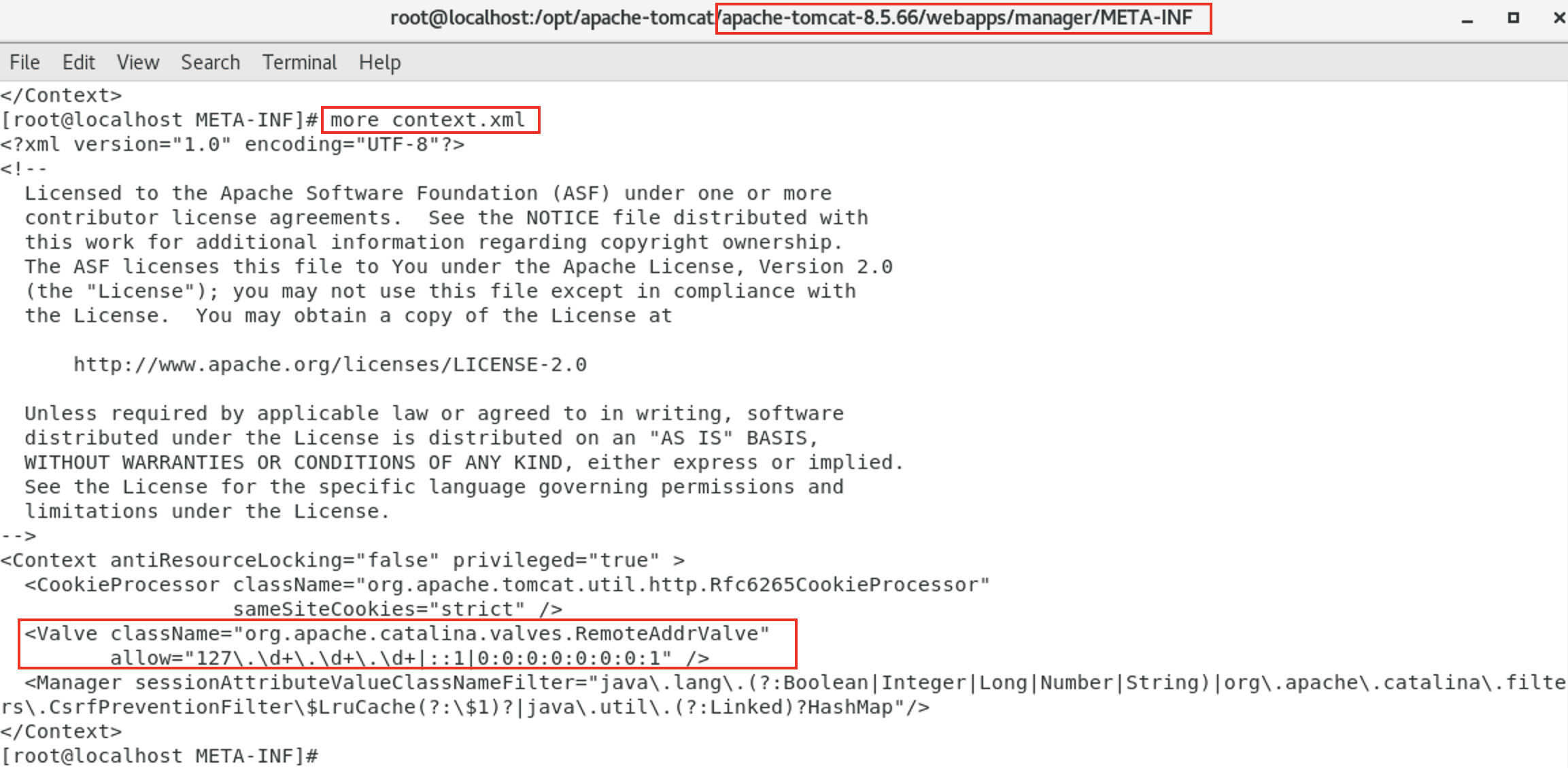

部署war包
生成war包jar -cvf antsword.war antsword.jsp
访问jsp文件,war包文件名+原jsp文件的名称
http://10.211.55.9:8080/antsword/antsword.jsp
后台管理员账号密码
/conf/tomcat-users.xml
官方链接:https://tomcat.apache.org/tomcat-8.5-doc/manager-howto.html#Deployusing_a_Context_configuration%22.xml%22_file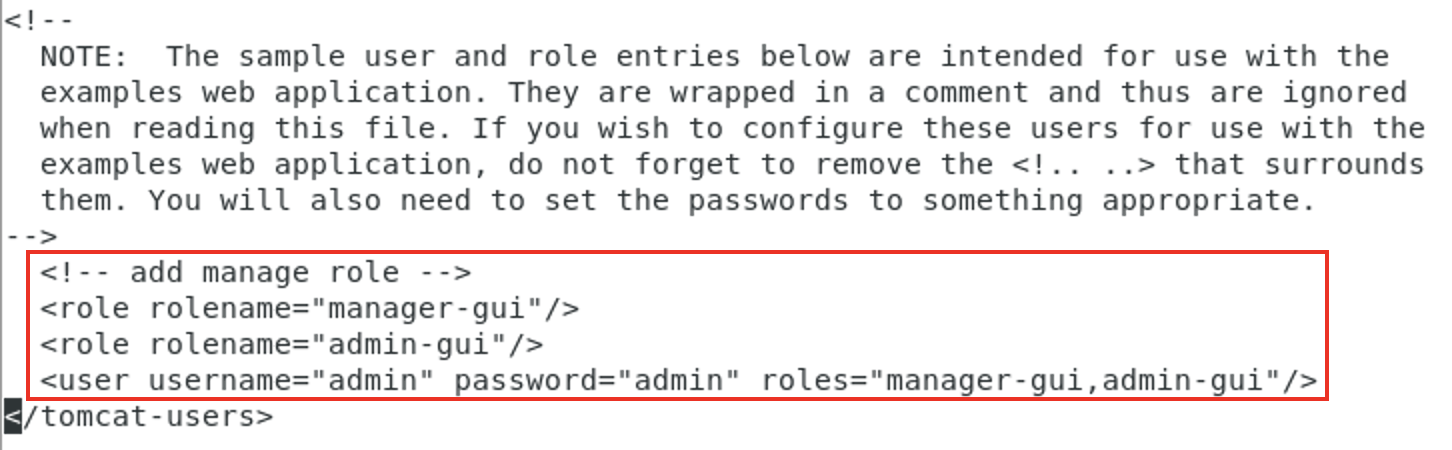
PS:
1、修改之后需要重启Apache Tomcat服务才能生效;
2、角色只要有manager-gui就行了,admin-gui可能是之前版本存在的角色。
网站根目录
/apache-tomcat-8.5.66/webapps/
默认端口

访问日志
/conf/server.xml
默认是不记录POST请求体的,如需修改,可参考https://blog.csdn.net/qq_30121245/article/details/52861935

若有收获,就点个赞吧
0 人点赞


