Reference
- 查看Documents - http://oozie.apache.org/
- 4.0.0 - Quick Start - http://oozie.apache.org/docs/4.0.0/DG_QuickStart.html
- oozie of CDH5.3.6 - https://www.bilibili.com/video/BV1jb411A7Ar
Building Oozie
编译二进制版本oozie源文件。
使用Cloudera等厂商的发行版本tar包,可略过编译。
Server Installation
System Requirements
Unix (tested in Linux and Mac OS X)
当前使用版本信息如下。$ head -n 1 /etc/issueCentOS release 6.4 (Final)
Java 1.6+
当前使用版本信息如下。$ java -versionjava version "1.7.0_67"Java(TM) SE Runtime Environment (build 1.7.0_67-b01)Java HotSpot(TM) 64-Bit Server VM (build 24.65-b04, mixed mode)
Hadoop
当前使用版本信息如下。$ Documents/hadoop/bin/hadoop versionHadoop 2.5.0-cdh5.3.6Subversion http://github.com/cloudera/hadoop -r 6743ef286bfdd317b600adbdb154f982cf2fac7aCompiled by jenkins on 2015-07-28T22:14ZCompiled with protoc 2.5.0From source with checksum 9c7775296a534f91809cc23d2d15ffccThis command was run using /home/jack/Documents/hadoop/share/hadoop/common/hadoop-common-2.5.0-cdh5.3.6.jar
ExtJS library (optional, to enable Oozie webconsole)
Server Installation
IMPORTANT: Oozie ignores any set value for OOZIE_HOME , Oozie computes its home automatically.
- Build an Oozie binary distribution
Download a Hadoop binary distribution
Download ExtJS library (it must be version 2.2)
NOTE: The ExtJS library is not bundled with Oozie because it uses a different license.
NOTE: It is recommended to use a Oozie Unix user for the Oozie server.
使用Cloudera发行版,解压配置即可使用。
- hadoop-2.5.0-cdh5.3.6
下载地址 - [http://archive.cloudera.com/cdh5/cdh/5/hadoop-2.5.0-cdh5.3.6.tar.gz](http://archive.cloudera.com/cdh5/cdh/5/hadoop-2.5.0-cdh5.3.6.tar.gz) - oozie-4.0.0-cdh5.3.6
下载地址 - [http://archive.cloudera.com/cdh5/cdh/5/oozie-4.0.0-cdh5.3.6.tar.gz](http://archive.cloudera.com/cdh5/cdh/5/oozie-4.0.0-cdh5.3.6.tar.gz)
Hadoop环境
NOTE: Configure the Hadoop cluster with proxyuser for the Oozie process.
Hadoop core-site.xml 中需要以下两个属性:
<!-- OOZIE --><property><name>hadoop.proxyuser.[OOZIE_SERVER_USER].hosts</name><value>[OOZIE_SERVER_HOSTNAME]</value></property><property><name>hadoop.proxyuser.[OOZIE_SERVER_USER].groups</name><value>[USER_GROUPS_THAT_ALLOW_IMPERSONATION]</value></property>
用特定的值替换大写字母部分,然后重新启动Hadoop。
使用现有Hadoop环境,伪分布式集群。(具体查看hadoop集群配置部分)
core-site.xml的代理用户配置mapred-site.xml的 MapReduce JobHistory Server 配置- … …
修改 core-site.xml ,配置proxy user。现有Oozie环境用户,与hadoop环境的超级用户(jack)相同。
代理用户原理,查看官方文档,比如:hadoop 3.2.1 - Proxy user - Superusers Acting On Behalf Of Other Users -[https://hadoop.apache.org/docs/current/hadoop-project-dist/hadoop-common/Superusers.html](https://hadoop.apache.org/docs/current/hadoop-project-dist/hadoop-common/Superusers.html)。
<property><name>hadoop.proxyuser.jack.hosts</name><value>*</value></property><property><name>hadoop.proxyuser.jack.groups</name><value>*</value></property>
启动Hadoop集群,进程状态如下。
$ jps -l3355 org.apache.hadoop.hdfs.server.namenode.SecondaryNameNode3064 org.apache.hadoop.hdfs.server.namenode.NameNode3631 org.apache.hadoop.yarn.server.nodemanager.NodeManager3525 org.apache.hadoop.yarn.server.resourcemanager.ResourceManager57245 sun.tools.jps.Jps4019 org.apache.hadoop.mapreduce.v2.hs.JobHistoryServer3191 org.apache.hadoop.hdfs.server.datanode.DataNode
Oozie环境
解压 oozie-4.0.0-cdh5.3.6.tar.gz
$ cd ~/Documents$ tar zxvf ~/Downloads/oozie-4.0.0-cdh5.3.6.tar.gz -C .$ mv oozie-4.0.0-cdh5.3.6.tar.gz oozie$ cd oozie$ lsbin lib NOTICE.txt oozie-hadooplibs-4.0.0-cdh5.3.6.tar.gz oozie-sharelib-4.0.0-cdh5.3.6-yarn.tar.gz srcconf libtools oozie-core oozie-server oozie.wardocs LICENSE.txt oozie-examples.tar.gz oozie-sharelib-4.0.0-cdh5.3.6.tar.gz release-log.txt
IMPORTANT: all Oozie server scripts ( oozie-setup.sh , oozied.sh , oozie-start.sh , oozie-run.sh and oozie-stop.sh ) run only under the Unix user that owns the Oozie installation directory, if necessary use sudo -u OOZIE_USER when invoking the scripts.
As of Oozie 3.3.2, use of oozie-start.sh , oozie-run.sh , and oozie-stop.sh has been deprecated and will print a warning. The oozied.sh script should be used instead; passing it start , run , or stop as an argument will perform the behaviors of oozie-start.sh , oozie-run.sh , and oozie-stop.sh respectively.
Create a libext/ directory in the directory where Oozie was expanded.
If using a version of Hadoop bundled in Oozie hadooplibs/ , copy the corresponding Hadoop JARs from hadooplibs/ to the libext/ directory. If using a different version of Hadoop, copy the required Hadoop JARs from such version in the libext/ directory.
解压 oozie-hadooplibs-4.0.0-cdh5.3.6.tar.gz 。
创建libext文件夹, 拷贝依赖的相关jar包。
$ cd ~/Documents/oozie$ mkdir libext$ tar zxvf oozie-hadooplibs-4.0.0-cdh5.3.6.tar.gz$ cp oozie-4.0.0-cdh5.3.6/hadooplibs/hadooplib-2.5.0-cdh5.3.6.oozie-4.0.0-cdh5.3.6/* libext/
If using the ExtJS library copy the ZIP file to the libext/ directory.
拷贝 ext-2.2.zip 到 libext 。
$ cp ~/Downloads/ext-2.2.zip libext/
修改oozie配置文件,使用MySQL创建保存元数据的oozie数据库。
<property><name>oozie.service.JPAService.jdbc.driver</name><value>com.mysql.jdbc.Driver</value></property><property><name>oozie.service.JPAService.jdbc.url</name><value>jdbc:mysql://192.168.32.130:3306/oozie</value></property><property><name>oozie.service.JPAService.jdbc.username</name><value>root</value></property><property><name>oozie.service.JPAService.jdbc.password</name><value>123456</value></property><property><name>oozie.service.HadoopAccessorService.hadoop.configurations</name><value>*=/home/jack/Documents/hadoop/etc/hadoop</value><description>让Oozie引用Hadoop的配置文件“*=”不能删</description></property>
拷贝MySQL 连接驱动 jar包到 libext/ 中。
$ cp ~/Downloads/connector/mysql-connector-java-5.1.27/mysql-connector-java-5.1.27-bin.jar libext/
创建oozie数据库。
$ mysql -uroot -p123456Welcome to the MySQL monitor. Commands end with ; or \g.Your MySQL connection id is 9446Server version: 5.1.73 Source distributionCopyright (c) 2000, 2013, Oracle and/or its affiliates. All rights reserved.Oracle is a registered trademark of Oracle Corporation and/or itsaffiliates. Other names may be trademarks of their respectiveowners.Type 'help;' or '\h' for help. Type '\c' to clear the current input statement.mysql> create database oozie;mysql> quit;
初始化oozie
A sharelib create|upgrade -fs fs_default_name [-locallib sharelib] command is available when running oozie-setup.sh for uploading new or upgrading existing sharelib into hdfs where the first argument is the default fs name and the second argument is the Oozie sharelib to install, it can be a tarball or the expanded version of it. If the second argument is omitted, the Oozie sharelib tarball from the Oozie installation directory will be used.
prepare-war [-d directory] command is for creating war files for oozie with an optional alternative directory other than libext.
db create|upgrade|postupgrade -run [-sqlfile ] command is for create, upgrade or postupgrade oozie db with an optional sql file
Run the oozie-setup.sh script to configure Oozie with all the components added to the libext/ directory.
$ bin/oozie-setup.sh prepare-war [-d directory] [-secure]sharelib create -fs <FS_URI> [-locallib ]sharelib upgrade -fs <FS_URI> [-locallib ]db create|upgrade|postupgrade -run [-sqlfile ]
The -secure option will configure Oozie to use HTTP (SSL); refer to Setting Up Oozie with HTTPS (SSL) for more details.
上传sharelib相关文件到HDFS上,查看当前用户对应目录下share文件夹,确认上传内容。该部分内容,会由oozie执行工作流任务时引用。(无需解压,上传时,自动解压,且必须是oozie服务用户。)
创建oozie.sql文件及在MySQL中初始化元数据数据库oozie。
创建oozie server项目的war包,位于oozie安装目录下 oozie-server/webapp/ 中,用于启动Web服务。
$ bin/oozie-setup.sh sharelib create -fs hdfs://192.168.32.130:8020 -locallib oozie-sharelib-4.0.0-cdh5.3.6-yarn.tar.gz··· ···$ bin/oozie-setup.sh db create -run -sqlfile oozie.sql··· ···$ bin/oozie-setup.sh prepare-war··· ···INFO: Adding extension: /home/jack/Documents/oozie/libext/stax-api-1.0-2.jarINFO: Adding extension: /home/jack/Documents/oozie/libext/xmlenc-0.52.jarINFO: Adding extension: /home/jack/Documents/oozie/libext/xz-1.0.jarINFO: Adding extension: /home/jack/Documents/oozie/libext/zookeeper-3.4.5-cdh5.3.6.jarNew Oozie WAR file with added 'ExtJS library, JARs' at /home/jack/Documents/oozie/oozie-server/webapps/oozie.warINFO: Oozie is ready to be started
启动与关闭
启动命令
$ bin/oozied.sh startSetting OOZIE_HOME: /home/jack/Documents/oozieSetting OOZIE_CONFIG: /home/jack/Documents/oozie/confSourcing: /home/jack/Documents/oozie/conf/oozie-env.shsetting CATALINA_OPTS="$CATALINA_OPTS -Xmx1024m"Setting OOZIE_CONFIG_FILE: oozie-site.xmlSetting OOZIE_DATA: /home/jack/Documents/oozie/dataSetting OOZIE_LOG: /home/jack/Documents/oozie/logsSetting OOZIE_LOG4J_FILE: oozie-log4j.propertiesSetting OOZIE_LOG4J_RELOAD: 10Setting OOZIE_HTTP_HOSTNAME: masterSetting OOZIE_HTTP_PORT: 11000Setting OOZIE_ADMIN_PORT: 11001Setting OOZIE_HTTPS_PORT: 11443Setting OOZIE_BASE_URL: http://master:11000/oozieSetting CATALINA_BASE: /home/jack/Documents/oozie/oozie-serverSetting OOZIE_HTTPS_KEYSTORE_FILE: /home/jack/.keystoreSetting OOZIE_HTTPS_KEYSTORE_PASS: passwordSetting OOZIE_INSTANCE_ID: masterSetting CATALINA_OUT: /home/jack/Documents/oozie/logs/catalina.outSetting CATALINA_PID: /home/jack/Documents/oozie/oozie-server/temp/oozie.pidUsing CATALINA_OPTS: -Xmx1024m -Dderby.stream.error.file=/home/jack/Documents/oozie/logs/derby.logAdding to CATALINA_OPTS: -Doozie.home.dir=/home/jack/Documents/oozie -Doozie.config.dir=/home/jack/Documents/oozie/conf -Doozie.log.dir=/home/jack/Documents/oozie/logs -Doozie.data.dir=/home/jack/Documents/oozie/data -Doozie.instance.id=master -Doozie.config.file=oozie-site.xml -Doozie.log4j.file=oozie-log4j.properties -Doozie.log4j.reload=10 -Doozie.http.hostname=master -Doozie.admin.port=11001 -Doozie.http.port=11000 -Doozie.https.port=11443 -Doozie.base.url=http://master:11000/oozie -Doozie.https.keystore.file=/home/jack/.keystore -Doozie.https.keystore.pass=password -Djava.library.path=Using CATALINA_BASE: /home/jack/Documents/oozie/oozie-serverUsing CATALINA_HOME: /home/jack/Documents/oozie/oozie-serverUsing CATALINA_TMPDIR: /home/jack/Documents/oozie/oozie-server/tempUsing JRE_HOME: /usr/java/jdk/jreUsing CLASSPATH: /home/jack/Documents/oozie/oozie-server/bin/bootstrap.jarUsing CATALINA_PID: /home/jack/Documents/oozie/oozie-server/temp/oozie.pid
关闭命令
$ bin/oozied.sh stop··· ···
访问 Web 界面
http://192.168.32.130:11000/oozie/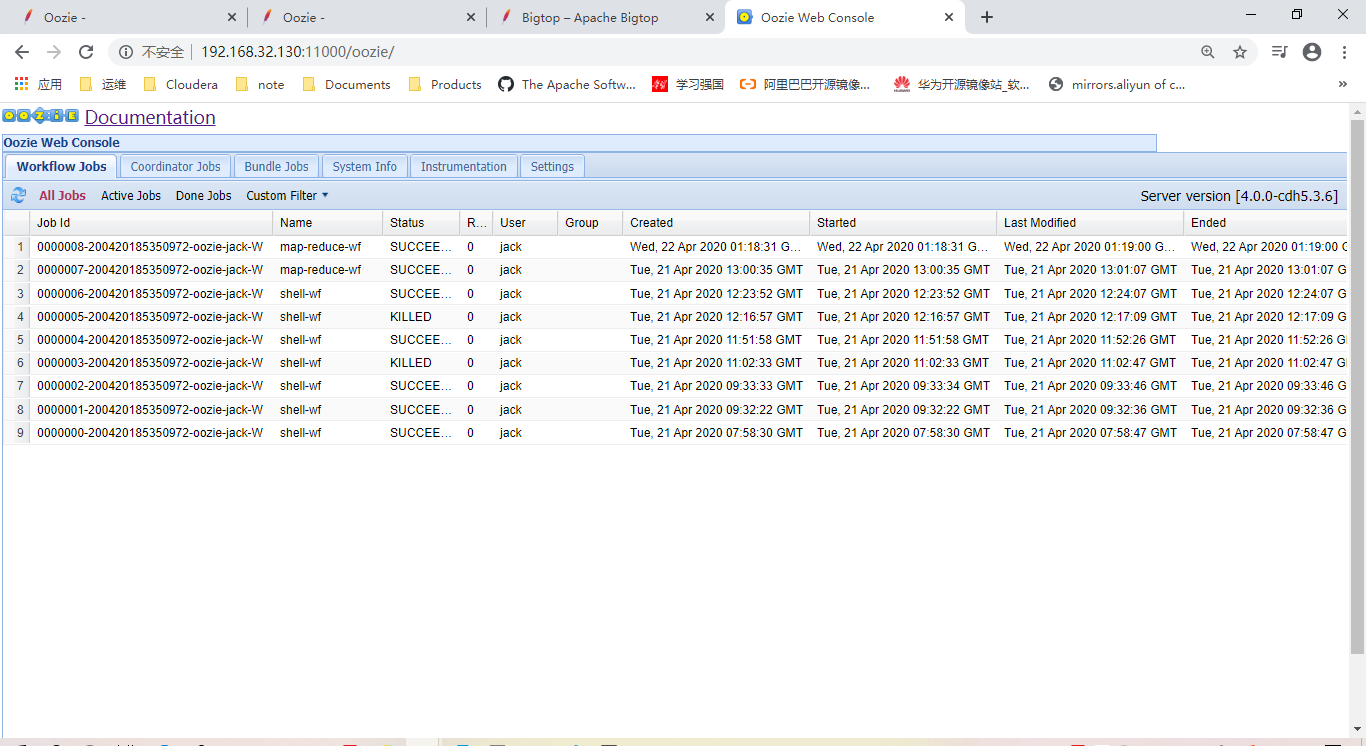
Trouble Shooting
框架间环境变量相互影响
用户环境变量污染,Sqoop2中同样使用到tomcat,环境变量中配置有 CATALINA_BASE 变量。当处于该情况时,打war包时,会引用 CATALINA_BASE 变量定义的sqoop2安装目录,导致出错。
$ bin/oozie-setup.sh prepare-warsetting CATALINA_OPTS="$CATALINA_OPTS -Xmx1024m"··· ···File/Dir does no exist: /home/jack/Documents/sqoop2/server/conf/ssl/server.xml
Client Installation
Copy and expand the
oozie-client TAR.GZ file bundled with the distribution. Add the bin/ directory
to the PATH .
有关oozie命令行工具的完整参考资料,请参阅 Command Line
Interface Utilities。
注意:oozie服务器的安装包括Oozie客户机。Oozie客户机应该只安装在远程机器上。
Oozie Share Lib Installation
略过,见1.2.3节中sharelib上传操作。
Expand the oozie-sharelib TAR.GZ
file bundled with the distribution.
The share/ directory
must be copied to the Oozie HOME directory in HDFS:
$ hadoop fs -put share share
IMPORTANT: This must be done
using the Oozie Hadoop (HDFS) user. If a share directory already
exists in HDFS, it must be deleted before copying it again.
See the Workflow
Functional Specification for more information about the Oozie
ShareLib.
::Go back to Oozie
Documentation Index::

若有收获,就点个赞吧
0 人点赞


