fact简介

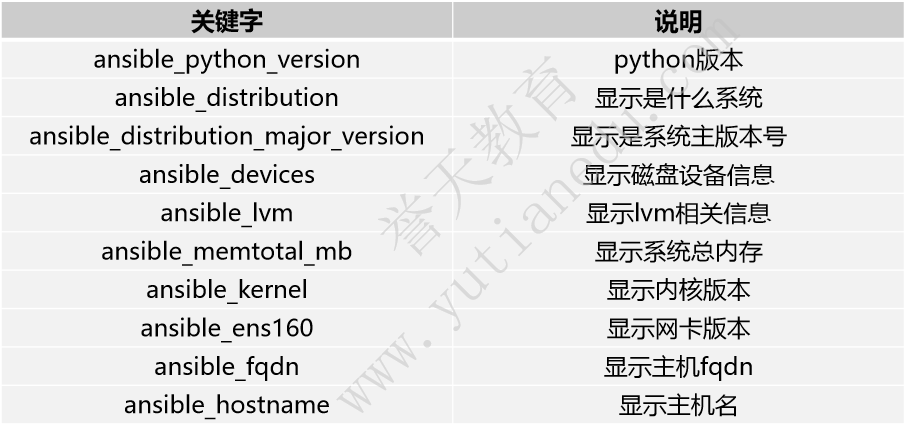
fact变量引用
使用 ansible_eth0.ipv4.address 来引用被控端的ip地址
开启和关闭fact
-hosts: testgather_facts: false #关闭自动收集facts,默认是开启的tasks:-name: test gather facts #用setup模块收集setup:
自定义fact
[admin@ansible ansible]$ cat costom.fact[general]package = httpdservice = httpdstate = started[admin@ansible ansible]$ cat fact2.yml- hosts: node1tasks:- file:path: /etc/ansible/facts.dstate: directory- name: copy fact file to remote hostscopy:src: costom.factdest: /etc/ansible/facts.d #放到目标文件夹/etc/ansible/facts.d- name: get factsdebug:msg: "{{ ansible_local.costom.general.package }}"
使用set_fact模块定义新的变量
[admin@ansible ansible]$ vim fact3.yml- hosts: node1vars:version: "{{ ansible_os_family }}-{{ ansible_distribution_major_version }}"tasks:- name: set factsset_fact:osversion: "{{ ansible_os_family }}-{{ ansible_distribution_major_version }}"oscomment: "this is a rhel8 os"- name: debug set factdebug:msg: "{{ osversion }}"- debug:msg: "{{ oscomment }}"- debug:msg: "{{ version }}"
- hosts: node1tasks:- debug:msg: "{{ osversion }}"- debug:msg: "{{ oscomment }}"
使用lookup生成变量
lookup可以从主控端获取相关信息赋值给一个变量
下面是一个ssh 免密的例子
[admin@ansible ansible]$ cat lookup.yml- hosts: node1tasks:- name: create user3user:name: user3state: present- name: create .ssh directoryfile:path: /home/user3/.sshowner: user3group: user3mode: "700"state: directory- name: copy pub key to user3copy:content: "{{ lookup('file','/home/admin/.ssh/id_rsa.pub') }}"dest: /home/user3/.ssh/authorized_keys- name: exec shell commanddebug:msg: "{{ lookup('pipe','hostname') }}"- name: get env varsdebug:msg: "{{ lookup('env','PWD')}}"
ansible魔法变量
hostvars:
获取某台指定的主机的相关变量。如果有一台web服务器的配置文件中需要指定db服务器的ip地址,我们假定这台db服务器的hostname为db.example.com,ip地址绑定再eth0网卡上,我们通过如下方法在web服务器上调用db服务器的ip地址:
{{hostvars['db.example.com'].ansible_eth0.ipv4.address }}
需要注意db.example.com不能使用ip地址来代替,只能使用主机名
inventory_hostname:
是Ansible所识别的当前正在运行task的主机的主机名:
{{hostvars[inventory_hostname].ansible_eth0.ipv4.address }}
groups:
groups是inventory中所有主机组的列表,可用以枚举主机组中的所有主机
{{groups}} 列出所有的主机组{{groups.test}}列出test组内的所有主机,可用于循环主机组内的主机{{ groups.web }} 获取主机清单中web组内的所有主机,值是一个列表,跟在哪个节点上运行无关{{group_names}} 在哪个主机上运行,就获取该主机所在的组
例子
[admin@ansible ansible]$ cat magic.yml- hosts: alltasks:- name: "获取node1的ip地址"debug:msg: "{{ hostvars['node1'].ansible_ens160.ipv4.address }}"- name: "获取主机清单中的主机名"debug:msg: "{{ inventory_hostname }}"- name: "获取各自的ip地址"debug:msg: "{{ hostvars[inventory_hostname].ansible_ens160.ipv4.address }}"- name: "获取各自的ip地址"debug:msg: "{{ ansible_ens160.ipv4.address }}"- name: "获取主机清单中定义的组名"debug:msg: "{{ groups }}"- name: "获取web组的所有主机"debug:msg: "{{ groups.web }}"- name: "获取主机所在的组"debug:msg: "{{ group_names }}"- name: display some infomationdebug:msg: "{{ inventory_hostname }} is in db"when: '"db" in group_names'

若有收获,就点个赞吧
0 人点赞


