因为一些原因,无意中看到了H5的全局属性contenteditable,原本不知道这个属性该用在哪里,后来发现可以用带有contenteditable属性的div而不是input或者textarea来作为输入框(div可以根据内容自动调整高度哦)。但是div它是不支持placeholder属性的。那怎么在div内容为空的时候显示一个默认文字呢?
先看下效果:
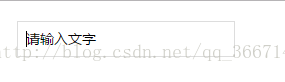
看下代码(code)呗:
1. <div class='input' contenteditable placeholder='请输入文字'></div>2.3. /**css样式*/4. .input{5. width:200px;6. height:24px;7. line-height:24px;8. font-size:14px;9. padding:5px 8px;10. border:1px solid #ddd;11. }12. .input:empty::before {13. content: attr(placeholder);14. }15.16. /**css样式*/17. .input{18. width:200px;19. height:24px;20. line-height:24px;21. font-size:14px;22. padding:5px 8px;23. border:1px solid #ddd;24. }25. .input:empty::before {26. content: attr(placeholder);27. }
contenteditable属性是干嘛的呢? contenteditable属性定义了是否可编辑元素的内容;很官方的解释,有木有….. contenteditable=’true’表示该元素内容可编辑;’false’表示该元素内容不可编辑;

若有收获,就点个赞吧
0 人点赞


