1. useEffect 的使用
目标:能够掌握 useEffect 在 TS 中 的使用
知识点:
useEffect 函数不涉及到任何类型,TS 和 JS 中使用一致
useEffect(() => {const onResize = () => {console.log('屏幕大小改变了')}window.addEventListener('resize', onResize)return () => {window.removeEventListener('resize', onResize)}}, [])
2. useState 的使用
目标:能够掌握 useState 在 TS 中的使用
知识点:
- useState hook 是一个泛型函数,接收一个类型变量来指定状态的类型 ```typescript // useState 是一个泛型函数,接收一个类型变量用来指定状态的类型
// 指定 count 状态的类型为 number
const [count, setCount] = useState
2. 注意:该类型变量,不仅指定了状态的类型,也指定了 setName 等修改状态函数的参数类型```typescriptconst [name, setName] = useState<string>('tom')// 此时,setName 的参数的类型也是 stringsetName('jerry')// 错误演示:// setName(18)
- 省略类型变量,简化 useState 的调用
- 在使用 useState 时,只要提供了初始值,TS 就会自动根据初始值来推断出其类型,因此,可以省略类型变量
- 注意:如果 TS 自动推断出来的类型不准确,还得显式指定泛型类型
const [count, setCount] = useState(0)const [name, setName] = useState('tom')
3. useState 明确指定泛型类型
目标:能够明确指定 useState 的泛型类型
知识点:
- 需求:获取频道列表数据并渲染
频道列表数据的接口:http://geek.itheima.net/v1_0/channels ```jsx const App = () => { // 比如,频道列表数据是一个数组,所以,在 JS 中我们将其默认值设置为:[] // 但是,在 TS 中使用时,如果仅仅将默认值设置为空数组, // list 的类型被推断为:never[],此时,无法往数组中添加任何数据 const [list, setList] = useState([])
return (
) }{list.map((item, index) => {return <li>{item.name}</li>})}
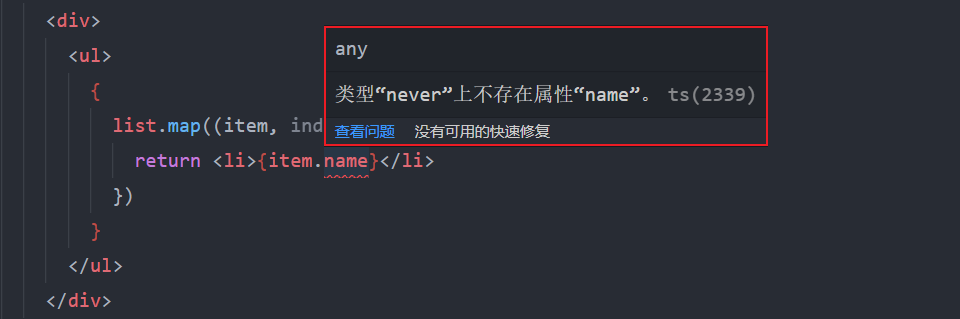注意:1. useState 的初始值是数组、对象等复杂的数据类型,需要明确指定泛型类型1. 因为虽然都是数组、对象,但是,项目开发中不同需求所需要的数组结构、对象结构是不同的。因此,需要明确指定其类型```typescripttype Channel = {id: numbername: string}// 明确指定状态的类型,此时,list 的类型为:Channel[]// Channel[] 表示 Channel 类型的数组,也就是,数组中只能出现 Channel 类型的数据const [list, setList] = useState<Channel[]>([])
总结:
- 使用 TS 时,应该以类型化思维来写代码,简单来说:先有类型,再写逻辑代码来使用该类型的数据
- 比如,对于 对象、数组 来说,就应该在使用前先明确指定要用到的对象的类型、数组的类型等等
4. useRef 的使用
4.1 useRef 接收类型产生问题
目标:能够使用 useRef 配合 TS 操作 DOM
知识点:
useRef hook 接收一个类型变量,用于指定 current 属性的类型
import { useRef } from "react"const App = () => {const inputRef = useRef<HTMLInputElement>(null)return (<div>{/* 假设操作的是 input 标签,则指定类型为:HTMLInputElement */}<input type="text" ref={inputRef} /><button onClick={() => {// 错误:对象可能为 "null"。// 把鼠标放在变量 inputRef.current 上,// 可以看到 inputRef.current 属性的类型为: HTMLInputElement | null// 其中,HTMLInputElement 是我们明确指定的类型,而 null 是参数的类型// 因为在创建 ref 对象时,JSX 对应的 DOM 还没有创建,所以,参数默认值先指定为 nullconsole.log(inputRef.current.value)}}>获取 value</button></div>)}export default App
使用 ref 对象,获取进行 DOM 操作,在指定类型后,current 属性的类型是:HTMLInputElement | null,所以,必须要从类型中 “去掉 null “ 才能继续操作,处理方式有两个:
- 使用 JS 中的 可选链操作符(?.)来实现
- 使用 TS 中的非空断言的使用
- 使用流程控制来判断 Ts 类型
4.2 使用可选链操作符解决类型问题
目标:能够使用 useRef 结合可选链操作符操作 DOM
知识点:
使用可选链操作符解决问题的原理:
可选链操作符 ?. 会判断 current 属性是否为空值(null 或 undefined),如果不是空值,就继续访问 value 值;如果是空值,不会继续访问 value
- 如果 current 不是空值,其类型为 HTMLInputElement,就可以拿到 value 值
如果 current 是空值,其类型为 null,不再继续访问 value,代码就不会报错了
const getValue = () => {// 正确:console.log(inputRef.current?.value)// 报错:未处理 current 属性类型为 null 的情况// console.log(inputRef.current.value)}
4.3 使用非空断言解决类型问题
目标:能够使用 useRef 结合非空断言操作 DOM
知识点:
使用 ref 进行 DOM 操作时,可以将 ref 对象的 current 的类型 HTMLInputElement | null 中的 null 类型去掉变为:HTMLInputElement
const inputRef = useRef<HTMLInputElement>(null)const getValue = () => {console.log(inputRef.current!.value)}
4.4 使用流程控制来判断 Ts 类型
目标:能够通过 if 判断来控制 TS 类型
知识点:
- TS文档-流程控制分析
- TS 可以通过 if 判断等操作进行流程控制分析,来得到更加具体的类型,实现类型收缩(缩小类型的取值范围)
- 这一检查机制也叫做:type guard - 类型守卫
- 结果:变量在不同的位置,可以有不同的类型 ```typescript let x: number | string
function handle (x) { if (typeof x === ‘number’) { // 鼠标放在 x 上查看类型为: number console.log(x) } else { // 此时,x 的类型为: string console.log(x) } }
handle(1)
使用 ref 进行 DOM 操作时,通过 if 判断来排除掉 null 类型```typescriptconst inputRef = useRef<HTMLInputElement>(null)const getValue = () => {// 判断 inputRef.current 是否为空,如果是,直接 return 不再执行后面的代码if (!inputRef.current) return// 如果此处代码执行,说明 inputRef.current 不为空,所以,此处可以直接访问 value 属性console.log(inputRef.current.value)}
5. Redux 基本使用
目标:能够掌握如何在 TS 项目中初始化 redux
知识点:
- 安装依赖包:
yarn add redux react-redux redux-devtools-extension redux-thunk - 新建文件 store/index.ts( 后缀为 .ts ) ```typescript import { createStore, applyMiddleware } from ‘redux’ import { composeWithDevTools } from ‘redux-devtools-extension’ import thunk from ‘redux-thunk’ import reducer from ‘./reducers’
const store = createStore(reducer, composeWithDevTools(applyMiddleware(thunk)))
export default store
3. 新建文件 store/reducers/index.ts```tsximport { combineReducers } from 'redux'import { todos } from './todos'const rootReducer = combineReducers({todos,})export default rootReducer
- 新建文件 store/reducers/todos.ts ```typescript type TodoList = { id: number text: string done: boolean }
const initialState: TodoList[] = [ { id: 1, text: ‘吃饭’, done: false, }, { id: 2, text: ‘睡觉’, done: true, }, { id: 3, text: ‘打豆豆’, done: false, } ]
export const todos = (state = initialState, action: any) => { return state }
5. index.tsx中```tsximport ReactDOM from 'react-dom'import { Provider } from 'react-redux'import App from './App'import store from './store'ReactDOM.render(<Provider store={store}><App /></Provider>,document.getElementById('root'))
6. useSelector 的使用
目标:能够掌握 useSelector 在 TS 中的使用
知识点:
useSelector hook 是一个泛型函数,接收两个类型变量,分别来指定:
- 第一个类型变量:指定 Redux 仓库 state 的类型
- 第二个类型变量:指定要获取状态的类型 ```typescript // useSelector 类型,源码如下:
// TState = DefaultRootState 是 泛型参数 的默认值,
// 设置默认值后,将来在调用该函数时,可以省略该泛型参数不写
export function useSelector
// 第一个参数:回调函数,
// 用来获取 redux 状态的回调函数,通过回调函数的返回值来指定要获取的状态 selector: (state: TState) => TSelected,
// 第二个参数:可以拿到更新前后的两次状态,通过返回的布尔值就可以来知道状态是否发生变化 equalityFn?: (left: TSelected, right: TSelected) => boolean
): TSelected
useSelector 的两种使用方式:1. 指定泛型类型:```typescriptimport { useSelector } from 'react-redux'type TodosList = {id: numbertext: stringdone: boolean}type RootState = {count: numbertodos: TodosList}const Todos = () => {const count = useSelector<RootState, number>(RootState => RootState.count)const todos = useSelector<RootState, TodosList>(RootState => RootState.todos)console.log(count)console.log(todos)return <div>任务管理</div>}export default Todos
- 不指定泛型类型,只指定回调函数参数 state 的类型
react-redux 指定 useSelecotor 的类型
const Todos = () => {const count = useSelector((state: RootState) => state.count)const todos = useSelector((state: RootState) => state.todos)console.log(count)console.log(todos)return <div>任务管理</div>}
7. 获取Redux仓库的状态类型
目标:能够获取 Redux 仓库的状态类型
知识点:
- 获取Redux仓库状态类型
- 仓库状态分散到每一个 reducer 文件中,而我们需要一次获取 Redux 仓库全部状态
- 思路:store.getState() 可以用来获取 Redux 应用的状态,所以只需要获取其类型即可
- 同时 使用 ReturnType 是泛型工具类型,用来获取函数的返回值类型 ```typescript function add(n1: number, n2: number): number { return n1 + n2 }
// 获取函数 add 的类型 type AddFn = typeof add
// 获取函数 add 的返回值类型
type AddFnReturnType = ReturnType
// 直接获取 add 函数的返回值类型
type AddFnReturnType = ReturnType
**落地代码:**store/index.ts 中:```typescript// 获取 Redux 整个仓库的状态类型:export type RootState = ReturnType<typeof store.getState>
组件中引入模块 RootState
import { RootState } from '../store'const Todos = () => {// 获取todos数据const todos = useSelector((state: RootState) => state.todos)return <div><h4>任务管理</h4><ul>{todos.map(item => {return <li key={item.id} style={{color: item.done ? '#ccc' : '',textDecoration: item.done ? 'line-through' : ''}}>{item.text}</li>})}</ul></div>}
8. reducer 函数的类型
目标:能够掌握 reducers 在TS中的写法
action 的类型有两种实现方式:
- 自己手动创建 action 的类型
- 根据 action creator 来得到(扩展)
8.1 手动创建 action 的类型
- 先创建 action 类型
- 用 action 类型来约束 action creator
- 指定 reducer 的 action 参数和返回值的类型
- 约定:为 reducer 指定返回值类型,约束 return 的内容必须满足返回值类型的要求,防止返回错误的数据
actions/todos.ts
type AddTodo = {type: 'todos/add'payload: string}type DelTodo = {type: 'todos/del'payload: number}export type TodoAction = AddTodo | DelTodo// 添加任务export const addTodo = (name: string): AddTodo => ({type: 'todos/add',payload: name})// 删除任务export const delTodo = (id: number): DelTodo => ({type: 'todos/del',payload: id})
reducer/todos.ts
import { TodoAction } from '../actions/todos'// 使用 action 中提供的所有的 action 类型 TodoAction 来作为此处的 action 参数的类型export const todos = (state = initialState, action: TodoAction): TodoList => {switch (action.type) {case 'todos/add':console.log(action.payload)break;case 'todos/del':console.log(action.payload)breakdefault:break;}return state}
8.2 根据 action creator 得到类型
- 先创建 action creator
- 然后使用 as const 常量断言,让当前类型固定为字面量本身,不扩大范围
- 最后使用 ReturnType 根据 action creator 得到 action 类型 ```typescript // 1 添加任务 export const addTodo = (text: string) => ({ // as const 常量断言,会让当前类型固定为 字面量本身,而不再被扩大类型 // 比如,string 就是 字面量类型 ‘todos/add’ 的扩大类型 // 如果不加 as const,type 被推断为: string // 如果加了 as const,type 被推断为: ‘todos/add’ type: ‘todos/add’ as const, payload: text })
// 2 删除任务 export const delTodo = (id: number) => ({ type: ‘todos/del’ as const, payload: id })
// 根据 action creator 来得到 action 的类型
type AddTodo = ReturnType
export type TodoAction = AddTodo | DelTodo | ToggleTodo
<a name="ZIfXb"></a>### 8.3 约束返回类型1. 必须明确指定 reducer 的 action 参数和返回值的类型1. 约定:为 reducer 指定返回值类型,约束 return 的内容必须满足返回值类型的要求,防止返回错误的数据```typescript// 必须明确指定 reducer 的 action 参数和返回值的类型 TodoListexport const todos = (state = initialState, action: TodoAction): TodoList => {switch (action.type) {case 'todos/add':console.log(action.payload)break;case 'todos/del':console.log(action.payload)breakdefault:break;}return state}
9. useDispatch 的使用
目标:能够掌握 useDispatch 在 TS 中的使用
知识点:
- react-redux 指定 useDispatch 的类型
- useDispatch hook 是一个泛型函数,接收一个类型变量用于指定 Action 的类型,该泛型类型可以直接省略
const dispatch = useDispatch()<button onClick={() => dispatch(delTodo(item.id))}>x</button>
10. React 事件对象的类型
目标:能够掌握如何在 TS 中为事件对象指定类型
知识点:
为 JSX 标签绑定事件时,可能需要指定事件对象的类型,分两种情况:
- 直接在 JSX 标签上写事件处理程序,此时,不需要手动指定事件对象的类型
- 技巧:在 JSX 标签上先把事件处理程序写好,然后,鼠标移动到事件对象上面,来查看事件对象的类型

- 如果将事件处理程序抽离出来,需要手动指定函数参数(事件对象)的类型
const change = (e: React.ChangeEvent<HTMLInputElement>) => {console.log(e.target.value)}
11. redux-thunk 的使用
目标:能够掌握 Redux-thunk 在 TS 中的使用
知识点:
指定 redux-thunk 的 action 类型
thunk action 的类型处理:
- 创建 thunk action 的类型:RootThunkAction
```typescript
// 第一个类型参数:thunk action 返回值类型
// 第二个类型参数:Redux 状态的类型
// 第三个类型参数:thunk action 额外参数的类型
// 第四个类型参数:Redux 中所有 action 的类型
export type RootThunkAction = ThunkAction
// 第1、3个类型参数,参照上述文档来指定即可
2. 使用 thunk action 类型:将该类型作为 thunk action 的返回值类型```typescript// 将删除任务的 action 修改为 thunk action// 注意:返回的函数,才是 thunk action// delTodo 是 action creatorexport const delTodo = (id: number): RootThunkAction => {return dispatch => {}}
12. redux-thunk 新版本特性
注意:redux-thunk@2.4.0 新版使用 TS 重写了框架源码,并且相关的 TS 类型也做了一些调整,变化如下:
在 redux-thunk@2.3.0 版本中,在 thunk action 中分发对象 action 时有明确的类型提示
export const delTodo = (id: number): RootThunkAction => {return dispatch => {setTimeout(() => {// 此处,在写 对象action 时,输入 type 属性会有明确的代码提示dispatch({type: 'todos/del',payload: id})}, 1000)}}
在 redux-thunk@2.4.0 新版本中,上述操作没有了明确的类型提示
- 参考该 issue:https://github.com/reduxjs/redux-thunk/issues/326
- 大概的意思是:使用 action creator 就不需要此处的类型提示了,或者有更好的 TS 类型实现来替换 redux-thunk 中现有的类型
所以,如果想要在 thunk action 中 diapatch 对象 action 时有类型提示,可以安装 2.3.0 版本
yarn add redux-thunk@2.3.0
**

若有收获,就点个赞吧
0 人点赞


