需要添加 dx-arch 端口:
http://dx-arch.com:30033
Version: 1.2.0-705Enter Installed DX-ARCH Namespace [default: dx-arch]:Notice: If the input is null, the reverse proxy address that has been set will be removedEnter reverse proxy url(example: http://10.0.0.1/dx-arch) [current: http://dx-arch.com]:http://dx-arch.com:30033Original reverse proxy url: http://dx-arch.comInput reverse proxy url: http://dx-arch.com:30033Continue set reverse proxy? [y/n]: yexec update cmd: helm -n dx-arch upgrade --wait --timeout 5m dx-arch /root/dx-arch-package-1.2.0-705/tools/../helm/dx-arch-1.2.0-705.tgz -f /root/dx-arch-package-1.2.0-705/tools/.update-dx-arch-values.yaml.tmp --set baseUrl=http://dx-arch.com:30033Release "dx-arch" has been upgraded. Happy Helming!NAME: dx-archLAST DEPLOYED: Sat Nov 27 19:09:48 2021NAMESPACE: dx-archSTATUS: deployedREVISION: 17TEST SUITE: NoneReverse Proxy Successfully Set!UI Access URL: http://dx-arch.com:30033[root@dce-10-6-153-5 tools]#
编辑 dx-arch deployment,添加如下配置
kc edit deployment dx-arch-ram -n dx-arch
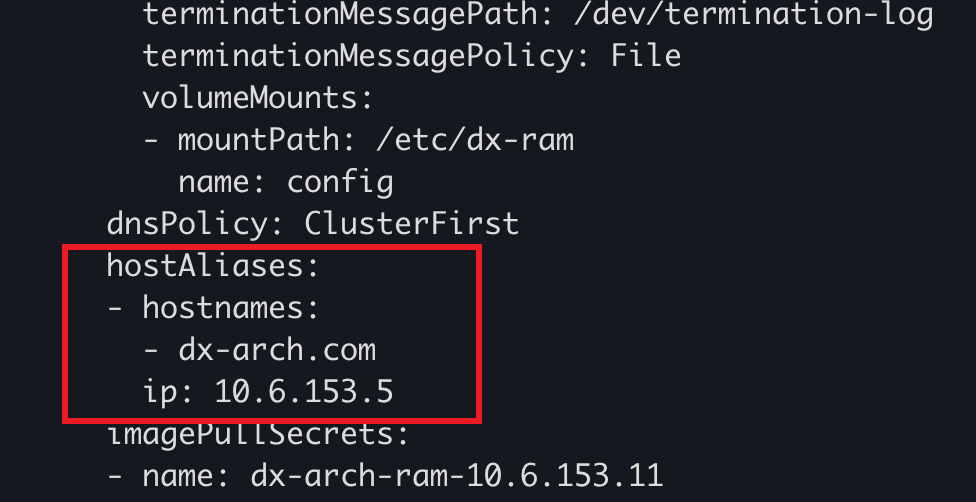
ip: dx-arch 的 ip 地址

若有收获,就点个赞吧
0 人点赞


