Python 操作 Excel 之 xlwt 库
一、学习概览
大家伙,我是 Gorit,今天我来给大家分享 Python 使用技巧系列之,Python 操作 Excel 表格,对,你没听错,使用 Python 操作 Excel
二、主要内容
- 安装 Python 操作 Excel 库之 xlwt
- 使用 Python 往 Excel 中写入数据
- 小案例:
2.1 安装 xlwt 库
Python 的 xlwt 库是一个优秀的对 Excel 进行读操作的库,因为是第三方包,我们使用传统的 pip install xlwt 可能会出现安装不上的情况,所以我给大家提供了一种便捷的下载方式
pip install -i https://pypi.tuna.tsinghua.edu.cn/simple xlwt
参数解释:-i 使用指定的 pip 源进行下载,我使用的源是 清华大学的源
2.3 小案例
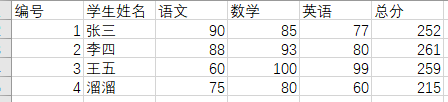
#!/usr/bin/python# -*- coding: utf-8 --#@File: task.py#@author: Gorit#@contact: gorit@qq.com#@time: 2020/5/12 23:47# 操作 Excel 表格import xlwt# 获取一个操作表对象wb = xlwt.Workbook()# 获取一个工作簿操作对象,及 Sheet1sheet = wb.add_sheet("scores")content = ['编号','学生姓名','语文','数学','英语'] # 第一行数据body = [{"id":1,"name":"张三","chinese":90,"math":85,"english":77},{"id":2,"name":"李四","chinese":88,"math":93,"english":80},{"id":3,"name":"王五","chinese":60,"math":100,"english":99},{"id":4,"name":"溜溜","chinese":75,"math":80,"english":60}]# 一次性 写入内容(行表,列表,内容),写过了就不能再写入了for i in range(0,5): # 循环行 0~4for j in range(0,5): # 循环列 0~4if i == 0:# 写入第一行数据sheet.write(i, j, content[j])else:if j==0: # 指定往 第一列写入数据sheet.write(i, j, body[i-1].get("id"))elif j==1: # 指定往第二列写入数据sheet.write(i, j, body[i-1].get("name"))elif j==2:sheet.write(i, j, body[i-1].get("chinese"))elif j==3:sheet.write(i, j, body[i-1].get("math"))elif j==4:sheet.write(i, j, body[i-1].get("english"))# 保存您当前工作表wb.save("scores.xls")
三、课后练习
四、视频操作
五、往期知识分享
1.2

若有收获,就点个赞吧
0 人点赞


