Let’s get started by building a simple web application with TypeScript.
让我们开始用TypeScript构建一个简单的web程序。
Installing TypeScript
安装TypeScript
There are two main ways to get the TypeScript available for your project:
有两种主要的方法可以让 你的项目中使用TypeScript:
- Via npm (the Node.js package manager)
- 通过npm (Node.js包管理器)
- By installing TypeScript’s Visual Studio plugins
- 通过安装Typescript的Visual Studio插件
Visual Studio 2017 and Visual Studio 2015 Update 3 include TypeScript by default. If you didn’t install TypeScript with Visual Studio, you can still download it.
For npm users:
> npm install -g typescript
Building your first TypeScript file
新建你的第一个TypeScript文件
In your editor, type the following JavaScript code in greeter.ts:
在编辑器中,在greeter.ts中输入以下JavaScript代码:
function greeter(person) {return "Hello, " + person;}let user = "Jane User";document.body.textContent = greeter(user);
Compiling your code
编译你的代码
We used a .ts extension, but this code is just JavaScript. You could have copy/pasted this straight out of an existing JavaScript app.
我们使用了.ts扩展名,但这段代码只是JavaScript。您可以直接从现有的JavaScript应用程序复制/粘贴此内容。
At the command line, run the TypeScript compiler
在命令行,运行Typescript编译器
tsc greeter.ts
The result will be a file greeter.js which contains the same JavaScript that you fed in. We’re up and running using TypeScript in our JavaScript app!
结果将是一个greeter.js文件,其中包含与您输入的相同的Javascript。我们在JavaScript应用中使用TypeScript启动并运行!
Now we can start taking advantage of some of the new tools TypeScript offers. Add a : string type annotation to the ‘person’ function argument as shown here:
现在我们可以开始利用Typescript提供的一些新工具了。为’person’函数参数添加:string类型注解,如下所示:
function greeter(person: string) {return "Hello, " + person;}let user = "Jane User";document.body.textContent = greeter(user);
Type annotations
类型注解
Type annotations in TypeScript are lightweight ways to record the intended contract of the function or variable. In this case, we intend the greeter function to be called with a single string parameter. We can try changing the call greeter to pass an array instead:
Typescript中的类型注解是一种轻量级的方式,用来约束函数或变量。在本例中,我们打算使用单个字符串形参调用greeter函数。我们可以尝试改变调用greeter 来传递一个数组:
function greeter(person: string) {return "Hello, " + person;}let user = [0, 1, 2];document.body.textContent = greeter(user);Argument of type 'number[]' is not assignable to parameter of type 'string'
Re-compiling, you’ll now see an error:
重新编译,你将看到一个错误:
error TS2345: Argument of type 'number[]' is not assignable to parameter of type 'string'.
Similarly, try removing all the arguments to the greeter call. TypeScript will let you know that you have called this function with an unexpected number of parameters. In both cases, TypeScript can offer static analysis based on both the structure of your code, and the type annotations you provide.
类似地,尝试删除greeter调用的所有参数。TypeScript会告诉你,你调用了这个函数,但参数的数量并不对。在这两种情况下,TypeScript都可以根据你的代码结构和你提供的类型注解来提供静态分析。
Notice that although there were errors, the greeter.js file is still created. You can use TypeScript even if there are errors in your code. But in this case, TypeScript is warning that your code will likely not run as expected.
请注意,尽管有错误,但greeter.js文件仍然被创建。即使你的代码中有错误,你也可以使用TypeScript。但在这种情况下,TypeScript会警告你的代码可能不会按预期运行
Interfaces
接口
Let’s develop our sample further. Here we use an interface that describes objects that have a firstName and lastName field. In TypeScript, two types are compatible if their internal structure is compatible. This allows us to implement an interface just by having the shape the interface requires, without an explicit implements clause.
让我们进一步开发我们的示例。这里我们使用一个接口来描述具有firstName和lastName字段的对象。在TypeScript中,如果两种类型的内部结构是兼容的,它们就是兼容的。这允许我们通过接口需要的形状来实现接口,而不需要显式的implements子句。
interface Person {firstName: string;lastName: string;}function greeter(person: Person) {return "Hello, " + person.firstName + " " + person.lastName;}let user = { firstName: "Jane", lastName: "User" };document.body.textContent = greeter(user);
Classes
类
Finally, let’s extend the example one last time with classes. TypeScript supports new features in JavaScript, like support for class-based object-oriented programming.
最后,让我们最后一次用类扩展这个示例。TypeScript支持JavaScript中的新特性,比如支持基于类的面向对象编程。
Here we’re going to create a Student class with a constructor and a few public fields. Notice that classes and interfaces play well together, letting the programmer decide on the right level of abstraction.
这里,我们将创建一个带有构造函数和一些公共字段的Student类。请注意,类和接口可以很好地结合在一起,让程序员决定正确的抽象程度。
Also of note, the use of public on arguments to the constructor is a shorthand that allows us to automatically create properties with that name.
同样值得注意的是,对构造函数的参数使用public 是一种简化,它允许我们自动创建具有该名称的属性。
class Student {fullName: string;constructor(public firstName: string,public middleInitial: string,public lastName: string) {this.fullName = firstName + " " + middleInitial + " " + lastName;}}interface Person {firstName: string;lastName: string;}function greeter(person: Person) {return "Hello, " + person.firstName + " " + person.lastName;}let user = new Student("Jane", "M.", "User");document.body.textContent = greeter(user);
Re-run tsc greeter.ts and you’ll see the generated JavaScript is the same as the earlier code. Classes in TypeScript are just a shorthand for the same prototype-based OO that is frequently used in JavaScript.
重新执行tsc greeter.ts,你将看到生成的JavaScript与前面的代码相同。TypeScript中的类只是JavaScript中常用的基于原型的OO的简写
Running your TypeScript web app
运行TypeScript web应用程序
Now type the following in greeter.html:
现在在greeter.html中输入以下内容:
<!DOCTYPE html><html><head><title>TypeScript Greeter</title></head><body><script src="greeter.js"></script></body></html>
Open greeter.html in the browser to run your first simple TypeScript web application!
在浏览器中打开greeter.html,运行第一个简单的TypeScript web应用程序
Optional: Open greeter.ts in Visual Studio, or copy the code into the TypeScript playground. You can hover over identifiers to see their types. Notice that in some cases these types are inferred automatically for you. Re-type the last line, and see completion lists and parameter help based on the types of the DOM elements. Put your cursor on the reference to the greeter function, and hit F12 to go to its definition. Notice, too, that you can right-click on a symbol and use refactoring to rename it.
可选:在Visual Studio中打开greeter.ts或将代码复制到TypeScript的playground中。你可以将鼠标悬停在标识符上以查看它们的类型。注意,在某些情况下,这些类型会自动为你推断。重新输入最后一行,并根据DOM元素的类型查看补全列表和参数帮助。将光标放在对greeter 函数的引用上,并按F12进入其定义。还要注意,您可以右键单击一个符号,并使用重构来重命名它。
The type information provided works together with the tools to work with JavaScript at application scale. For more examples of what’s possible in TypeScript, see the Samples section of the website.
所提供的类型信息与在应用程序范围内使用Javascript的工具一起运行。要了解更多Typescript的示例,请参阅网站的示例部分。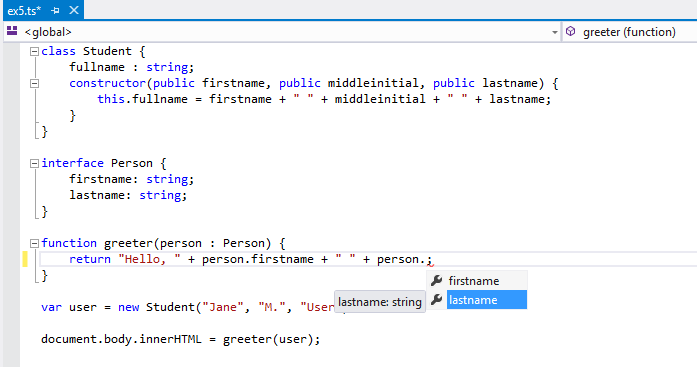

若有收获,就点个赞吧
0 人点赞


