官方文档镇楼:https://mybatis.org/mybatis-3/zh/index.html
说明:本笔记为观看B站狂神说学习视频的记录文档。
B站狂神说视频链接:https://www.bilibili.com/video/BV1NE411Q7Nx?p=1
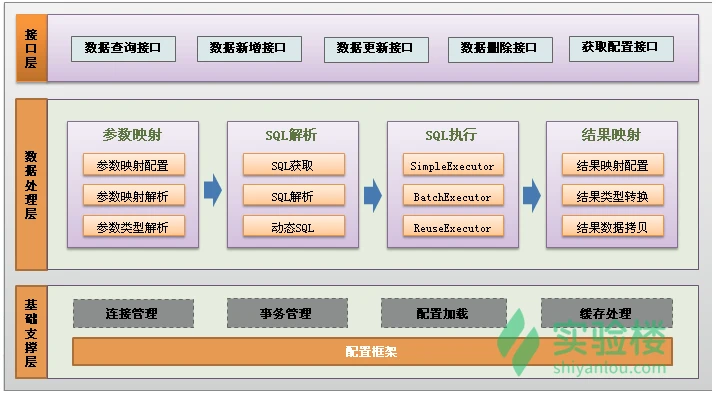
一、第一个MyBatis程序
步骤:
1.加载maven
<dependency><groupId>org.mybatis</groupId><artifactId>mybatis</artifactId><version>x.x.x</version></dependency>
2.从 MyBatis-config.xml中构建 SqlSessionFactory
每个基于 MyBatis 的应用都是以一个 SqlSessionFactory 的实例为核心的。SqlSessionFactory 的实例可以通过 SqlSessionFactoryBuilder 获得。而 SqlSessionFactoryBuilder 则可以从 XML 配置文件或一个预先配置的 Configuration 实例来构建出 SqlSessionFactory 实例。
<?xml version="1.0" encoding="UTF-8" ?><!DOCTYPE configurationPUBLIC "-//mybatis.org//DTD Config 3.0//EN""http://mybatis.org/dtd/mybatis-3-config.dtd"><configuration><environments default="development"><environment id="development"><transactionManager type="JDBC"/><dataSource type="POOLED"><property name="driver" value="jdbc:mysql://localhost:3306/mybatis?useSSL=true&useUnicode=true&characterEncoding=utf8""/><property name="url" value="${url}"/><property name="username" value="${username}"/><property name="password" value="${password}"/></dataSource></environment></environments><mappers><mapper resource="org/mybatis/example/BlogMapper.xml"/></mappers></configuration>
3.编写MyBatis工具类,从 SqlSessionFactory 中获取 SqlSession
import org.apache.ibatis.io.Resources;
import org.apache.ibatis.session.SqlSession;
import org.apache.ibatis.session.SqlSessionFactory;
import org.apache.ibatis.session.SqlSessionFactoryBuilder;
import java.io.IOException;
import java.io.InputStream;

public class MybatisUtils {

   private static SqlSessionFactory sqlSessionFactory;

   static {
       try {
           String resource = "mybatis-config.xml";
           InputStream inputStream = Resources.getResourceAsStream(resource);
           sqlSessionFactory = new SqlSessionFactoryBuilder().build(inputStream);
      } catch (IOException e) {
           e.printStackTrace();
      }
  }

   //获取SqlSession连接
   public static SqlSession getSession(){
       return sqlSessionFactory.openSession();
  }

}
4、创建实体类
public class User {

   private int id;  //id
   private String name;   //姓名
   private String pwd;   //密码

   //构造,有参,无参
   //set/get
   //toString()

}
5、编写Mapper接口类
import com.kuang.pojo.User;
import java.util.List;
public interface UserMapper {
   List<User> selectUser();
}
6、编写Mapper.xml配置文件
namespace 十分重要,不能写错!
<?xml version="1.0" encoding="UTF-8" ?>
<!DOCTYPE mapper
     PUBLIC "-//mybatis.org//DTD Mapper 3.0//EN"
     "http://mybatis.org/dtd/mybatis-3-mapper.dtd">
<mapper namespace="com.kuang.dao.UserMapper">
<select id="selectUser" resultType="com.kuang.pojo.User">
select * from user
</select>
</mapper>
7、编写测试类
Junit 包测试
public class MyTest {
 @Test
 public void selectUser() {
     SqlSession session = MybatisUtils.getSession();
     //方法一:
     //List<User> users = session.selectList("com.kuang.mapper.UserMapper.selectUser");
     //方法二:
     UserMapper mapper = session.getMapper(UserMapper.class);
     List<User> users = mapper.selectUser();

     for (User user: users){
         System.out.println(user);
    }

      //记得关闭资源!!
     session.close();
}
}
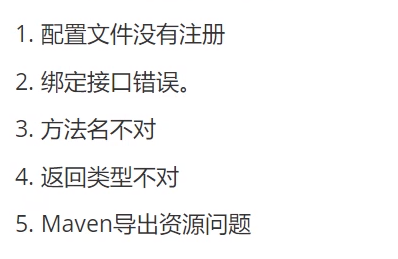
MyBatis查错思路:

二、CRUD
需求:根据 密码 和 名字 查询用户
思路一:直接在方法中传递参数
1、在接口方法的参数前加 @Param属性
2、Sql语句编写的时候,直接取@Param中设置的值即可,不需要单独设置参数类型
//通过密码和名字查询用户
User selectUserByNP(@Param("username") String username,@Param("pwd") String pwd);

/*
   <select id="selectUserByNP" resultType="com.kuang.pojo.User">
     select * from user where name = #{username} and pwd = #{pwd}
   </select>
*/
思路二:使用万能的Map
1、在接口方法中,参数直接传递Map;
User selectUserByNP2(Map<String,Object> map);
2、编写sql语句的时候,需要传递参数类型,参数类型为map
<select id="selectUserByNP2" parameterType="map"resultType="com.kuang.pojo.User">
select * from user where name = #{username} and pwd = #{pwd}
</select>
3、在使用方法的时候,Map的 key 为 sql中取的值即可,没有顺序要求!
Map<String, Object> map = new HashMap<String, Object>();
map.put("username","小明");
map.put("pwd","123456");
User user = mapper.selectUserByNP2(map);
扩展:模糊查询like语句该怎么写?
第1种:在Java代码中添加sql通配符。
string wildcardname = "%smi%";
list<name> names = mapper.selectlike(wildcardname);
<select id="selectlike">
select * from foo where bar like #{value}
</select>
第2种:在sql语句中拼接通配符,会引起sql注入
string wildcardname = "smi";
list<name> names = mapper.selectlike(wildcardname);
<select id="selectlike">
    select * from foo where bar like "%"#{value}"%"
</select>
要添加注解@Param的情况:
- 多个参数是要写的
2. 要是想给参数起个别名,那得写
3. XML 中的 sql 语句使用了 $ 符号也要写
4. 动态 sql 语句中有参数作为变量,那么该参数就要写
需求:给数据库增加一个用户
注意点:增、删、改操作需要提交事务!
1、在UserMapper接口中添加对应的方法
//添加一个用户
int addUser(User user);
2、在UserMapper.xml中添加insert语句
<insert id="addUser" parameterType="com.kuang.pojo.User">
    insert into user (id,name,pwd) values (#{id},#{name},#{pwd})
</insert>
3、测试
@Test
public void testAddUser() {
   SqlSession session = MybatisUtils.getSession();
   UserMapper mapper = session.getMapper(UserMapper.class);
   User user = new User(5,"王五","zxcvbn");
   int i = mapper.addUser(user);
   System.out.println(i);
   session.commit(); //提交事务,重点!不写的话不会提交到数据库
   session.close();
}
需求:修改用户的信息
1、同理,编写接口方法
//修改一个用户
int updateUser(User user);
2、编写对应的配置文件SQL
<update id="updateUser" parameterType="com.kuang.pojo.User">
  update user set name=#{name},pwd=#{pwd} where id = #{id}
</update>
3、测试
@Test
public void testUpdateUser() {
   SqlSession session = MybatisUtils.getSession();
   UserMapper mapper = session.getMapper(UserMapper.class);
   User user = mapper.selectUserById(1);
   user.setPwd("asdfgh");
   int i = mapper.updateUser(user);
   System.out.println(i);
   session.commit(); //提交事务,重点!不写的话不会提交到数据库
   session.close();
}
需求:根据id删除一个用户
1、编写接口方法
//根据id删除用户
int deleteUser(int id);
2、编写对应的配置文件SQL
<delete id="deleteUser" parameterType="int">
  delete from user where id = #{id}
</delete>
3、测试
@Test
public void testDeleteUser() {
   SqlSession session = MybatisUtils.getSession();
   UserMapper mapper = session.getMapper(UserMapper.class);
   int i = mapper.deleteUser(5);
   System.out.println(i);
   session.commit(); //提交事务,重点!不写的话不会提交到数据库
   session.close();
}
小结:
- 所有的增删改操作都需要提交事务!
- 接口所有的普通参数,尽量都写上@Param参数,尤其是多个参数时,必须写上!
- 有时候根据业务的需求,可以考虑使用map传递参数!
- 为了规范操作,在SQL的配置文件中,我们尽量将Parameter参数和resultType都写上!
三、XML配置
mybatis-config.xml能配置的内容如下:
configuration(配置)
properties(属性)
settings(设置)
typeAliases(类型别名)
typeHandlers(类型处理器)
objectFactory(对象工厂)
plugins(插件)
environments(环境配置)
environment(环境变量)
transactionManager(事务管理器)
dataSource(数据源)
databaseIdProvider(数据库厂商标识)
mappers(映射器)
<!-- 注意元素节点的顺序!顺序不对会报错 -->
重点掌握属性、设置、别名三大配置。
mappers配置需要注意的点:
配置详解直接戳官方文档
四、作用域(Scope)和生命周期
SqlSessionFactoryBuilder
这个类可以被实例化、使用和丢弃,一旦创建了 SqlSessionFactory,就不再需要它了。 因此 SqlSessionFactoryBuilder 实例的最佳作用域是方法作用域(也就是局部方法变量)。
SqlSessionFactory
SqlSessionFactory 一旦被创建就应该在应用的运行期间一直存在,没有任何理由丢弃它或重新创建另一个实例。 使用 SqlSessionFactory 的最佳实践是在应用运行期间不要重复创建多次,因此 SqlSessionFactory 的最佳作用域是应用作用域。 有很多方法可以做到,最简单的就是使用单例模式或者静态单例模式。
SqlSession
每个线程都应该有它自己的 SqlSession 实例。SqlSession 的实例不是线程安全的,因此是不能被共享的,所以它的最佳的作用域是请求或方法作用域。 这个关闭操作很重要,为了确保每次都能执行关闭操作,你应该把这个关闭操作放到 finally 块中。 下面的示例就是一个确保 SqlSession 关闭的标准模式:
try (SqlSession session = sqlSessionFactory.openSession()) {
  // 你的应用逻辑代码
}
在所有代码中都遵循这种使用模式,可以保证所有数据库资源都能被正确地关闭。
五、复杂查询处理
association关联:多对一
需求:获取所有学生及对应老师的信息
思路1:按查询嵌套处理(sql语句子查询)
1、给StudentMapper接口增加方法
public List<Student> getStudents();
2、编写对应的Mapper文件
<?xml version="1.0" encoding="UTF-8" ?>
<!DOCTYPE mapper
       PUBLIC "-//mybatis.org//DTD Mapper 3.0//EN"
       "http://mybatis.org/dtd/mybatis-3-mapper.dtd">
<mapper namespace="com.kuang.mapper.StudentMapper">
   <!--
   需求:获取所有学生及对应老师的信息
   思路:
       1. 获取所有学生的信息
       2. 根据获取的学生信息的老师ID->获取该老师的信息
       3. 思考问题,这样学生的结果集中应该包含老师,该如何处理呢,数据库中我们一般使用关联查询?
           1. 做一个结果集映射:StudentTeacher
           2. StudentTeacher结果集的类型为 Student
           3. 学生中老师的属性为teacher,对应数据库中为tid。
              多个 [1,...)学生关联一个老师=> 一对一,一对多
           4. 查看官网找到:association – 一个复杂类型的关联;使用它来处理关联查询
                    5.association:处理对象
                        collection:处理集合
   -->
   <select id="getStudents" resultMap="StudentTeacher">
    select * from student
   </select>
   <resultMap id="StudentTeacher" type="Student">
       <!--association关联属性 property属性名 javaType属性类型 column在多的一方的表中的列名-->
       <association property="teacher"  column="tid" javaType="Teacher"select="getTeacher"/>
   </resultMap>

   <select id="getTeacher" resultType="teacher">
      select * from teacher where id = #{id}
   </select>
</mapper>
3、编写完毕去Mybatis配置文件中,注册Mapper!
4、注意点说明:
<resultMap id="StudentTeacher" type="Student">
   <!--association关联属性 property属性名 javaType属性类型 column在多的一方的表中的列名-->
   <association property="teacher"  column="{id=tid,name=tid}" javaType="Teacher"select="getTeacher"/>
</resultMap>
<!--
这里传递过来的id,只有一个属性的时候,下面可以写任何值
association中column多参数配置:
   column="{key=value,key=value}"
   其实就是键值对的形式,key是传给下个sql的取值名称,value是片段一中sql查询的字段名。
-->
<select id="getTeacher" resultType="teacher">
  select * from teacher where id = #{id} and name = #{name}
</select>
5、测试
@Test
public void testGetStudents(){
   SqlSession session = MybatisUtils.getSession();
   StudentMapper mapper = session.getMapper(StudentMapper.class);
   List<Student> students = mapper.getStudents();
   for (Student student : students){
       System.out.println(
               "学生名:"+ student.getName()
                       +"\t老师:"+student.getTeacher().getName());
  }
}
思路2:按结果嵌套处理(SQL中的联表查询)
除了上面这种方式,还有其他思路吗?
我们还可以按照结果进行嵌套处理;
1、接口方法编写
public List<Student> getStudents2();
2、编写对应的mapper文件
<!--
按查询结果嵌套处理
思路:
   1. 直接查询出结果,进行结果集的映射
-->
<select id="getStudents2" resultMap="StudentTeacher2" >
  select s.id sid, s.name sname , t.name tname
  from student s,teacher t
  where s.tid = t.id
</select>
<resultMap id="StudentTeacher2" type="Student">
   <id property="id" column="sid"/>
   <result property="name" column="sname"/>
   <!--关联对象property 关联对象在Student实体类中的属性-->
   <association property="teacher" javaType="Teacher">
       <result property="name" column="tname"/>
   </association>
</resultMap>
3、去mybatis-config文件中注入【此处应该处理过了】
4、测试
@Test
public void testGetStudents2(){
   SqlSession session = MybatisUtils.getSession();
   StudentMapper mapper = session.getMapper(StudentMapper.class);
   List<Student> students = mapper.getStudents2();
   for (Student student : students){
       System.out.println(
               "学生名:"+ student.getName()
                       +"\t老师:"+student.getTeacher().getName());
  }
}
collection集合:一对多
需求:获取老师名字以及所教所有学生
实体类编写
@Data
public class Student {
   private int id;
   private String name;
   private int tid;
}
@Data
public class Teacher {
   private int id;
   private String name;
   //一个老师多个学生
   private List<Student> students;
}
思路1:按结果嵌套处理
1、TeacherMapper接口编写方法
//获取指定老师,及老师下的所有学生
public Teacher getTeacher(int id);
2、编写接口对应的Mapper配置文件
<mapper namespace="com.kuang.mapper.TeacherMapper">
   <!--
   思路:
       1. 从学生表和老师表中查出学生id,学生姓名,老师姓名
       2. 对查询出来的操作做结果集映射
           1. 集合的话,使用collection!
               JavaType和ofType都是用来指定对象类型的
               JavaType是用来指定pojo中属性的类型
               ofType指定的是映射到list集合属性中pojo的类型。
   -->
   <select id="getTeacher" resultMap="TeacherStudent">
      select s.id sid, s.name sname , t.name tname, t.id tid
      from student s,teacher t
      where s.tid = t.id and t.id=#{id}
   </select>
   <resultMap id="TeacherStudent" type="Teacher">
       <result  property="name" column="tname"/>
       <collection property="students" ofType="Student">
           <result property="id" column="sid" />
           <result property="name" column="sname" />
           <result property="tid" column="tid" />
       </collection>
   </resultMap>
</mapper>
3、将Mapper文件注册到MyBatis-config文件中
<mappers>
   <mapper resource="mapper/TeacherMapper.xml"/>
</mappers>
4、测试
@Test
public void testGetTeacher(){
   SqlSession session = MybatisUtils.getSession();
   TeacherMapper mapper = session.getMapper(TeacherMapper.class);
   Teacher teacher = mapper.getTeacher(1);
   System.out.println(teacher.getName());
   System.out.println(teacher.getStudents());
}
思路2:按查询嵌套处理
1、TeacherMapper接口编写方法
public Teacher getTeacher2(int id);
2、编写接口对应的Mapper配置文件
<select id="getTeacher2" resultMap="TeacherStudent2">
select * from teacher where id = #{id}
</select>
<resultMap id="TeacherStudent2" type="Teacher">
   <!--column是一对多的外键 , 写的是一的主键的列名-->
   <collection property="students" javaType="ArrayList" ofType="Student"column="id" select="getStudentByTeacherId"/>
</resultMap>
<select id="getStudentByTeacherId" resultType="Student">
  select * from student where tid = #{id}
</select>
3、将Mapper文件注册到MyBatis-config文件中
4、测试
@Test
public void testGetTeacher2(){
   SqlSession session = MybatisUtils.getSession();
   TeacherMapper mapper = session.getMapper(TeacherMapper.class);
   Teacher teacher = mapper.getTeacher2(1);
   System.out.println(teacher.getName());
   System.out.println(teacher.getStudents());
}
小结
1、关联-association
2、集合-collection
3、所以association是用于一对一和多对一,而collection是用于一对多的关系
4、JavaType和ofType都是用来指定对象类型的
- JavaType是用来指定pojo中属性的类型
- ofType指定的是映射到list集合属性中pojo的类型。
六、动态SQL
1.if
满足if条件会在原sql的基础上自动拼接标签里的sql语句。
需求:
根据作者名字和博客名字来查询博客!如果作者名字为空,那么只根据博客名字查询,反之,则根据作者名来查询
Mapper层的SQL代码:
这样写我们可以看到,如果 author 等于 null,那么查询语句为 select from user where title=#{title},但是如果title为空呢?那么查询语句为 select from user where and author=#{author},这是错误的 SQL 语句,如何解决呢?请看下面的 where 语句!<select id="queryBlogIf" parameterType="map" resultType="blog"> select * from blog where <if test="title != null"> title = #{title} </if> <if test="author != null"> and author = #{author} </if> </select>2.where
修改上面的SQL语句;
这个“where”标签会知道如果它包含的标签中有返回值的话,它就插入一个‘where’。此外,如果标签返回的内容是以AND 或OR 开头的,则它会剔除掉。<select id="queryBlogIf" parameterType="map" resultType="blog"> select * from blog <where> <if test="title != null"> title = #{title} </if> <if test="author != null"> and author = #{author} </if> </where> </select>3.set
同理,上面的对于查询 SQL 语句包含 where 关键字,如果在进行更新操作的时候,含有 set 关键词,我们怎么处理呢?
Mapper层的SQL代码:<!--注意set是用的逗号隔开--> <update id="updateBlog" parameterType="map"> update blog <set> <if test="title != null"> title = #{title}, </if> <if test="author != null"> author = #{author} </if> </set> where id = #{id}; </update>
4.choose
有时候,我们不想用到所有的查询条件,只想选择其中的一个,查询条件有一个满足即可,使用 choose 标签可以解决此类问题,类似于 Java 的 switch 语句
Mapper层的SQL代码:
<select id="queryBlogChoose" parameterType="map" resultType="blog">
  select * from blog
   <where>
       <choose>
           <when test="title != null">
                title = #{title}
           </when>
           <when test="author != null">
              and author = #{author}
           </when>
           <otherwise>
              and views = #{views}
           </otherwise>
       </choose>
   </where>
</select>
5.SQL片段
有时候可能某个 sql 语句我们用的特别多,为了增加代码的重用性,简化代码,我们需要将这些代码抽取出来,然后使用时直接调用。
提取SQL片段:
<sql id="if-title-author">
   <if test="title != null">
      title = #{title}
   </if>
   <if test="author != null">
      and author = #{author}
   </if>
</sql>
引用SQL片段:
<select id="queryBlogIf" parameterType="map" resultType="blog">
  select * from blog
   <where>
       <!-- 引用 sql 片段,如果refid 指定的不在本文件中,那么需要在前面加上 namespace -->
       <include refid="if-title-author"></include>
       <!-- 在这里还可以引用其他的 sql 片段 -->
   </where>
</select>
注意:
- 最好基于 单表来定义 sql 片段,提高片段的可重用性
- 在 sql 片段中不要包括 where
6.foreach
需求:我们需要查询 blog 表中 id 分别为1,2,3的博客信息
Mapper层的SQL代码:
<select id="queryBlogForeach" parameterType="map" resultType="blog">
  select * from blog
   <where>
       <!--
       collection:指定输入对象中的集合属性
       item:每次遍历生成的对象
       open:开始遍历时的拼接字符串
       close:结束时拼接的字符串
       separator:遍历对象之间需要拼接的字符串
       select * from blog where 1=1 and (id=1 or id=2 or id=3)
     -->
       <foreach collection="ids"  item="id" open="and (" close=")" separator="or">
          id=#{id}
       </foreach>
   </where>
</select>
小结:
其实动态 sql 语句的编写往往就是一个拼接的问题,为了保证拼接准确,我们最好首先要写原生的 sql 语句出来,然后在通过 mybatis 动态sql 对照着改,防止出错。多在实践中使用才是熟练掌握它的技巧。
七、缓存
简介
1、什么是缓存 [ Cache ]?
- 存在内存中的临时数据。
- 将用户经常查询的数据放在缓存(内存)中,用户去查询数据就不用从磁盘上(关系型数据库数据文件)查询,从缓存中查询,从而提高查询效率,解决了高并发系统的性能问题。
2、为什么使用缓存?
- 减少和数据库的交互次数,减少系统开销,提高系统效率。
3、什么样的数据能使用缓存?
-
一级缓存
一级缓存也叫本地缓存
与数据库同一次会话期间查询到的数据会放在本地缓存中。
- 以后如果需要获取相同的数据,直接从缓存中拿,没必须再去查询数据库;
- 默认情况下,只有一级缓存开启。(SqlSession级别的缓存,也称为本地缓存)
- 一级缓存就是一个map
一级缓存失效的四种情况
1、sqlSession不同
@Test
public void testQueryUserById(){
   SqlSession session = MybatisUtils.getSession();
   SqlSession session2 = MybatisUtils.getSession();
   UserMapper mapper = session.getMapper(UserMapper.class);
   UserMapper mapper2 = session2.getMapper(UserMapper.class);
   User user = mapper.queryUserById(1);
   System.out.println(user);
   User user2 = mapper2.queryUserById(1);
   System.out.println(user2);
   System.out.println(user==user2);
   session.close();
   session2.close();
}
观察结果:发现发送了两条SQL语句!
结论:每个sqlSession中的缓存相互独立
2、sqlSession相同,查询条件不同
@Test
public void testQueryUserById(){
   SqlSession session = MybatisUtils.getSession();
   UserMapper mapper = session.getMapper(UserMapper.class);
   UserMapper mapper2 = session.getMapper(UserMapper.class);
   User user = mapper.queryUserById(1);
   System.out.println(user);
   User user2 = mapper2.queryUserById(2);
   System.out.println(user2);
   System.out.println(user==user2);
   session.close();
}
观察结果:发现发送了两条SQL语句!很正常的理解
结论:当前缓存中,不存在这个数据
3、sqlSession相同,两次查询之间执行了增删改操作!
增加方法
//修改用户
int updateUser(Map map);
编写SQL
<update id="updateUser" parameterType="map">
  update user set name = #{name} where id = #{id}
</update>
测试
@Test
public void testQueryUserById(){
   SqlSession session = MybatisUtils.getSession();
   UserMapper mapper = session.getMapper(UserMapper.class);
   User user = mapper.queryUserById(1);
   System.out.println(user);
   HashMap map = new HashMap();
   map.put("name","kuangshen");
   map.put("id",4);
   mapper.updateUser(map);
   User user2 = mapper.queryUserById(1);
   System.out.println(user2);
   System.out.println(user==user2);
   session.close();
}
观察结果:查询在中间执行了增删改操作后,重新执行了
结论:因为增删改操作可能会对当前数据产生影响
4、sqlSession相同,手动清除一级缓存
@Test
public void testQueryUserById(){
   SqlSession session = MybatisUtils.getSession();
   UserMapper mapper = session.getMapper(UserMapper.class);
   User user = mapper.queryUserById(1);
   System.out.println(user);
   session.clearCache();//手动清除缓存
   User user2 = mapper.queryUserById(1);
   System.out.println(user2);
   System.out.println(user==user2);
   session.close();
}
二级缓存
- 二级缓存也叫全局缓存,一级缓存作用域太低了,所以诞生了二级缓存
- 基于namespace级别的缓存,一个名称空间,对应一个二级缓存;
- 工作机制
- 一个会话查询一条数据,这个数据就会被放在当前会话的一级缓存中;
- 如果当前会话关闭了,一级缓存中的数据被保存到二级缓存中;
- 新的会话查询信息,就可以从二级缓存中获取内容;
- 不同的mapper查出的数据会放在自己对应的缓存(map)中;
使用步骤
1、开启全局缓存 【mybatis-config.xml】
<setting name="cacheEnabled" value="true"/>
2、去每个mapper.xml中配置使用二级缓存,这个配置非常简单;【xxxMapper.xml】
<cache/>
官方示例=====>查看官方文档
<cache
 eviction="FIFO"
 flushInterval="60000"
 size="512"
 readOnly="true"/>
这个更高级的配置创建了一个 FIFO 缓存,每隔 60 秒刷新,最多可以存储结果对象或列表的 512 个引用,而且返回的对象被认为是只读的,因此对它们进行修改可能会在不同线程中的调用者产生冲突。
3、代码测试
- 所有的实体类先实现序列化接口
测试代码
@Test
public void testQueryUserById(){
 SqlSession session = MybatisUtils.getSession();
 SqlSession session2 = MybatisUtils.getSession();
 UserMapper mapper = session.getMapper(UserMapper.class);
 UserMapper mapper2 = session2.getMapper(UserMapper.class);
 User user = mapper.queryUserById(1);
 System.out.println(user);
 session.close();
 User user2 = mapper2.queryUserById(1);
 System.out.println(user2);
 System.out.println(user==user2);
 session2.close();
}
结论
只要开启了二级缓存,我们在同一个Mapper中的查询,可以在二级缓存中拿到数据
- 查出的数据都会被默认先放在一级缓存中
- 只有会话提交或者关闭以后,一级缓存中的数据才会转到二级缓存中
缓存原理图

EhCache使用说明
<!-- https://mvnrepository.com/artifact/org.mybatis.caches/mybatis-ehcache -->
<dependency>
   <groupId>org.mybatis.caches</groupId>
   <artifactId>mybatis-ehcache</artifactId>
   <version>1.1.0</version>
</dependency>
在mapper.xml中使用对应的缓存即可
<mapper namespace = “org.acme.FooMapper” >
   <cache type = “org.mybatis.caches.ehcache.EhcacheCache” />
</mapper>
编写ehcache.xml文件,如果在加载时未找到/ehcache.xml资源或出现问题,则将使用默认配置。
<?xml version="1.0" encoding="UTF-8"?>
<ehcache xmlns:xsi="http://www.w3.org/2001/XMLSchema-instance"
        xsi:noNamespaceSchemaLocation="http://ehcache.org/ehcache.xsd"
        updateCheck="false">
   <!--
      diskStore:为缓存路径,ehcache分为内存和磁盘两级,此属性定义磁盘的缓存位置。参数解释如下:
      user.home – 用户主目录
      user.dir – 用户当前工作目录
      java.io.tmpdir – 默认临时文件路径
    -->
   <diskStore path="./tmpdir/Tmp_EhCache"/>

   <defaultCache
           eternal="false"
           maxElementsInMemory="10000"
           overflowToDisk="false"
           diskPersistent="false"
           timeToIdleSeconds="1800"
           timeToLiveSeconds="259200"
           memoryStoreEvictionPolicy="LRU"/>
   <cache
           name="cloud_user"
           eternal="false"
           maxElementsInMemory="5000"
           overflowToDisk="false"
           diskPersistent="false"
           timeToIdleSeconds="1800"
           timeToLiveSeconds="1800"
           memoryStoreEvictionPolicy="LRU"/>
   <!--
      defaultCache:默认缓存策略,当ehcache找不到定义的缓存时,则使用这个缓存策略。只能定义一个。
    -->
   <!--
     name:缓存名称。
     maxElementsInMemory:缓存最大数目
     maxElementsOnDisk:硬盘最大缓存个数。
     eternal:对象是否永久有效,一但设置了,timeout将不起作用。
     overflowToDisk:是否保存到磁盘,当系统当机时
     timeToIdleSeconds:设置对象在失效前的允许闲置时间(单位:秒)。仅当eternal=false对象不是永久有效时使用,可选属性,默认值是0,也就是可闲置时间无穷大。
     timeToLiveSeconds:设置对象在失效前允许存活时间(单位:秒)。最大时间介于创建时间和失效时间之间。仅当eternal=false对象不是永久有效时使用,默认是0.,也就是对象存活时间无穷大。
     diskPersistent:是否缓存虚拟机重启期数据 Whether the disk store persists between restarts of the Virtual Machine. The default value is false.
     diskSpoolBufferSizeMB:这个参数设置DiskStore(磁盘缓存)的缓存区大小。默认是30MB。每个Cache都应该有自己的一个缓冲区。
     diskExpiryThreadIntervalSeconds:磁盘失效线程运行时间间隔,默认是120秒。
     memoryStoreEvictionPolicy:当达到maxElementsInMemory限制时,Ehcache将会根据指定的策略去清理内存。默认策略是LRU(最近最少使用)。你可以设置为FIFO(先进先出)或是LFU(较少使用)。
     clearOnFlush:内存数量最大时是否清除。
     memoryStoreEvictionPolicy:可选策略有:LRU(最近最少使用,默认策略)、FIFO(先进先出)、LFU(最少访问次数)。
     FIFO,first in first out,这个是大家最熟的,先进先出。
     LFU, Less Frequently Used,就是上面例子中使用的策略,直白一点就是讲一直以来最少被使用的。如上面所讲,缓存的元素有一个hit属性,hit值最小的将会被清出缓存。
     LRU,Least Recently Used,最近最少使用的,缓存的元素有一个时间戳,当缓存容量满了,而又需要腾出地方来缓存新的元素的时候,那么现有缓存元素中时间戳离当前时间最远的元素将被清出缓存。
  -->
</ehcache>

若有收获,就点个赞吧
0 人点赞


