竞赛评价指标
The evaluation metric, M, for this competition is the mean of two measures of rank ordering: Normalized Gini Coefficient, G, and default rate captured at 4%, D.
本次比赛的评估指标M 是两个排名指标的平均值:归一化基尼系数G,以及4%的违约率D 。
M=0.5⋅(G+D)
4%捕获的默认率是在最高排名的4%预测中捕获的阳性标签(默认值)的百分比,表示敏感度/召回统计。对于子指标G和D,负标签的权重为20,以调整下采样。此度量的最大值为1.0。
计算此度量的Python代码可以在本笔记本中找到。链接
import numpy as npimport pandas as pdfrom pathlib import Pathinput_path = Path('/kaggle/input/amex-default-prediction/')def amex_metric(y_true: pd.DataFrame, y_pred: pd.DataFrame) -> float:def top_four_percent_captured(y_true: pd.DataFrame, y_pred: pd.DataFrame) -> float:df = (pd.concat([y_true, y_pred], axis='columns').sort_values('prediction', ascending=False)) # 拼接预测值和实际值df['weight'] = df['target'].apply(lambda x: 20 if x==0 else 1) # 欺诈例检测*20four_pct_cutoff = int(0.04 * df['weight'].sum()) # 去整体得分的 4%df['weight_cumsum'] = df['weight'].cumsum() # cumsum() 函数,累加值df_cutoff = df.loc[df['weight_cumsum'] <= four_pct_cutoff] # 累加小于等于4%的书return (df_cutoff['target'] == 1).sum() / (df['target'] == 1).sum()def weighted_gini(y_true: pd.DataFrame, y_pred: pd.DataFrame) -> float:df = (pd.concat([y_true, y_pred], axis='columns').sort_values('prediction', ascending=False))df['weight'] = df['target'].apply(lambda x: 20 if x==0 else 1)df['random'] = (df['weight'] / df['weight'].sum()).cumsum()total_pos = (df['target'] * df['weight']).sum()df['cum_pos_found'] = (df['target'] * df['weight']).cumsum()df['lorentz'] = df['cum_pos_found'] / total_posdf['gini'] = (df['lorentz'] - df['random']) * df['weight']return df['gini'].sum()def normalized_weighted_gini(y_true: pd.DataFrame, y_pred: pd.DataFrame) -> float:y_true_pred = y_true.rename(columns={'target': 'prediction'})return weighted_gini(y_true, y_pred) / weighted_gini(y_true, y_true_pred)g = normalized_weighted_gini(y_true, y_pred)d = top_four_percent_captured(y_true, y_pred)return 0.5 * (g + d)train_data = pd.read_csv(input_path / 'train_data.csv',index_col='customer_ID',usecols=['customer_ID', 'P_2'])train_labels = pd.read_csv(input_path / 'train_labels.csv', index_col='customer_ID')ave_p2 = (train_data.groupby('customer_ID').mean().rename(columns={'P_2': 'prediction'}))# Scale the mean P_2 by the max value and take the complimentave_p2['prediction'] = 1.0 - (ave_p2['prediction'] / ave_p2['prediction'].max())print(amex_metric(train_labels, ave_p2)) # 0.572773
Markdown 和快捷键全覆盖
💡 Tips:语雀支持全功能 markdown 语法,可以点击文档编辑页右下角小键盘查看全部支持的语法和快捷键。
- 支持导入导出
markdown文件。 - 支持自动识别粘贴的
markdown格式内容转换为富文本。行内代码
💡 Tips:可通过 markdown 语法(
+ `code` ++空格)或者快捷键ctrl/cmd+E快速插入行内代码。
代码块
💡 Tips:输入
/代码块或点击上方工具栏点击上方工具栏,选择「代码块」、插入代码卡片。
代码块同时支持多种颜色主题:
export default class QuickSort extends Sort {sort(originalArray) {const array = [...originalArray];if (array.length <= 1) {return array;}// Init left and right arrays.const leftArray = [];const rightArray = [];// Take the first element of array as a pivot.const pivotElement = array.shift();const centerArray = [pivotElement];// Split all array elements between left, center and right arrays.while (array.length) {const currentElement = array.shift();// Call visiting callback.this.callbacks.visitingCallback(currentElement);if (this.comparator.equal(currentElement, pivotElement)) {centerArray.push(currentElement);} else if (this.comparator.lessThan(currentElement, pivotElement)) {leftArray.push(currentElement);} else {rightArray.push(currentElement);}}// Sort left and right arrays.const leftArraySorted = this.sort(leftArray);const rightArraySorted = this.sort(rightArray);return leftArraySorted.concat(centerArray, rightArraySorted);}}
export default class QuickSort extends Sort {
  sort(originalArray) {
    const array = [...originalArray];

    if (array.length <= 1) {
      return array;
    }

    // Init left and right arrays.
    const leftArray = [];
    const rightArray = [];

    // Take the first element of array as a pivot.
    const pivotElement = array.shift();
    const centerArray = [pivotElement];

    // Split all array elements between left, center and right arrays.
    while (array.length) {
      const currentElement = array.shift();

      // Call visiting callback.
      this.callbacks.visitingCallback(currentElement);

      if (this.comparator.equal(currentElement, pivotElement)) {
        centerArray.push(currentElement);
      } else if (this.comparator.lessThan(currentElement, pivotElement)) {
        leftArray.push(currentElement);
      } else {
        rightArray.push(currentElement);
      }
    }
    // Sort left and right arrays.
    const leftArraySorted = this.sort(leftArray);
    const rightArraySorted = this.sort(rightArray);

    return leftArraySorted.concat(centerArray, rightArraySorted);
  }
}
export default class QuickSort extends Sort {
  sort(originalArray) {
    const array = [...originalArray];

    if (array.length <= 1) {
      return array;
    }

    // Init left and right arrays.
    const leftArray = [];
    const rightArray = [];

    // Take the first element of array as a pivot.
    const pivotElement = array.shift();
    const centerArray = [pivotElement];

    // Split all array elements between left, center and right arrays.
    while (array.length) {
      const currentElement = array.shift();

      // Call visiting callback.
      this.callbacks.visitingCallback(currentElement);

      if (this.comparator.equal(currentElement, pivotElement)) {
        centerArray.push(currentElement);
      } else if (this.comparator.lessThan(currentElement, pivotElement)) {
        leftArray.push(currentElement);
      } else {
        rightArray.push(currentElement);
      }
    }
    // Sort left and right arrays.
    const leftArraySorted = this.sort(leftArray);
    const rightArraySorted = this.sort(rightArray);

    return leftArraySorted.concat(centerArray, rightArraySorted);
  }
}
数学公式
💡 Tips:输入
/公式或点击上方工具栏点击上方工具栏,选择「公式」、插入公式卡片。
 ,也支持块级嵌入。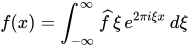
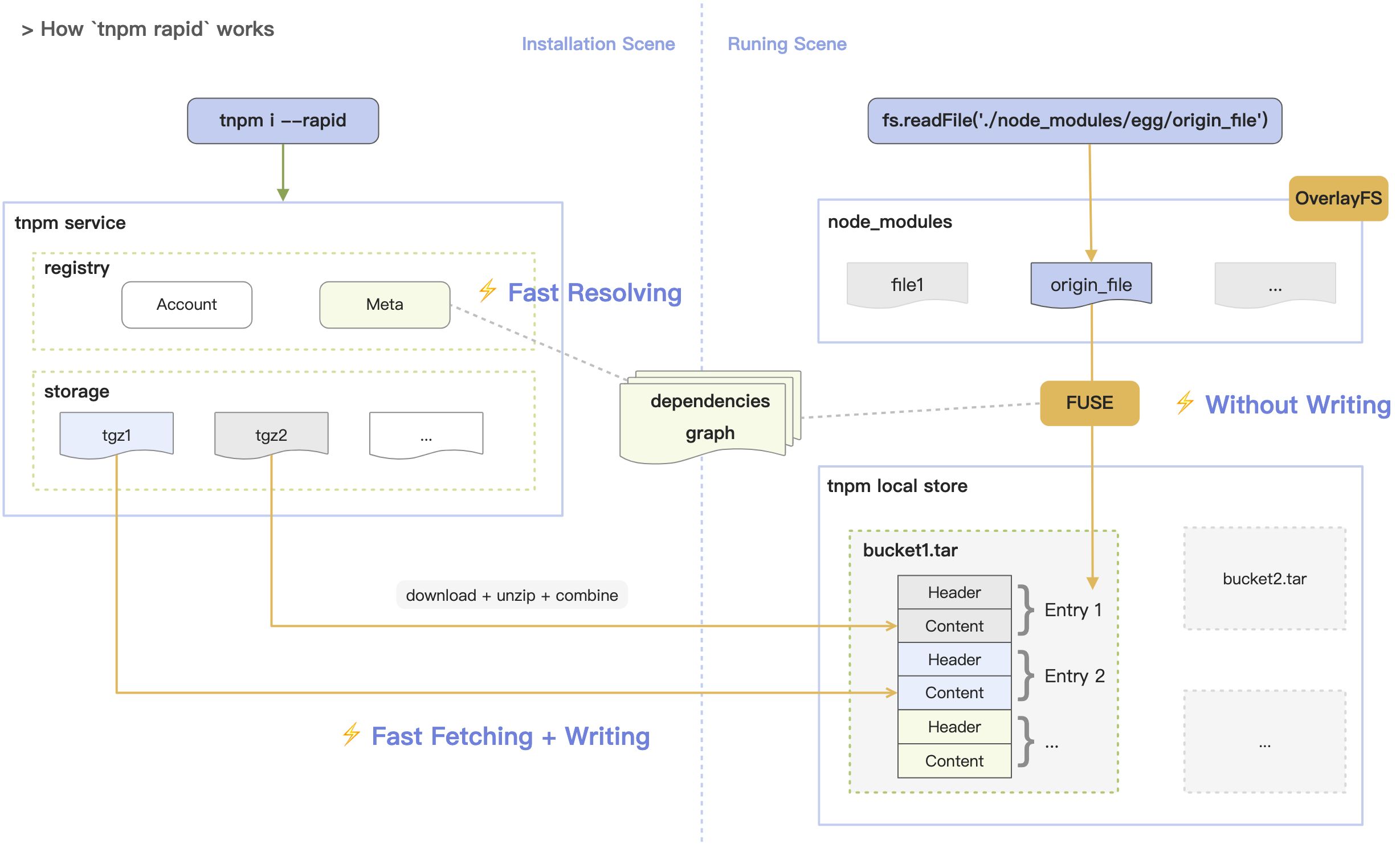
画板
💡 Tips:输入
/画板或点击上方工具栏,选择「画板」、绘制流程图、架构图等各种图形。


文本绘图
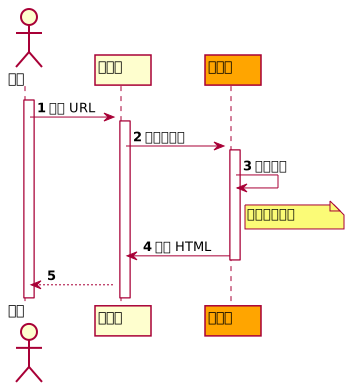
💡 Tips:输入
/文本绘图点击上方工具栏,选择「文本绘图」、插入文本绘图卡片。
支持 plantuml、mermaid 等多种格式,点击预览可看到图形。具体代码样式见说明文档。


若有收获,就点个赞吧
0 人点赞


