
需求设计
我们都玩过贪吃蛇,在屏幕上随机出现一个苹果,我们要操控蛇去吃到苹果,当蛇吃到苹果后蛇的长度会加一。随着蛇的长度的增加,当蛇碰到自己或者碰到墙游戏就算结束。
依赖
rand:我们需要使用rand的随机数包来设置苹果的位置。
piston_window:这个包是用来调用openGL的,通过这个包可以快速的创建游戏的内容。
项目目录
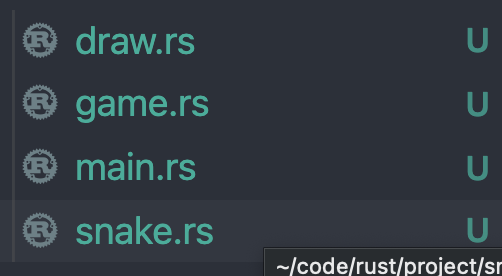 四个文件分别为,snake.rs用来创建我们的蛇,draw.rs用来创建我们的绘画方法,game.rs用来写我们这个游戏的规则,main.rs用来运行游戏。马上开始写。
draw.rs
use piston_window::{rectangle,Context,G2d};use piston_window::types::Color;const BLOCK_SIZE:f64 = 25.0;pub fn to_coord(game_coord:i32) -> f64 {//因为该游戏是由像素块组成的,所以每一个提供的数组都需要乘以像素块的宽高,以定位到具体位置(game_coord as f64) * BLOCK_SIZE}pub fn to_coord_u32(game_coord:i32) -> u32 {to_coord(game_coord) as u32}pub fn draw_block(color:Color,x:i32,y:i32,con:&Context,g: &mut G2d){ // 该方法是画像素块的方法let gui_x = to_coord(x);let gui_y = to_coord(y);rectangle( //rectangle结构体有四个参数 颜色,[x坐标,y坐标,宽度,高度],绘制方式,画布color,[gui_x,gui_y,BLOCK_SIZE,BLOCK_SIZE],con.transform,g,);}pub fn draw_rectangle(color:Color,x:i32,y:i32,width:i32,height:i32,con:&Context,g:&mut G2d){ //该方法用来画游戏背景let x = to_coord(x);let y = to_coord(y);rectangle(color,[x,y,BLOCK_SIZE * (width as f64),BLOCK_SIZE * (height as f64),],con.transform,g,)}
Snake.rs
use std::collections::LinkedList; //我们使用链表的数据结构来存储我们的蛇use piston_window::{Context,G2d};use piston_window::types::Color;use crate::draw::draw_block;const SNAKE_COLOR: Color = [0.00,0.80,0.00,1.0]; //定义蛇的颜色pub struct Snake {direction:Direction, //我们需要蛇在移动的时候的方向body:LinkedList<Block>,//用LinkedList来存储蛇的身体,其实就是一个x和y的坐标,我们用Block表示tail:Option<Block>,//储存蛇的尾巴,因为吃到苹果后蛇的身体从尾部增加一个所以要记住尾部。因为目前的移动方式是加头去尾的方式开始移动之后就会有值存在这里}#[derive(Debug,Clone)]struct Block {x:i32,y:i32,}#[derive(Copy,Clone,PartialEq)]pub enum Direction { //我们用枚举来写出四个方向Up,Down,Left,Right,}impl Direction {pub fn opposite(&self) -> Direction { //给方向设置一个方法,即当我们按的方向与当前蛇运行的方向相反时。我们不做任何操作match *self {Direction::Up => Direction::Down,Direction::Down => Direction::Up,Direction::Left => Direction::Right,Direction::Right => Direction::Left,}}}impl Snake { //给蛇结构体定义方法pub fn new(x:i32,y:i32)->Snake { //初始化 蛇的长度是三let mut body:LinkedList<Block> = LinkedList::new();body.push_back(Block{ //push_back 向List后方添加元素 push_fornt 向List前方添加元素x:x+2,y});body.push_back(Block{x:x+1,y});body.push_back(Block{x:x,y});Snake{direction:Direction::Right,body,tail:None,}}pub fn draw(&self,con:&Context,g:&mut G2d){ //遍历List 把蛇的每一部分画出来for block in &self.body {draw_block(SNAKE_COLOR, block.x, block.y, con, g)}}pub fn head_position(&self) -> (i32,i32) {let head_block = self.body.front().unwrap(); //取List的头节点 放回一个Result 所以要用upwrap()(head_block.x,head_block.y)}pub fn move_forward(&mut self,dir:Option<Direction>) { //蛇的移动match dir { //判断是由调整了方向Some(d) => self.direction = d,None=>(),}//移动的策略是向链表的头节点新增一个节点,在尾节点处去除一个节点let (head_x,head_y):(i32,i32) = self.head_position();//根据移动方向调整新加节点的位置let new_block = match self.direction {Direction::Up => Block{x:head_x,y:head_y-1,},Direction::Down => Block{x:head_x,y:head_y+1,},Direction::Left => Block{x:head_x-1,y:head_y,},Direction::Right=> Block{x:head_x+1,y:head_y,},};//把新节点添加到链表中self.body.push_front(new_block);//把尾节点吐出来let removed_block = self.body.pop_back().unwrap();self.tail = Some(removed_block);}pub fn head_direction(&self)->Direction {self.direction}//判断蛇头的下一个位置pub fn next_head(&self,dir:Option<Direction>) -> (i32,i32) {let (head_x,head_y):(i32,i32) = self.head_position();let mut moving_dir = self.direction;match dir {Some(d) => moving_dir =d,None => {}};match moving_dir {Direction::Up => (head_x,head_y-1),Direction::Down => (head_x,head_y+1),Direction::Left => (head_x-1,head_y),Direction::Right => (head_x+1,head_y),}}pub fn restore_tail(&mut self){ // 当吃到苹果的时候,把因为移动而去掉的尾巴加回来let blk = self.tail.clone().unwrap();self.body.push_back(blk);}//判断下一个位置的蛇头是不是会碰到蛇身体pub fn overlap_tail(&self,x:i32,y:i32) -> bool {let mut ch = 0;for block in &self.body {if x == block.x && y == block.y {return true}ch += 1;if ch == self.body.len() -1 {break;}}return false;}}
game.rs
use piston_window::*;use piston_window::types::Color;use rand::{thread_rng,Rng};use crate::snake::{Direction,Snake};use crate::draw::{draw_block,draw_rectangle};//设置颜色const FOOD_COLOR:Color= [0.80,0.00,0.00,1.0];const BORDER_COLOR:Color= [0.00,0.00,0.00,1.0];const GAMEOVER_COLOR:Color= [0.90,0.00,0.00,1.0];//设置速度和重开时间const MOVING_PERIOD: f64 = 0.1;const RESTART_TIME:f64 = 1.0;//Game结构体pub struct Game {snake:Snake,food_exists:bool,food_x:i32,food_y:i32,width:i32,height:i32,game_over:bool,waiting_time:f64,}impl Game {//初始化Gamepub fn new(width:i32,height:i32) -> Game {Game{snake:Snake::new(2,2),waiting_time:0.0,food_exists:true,food_x:6,food_y:4,width,height,game_over:false}}//监听键盘 操作pub fn key_press(&mut self,key:Key){if self.game_over{return}let dir = match key {Key::Up => Some(Direction::Up),Key::Down => Some(Direction::Down),Key::Left => Some(Direction::Left),Key::Right => Some(Direction::Right),_ => None};if dir.unwrap() == self.snake.head_direction().opposite() {return}self.update_snake(dir);}//将蛇 苹果 边框 GameOver都画出来pub fn draw(&self,con:&Context,g:&mut G2d){self.snake.draw(con, g);if self.food_exists {draw_block(FOOD_COLOR, self.food_x, self.food_y, con, g);}//四边边框draw_rectangle(BORDER_COLOR,0,0, self.width, 1, con, g);draw_rectangle(BORDER_COLOR,0,self.width-1, self.width, 1, con, g);draw_rectangle(BORDER_COLOR,0,0, 1, self.height, con, g);draw_rectangle(BORDER_COLOR,self.width-1,0, 1, self.height, con, g);//GameOverif self.game_over {draw_rectangle(GAMEOVER_COLOR, 0, 0, self.width, self.height, con, g)}}//检查是否gameover 吃到苹果 以及生么也不操作时候的如何更新pub fn update(&mut self,delta_time:f64){self.waiting_time += delta_time;if self.game_over {if self.waiting_time > RESTART_TIME {self.restart();}return}if !self.food_exists {self.add_food();self.update_snake(None);}if self.waiting_time > MOVING_PERIOD{self.update_snake(None);}}//检查是否吃到苹果了fn check_eating(&mut self){let (head_x,head_y):(i32,i32) = self.snake.head_position();if self.food_exists && self.food_y == head_y && self.food_x == head_x {self.food_exists = false;self.snake.restore_tail();}}//检查蛇是否活着fn check_if_snake_alive(&self,dir:Option<Direction>) -> bool {let (next_x,next_y) = self.snake.next_head(dir);if self.snake.overlap_tail(next_x, next_y) {return false;}next_x > 0 && next_y > 0 && next_x < self.width -1 && next_y < self.height -1}//添加随机位置的苹果fn add_food(&mut self) {let mut rng = thread_rng();let mut new_x = rng.gen_range(1..=(self.width - 1));let mut new_y = rng.gen_range(1..=(self.height - 1));while self.snake.overlap_tail(new_x,new_y) {new_x = rng.gen_range(1..=(self.width - 1));new_y = rng.gen_range(1..=(self.height - 1));}self.food_x = new_x;self.food_y = new_y;self.food_exists = true;}//更新蛇的位置 同时检查是否吃到苹果fn update_snake(&mut self, dir:Option<Direction>) {if self.check_if_snake_alive(dir) {self.snake.move_forward(dir);self.check_eating();} else {self.game_over = true;}self.waiting_time = 0.0;}//重开fn restart (&mut self){self.snake = Snake::new(2,2);self.waiting_time = 0.0;self.food_exists = true;self.food_x = 6;self.food_y = 4;self.game_over = false;}}
main.rs
extern crate rand;
extern crate piston_window;

mod draw;
mod snake;
mod game;

use piston_window::*;
use piston_window::types::Color;
use game::Game;
use draw::to_coord_u32;

const BACK_COLOR:Color = [0.5,0.5,0.5,1.0];

fn main() {
    let (width,height) = (30,30);
    //  https://docs.rs/piston_window/latest/piston_window/struct.PistonWindow.html 查看PistonWindow结构体的作用
    let mut window:PistonWindow = WindowSettings::new(
        "Snake",
        [to_coord_u32(width),to_coord_u32(height)],
    ).exit_on_esc(true)
        .build()
        .unwrap();

    let mut game = Game::new(width,height);
    //一直监听事件 一直根据arg.dt的时间更新
    while let Some(event) = window.next() {
        if let Some(Button::Keyboard(key)) = event.press_args() {
            game.key_press(key);
        }
        window.draw_2d(&event, |c,g,_|{
            clear(BACK_COLOR, g);
            game.draw(&c, g);
        });

        event.update(|arg| {
            game.update(arg.dt)
        });
    }
}

若有收获,就点个赞吧
0 人点赞


