介绍
Spirng Boot整合ElasticSearch,通过Java代码操作ElasticSearch。
https://www.elastic.co/guide/en/elasticsearch/client/index.html
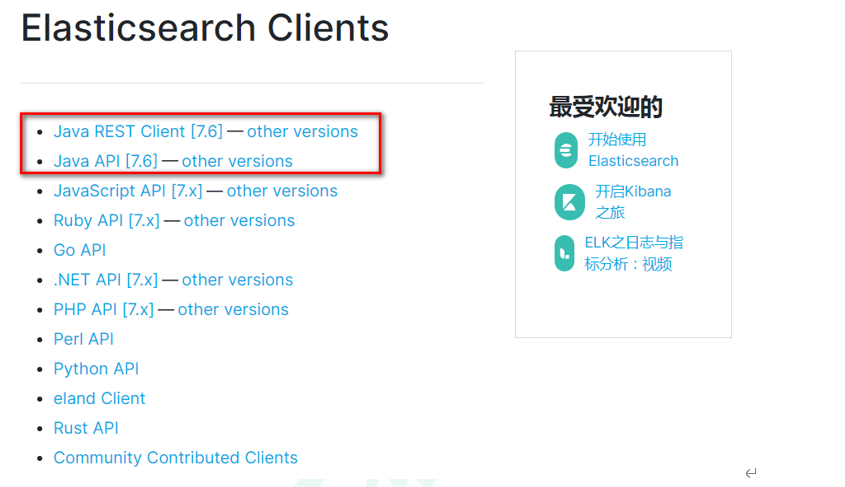
Spring Boot集成ElasticSearch的时候,我们需要引入高阶客户端【elasticsearch-rest-high-level-client】【elasticsearch-rest-client】和【elasticsearch】来操作Elasticsearch,在引入依赖的时候,需要严格注意版本关系,否则在使用过程中会出很多问题。
另外,TransportClient 为代表的ES原生客户端,不能执行原生DSL语句,必须使用它的Java API方法。
最近elasticsearch官网,宣布计划在7.0以后的版本中废除TransportClient。以Java high Level Rest Client为主。
【客户端开发环境搭建】
1. 创建Maven工程
2.pom文件导入依赖
<?xml version="1.0" encoding="UTF-8"?><project xmlns="http://maven.apache.org/POM/4.0.0"xmlns:xsi="http://www.w3.org/2001/XMLSchema-instance"xsi:schemaLocation="http://maven.apache.org/POM/4.0.0 http://maven.apache.org/xsd/maven-4.0.0.xsd"><modelVersion>4.0.0</modelVersion><groupId>com.adong.elasticsearch</groupId><artifactId>springboot-highlevel-client</artifactId><version>1.0-SNAPSHOT</version><parent><groupId>org.springframework.boot</groupId><artifactId>spring-boot-starter-parent</artifactId><version>2.2.2.RELEASE</version><relativePath/></parent><properties><java.version>1.8</java.version></properties><dependencies><!--elasticsearch的高级别rest客户端--><dependency><groupId>org.elasticsearch.client</groupId><artifactId>elasticsearch-rest-high-level-client</artifactId><version>6.8.1</version></dependency><!--elasticsearch的rest客户端--><dependency><groupId>org.elasticsearch.client</groupId><artifactId>elasticsearch-rest-client</artifactId><version>6.8.1</version></dependency><!--elasticsearch的核心jar包--><dependency><groupId>org.elasticsearch</groupId><artifactId>elasticsearch</artifactId><version>6.8.1</version></dependency><dependency><groupId>org.springframework.boot</groupId><artifactId>spring-boot-starter</artifactId></dependency><!--json转换的jar包--><dependency><groupId>com.fasterxml.jackson.core</groupId><artifactId>jackson-databind</artifactId><version>2.9.9</version></dependency><dependency><groupId>org.springframework.boot</groupId><artifactId>spring-boot-devtools</artifactId><scope>runtime</scope><optional>true</optional></dependency><dependency><groupId>org.springframework.boot</groupId><artifactId>spring-boot-configuration-processor</artifactId><optional>true</optional></dependency><dependency><groupId>org.projectlombok</groupId><artifactId>lombok</artifactId><optional>true</optional></dependency><dependency><groupId>org.springframework.boot</groupId><artifactId>spring-boot-starter-test</artifactId><scope>test</scope></dependency></dependencies><build><plugins><plugin><groupId>org.springframework.boot</groupId><artifactId>spring-boot-maven-plugin</artifactId></plugin></plugins></build></project>
3.配置文件
elasticsearch:host: 127.0.0.1port: 9200logging:level:com.adong.es: debug
4.主启动类
@SpringBootApplicationpublic class ElasticSearchMainApplication {public static void main(String[] args) {SpringApplication.run(ElasticSearchMainApplication.class, args);}}
5.配置类
package com.adong.es.config;import lombok.Data;import org.apache.http.HttpHost;import org.elasticsearch.client.RestClient;import org.elasticsearch.client.RestClientBuilder;import org.elasticsearch.client.RestHighLevelClient;import org.springframework.boot.context.properties.ConfigurationProperties;import org.springframework.context.annotation.Bean;import org.springframework.context.annotation.Configuration;import org.springframework.stereotype.Component;@Configuration@ConfigurationProperties(prefix = "elasticsearch") // 读取配置文件内容@Component@Data //安装Lombok插件public class ElasticSearchConfig {private String host;private Integer port;@Beanpublic RestHighLevelClient client() {RestClientBuilder builder = RestClient.builder(new HttpHost(host, port));RestHighLevelClient restHighLevelClient = new RestHighLevelClient(builder);return restHighLevelClient;}}
【索引库操作】
索引库操作
目标:使用ElasticSearch的高阶客户端,编写Java代码,操作索引库
分析:Java high level客户端的操作,是通过发送RESTful接口调用的方式处理请求。
package com.adong.es.test;import org.elasticsearch.action.admin.indices.delete.DeleteIndexRequest;import org.elasticsearch.action.support.master.AcknowledgedResponse;import org.elasticsearch.client.RequestOptions;import org.elasticsearch.client.RestHighLevelClient;import org.elasticsearch.client.indices.CreateIndexRequest;import org.elasticsearch.client.indices.CreateIndexResponse;import org.elasticsearch.client.indices.GetIndexRequest;import org.elasticsearch.client.indices.GetIndexResponse;import org.junit.Test;import org.junit.runner.RunWith;import org.springframework.boot.test.context.SpringBootTest;import org.springframework.test.context.junit4.SpringRunner;import javax.annotation.Resource;import java.io.IOException;@RunWith(SpringRunner.class)@SpringBootTestpublic class IndexTest {//@Autowired@Resourceprivate RestHighLevelClient client;/*** 目标:创建索引库* 1.创建请求对象 设置索引库name* 2.客户端发送请求,获取响应对象* 3.打印响应对象中的返回结果* 4.关闭客户端,释放连接资源*/@Testpublic void create() throws IOException {//1.创建请求对象,创建索引的请求CreateIndexRequest request = new CreateIndexRequest("shopping");//2.客户端发送请求,获取响应对象CreateIndexResponse response = client.indices().create(request, RequestOptions.DEFAULT);//3.打印响应对象中的返回结果//返回index信息System.out.println("index:" + response.index());//acknowledged代表创建成功System.out.println("acknowledged:" + response.isAcknowledged());//4.关闭客户端,释放连接资源client.close();}//查看索引库@Testpublic void getIndex() throws IOException {//1.创建请求对象:查询索引库GetIndexRequest request = new GetIndexRequest("shopping");//2.客户端执行请求发送,返回响应对象GetIndexResponse response = client.indices().get(request, RequestOptions.DEFAULT);//3.打印结果信息System.out.println("aliases:" + response.getAliases());System.out.println("mappings:" + response.getMappings());System.out.println("settings:" + response.getSettings());//4.关闭客户端,释放连接资源client.close();}//删除索引库@Testpublic void deleteIndex() throws IOException {//1.创建请求对象DeleteIndexRequest request = new DeleteIndexRequest("shopping");//2.客户端发送请求,获取响应对象AcknowledgedResponse response = client.indices().delete(request, RequestOptions.DEFAULT);//3.打印结果信息System.out.println("ack:" + response.isAcknowledged());//4.关闭客户端,释放连接资源client.close();}}
【配置映射】
RestHighLevelClient配置映射,与kibana略有区别。在客户端中配置映射,不支持设置类型type。不设置type,并不代表没有,而是默认的type为_doc。
映射操作:
1.配置映射,一共2种方式:
第一种:使用XContentBuilder,构建请求体
第二种:使用JSON字符串
2.查看映射配置
package com.adong.es.test;import org.elasticsearch.action.support.master.AcknowledgedResponse;import org.elasticsearch.client.RequestOptions;import org.elasticsearch.client.RestHighLevelClient;import org.elasticsearch.client.indices.GetMappingsRequest;import org.elasticsearch.client.indices.GetMappingsResponse;import org.elasticsearch.client.indices.PutMappingRequest;import org.elasticsearch.common.xcontent.XContentBuilder;import org.elasticsearch.common.xcontent.XContentFactory;import org.elasticsearch.common.xcontent.XContentType;import org.junit.Test;import org.junit.runner.RunWith;import org.springframework.boot.test.context.SpringBootTest;import org.springframework.test.context.junit4.SpringRunner;import javax.annotation.Resource;import java.io.IOException;@RunWith(SpringRunner.class)@SpringBootTestpublic class MappingTest {@Resourceprivate RestHighLevelClient client;/*** 目标:配置映射。第一种方式,使用XContentBuilder,构建请求体* 1.创建请求对象:配置映射* 设置索引库name* 设置配置映射请求体* 2.客户端发送请求,获取响应对象* 3.打印响应结果*/@Testpublic void putMapping01() throws IOException {//1.创建请求对象:配置映射PutMappingRequest request = new PutMappingRequest("shopping01");//构建请求体XContentBuilder jsonBuilder = XContentFactory.jsonBuilder();jsonBuilder.startObject().startObject("properties").startObject("title").field("type", "text").field("analyzer", "ik_max_word").endObject().startObject("subtitle").field("type", "text").field("analyzer", "ik_max_word").endObject().startObject("images").field("type", "keyword").field("index", false).endObject().startObject("price").field("type", "float").endObject().endObject().endObject();//设置请求体,source("请求体json构建器对象");request.source(jsonBuilder);//2.客户端发送请求,获取响应对象AcknowledgedResponse response = client.indices().putMapping(request, RequestOptions.DEFAULT);//3.打印响应结果System.out.println("acknowledged::" + response.isAcknowledged());}/*** 目标:配置映射。第二种方式,使用JSON字符串* 1.创建请求对象:配置映射* 设置索引库name* 设置配置映射请求体* 2.客户端发送请求,获取响应对象* 3.打印响应结果*/@Testpublic void putMapping02() throws IOException {//1.创建请求对象:配置映射PutMappingRequest request = new PutMappingRequest("shopping02");//设置请求体,source("请求体json字符串","请求体的数据类型");String s = "{\"properties\":{\"title\":{\"type\":\"text\",\"analyzer\":\"ik_max_word\"},\"subtitle\":{\"type\":\"text\",\"analyzer\":\"ik_max_word\"},\"price\":{\"type\":\"float\"},\"images\":{\"type\":\"keyword\",\"index\":false}}}";request.source(s, XContentType.JSON);//2.客户端发送请求,获取响应对象AcknowledgedResponse response = client.indices().putMapping(request, RequestOptions.DEFAULT);//3.打印响应结果System.out.println("acknowledged::" + response.isAcknowledged());}/*** 查看映射* 1.创建请求对象:查看映射* 设置索引库name* 2.客户端发送请求,获取响应对象* 3.打印响应结果*/@Testpublic void getMapping() throws IOException {//1.创建请求对象:查看映射GetMappingsRequest request = new GetMappingsRequest();//设置索引库namerequest.indices("shopping01");//2.客户端发送请求,获取响应对象GetMappingsResponse response = client.indices().getMapping(request, RequestOptions.DEFAULT);//3.打印响应结果System.out.println("mappings::" + response.mappings());System.out.println("Source::" + response.mappings().get("shopping01").getSourceAsMap());}}
【文档操作】
创建Bean对象 :
package com.adong.es.entities;import lombok.*;@Data@NoArgsConstructor@AllArgsConstructor@ToString@Builderpublic class Product {private Long id;//商品唯一标识private String title;//商品名称private Double price;//商品价格private String images;//图片地址}
测试类 :
package com.adong.es.test;import com.adong.es.entities.Product;import com.fasterxml.jackson.databind.ObjectMapper;import org.elasticsearch.action.bulk.BulkRequest;import org.elasticsearch.action.bulk.BulkResponse;import org.elasticsearch.action.delete.DeleteRequest;import org.elasticsearch.action.delete.DeleteResponse;import org.elasticsearch.action.get.GetRequest;import org.elasticsearch.action.get.GetResponse;import org.elasticsearch.action.index.IndexRequest;import org.elasticsearch.action.index.IndexResponse;import org.elasticsearch.action.update.UpdateRequest;import org.elasticsearch.action.update.UpdateResponse;import org.elasticsearch.client.RequestOptions;import org.elasticsearch.client.RestHighLevelClient;import org.elasticsearch.common.xcontent.XContentType;import org.junit.Test;import org.junit.runner.RunWith;import org.springframework.boot.test.context.SpringBootTest;import org.springframework.test.context.junit4.SpringRunner;import javax.annotation.Resource;import java.io.IOException;/*** 目标:文档的操作* 1.新增文档* 2.修改* 3.根据id查询文档* 4.删除* 5.批量*/@RunWith(SpringRunner.class)@SpringBootTestpublic class DocumentTest {@Resourceprivate RestHighLevelClient client;//新增文档@Testpublic void saveDoc() throws IOException {//1.创建请求对象(创建索引库CreateIndexRequest),索引库名称、类型名称、主键idIndexRequest request = new IndexRequest().index("shopping01").type("_doc").id("2");//方式1:写一个Product对象将对象转为json字符串Product product = Product.builder().id(1L).title("小米手机").price(1999.0).build();ObjectMapper objectMapper = new ObjectMapper();String productJson = objectMapper.writeValueAsString(product);request.source(productJson, XContentType.JSON);//方式2:直接在source中写入key-value参数//request.source(XContentType.JSON, "id", 2L,"title", "小米手机", "price", "3999");//2.客户端发送请求,获取响应对象IndexResponse response = client.index(request, RequestOptions.DEFAULT);//3.打印结果信息System.out.println("_index:" + response.getIndex());System.out.println("_type:" + response.getType());System.out.println("_id:" + response.getId());System.out.println("_result:" + response.getResult());}//修改文档,不是覆盖修改@Testpublic void update() throws IOException {//1.创建请求对象(创建索引库CreateIndexRequest),索引库名称、类型名称、主键idUpdateRequest request = new UpdateRequest().index("shopping01").type("_doc").id("2");//设置请求体request.doc(XContentType.JSON, "id", "2", "title", "小米手机", "price", "2999");//2.客户端发送请求,获取响应对象UpdateResponse response = client.update(request, RequestOptions.DEFAULT);////3.打印结果信息System.out.println("_index:" + response.getIndex());System.out.println("_type:" + response.getType());System.out.println("_id:" + response.getId());System.out.println("_result:" + response.getResult());}//查询文档@Testpublic void getDoc() throws IOException {//1.创建请求对象GetRequest request = new GetRequest().index("shopping01").type("_doc").id("2");//2.客户端发送请求,获取响应对象GetResponse response = client.get(request, RequestOptions.DEFAULT);////3.打印结果信息System.out.println("_index:" + response.getIndex());System.out.println("_type:" + response.getType());System.out.println("_id:" + response.getId());System.out.println("source:" + response.getSourceAsString());}//删除文档@Testpublic void deleteDoc() throws IOException {//创建请求对象DeleteRequest request = new DeleteRequest().index("shopping01").type("_doc").id("1");//客户端发送请求,获取响应对象DeleteResponse response = client.delete(request, RequestOptions.DEFAULT);//打印信息System.out.println(response.toString());}//批量新增操作@Testpublic void bulkSave() throws IOException {//创建请求对象BulkRequest request = new BulkRequest();request.add(new IndexRequest().index("shopping01").type("_doc").id("1").source(XContentType.JSON, "title", "小米手机"));request.add(new IndexRequest().index("shopping01").type("_doc").id("2").source(XContentType.JSON, "title", "苹果手机"));request.add(new IndexRequest().index("shopping01").type("_doc").id("3").source(XContentType.JSON, "title", "华为手机"));//客户端发送请求,获取响应对象BulkResponse responses = client.bulk(request, RequestOptions.DEFAULT);//打印结果信息System.out.println("took:" + responses.getTook());System.out.println("items:" + responses.getItems());}//批量删除操作@Testpublic void bulkDelete() throws IOException {//创建请求对象BulkRequest request = new BulkRequest();request.add(new DeleteRequest().index("shopping01").type("_doc").id("1"));request.add(new DeleteRequest().index("shopping01").type("_doc").id("2"));request.add(new DeleteRequest().index("shopping01").type("_doc").id("3"));//客户端发送请求,获取响应对象BulkResponse responses = client.bulk(request, RequestOptions.DEFAULT);//打印结果信息System.out.println("took:" + responses.getTook());System.out.println("items:" + responses.getItems());}}
【请求体查询】
package com.adong.es.test;import org.elasticsearch.action.bulk.BulkRequest;import org.elasticsearch.action.bulk.BulkResponse;import org.elasticsearch.action.index.IndexRequest;import org.elasticsearch.action.search.SearchRequest;import org.elasticsearch.action.search.SearchResponse;import org.elasticsearch.client.RequestOptions;import org.elasticsearch.client.RestHighLevelClient;import org.elasticsearch.common.unit.Fuzziness;import org.elasticsearch.common.xcontent.XContentType;import org.elasticsearch.index.query.BoolQueryBuilder;import org.elasticsearch.index.query.QueryBuilders;import org.elasticsearch.search.SearchHit;import org.elasticsearch.search.SearchHits;import org.elasticsearch.search.builder.SearchSourceBuilder;import org.elasticsearch.search.sort.SortOrder;import org.junit.Test;import org.junit.runner.RunWith;import org.springframework.boot.test.context.SpringBootTest;import org.springframework.test.context.junit4.SpringRunner;import javax.annotation.Resource;import java.io.IOException;@RunWith(SpringRunner.class)@SpringBootTestpublic class RequestBodyTest {@Resourceprivate RestHighLevelClient client;/*** 初始化查询数据*/@Testpublic void initData() throws IOException {//批量新增操作BulkRequest request = new BulkRequest();request.add(new IndexRequest().type("_doc").index("shopping01").source(XContentType.JSON, "title", "小米手机", "images", "http://www.gulixueyuan.com/xm.jpg", "price", 1999.0));request.add(new IndexRequest().type("_doc").index("shopping01").source(XContentType.JSON, "title", "小米电视", "images", "http://www.gulixueyuan.com/xmds.jpg", "price", 2999.0));request.add(new IndexRequest().type("_doc").index("shopping01").source(XContentType.JSON, "title", "华为手机", "images", "http://www.gulixueyuan.com/hw.jpg", "price", 4999.0, "subtitle", "小米"));request.add(new IndexRequest().type("_doc").index("shopping01").source(XContentType.JSON, "title", "apple手机", "images", "http://www.gulixueyuan.com/appletl.jpg", "price", 5999.00));request.add(new IndexRequest().type("_doc").index("shopping01").source(XContentType.JSON, "title", "apple", "images", "http://www.gulixueyuan.com/apple.jpg", "price", 3999.00));BulkResponse response = client.bulk(request, RequestOptions.DEFAULT);System.out.println("took::" + response.getTook());System.out.println("Items::" + response.getItems());}//请求体查询-基本查询//1.创建请求对象//2.客户端发送请求,获取响应对象//3.打印结果信息@Testpublic void basicQuery() throws IOException {//1.创建请求对象SearchRequest request = new SearchRequest().indices("shopping01").types("_doc");//构建查询的请求体SearchSourceBuilder sourceBuilder = new SearchSourceBuilder();//查询所有//sourceBuilder.query(QueryBuilders.matchAllQuery());////match查询,带分词器的查询//sourceBuilder.query(QueryBuilders.matchQuery("title","小米手机").operator(Operator.AND));//term查询:不带分词器,查询条件作为关键词sourceBuilder.query(QueryBuilders.termQuery("price", "1999"));//TODO ...multi_match:多个字段的match查询//TODO ...terms查询:多个关键词去匹配request.source(sourceBuilder);//2.客户端发送请求,获取响应对象SearchResponse response = client.search(request, RequestOptions.DEFAULT);//3.打印结果信息printResult(response);}/*** 打印结果信息*/private void printResult(SearchResponse response) {SearchHits hits = response.getHits();System.out.println("took:" + response.getTook());System.out.println("timeout:" + response.isTimedOut());System.out.println("total:" + hits.getTotalHits());System.out.println("MaxScore:" + hits.getMaxScore());System.out.println("hits========>>");for (SearchHit hit : hits) {//输出每条查询的结果信息System.out.println(hit.getSourceAsString());}System.out.println("<<========");}/*** 目标:查询的字段过滤,分页,排序** @throws IOException*/@Testpublic void fetchSourceAndSortAndByPage() throws IOException {//1.创建请求对象SearchRequest request = new SearchRequest().indices("shopping01").types("_doc");//构建查询的请求体SearchSourceBuilder sourceBuilder = new SearchSourceBuilder();//查询所有sourceBuilder.query(QueryBuilders.matchAllQuery());//分页信息//当前页其实索引(第一条数据的顺序号),fromsourceBuilder.from(2);//每页显示多少条sizesourceBuilder.size(2);//排序信息,参数一:排序的字段,参数二:顺序ASC升序,降序DESCsourceBuilder.sort("price", SortOrder.ASC);//查询字段过滤String[] excludes = {};String[] includes = {"title", "subtitle", "price"};sourceBuilder.fetchSource(includes, excludes);request.source(sourceBuilder);//2.客户端发送请求,获取响应对象SearchResponse response = client.search(request, RequestOptions.DEFAULT);//3.打印结果信息printResult(response);}/*** 高级查询*/@Testpublic void boolAndRangeAndFuzzyQuery() throws IOException {//1.创建请求对象SearchRequest request = new SearchRequest().indices("shopping01").types("_doc");//构建查询的请求体SearchSourceBuilder sourceBuilder = new SearchSourceBuilder();//高级查询的三种方式://-----------------------------------------------------------------------------// //bool查询:查询title中必须包含小米,一定不含有电视,应该含有手机的所有商品BoolQueryBuilder boolQueryBuilder = QueryBuilders.boolQuery();// //must// boolQueryBuilder.must(QueryBuilders.matchQuery("title", "小米"));// //must not// boolQueryBuilder.mustNot(QueryBuilders.matchQuery("title", "电视"));// //should// boolQueryBuilder.should(QueryBuilders.matchQuery("title", "手机"));// sourceBuilder.query(boolQueryBuilder);//-----------------------------------------------------------------------------//范围查询:查询价格大于3千,小于5千的所有商品// RangeQueryBuilder rangeQuery = QueryBuilders.rangeQuery("price");// //#### gt 大于(greater than)// rangeQuery.gt("3000");// //#### lt 小于(less than)// rangeQuery.lt("5000");// //#### gte 大于等于(greater than equals)// //#### lte 小于等于(less than equals)// sourceBuilder.query(rangeQuery);//-----------------------------------------------------------------------------//模糊查询:查询包含apple关键词的所有商品,完成模糊查询cpplesourceBuilder.query(QueryBuilders.fuzzyQuery("title", "cpple").fuzziness(Fuzziness.ONE));//-----------------------------------------------------------------------------request.source(sourceBuilder);//2.客户端发送请求,获取响应对象SearchResponse response = client.search(request, RequestOptions.DEFAULT);//3.打印结果信息printResult(response);}}
【高亮查询】
package com.adong.es.test;import org.elasticsearch.action.search.SearchRequest;import org.elasticsearch.action.search.SearchResponse;import org.elasticsearch.client.RequestOptions;import org.elasticsearch.client.RestHighLevelClient;import org.elasticsearch.index.query.QueryBuilders;import org.elasticsearch.index.query.TermsQueryBuilder;import org.elasticsearch.search.SearchHit;import org.elasticsearch.search.SearchHits;import org.elasticsearch.search.builder.SearchSourceBuilder;import org.elasticsearch.search.fetch.subphase.highlight.HighlightBuilder;import org.elasticsearch.search.fetch.subphase.highlight.HighlightField;import org.junit.Test;import org.junit.runner.RunWith;import org.springframework.boot.test.context.SpringBootTest;import org.springframework.test.context.junit4.SpringRunner;import javax.annotation.Resource;import java.io.IOException;import java.util.Map;@RunWith(SpringRunner.class)@SpringBootTestpublic class HighLightTest {@Resourceprivate RestHighLevelClient client;/*** 高亮查询,对查询关键词进行高亮* 1.创建请求对象:高亮查询* 设置索引库name* 设置类型type* 2.创建查询请求体构建器* 设置请求体* 3.客户端发送请求,获取响应对象* 4.打印响应结果*/@Testpublic void highLighterQuery() throws IOException {//1.创建请求对象SearchRequest request = new SearchRequest().types("_doc").indices("shopping01");//2.创建查询请求体构建器SearchSourceBuilder sourceBuilder = new SearchSourceBuilder();//构建查询方式:高亮查询TermsQueryBuilder termsQueryBuilder = QueryBuilders.termsQuery("title", "apple");//设置查询方式sourceBuilder.query(termsQueryBuilder);//构建高亮字段HighlightBuilder highlightBuilder = new HighlightBuilder();highlightBuilder.preTags("<font color='red'>");//设置标签前缀highlightBuilder.postTags("</font>");//设置标签后缀highlightBuilder.field("title");//设置高亮字段//设置高亮构建对象sourceBuilder.highlighter(highlightBuilder);//设置请求体request.source(sourceBuilder);//3.客户端发送请求,获取响应对象SearchResponse response = client.search(request, RequestOptions.DEFAULT);//4.打印响应结果SearchHits hits = response.getHits();System.out.println("took::" + response.getTook());System.out.println("time_out::" + response.isTimedOut());System.out.println("total::" + hits.getTotalHits());System.out.println("max_score::" + hits.getMaxScore());System.out.println("hits::::>>");for (SearchHit hit : hits) {String sourceAsString = hit.getSourceAsString();System.out.println(sourceAsString);//打印高亮结果Map<String, HighlightField> highlightFields = hit.getHighlightFields();System.out.println(highlightFields);}System.out.println("<<::::");}}

若有收获,就点个赞吧
0 人点赞


