创建证书,一般就是要生成 key.pem 和 cert.pem 两个文件。
方式1: 使用 openssl
mkdir certcd cert# 1、Generate a Private Keyopenssl genrsa -out key.pem# 2、Create a CSR ( Certificate Signing Request)openssl req -new -key key.pem -out csr.pem# 3、Generate the SSL Certificateopenssl x509 -req -days 365 -in csr.pem -signkey key.pem -out cert.pem# in cert folder, you will have cert.pem and key.pem
在 nodejs 中使用创建的证书:
const express = require('express')const https = require("https") // https module to create a ssl enabled serverconst path = require("path") // path moduleconst fs = require("fs") //file system moduleconst app =express()app.use("/",(req,res,next)=>{res.send("hello from ssl secured server!!")})const options ={key:fs.readFileSync(path.join(__dirname,'./certs/key.pem')),cert:fs.readFileSync(path.join(__dirname,'./certs/cert.pem'))}const sslserver =https.createServer(options,app)sslserver.listen(port,()=>{console.log(`Secure Server is listening on port ${port}`)});
然后可以访问:https://localhost:3000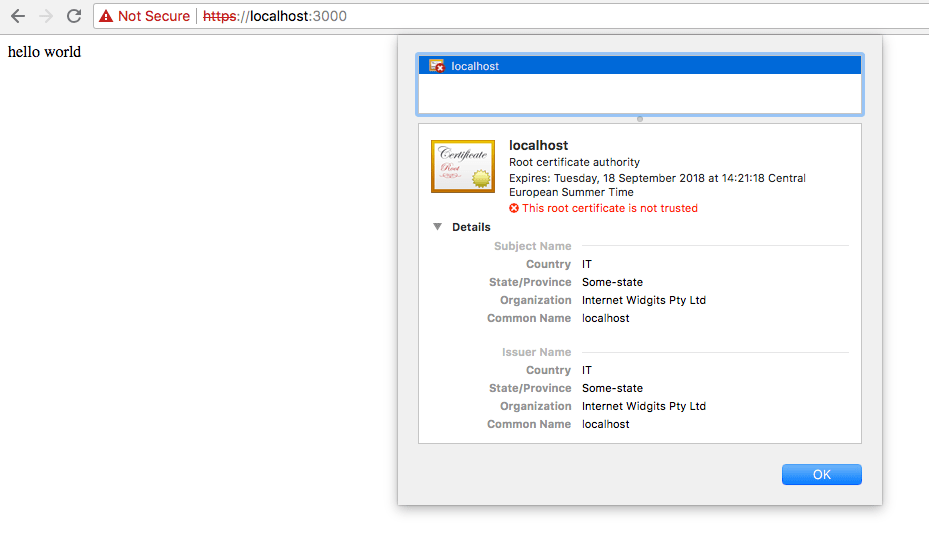
方式2: 使用 node-forge
const forge = require('node-forge');const makeNumberPositive = (hexString) => {let mostSignificativeHexDigitAsInt = parseInt(hexString[0], 16);if (mostSignificativeHexDigitAsInt < 8) return hexString;mostSignificativeHexDigitAsInt -= 8return mostSignificativeHexDigitAsInt.toString() + hexString.substring(1)}// Generate a random serial number for the Certificateconst randomSerialNumber = () => {return makeNumberPositive(forge.util.bytesToHex(forge.random.getBytesSync(20)));}// Get the Not Before Date for a Certificate (will be valid from 2 days ago)const getCertNotBefore = () => {let twoDaysAgo = new Date(Date.now() - 60*60*24*2*1000);let year = twoDaysAgo.getFullYear();let month = (twoDaysAgo.getMonth() + 1).toString().padStart(2, '0');let day = twoDaysAgo.getDate();return new Date(`${year}-${month}-${day} 00:00:00Z`);}// Get Certificate Expiration Date (Valid for 90 Days)const getCertNotAfter = (notBefore) => {let ninetyDaysLater = new Date(notBefore.getTime() + 60*60*24*90*1000);let year = ninetyDaysLater.getFullYear();let month = (ninetyDaysLater.getMonth() + 1).toString().padStart(2, '0');let day = ninetyDaysLater.getDate();return new Date(`${year}-${month}-${day} 23:59:59Z`);}// Get CA Expiration Date (Valid for 100 Years)const getCANotAfter = (notBefore) => {let year = notBefore.getFullYear() + 100;let month = (notBefore.getMonth() + 1).toString().padStart(2, '0');let day = notBefore.getDate();return new Date(`${year}-${month}-${day} 23:59:59Z`);}const DEFAULT_C = 'Australia';const DEFAULT_ST = 'Victoria';const DEFAULT_L = 'Melbourne';class CertificateGeneration {static CreateRootCA() {// Create a new Keypair for the Root CAconst { privateKey, publicKey } = forge.pki.rsa.generateKeyPair(2048);// Define the attributes for the new Root CAconst attributes = [{shortName: 'C',value: DEFAULT_C}, {shortName: 'ST',value: DEFAULT_ST}, {shortName: 'L',value: DEFAULT_L}, {shortName: 'CN',value: 'My Custom Testing RootCA'}];const extensions = [{name: 'basicConstraints',cA: true}, {name: 'keyUsage',keyCertSign: true,cRLSign: true}];// Create an empty Certificateconst cert = forge.pki.createCertificate();// Set the Certificate attributes for the new Root CAcert.publicKey = publicKey;cert.privateKey = privateKey;cert.serialNumber = randomSerialNumber();cert.validity.notBefore = getCertNotBefore();cert.validity.notAfter = getCANotAfter(cert.validity.notBefore);cert.setSubject(attributes);cert.setIssuer(attributes);cert.setExtensions(extensions);// Self-sign the Certificatecert.sign(privateKey, forge.md.sha512.create());// Convert to PEM formatconst pemCert = forge.pki.certificateToPem(cert);const pemKey = forge.pki.privateKeyToPem(privateKey);// Return the PEM encoded cert and private keyreturn { certificate: pemCert, privateKey: pemKey, notBefore: cert.validity.notBefore, notAfter: cert.validity.notAfter };}static CreateHostCert(hostCertCN, validDomains, rootCAObject) {if (!hostCertCN.toString().trim()) throw new Error('"hostCertCN" must be a String');if (!Array.isArray(validDomains)) throw new Error('"validDomains" must be an Array of Strings');if (!rootCAObject || !rootCAObject.hasOwnProperty('certificate') || !rootCAObject.hasOwnProperty('privateKey')) throw new Error('"rootCAObject" must be an Object with the properties "certificate" & "privateKey"');// Convert the Root CA PEM details, to a forge Objectlet caCert = forge.pki.certificateFromPem(rootCAObject.certificate);let caKey = forge.pki.privateKeyFromPem(rootCAObject.privateKey);// Create a new Keypair for the Host Certificateconst hostKeys = forge.pki.rsa.generateKeyPair(2048);// Define the attributes/properties for the Host Certificateconst attributes = [{shortName: 'C',value: DEFAULT_C}, {shortName: 'ST',value: DEFAULT_ST}, {shortName: 'L',value: DEFAULT_L}, {shortName: 'CN',value: hostCertCN}];const extensions = [{name: 'basicConstraints',cA: false}, {name: 'nsCertType',server: true}, {name: 'subjectKeyIdentifier'}, {name: 'authorityKeyIdentifier',authorityCertIssuer: true,serialNumber: caCert.serialNumber}, {name: 'keyUsage',digitalSignature: true,nonRepudiation: true,keyEncipherment: true}, {name: 'extKeyUsage',serverAuth: true}, {name: 'subjectAltName',altNames: validDomains.map(domain => { return { type: 2, value: domain } })}];// Create an empty Certificatelet newHostCert = forge.pki.createCertificate();// Set the attributes for the new Host CertificatenewHostCert.publicKey = hostKeys.publicKey;newHostCert.serialNumber = randomSerialNumber();newHostCert.validity.notBefore = getCertNotBefore();newHostCert.validity.notAfter = getCertNotAfter(newHostCert.validity.notBefore);newHostCert.setSubject(attributes);newHostCert.setIssuer(caCert.subject.attributes);newHostCert.setExtensions(extensions);// Sign the new Host Certificate using the CAnewHostCert.sign(caKey, forge.md.sha512.create());// Convert to PEM formatlet pemHostCert = forge.pki.certificateToPem(newHostCert);let pemHostKey = forge.pki.privateKeyToPem(hostKeys.privateKey);return { certificate: pemHostCert, privateKey: pemHostKey, notAfter: newHostCert.validity.notBefore, notAfter: newHostCert.validity.notAfter };}}let CA = CertificateGeneration.CreateRootCA();/* The following certificate:- Will be called 'testing.com'.- Will be valid for 'testing.com' and 'test.com'.- Will be signed by the CA we just created above.*/let hostCert = CertificateGeneration.CreateHostCert('testing.com', ['testing.com', 'test.com'], CA);console.log(CA.certificate);console.log(hostCert.certificate);

若有收获,就点个赞吧
0 人点赞


