目前,至此项目只实现了加载 js (如在控制台中输出 Hello World! ),那么 webpack 是怎么加载其他类型的资源呢?如:images
在 webpack 出现之前,前端开发人员会使用 grunt 和 gulp 等工具来处理资源,并将它们从 /src 文件夹移动到/dist 或 /build 目录中。webpack 最出色的功能之一就是,除了引入 JavaScript,还可以使用内置的资源模块 Asset Modules 引入任何其他类型的文件
资源模块(asset module)是一种模块类型,它允许我们应用Webpack来打包其他资源文件(如字体,图标等)
资源模块类型
通过添加 4 种新的模块类型,来替换所有这些 loader:
asset/resource发送一个单独的文件并导出 URLasset/inline导出一个资源的 data URIasset/source导出资源的源代码asset在导出一个 data URI 和发送一个单独的文件之间自动选择
使用资源模块之前,先要配置 webpack.config.js
// 配置资源文件module: {rules: [{test: /\.jpg$/,type: 'asset/resource'}]}
1. Resource 资源
会导出一个 URL,而且打包后也可以在 dist 目录中看见导出的文件
在 module属性中的rules数组中配置规则
// 配置资源文件module: {rules: [{// 校验文件类型test: /\.jpg$/,// 资源模块类型type: 'asset/resource'}]}
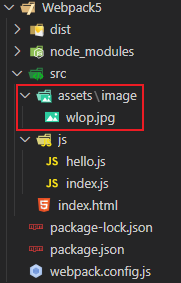
入口文件:js/index.js
import hello from './hello'import jpgSrc from '../assets/image/wlop.jpg'// 加载 js 格式文件hello()// 加载 jpg 格式文件const img1 = document.createElement('img')img1.src = jpgSrcdocument.body.appendChild(img1)
打包:
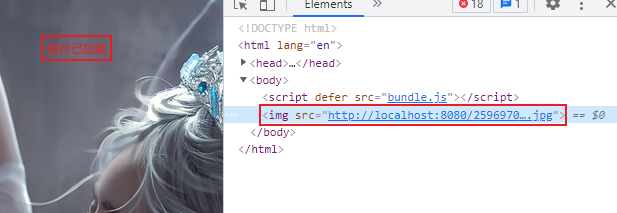
图片已经打包在 dist 目录下了,产生一个带有默认名字的图片;而在浏览器中以原图片格式加载出来
当然,我们也可以自定义打包输出的文件名
自定义输出文件名:
默认情况下,asset/resource 模块以 [contenthash][ext][query]文件名发送到输出目录
contenthash:根据文件的内容生产 hash
ext:扩展名
① generation
rules: [{// 校验文件格式test: /\.jpg$/,// 资源模块类型type: 'asset/resource',// 定义输出文件的文件名generator: {filename: 'img/[contenthash][ext][query]'}}
② output.assetModuleFilename
// 设置项目打包的出口文件output: {// 指定输出文件的文件名filename: 'bundle.js',// 指定文件的输出路径(只能是绝对路径)path: path.resolve(__dirname, './dist'),// 清除上一次打包,但这一次打包不需要的文件clean: true,// 定义输出文件的文件名(优先级小于generator)assetModuleFilename: 'img/[contenthash][ext][query]'}
两种方法都存在,则优先级:generator> assetModuleFilename

2. inline 资源
只导出资源的 URL,不会导出一个单独的文件,所以不会在 dist 产生新的文件
rules: [{test: /\.jpg$/,type: 'asset/resource',generator: {filename: 'img/[contenthash][ext][query]'}},{test: /\.svg$/,// 注:inline资源模块类型不会导出文件type: 'asset/inline'}]
import hello from './hello'import jpgSrc from '../assets/image/wlop.jpg'import svgSrc from '../assets/image/勇气徽章.svg'// 加载 js 格式文件// hello()// 加载 jpg 格式文件const img1 = document.createElement('img')img1.src = jpgSrcdocument.body.appendChild(img1)// 加载 svg 格式文件const img2 = document.createElement('img')img2.src = svgSrcdocument.body.appendChild(img2)
执行 npx webpack 打包后,没有看见产生对应的文件
执行 npx webpack-dev-server进入浏览器查看: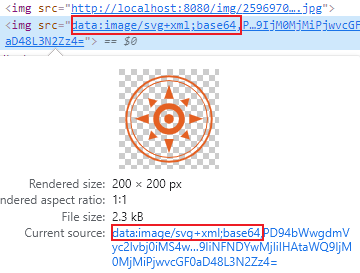
不是图片的 url,而是 base64 的格式
可见, .svg 文件都将作为 data URI 注入到 bundle 中
自定义 data URI 生成器 (不常用)
webpack 输出的 data URI,默认是呈现为使用 Base64 算法编码的文件内容。
如果要使用自定义编码算法,则可以指定一个自定义函数来编码文件内容
安装依赖
npm install mini-svg-data-uri -D
修改配置文件
const svgToMiniDataURI = require('mini-svg-data-uri')rules: [{test: /\.svg$/,// 注:inline资源模块类型不会导出文件type: 'asset/inline',// 自定义data urlgenerator: {dataUrl: context => {return svgToMiniDataURI(context.toString())}}}]
现在,所有 .svg 文件都将通过
mini-svg-data-uri包进行编码。重新启动服务,在浏览器查看效果:
确实精简了一些
3. source
只会导出资源的源代码
module: {rules: [{test: /\.txt$/,// 注:source资源模块类型不会导出文件type: 'asset/source'}]}
webpack5.txt hello Webpack5!!!
import hello from './hello'import jpgSrc from '../assets/image/wlop.jpg'import svgSrc from '../assets/image/勇气徽章.svg'import txt from '../assets/text/webpack5.txt'// 加载 js 格式文件// hello()// 加载 jpg 格式文件const img1 = document.createElement('img')img1.src = jpgSrcdocument.body.appendChild(img1)// 加载 svg 格式文件const img2 = document.createElement('img')img2.src = svgSrcdocument.body.appendChild(img2)// 加载 txt 格式文件const block = document.createElement('div')block.style.cssText = 'width: 500px;height: 100px;line-height: 100px;text-align: center;background-color: skyblue'block.textContent = txtdocument.body.appendChild(block)
打包:并未在 dist 中导出文件,所有 .txt 文件将原样注入到 bundle 中
浏览器中:
<div style="width: 500px; height: 100px; line-height: 100px; text-align: center; background-color: skyblue;">
  hello Webpack5!!!
</div>
4. 通用资源类型
它会在导出一个 data URI 和发送一个单独的文件之间自动选择
    module: {
        rules: [
            {
                test: /\.png$/,
                type: 'asset'
            }
        ]
    }
现在,webpack 将按照默认条件,自动地在 resource 和 inline 之间进行选择:
小于 8kb 的文件,将会视为 inline 模块类型,否则会被视为 resource 模块类型
可以通过在 webpack 配置的 module rule 层级中,设置 Rule.parser.dataUrlCondition.maxSize 选项来修改此条件:
const path = require('path')
const HtmlWebpackPlugin = require('html-webpack-plugin')

module.exports = {
    // 设置项目打包的入口文件
    entry: './src/js/index.js',

    // 设置项目打包的出口文件
    output: {
        // 指定输出文件的文件名
        filename: 'bundle.js',
        // 指定文件的输出路径(只能是绝对路径)
        path: path.resolve(__dirname, './dist'),
        // 清除上一次打包,但这一次打包不需要的文件
        clean: true,
        // 定义输出文件的文件名(优先级小于generator)
        assetModuleFilename: 'img/[contenthash][ext][query]'
    },

    // development--开发模式
    mode: 'development',

    // 能够准确的捕获代码方式错误的位置
    // inline-source-map:在开发模式下追踪代码(mode: 'development',)
    devtool: 'inline-source-map',

    // 插件
    plugins: [
        new HtmlWebpackPlugin({
            // 指定哪个html文件为模板
            template: './src/index.html',
            // 指定输出文件的文件名
            filename: 'index.html',
            // 指定生成的 script 标签在 head 中,还是在 body 中
            inject: 'body'
        })
    ],

    // 修改代码后实现浏览器热更新(结合 npx webpack-dev-server 命令开启本地服务器一起使用)
    devServer: {
        static: './dist'
    },

    // 配置资源文件
    module: {
        rules: [
            {
                // 校验文件格式
                test: /\.jpg$/,
                // 资源模块类型
                type: 'asset/resource',
                // 定义输出文件的文件名
                generator: {
                    filename: 'img/[contenthash][ext][query]'
                }
            },
            {
                test: /\.svg$/,
                // 注:inline资源模块类型不会导出文件
                type: 'asset/inline'
            },
            {
                test: /\.txt$/,
                // 注:source资源模块类型不会导出文件
                type: 'asset/source'
            },
            {
                test: /\.png$/,
                type: 'asset',
                parser: {
                    dataUrlCondition: {
                        // 默认4*1024(4kb)
                        maxSize: 4*1024
                    }
                }
            }
        ]
    }
}
import hello from './hello'
import jpgSrc from '../assets/image/wlop.jpg'
import svgSrc from '../assets/image/勇气徽章.svg'
import txt from '../assets/text/webpack5.txt'
import candle from '../assets/image/蜡烛.png'

// 加载 js 格式文件
// hello()

// 加载 jpg 格式文件
const img1 = document.createElement('img')
img1.src = jpgSrc
document.body.appendChild(img1)

// 加载 svg 格式文件
const img2 = document.createElement('img')
img2.src = svgSrc
document.body.appendChild(img2)

// 加载 png 格式文件
const img3 = document.createElement('img')
img3.src = candle
document.body.appendChild(img3)

// 加载 txt 格式文件
const block = document.createElement('div')
block.style.cssText = 'width: 500px;height: 100px;line-height: 100px;text-align: center;background-color: skyblue'
block.textContent = txt
document.body.appendChild(block)
文件大于阈值走 resource,低于阈值走 inline

若有收获,就点个赞吧
0 人点赞


